Wolfram Function Repository
Instant-use add-on functions for the Wolfram Language
Function Repository Resource:
Sort symbolic expressions using assumptions
ResourceFunction["SymbolicSort"][list,vars] attempts to sort list by assuming that the variables vars are real-valued. | |
ResourceFunction["SymbolicSort"][list,vars,assum] sorts by assuming that vars satisfy assumptions assum. | |
ResourceFunction["SymbolicSort"][list,vars,assum,dom] carries out symbolic manipulations over the domain dom. | |
Sort expressions in x defined for real numbers:
| In[1]:= | ![ResourceFunction["SymbolicSort"][{Exp[x], x}, x]](https://www.wolframcloud.com/obj/resourcesystem/images/f3d/f3d4746e-86fb-4f09-a04f-abd0051acaab/6035f708c3b35e7b.png) |
| Out[1]= |  |
Plot to illustrate that Exp[x] is always greater than x:
| In[2]:= | ![Plot[Evaluate@Reverse[%], {x, -3, 3}, PlotLegends -> "Expressions"]](https://www.wolframcloud.com/obj/resourcesystem/images/f3d/f3d4746e-86fb-4f09-a04f-abd0051acaab/0887e9b9b7aaad38.png) |
| Out[2]= | 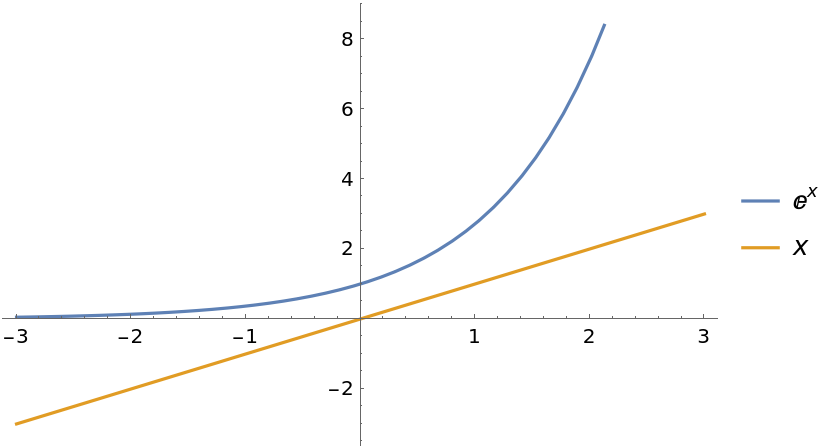 |
Use assumptions for sorting:
| In[3]:= | ![ResourceFunction["SymbolicSort"][{x, Log[x], Exp[x], x^2 + 1/2}, x, x > 0]](https://www.wolframcloud.com/obj/resourcesystem/images/f3d/f3d4746e-86fb-4f09-a04f-abd0051acaab/684bd02ba0889d50.png) |
| Out[3]= |  |
| In[4]:= | ![Plot[Evaluate@Reverse[%], {x, 0, 3}, PlotLegends -> "Expressions"]](https://www.wolframcloud.com/obj/resourcesystem/images/f3d/f3d4746e-86fb-4f09-a04f-abd0051acaab/29b117967353ef77.png) |
| Out[4]= | 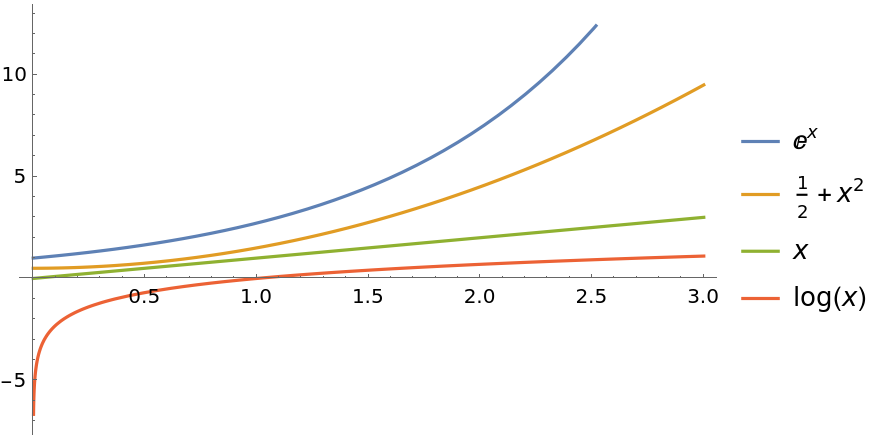 |
Sort expressions of a monotonic function applied to different variables:
| In[5]:= | ![ResourceFunction["SymbolicSort"][{Exp[y], Exp[x], Exp[z]}, {x, y, z}, x < y < z]](https://www.wolframcloud.com/obj/resourcesystem/images/f3d/f3d4746e-86fb-4f09-a04f-abd0051acaab/72e464d6d7e4a5b0.png) |
| Out[5]= |  |
If no definite order exists, a message will be raised and SymbolicSort remains unevaluated:
| In[6]:= | ![ResourceFunction["SymbolicSort"][{Sin[x], Exp[x], Cos[x]}, x, 0 <= x <= 2 \[Pi]]](https://www.wolframcloud.com/obj/resourcesystem/images/f3d/f3d4746e-86fb-4f09-a04f-abd0051acaab/79615dd7584bb1e8.png) |
| Out[6]= |  |
Use List as the last argument to force a result:
| In[7]:= | ![ResourceFunction["SymbolicSort"][{Sin[x], Exp[x], Cos[x]}, x, 0 <= x <= 2 \[Pi], Reals, List]](https://www.wolframcloud.com/obj/resourcesystem/images/f3d/f3d4746e-86fb-4f09-a04f-abd0051acaab/35c728c10e4aa308.png) |
| Out[7]= |  |
If not all expressions have a definite ordering, you can instead produce a Graph that shows the ordering relationships between the elements of the List:
| In[8]:= | ![ResourceFunction["SymbolicSort"][{Sqrt[x], Log[x], x, x^2, Exp[x]}, x,
x > 0, Reals]](https://www.wolframcloud.com/obj/resourcesystem/images/f3d/f3d4746e-86fb-4f09-a04f-abd0051acaab/70c84475d142cba8.png) |
| Out[8]= |  |
| In[9]:= | ![ResourceFunction["SymbolicSort"][{Sqrt[x], Log[x], x, x^2, Exp[x]}, x,
x > 0, Reals, Graph]](https://www.wolframcloud.com/obj/resourcesystem/images/f3d/f3d4746e-86fb-4f09-a04f-abd0051acaab/7edb695df9d4c68e.png) |
| Out[9]= | 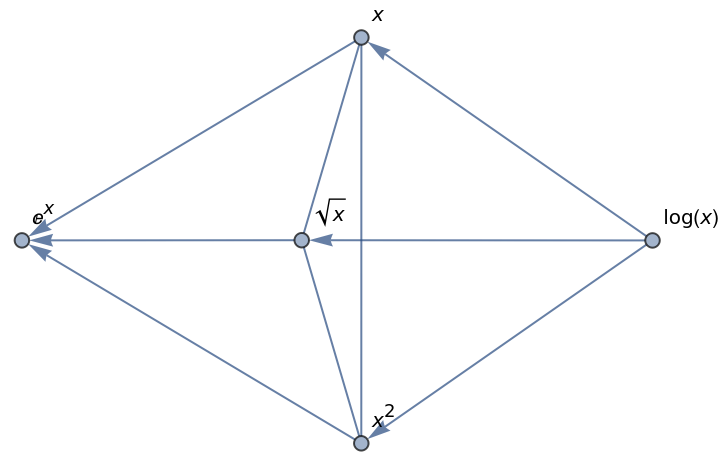 |
The undirected edges between  , x and x2 show that these expressions have no definite ordering.
A time constraint can be set for symbolic comparisons. If the time constraint is too low, no result will be found:
| In[10]:= | ![ResourceFunction["SymbolicSort"][{x, Log[x], Exp[x], x^2 + 1/2}, x, x > 0, TimeConstraint -> 10^-3]](https://www.wolframcloud.com/obj/resourcesystem/images/f3d/f3d4746e-86fb-4f09-a04f-abd0051acaab/56b52305ee986eb4.png) |
| Out[10]= |  |
Sort the eigenvalues of a symbolic matrix:
| In[11]:= | ![ResourceFunction["SymbolicSort"][
Eigenvalues[{{a, 1}, {1, c}}],
{a, b, c},
0 < a < c,
Reals
]](https://www.wolframcloud.com/obj/resourcesystem/images/f3d/f3d4746e-86fb-4f09-a04f-abd0051acaab/6b2f54ed0be26ef6.png) |
| Out[11]= |  |
This work is licensed under a Creative Commons Attribution 4.0 International License




