Wolfram Function Repository
Instant-use add-on functions for the Wolfram Language
Function Repository Resource:
Similar to AssociationMap but maps over a given set of values to obtain keys rather than vice versa
ResourceFunction["ValueMap"][func,x] creates an Association in which the keys are the mapping of func over x and the values are x. | |
ResourceFunction["ValueMap"][func] an operator form that, when presented with a list of values x, will create ResourceFunction["ValueMap"][func,x]. |
Create keys by mapping symbolic function f over a list of strings:
| In[1]:= | ![ResourceFunction["ValueMap"][f, {"a", "ab", "abc"}]](https://www.wolframcloud.com/obj/resourcesystem/images/ec8/ec811401-31d3-48af-94ad-2b37839f3c46/466ab8ba82a67f8d.png) |
| Out[1]= |  |
Create an Association between hashes of the values and the values themselves:
| In[2]:= | ![ResourceFunction["ValueMap"][
Hash[#, "CRC32", "HexString"] &, {"a", "ab", "abc"}]](https://www.wolframcloud.com/obj/resourcesystem/images/ec8/ec811401-31d3-48af-94ad-2b37839f3c46/51f6556b81037245.png) |
| Out[2]= |  |
ValueMap works on the first level of expressions:
| In[3]:= | ![ResourceFunction["ValueMap"][f, IdentityMatrix[3]]](https://www.wolframcloud.com/obj/resourcesystem/images/ec8/ec811401-31d3-48af-94ad-2b37839f3c46/29b57835f631132e.png) |
| Out[3]= |  |
Work on lower levels by using Map in conjunction with ValueMap:
| In[4]:= | ![Map[ResourceFunction["ValueMap"][f], IdentityMatrix[3]]](https://www.wolframcloud.com/obj/resourcesystem/images/ec8/ec811401-31d3-48af-94ad-2b37839f3c46/63b2c81b10a03e47.png) |
| Out[4]= |  |
ValueMap works with Query on datasets:
| In[5]:= | ![Query[ResourceFunction["ValueMap"][Total]][Dataset[{{3, 4}, {5, 6}}]]](https://www.wolframcloud.com/obj/resourcesystem/images/ec8/ec811401-31d3-48af-94ad-2b37839f3c46/3ba7380b5598296f.png) |
| Out[5]= | 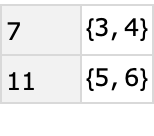 |
It also works with implicit Query operations:
| In[6]:= | ![Dataset[{{3, 4}, {5, 6}}][ResourceFunction["ValueMap"][Total]]](https://www.wolframcloud.com/obj/resourcesystem/images/ec8/ec811401-31d3-48af-94ad-2b37839f3c46/5caee9927bc283a9.png) |
| Out[6]= | 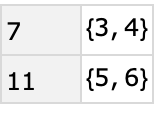 |
Create row headers for the Paul Revere social network based on the name of the person involved:
| In[7]:= | ![Query[ResourceFunction["ValueMap"][#Name &]][
ResourceData["Paul Revere's Social Network in Colonial Boston"]]](https://www.wolframcloud.com/obj/resourcesystem/images/ec8/ec811401-31d3-48af-94ad-2b37839f3c46/3f915b0d425b600d.png) |
| Out[7]= | 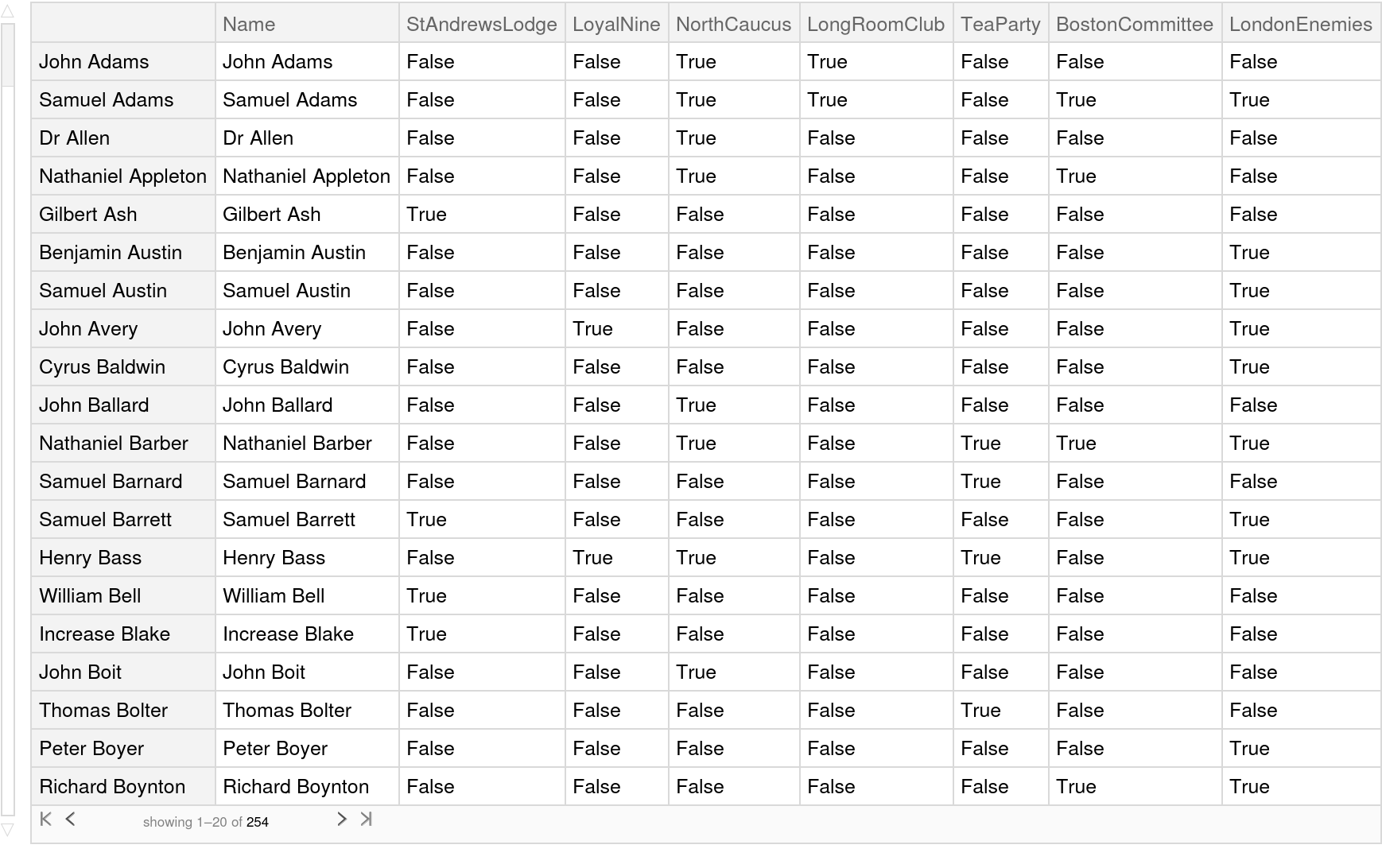 |
One can accomplish much the same thing as ValueMap with the following code that uses AssociationMap; however, it is quite cumbersome:
| In[8]:= | ![Association[
KeyValueMap[Rule @@ Reverse[{#1, #2}] &, AssociationMap[f, {a, b, c, d}]]] === ResourceFunction["ValueMap"][f, {a, b, c, d}]](https://www.wolframcloud.com/obj/resourcesystem/images/ec8/ec811401-31d3-48af-94ad-2b37839f3c46/2e014bcaec4dec7e.png) |
| Out[8]= |  |
If the key generated from application of the function is not unique, the value for that key will be the last value encountered that generated the key:
| In[9]:= | ![ResourceFunction["ValueMap"][StringLength, {"a", "b"}]](https://www.wolframcloud.com/obj/resourcesystem/images/ec8/ec811401-31d3-48af-94ad-2b37839f3c46/11bfa257c2126811.png) |
| Out[9]= |  |
Sometimes, this deletion of key-value pairs with duplicate keys may be exactly what is desired, however:
| In[10]:= | ![ResourceFunction["ValueMap"][
Hash[#, "CRC32", "HexString"] &][{Association["first" -> "John", "last" -> "Smith"], Association["first" -> "Mary", "last" -> "Jones"], Association["first" -> "John", "last" -> "Smith"] (* a mistaken duplicate*)}]](https://www.wolframcloud.com/obj/resourcesystem/images/ec8/ec811401-31d3-48af-94ad-2b37839f3c46/6aab1ec90a0d5f9b.png) |
| Out[10]= |  |
ValueMap will not work properly on datasets without the use of Query:
| In[11]:= | ![ResourceFunction["ValueMap"][f][Dataset[{{2, 3}, {4, 5}}]]](https://www.wolframcloud.com/obj/resourcesystem/images/ec8/ec811401-31d3-48af-94ad-2b37839f3c46/275a8b15a45a5bfc.png) |
| Out[11]= | 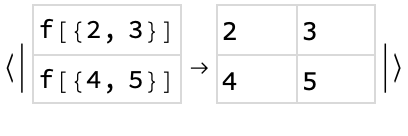 |
Use ValueMap to create a custom index on the hash of a function of two columns of a dataset and then use the index to swiftly retrieve information:
| In[12]:= | ![Module[{crcHash = Hash[#, "CRC32", "HexString"] &, extractor = {ToExpression@DateValue[#[[1]], "Year"], #[[3]]} &, indexedData},
indexedData = Query[ResourceFunction["ValueMap"][(extractor/*crcHash)]][
Normal@ResourceData["Supreme Court Justice Database"]];
Lookup[indexedData, crcHash[{1943, "Jackson"}]]
]](https://www.wolframcloud.com/obj/resourcesystem/images/ec8/ec811401-31d3-48af-94ad-2b37839f3c46/7d008e55bb83e694.png) |
| Out[12]= | 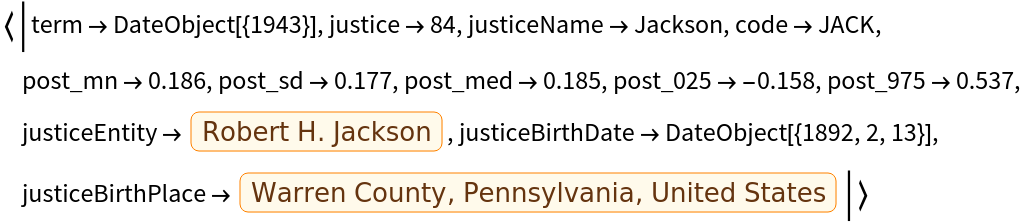 |
This work is licensed under a Creative Commons Attribution 4.0 International License
