

Описание
ПЛАГИН КОНТАКТНОЙ ФОРМЫ WORDPRESS
Познакомьтесь с Kali Forms — мощным и удобным плагином контактных форм WordPress. Начните с нуля с помощью простого в использовании конструктора перетаскивания или создайте форму с помощью наших готовых шаблонов всего за несколько щелчков…
Kali Forms позволяет легко и просто создавать мощные контактные формы, формы оплаты, формы обратной связи и многое другое для вашего сайта без лишних хлопот.
Простые в использовании шаблоны форм
Создание форм может занять время, которого у всех нас никогда не хватает. Поэтому, чтобы сделать процесс создания форм еще проще и эффективнее, Kali Forms поставляется со встроенными шаблонами форм, которые вы можете использовать, если не хотите начинать с нуля!
- Стандартная контактная форма
Мгновенно создайте контактную форму, которая позволит посетителям вашего сайта и потенциальным клиентам связаться с вами.
- Информационная форма сотрудника
Легко используйте и изменяйте шаблон формы информации о сотруднике Kali Forms, который вы можете использовать для сбора жизненно важной информации в процессе приема сотрудника на работу.
Эти 13 дополнительных шаблонов доступны только в Kali Forms Pro:
- Форма заявления на работу
Используя этот шаблон легко создать форму, позволяющую кандидатам подать заявку на работу.
- Форма назначения
Сделайте так, чтобы потенциальные клиенты и заказчики могли легко заказать звонок или назначить встречу с вами, не обращаясь к внешним сервисам.
- Форма обратной связи с клиентами
Используйте шаблон формы обратной связи с клиентами, чтобы начать сбор ценных отзывов и предложений от ваших клиентов.
- Художественный конкурс
Думаете о проведении художественного конкурса или соревнования, но не знаете, с чего начать? Шаблон формы для художественного конкурса Kali Forms позволит вам легко начать сбор записей всего за пару щелчков.
- Регистрационная форма игрового турнира
Вы управляете игровым сайтом и хотите провести игровой турнир, в котором смогут принять участие все ваши подписчики? В таком случае легко создайте регистрационную форму игрового турнира, импортировав этот готовый шаблон. Kali Forms позволяет легко планировать и проводить игровые турниры, которые понравятся всем.
- Контактная форма с учетом требований GDPR
Kali Forms позволяет очень легко создавать контактные формы, дружественные GDPR, с флажком подтверждения, который позволяет вам убедиться, что люди, отправляющие вашу контактную форму, согласны с условиями и положениями или политикой конфиденциальности вашего сайта.
- Форма бегового калькулятора
Помогает пользователям, которые любят бегать на свежем воздухе, рассчитывать темп, время и расстояние. Расчеты легко выполняются с помощью встроенного Калькулятора.
- Форма пожертвования
Простая форма, которая позволит вам принимать добровольные пожертвования через PayPal.
- Форма запроса ценового предложения
Пример формы для запроса расценок на услуги садоводства.
- Форма бронирования
Используйте эту форму, если вы хотите предоставить пользователям пример анкеты бронирования гостиницы.
- Форма членства в тренажерном зале
Оставаться в форме очень важно, позвольте пользователям подать заявку на посещение тренажерного зала в вашем заведении, используя эту типовую форму.
- Простая форма бронирования
Позволяет пользователям бронировать место проведения мероприятия через эту форму. Ранее выбранные даты будут автоматически отключены в выборе календаря, чтобы избежать наложения бронирований.
- Простая форма бронирования с оплатой
Предложите пользователю базовую форму, которая позволит ему забронировать номер в вашем отеле, а также принять оплату в режиме онлайн через PayPal.
Performance-Focused WordPress Form Plugin
We built the Kali Forms WordPress form plugin from the ground up with performance in mind. Kali Forms is built on React using modern development practices.
Все формы на 100% адаптированы для мобильных устройств.
Контактные формы, созданные с помощью Kali Forms, полностью мобильно отзывчивы, поэтому ваши контактные формы будут отлично смотреться на мобильниках, планшетах, ноутбуках и настольных компьютерах.
Дни спама в формах закончились
Мы знаем, что спам в формах является большой проблемой, поэтому Kali Forms разработан таким образом, чтобы использовать сочетание мощной reCAPTCHA от Google и спам-приманку, поэтому вам больше никогда не придется тратить свое время на борьбу с нежелательными сообщениями.
Easy doesn’t need to mean basic forms
This feature is only available in Kali Forms Pro!
Kali Forms was designed to be user-friendly but being easy-to-use doesn’t need to mean that you should only be able to create simple, basic forms.
С Kali Forms Pro вы можете легко создавать мощные формы, использующие условную логику, многостраничные формы, а также использовать нашу надстройку для частичной записи и обработки отправки.
External Services
This plugin connects to several third-party services to provide its functionality. Below is a complete list of external services used, what data is sent, when it is sent, and links to their terms of service and privacy policies.
Spam Protection Services
Google reCAPTCHA
— Service: Google reCAPTCHA is used to verify that form submissions are made by humans and not automated bots.
— What data is sent: When a form is submitted with reCAPTCHA enabled, the plugin sends the reCAPTCHA response token and your site’s secret key to Google’s verification service.
— When: Data is sent only when a form submission includes reCAPTCHA verification.
— Terms of Service: https://policies.google.com/terms
— Privacy Policy: https://policies.google.com/privacy
Cloudflare Turnstile
— Service: Cloudflare Turnstile is an alternative spam protection service used to verify that form submissions are made by humans and not automated bots.
— What data is sent: When a form is submitted with Turnstile enabled, the plugin sends the Turnstile response token and your site’s secret key to Cloudflare’s verification service.
— When: Data is sent only when a form submission includes Turnstile verification.
— Terms of Service: https://www.cloudflare.com/terms/
— Privacy Policy: https://www.cloudflare.com/privacy/
Akismet
— Service: Akismet is used to check form submissions for spam content when enabled.
— What data is sent: When Akismet is enabled and a form is submitted, the plugin sends the following data to Akismet: website URL, user IP address, user agent, referrer URL, form field values (name, email, message content), and comment type.
— When: Data is sent only when Akismet is enabled and a form is submitted.
— Terms of Service: https://akismet.com/tos/
— Privacy Policy: https://automattic.com/privacy/
Email Delivery Services (Optional)
These services are only used if you configure them in the plugin’s email settings. If you use the default WordPress email system, these services are not contacted.
Postmark
— Service: Postmark is an email delivery service used to send form notification emails when configured.
— What data is sent: Email content including recipient addresses (To, Cc, Bcc), sender information, subject, HTML/text body, reply-to addresses, and email attachments (if any).
— When: Data is sent only when Postmark is configured as the email provider and a form notification email is sent.
— Terms of Service: https://postmarkapp.com/terms
— Privacy Policy: https://postmarkapp.com/privacy
SMTP.com
— Service: SMTP.com is an email delivery service used to send form notification emails when configured.
— What data is sent: Email content including recipient addresses (To, Cc, Bcc), sender information, subject, HTML/text body, reply-to addresses, and email attachments (if any).
— When: Data is sent only when SMTP.com is configured as the email provider and a form notification email is sent.
— Terms of Service: https://www.smtp.com/terms-of-service/
— Privacy Policy: https://www.smtp.com/privacy-policy/
Sendinblue (Brevo)
— Service: Sendinblue (now Brevo) is an email delivery service used to send form notification emails when configured.
— What data is sent: Email content including recipient addresses (To, Cc, Bcc), sender information, subject, HTML/text body, reply-to addresses, and email attachments (if any).
— When: Data is sent only when Sendinblue is configured as the email provider and a form notification email is sent.
— Terms of Service: https://www.brevo.com/legal/termsofuse/
— Privacy Policy: https://www.brevo.com/legal/privacypolicy/
Mailgun
— Service: Mailgun is an email delivery service used to send form notification emails when configured.
— What data is sent: Email content including recipient addresses (To, Cc, Bcc), sender information, subject, HTML/text body, reply-to addresses, and email attachments (if any).
— When: Data is sent only when Mailgun is configured as the email provider and a form notification email is sent.
— Terms of Service: https://www.mailgun.com/terms/
— Privacy Policy: https://www.mailgun.com/privacy-policy/
Payment Processing (Optional)
PayPal
— Service: PayPal SDK is loaded to enable payment processing in forms when PayPal payment fields are used.
— What data is sent: The PayPal JavaScript SDK is loaded from PayPal’s servers. Payment data is handled directly between the user’s browser and PayPal — the plugin does not send payment information to PayPal servers.
— When: The PayPal SDK script is loaded only when a form contains PayPal payment fields and is displayed on a page.
— Terms of Service: https://www.paypal.com/us/webapps/mpp/ua/useragreement-full
— Privacy Policy: https://www.paypal.com/us/webapps/mpp/ua/privacy-full
Plugin Services (Kali Forms)
Kali Forms Extensions API
— Service: This service provides a list of available plugin extensions and add-ons.
— What data is sent: No user data is sent. The plugin requests a list of available extensions.
— When: Data is requested when you visit the Extensions page in the WordPress admin panel. Results are cached for 2 days.
— Terms of Service: https://kaliforms.com/terms-of-service/
— Privacy Policy: https://kaliforms.com/privacy-policy/
Kali Forms Uninstall Feedback API
— Service: This service collects feedback when you deactivate the plugin.
— What data is sent: When you deactivate the plugin, you may optionally provide feedback including: deactivation reason, improvement suggestions, and optionally your email address (if you choose not to submit anonymously).
— When: Data is sent only when you explicitly choose to submit feedback during plugin deactivation. You can choose to submit anonymously.
— Terms of Service: https://kaliforms.com/terms-of-service/
— Privacy Policy: https://kaliforms.com/privacy-policy/
Kali Forms Blog Posts API
— Service: This service provides blog posts to display in the WordPress dashboard widget.
— What data is sent: No user data is sent. The plugin requests blog posts tagged for the dashboard widget.
— When: Data is requested when the dashboard widget is displayed. Results are cached for 7 days.
— Terms of Service: https://kaliforms.com/terms-of-service/
— Privacy Policy: https://kaliforms.com/privacy-policy/
JavaScript Libraries (Bundled)
html2canvas
— Service: html2canvas is a JavaScript library bundled within the plugin’s vendor.js file. The reference to html2canvas found in the compiled code is a comment banner indicating the library’s origin and version, not a remote service call.
— What data is sent: No data is sent. html2canvas is included as a bundled dependency in the public/assets/backend/js/vendor.js file and operates entirely client-side without making external network requests.
— When: The library is loaded when the form entries page is accessed in the WordPress admin panel. It is used for client-side image rendering functionality.
— Source: The library is bundled from npm package html2canvas and included in the plugin’s vendor bundle. No external calls are made.
jsPDF (PDFObject CDN Reference)
— Service: jsPDF is a JavaScript library bundled within the plugin’s vendor.js file for PDF generation. The library includes an optional feature that can load PDFObject from a CDN, but this feature is only used if the «pdfobjectnewwindow» output type is explicitly called.
— What data is sent: The jsPDF library includes a hardcoded fallback URL to Cloudflare’s CDN (https://cdnjs.cloudflare.com/ajax/libs/pdfobject/2.1.1/pdfobject.min.js) that is only used when the optional «pdfobjectnewwindow» output method is called. This is a feature of the jsPDF library itself, not a requirement of this plugin.
— When: The CDN URL is only accessed if code explicitly uses jsPDF’s output("pdfobjectnewwindow") method. The plugin does not use this output method by default, so the CDN is not accessed during normal plugin operation.
— Source: The library is bundled from npm package jspdf and included in the plugin’s vendor bundle. The CDN reference is part of the jsPDF library’s optional functionality.
— Note: To avoid any external CDN calls, do not use the pdfobjectnewwindow output type. The plugin uses other jsPDF output methods that do not require external resources.
Important Note: Kali Forms does not send any data without user action or consent to external services, nor do we collect sensitive information from the requests. Email delivery services and payment processing are only used when explicitly configured by the site administrator. JavaScript libraries are bundled within the plugin and operate client-side. The only external CDN reference is an optional feature of the bundled jsPDF library that is not used by default.
Development
Source Code
The source code for Kali Forms is available in the plugin directory. The plugin includes a package.json file that documents all build dependencies and development tools used to compile the plugin’s JavaScript and CSS assets.
Build Process
Kali Forms uses modern web development tools to build its frontend assets:
- Webpack: Module bundler for JavaScript and CSS
- Babel: JavaScript compiler for modern ES6+ syntax
- Sass/SCSS: CSS preprocessor
- PostCSS: CSS post-processing with autoprefixer
The plugin’s JavaScript source code is located in the resources/assets/js/ directory and is compiled into the public/assets/ directory. The build process does not use code obfuscation or minification that makes code unreadable — only standard webpack production optimizations are applied.
Vendor Files
The plugin includes bundled vendor libraries in public/assets/backend/js/vendor.js and public/assets/frontend/js/vendor.js. These files contain third-party JavaScript libraries that are compiled and bundled during the build process.
A complete list of all vendor dependencies, including their versions and licenses, can be found in the package.json file included with the plugin. The dependencies are categorized as:
— dependencies: Runtime libraries required for the plugin to function
— devDependencies: Build tools and development dependencies used only during compilation
All vendor libraries are bundled locally within the plugin and do not make external network requests during normal operation. The source code for these libraries is available through their respective npm packages, and the bundled versions are included in the plugin distribution.
Any CDN references found in vendor files are either:
1. Comment banners or attribution notices (like library name and version information)
2. Optional features within bundled libraries that are not used by the plugin (such as optional output methods that require external resources)
For specific examples of how bundled libraries are used and whether they make external calls, see the «JavaScript Libraries (Bundled)» section above.
Building from Source
To build the plugin from source:
- Ensure you have Node.js and npm installed
- Navigate to the plugin directory
- Run
npm installto install dependencies - Run
npm run prodto build all assets for production, or use specific build commands:npm run prod-frontend— Build frontend form assetsnpm run prod-components— Build form builder componentsnpm run prod-general— Build general admin assetsnpm run prod-block— Build Gutenberg block assetsnpm run prod-form-entries— Build form entries page assetsnpm run prod-emails— Build email settings assets
For development with watch mode, use npm run start or the specific start-* commands.
Dependencies
All build dependencies …
Скриншоты
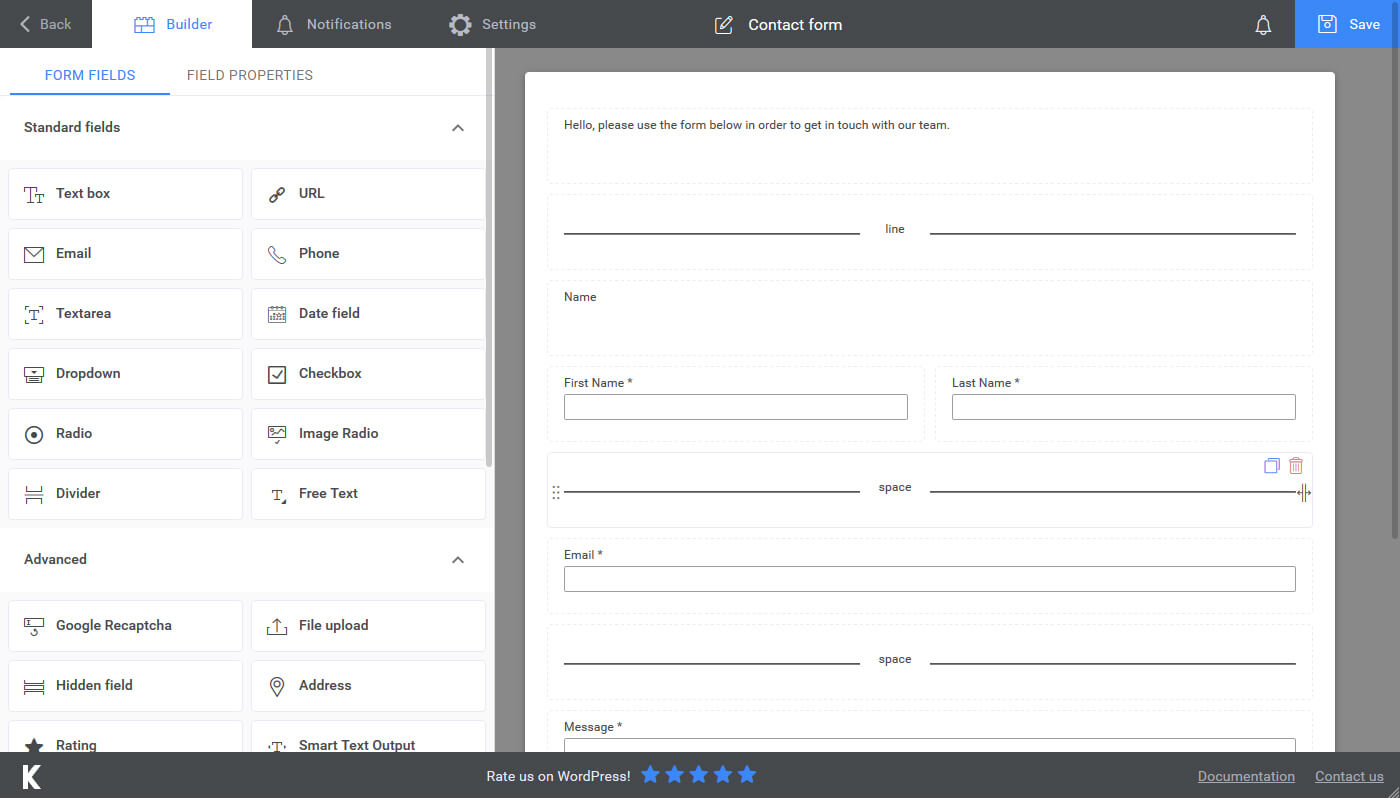
Конструктор формы 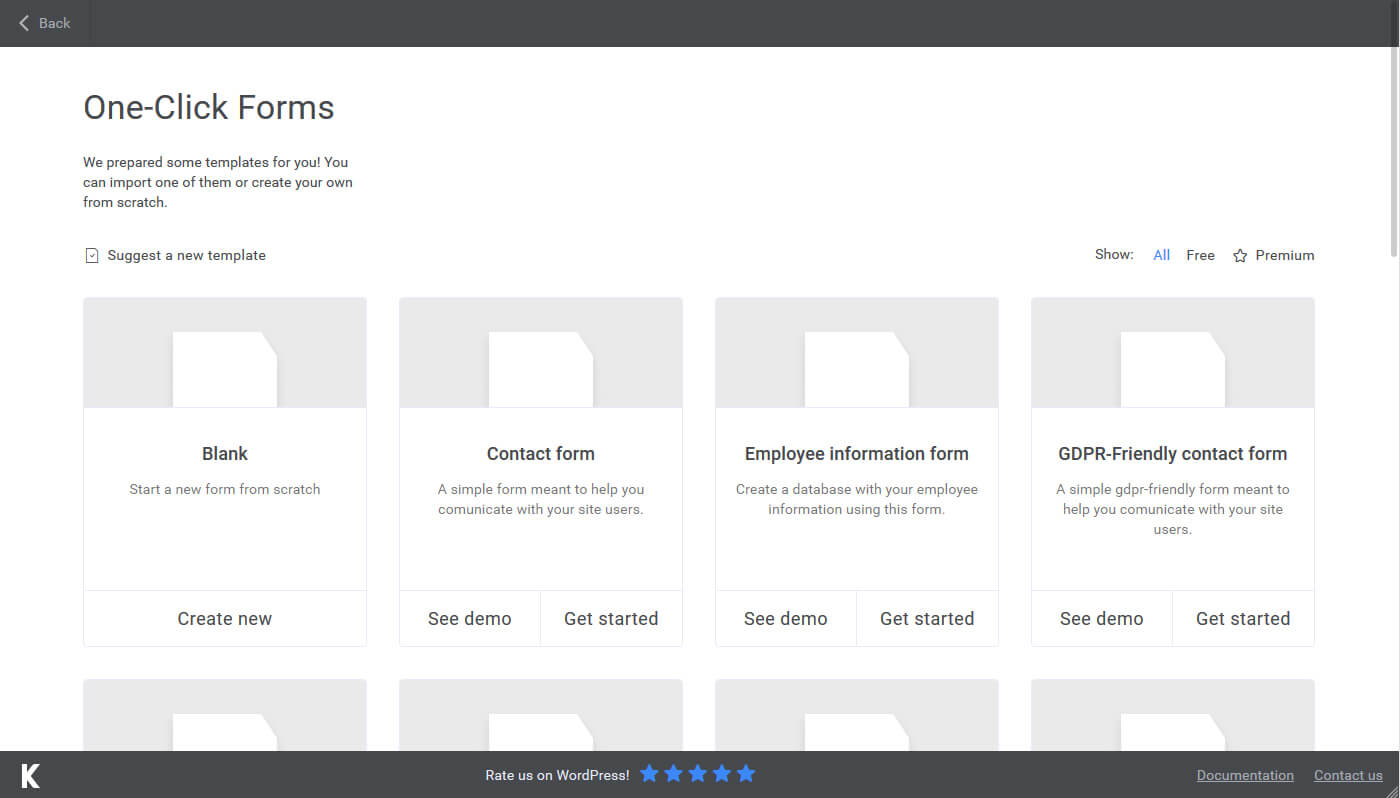
Формы одним щелчком 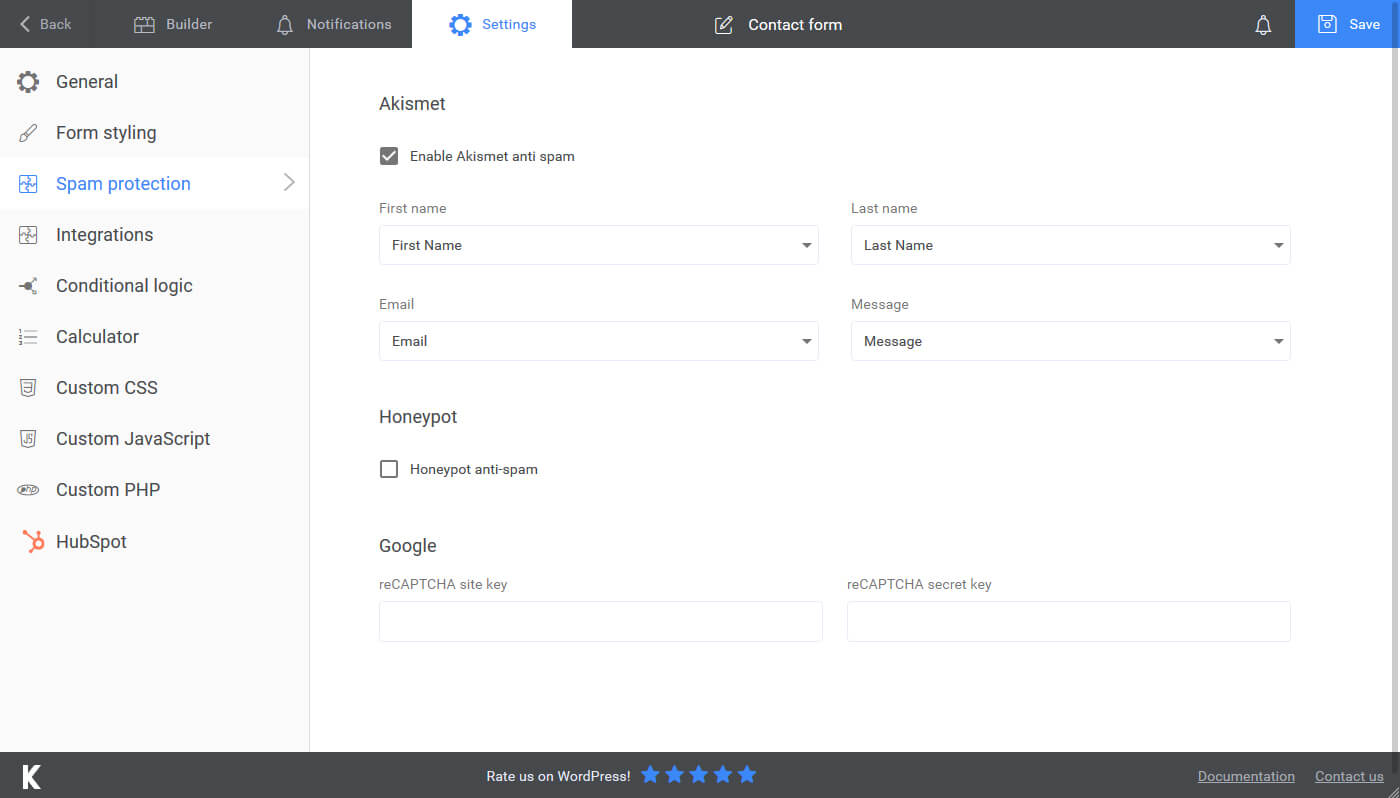
Защита от спама 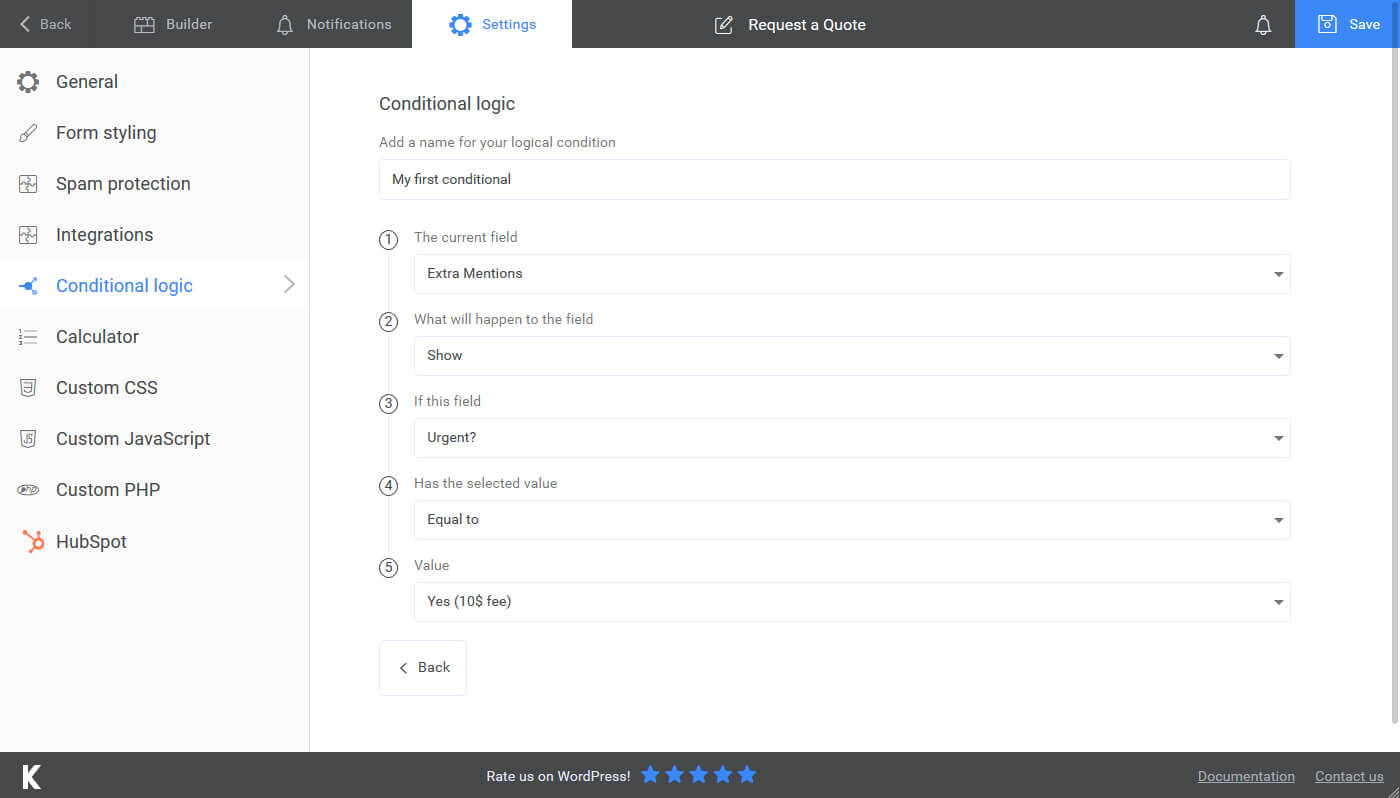
Условная логика (PRO) 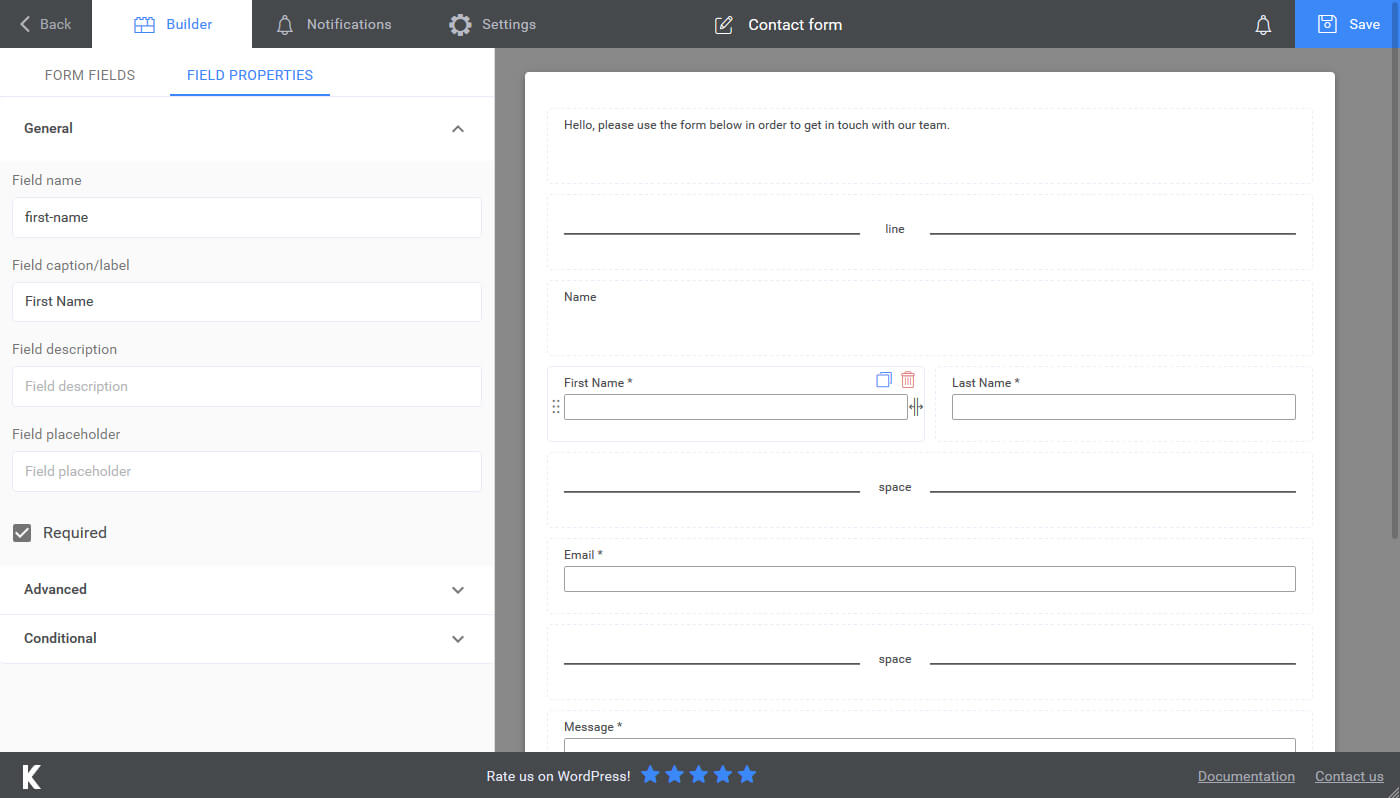
Редактирование поля формы 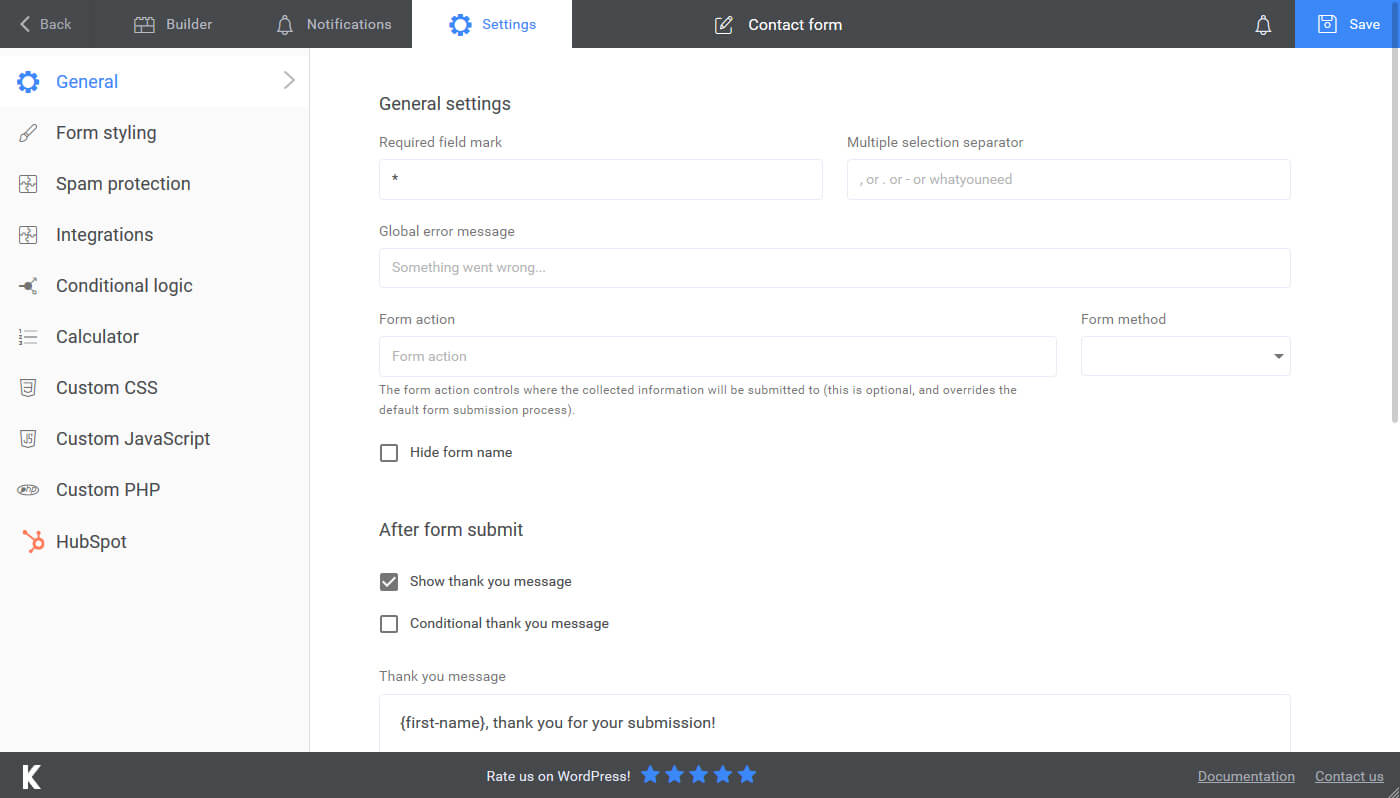
Общие настройки 
Предварительные настройки


Блоки
Этот плагин предоставляет 1 блок.
- Kali Forms Block (BETA)
Установка
For automatic installation:
The easiest and recommended way to install is to click on ‘Plugins’ then ‘Add New’ and type ‘Kali Forms’ in the search field. You’ll then be able to install the plugin within a few seconds and get started right away.
For Manual Installation (1):
- Login to your website and go to the Plugins section of your admin panel.
- Click the Add New button.
- Under Install Plugins, click the Upload link.
- Select the plugin zip file (kaliforms.x.x.x.zip) from your computer then click the Install Now button.
- Вы должны увидеть сообщение о том, что плагин был успешно установлен.
- Now click activate plugin.
For Manual Installation (2):
- У вас должен быть доступ к серверу, на котором установлен WordPress. Если это не так, обратитесь пожалуйста к системному администратору.
- Copy the plugin zip file (kaliforms.x.x.x.zip) to your server and unzip it somewhere in the file system.
- Copy the new folder with name «kaliforms» folder into the /wp-content/plugins directory of your WordPress installation.
- Login to your website and go to the Plugins section of your admin panel.
- Look for «Kali Forms» and click Activate.
Часто задаваемые вопросы
-
Для кого предназначены Kali Forms?
-
- Kali Forms is a WordPress form plugin suitable for businesses, web design agencies and anyone with a WordPress website. If you want to add a form to your WordPress website, Kali Forms provides a solid solution.
-
Do I need to be able to program to use Kali Forms?
-
- Kali Forms was built from the ground up to be user-friendly. You definetely do not need to know how to program to use it but if you are comfortable with custom CSS you can easily customize your form even further.
-
How can I access the full version of Kali Forms?
-
- Вы можете получить доступ к полной версии Kali Forms, премиум-расширениям и поддержке по следующей ссылке обновление.
-
How can I say thanks?
-
- Share Kali Forms with someone else who’s looking for a form plugin for their website!
-
Где можно предложить функцию?
-
- If you’d like to give us any feedback that we could use to take Kali Forms even further, please let us know by filling this form out!
-
Где я могу получить помощь?
-
- If you’re a Kali Forms Pro user, please reach out to us — if you’re using the free version of Kali Forms, feel free to use the WordPress.org Support Forums here.
-
Where do I report security bugs found in this plugin?
-
Please report security bugs found in the source code of the Contact Form builder with drag & drop — Kali Forms plugin through the Patchstack Vulnerability Disclosure Program. The Patchstack team will assist you with verification, CVE assignment, and notify the developers of this plugin.
Отзывы


Участники и разработчики
«Kali Forms — Contact Form & Drag-and-Drop Builder» — проект с открытым исходным кодом. В развитие плагина внесли свой вклад следующие участники:
Участники


«Kali Forms — Contact Form & Drag-and-Drop Builder» переведён на 1 язык. Благодарим переводчиков за их работу.
Перевести «Kali Forms — Contact Form & Drag-and-Drop Builder» на ваш язык.
Заинтересованы в разработке?
Посмотрите код, проверьте SVN репозиторий, или подпишитесь на журнал разработки по RSS.
Журнал изменений
2.4.8
— Form entries page was not working correctly
2.4.7
— Updated reaadme files
— Changed text domain to match the slug
— Removed certain features as requested by WordPress.org
2.4.6
— Added better handling for file upload fields in the form entries view and placeholders
2.4.5
— Form validation bug fixes
2.4.4
— Made a fix to initiate the form only once
2.4.3
— Fixed sanitization for dropdown options
2.4.2
— Added support for multiple form export concatenation in a single file
2.4.1
— Fixed a bug with the email log
2.4.0
— Added turnstile captcha
2.3.53
— Entries deletion was buggy
2.3.52
— Improved entries deletion
2.3.51
— Bugfix
2.3.50
— License checker improvements
2.3.49
— SMTP settings error code bugfix
2.3.48
— Bugfixing
2.3.47
— Fixed php warnings
2.3.46
— Fixed a php warning
— Added support for HTML edit of emails (for pro users)
2.3.45
— QOL improvements
2.3.44
— Added Conversion Bridge integration
2.3.43
— Fixed a bug with the file upload field
2.3.42
— Fixed vulnerability in the form entries functionality & plugin collision
2.3.41
— Various bugs, fixes and QOL improvements
2.3.40
— PayPal button wasn’t initiated correctly
2.3.39
— Added an integration with Modula gallery ( pro only )
2.3.38
— Fixed a bug with the file upload field validation
2.3.37
— Fixed a bug with the file upload field
2.3.35
— Fixed a bug with upload conditionals
2.3.34
— Fixed a bug with upload fields validation
2.3.33
— Fixed a bug where attachment wasn’t sent in emails
2.3.32
— Fixed a bug with conditional fields
2.3.31
— Fixed an issue with frontend rendering
2.3.30
— Fixed an issue with the file upload field
— Fixed an issue related to cache busting
2.3.28
— Email log verifies user role before anything else
2.3.27
— Fixed a vulnerability that allowed data submission to forms that where not published
2.3.27
— Fixed a typo
2.3.26
— Added mailgun reply to header
2.3.23
— Fix trailing comma throwing error
2.3.22
— Added a new option to delete entries after a certain amount of days
2.3.20
— Fatal error fix when sanitizing a certain input
2.3.19
— Bugfix related to checkbox validation and pages
2.3.18
— Emails now accept PDF’s as well for media attachments
2.3.17
— There was a bug with datetimepicker from PRO version
2.3.16
— Added the ip_address smart tag in the shorcode definition
2.3.15
— Small bugfix for certain PHP Versions
2.3.14
— Added an option to disable the bootstrap grid
2.3.13
— Fixed a problem with the {allFields} placeholder
2.3.12
— Bug fix
2.3.11
— Bug fix
2.3.10
— Added min — max options to the number input ( Textbox -> Type = Number )
2.3.9
— Fixed a bug where it tried to instantiate an array from object
— Fixed a bug regarding email logging
2.3.8
— Fixed an issue with not loading the right dependencies when having multiple forms
— Added HEIC extension to file upload
2.3.7
— Fixed a bug when sending an email that had textarea filled with multiple lines ( it collapsed them )
2.3.6
— Removed extra slash from asset load URL
2.3.5
— Added a configurable timeout for redirect
— Removed file upload directly from server in an email attachment
2.3.4
— Hide Extension submenu item on network
2.3.2 & 2.3.3
— Recaptcha triggered an error if you had 2 of them on the same page
— Compact overlap style would not be applied on date time picker
— Added a checkbox to trigger «scroll» to thank you page, instead of being a default
— Various bug fixes and QOL improvements
2.3.1
— Added ip address in form entry list
— Small fixes and qol improvements
2.3.0
— Added a new way to view and handle submissions
— Various bug fixes
2.2.30
— Fixed issue with reply to field with sendinblue provider
— Fixed issue with notice dismissal
2.2.29
— Forms now scroll to the thank you message after submission
— Fixed a typo
— Added a new method to init our forms inside elementor
2.2.28
— Fixed a bug in the akismet check
— Fixed a bug with entrycounter
2.2.27
— Updated language files
2.2.25
— Elementor patching
2.2.24
— Forms loaded in Elementor did not start the file upload process
2.2.22
— Kaliform shortcode inside Elementor shortcode widget would not «start»
2.2.21
— PHP 7.4 removed function each() — caused a fatal error
— Added support for pagebreak complete label
— There was an issue with conditional logic image radio items
— QOL improvements
— Added a Elementor widget (BETA) — still work in progress
2.2.20
— Various bug fixes and QOL improvements
2.2.19
— Elementor causing issues with javascript, removed JS files but forced the opacity to 1
2.2.18
— Small bug fixing
2.2.17
— Added support for getresponse (needs plugin)
— Fixed an issue with the date picker component (from the pro version)
— Image radio improvements (now accepts label and captions)
2.2.16
— Added support for moosend & campaign monitor (needs plugin)
— Added support for webhooks placeholders (needs plugin)
— Submission views will show the date and time of submission
2.2.0 -> 2.2.15
— Generated a pot file in the /languages directory
— Fixed an issue with file upload fields
— Required field mark is wrapped in a span now
— Added more options to the file upload field ( you can now add a minimum file size and a total maximum files size when using multiple uploads)
— Submission view (for the user) now renders digital signatures and fileUpload fields as images ( paving the way for the new and improved version )
— Added support for mailpoet & sendfox (needs the newsletter plugin)
— Fixed a bug when handling emails
— Fixed an issue with having multiple file upload fields at the same time with different settings
— Trigger frontend scripts in Elementor builder
— Added support for webhooks
— Fixed an issue with special characters in sent emails
— Default wp mailer did not set headers correctly
— Re-done email settings page ( along with email sending logic — hoping to increase deliverability)
— Added an option to «reset» the form after you finish it
— QOL improvements
— Bug fixes
2.1.7
— Fixed an issue with paypal and recaptcha
2.1.6
— Bugfix
2.1.5
— Small fix
2.1.3
— QOL improvements
— Bug fixes
— Added a new global placeholder {thisPermalink} that returns the page where the form was submitted
2.1.2
— Security issue fixed
2.1.1
— Security issues fixed and resolved
— Visual bug fixed ( for WP 5.5 )
2.1.0
— Added support for newsletter
— Added support for slack
— Added support for digital signature
— Added support for user registration
— Various bug fixes and qol issues
2.0.4 / 2.0.5 / 2.0.6
— Bugfix
2.0.3
— Bugfix on calculator page
2.0.2
— Added a little bit of backward compat with older PHP versions for akismet checks
2.0.1
— Bug fixes
2.0.0
— Revamped User Interface
— Added Image Radio field
— Added Donation field
— Added Button field
— Added Akismet integration
— Added honeypot spam protection
— Added more placeholders that you can you use in the Thank You Message and in the Emails
— Added support for more premium features
— Various QOL improvements
1.6.5
— Reply To header was not being set property (form notifications)
1.6.4
— Fixed a bug when clicking the update button would show the deactivation feedback form
1.6.3
— Checkbox values were not replaced in the placeholder
1.6.2
— Fixed an issue that didnt trigger the email wizzard
1.6.1
— {formName} placeholder wasn’t returning a value
1.6.0
— Improved form builder ( design & functionality )
— Added form themes
— Form submissions renamed to Form Entries
— Form entries can be saved without additional plugins ( note that you will need Form Submission plugin to access them through WP)
— Textareas can be converted to editors ( standard wp editor )
— Added several form fields ( URL, Phone, Email )
— Added email duplicate functionality
— Added field duplicate functionality
— Added functionality to add placeholders in inputs to prefill user data on page view (e.g. to prefill a field with the user email, you need to use the {user_email} placeholder : [kaliform id=»5″ email=»{user_email}»])
— Added 2 new placeholders that can be used in fields, thank you message or email notifications: {entryCounter} and {formName}
— Using PHP Before Form Process scripting areas, you can edit/add/delete values from the submitted data before they are saved
— QOL adjustments
1.5.0
— Added a new filter that happens before file uploads
— Added a review notice for wordpress.org
— Added Email Settings page to improve and debug mail deliverability
— Added a duplicate form button in the Forms listing
— Added a dashboard widget
— Added an email quick link in the form builder top navigation bar ( email icon )
— Added possibility to send data through the shorcode e.g. [kaliform id=»1″ first-name=»John» last-name=»Doe»]
— Added uninstall feedback
— Added system checks
— Several QOL adjustments
1.4.0
— Various bugs, fixes and QOL adjustments
1.3.0
— Added functionality to attach files uploaded through file upload fields to emails
— Added functionality to attach files from uploaded media to emails (will be improved in the next update)
— Added functionality to attach files from your server using a relative path (e.g. /app/public/wp-content/uploads/file.zip)
— Added a simple way to view/copy placeholders that can be used in emails/thank you message/etc
— Added conditional logic functionality to free text. Useful in scenarios where you want to display a certain message based on user input
— Various bugs, fixes and QOL adjustments
1.2.0
— Option to hide form name
— Layout builder improvements ( offsets are now taken into consideration )
— Various bugs, fixes and QOL adjustments
1.1.0
— Added an instalation hook to add a default contact form
— Added a loading state for the app
— Various bugs, fixes and QOL adjustments
1.0.0
— Release
