
Описание
Enhance user experience and site navigation with a lightweight, customizable «Scroll to Top» button. This plugin adds a smooth-scrolling button that appears as users scroll down the page and disappears when they return to the top.
Designed for speed and seamless integration, it works with any WordPress theme and includes options for custom icons, button position, color, animation, and intelligent display rules. No coding required—just install and configure in minutes.
Perfect for blogs, long-form articles, eCommerce sites, or any website where easy navigation improves usability.
Key Features & Customization
- Intelligent Display: Automatically appears as users scroll down, then disappears when at the top.
- Smooth Scroll Animation: Provides a fluid and pleasant «back to top» experience.
- Flexible Destinations:
- Internal Page Scroll: Link the button to any specific element within the current page.
- External Page Redirection: Redirect users to any other page or URL.
- Customizable Button Design:
- Choose between text, custom image (PNG/SVG), or Font Awesome icons.
- Use any image URL for complete branding control.
- Responsive Control:
- Mobile-Friendly: Option to hide the button on smaller devices/windows for better mobile UX.
- iFrame Compatibility: Ensures it doesn’t appear inappropriately within iframes.
- Targeted Visibility: Easily show or hide the button on specific pages or posts.
- Temporary Display: Auto-hide the button after a set duration for a cleaner interface.
- Optimized Performance: Utilizes Async JavaScript to ensure fast page loading.
- Accessibility Focused: Built with ARIA labels and screen reader text for inclusive navigation.
- SEO-Friendly Markup: Employs semantically correct HTML elements for optimal search engine and accessibility performance.
- Optimized Performance: Adds functionality without slowing down your site.
- Easy-to-Use Admin Panel: Configure all settings intuitively from your WordPress dashboard.
Скриншоты
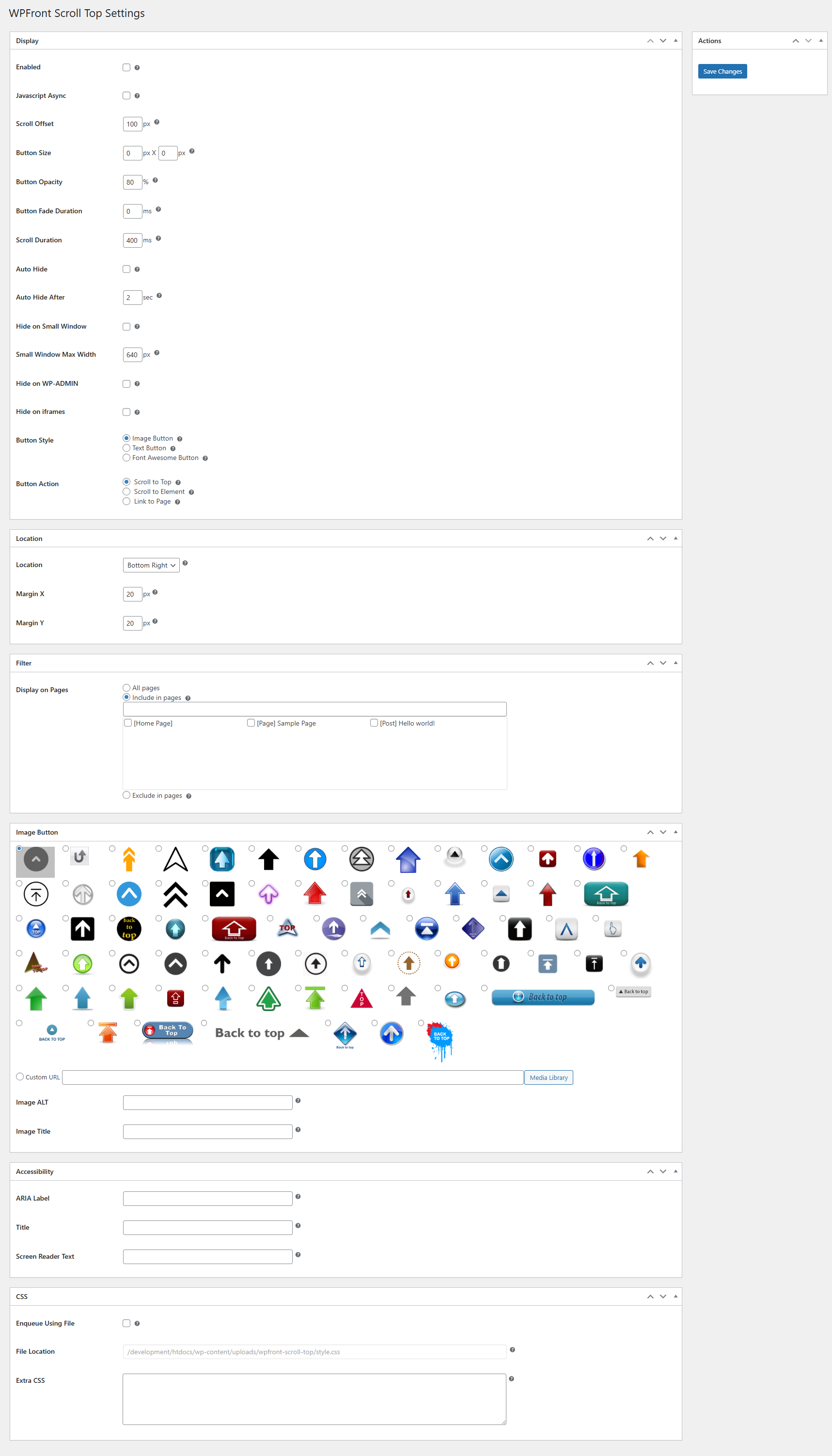
Страница настроек.

Установка
- Нажмите Plugins/Add New в панели администратора WordPress.
- Найдите «WPFront Scroll Top» и установите.
- Configure plugin using Scroll Top link under Settings menu.
Часто задаваемые вопросы
-
What is the «Scroll to Top» button, and how does it work?
The «Scroll to Top» button is a convenient navigation feature that appears on your website as users scroll down a page. With a single click, it allows them to effortlessly return to the top of the page with a smooth, animated scroll, significantly improving the user experience, especially on long-form content. -
Is the «Scroll to Top» button always visible?
No. The button gracefully appears only after a user has scrolled down a certain distance on the page and disappears when they are at the top, ensuring it doesn’t obstruct content unnecessarily. You can also configure an Auto-Hide feature to make it disappear after a few seconds of inactivity. -
Can I customize the design of the button?
You can choose to use simple text, select from a wide range of Font Awesome icons, or upload your own custom image (PNG or SVG) to perfectly match your website’s branding. You also have full control over its position, size, colors, and hover effects. -
Can the button link to something other than the top of the page?
Besides scrolling to the top, you can configure the button to:- Link to an In-Page Element: Direct users to a specific section or HTML element (like an anchor point) anywhere on the current page.
- Redirect to a Different URL: Use the button to send users to another page on your site or even an external website.
-
Can I control where the button appears on my website?
You can easily enable or disable the «Scroll to Top» button on specific pages, posts, or custom post types through the plugin’s settings, giving you full flexibility over its visibility. -
Is the plugin accessible for all users?
The plugin is built with proper ARIA labels and includes screen reader text, ensuring that users relying on assistive technologies can navigate your site effectively and experience the benefits of the button.
Отзывы


Участники и разработчики
«WPFront Scroll Top» — проект с открытым исходным кодом. В развитие плагина внесли свой вклад следующие участники:
Участники
«WPFront Scroll Top» переведён на 16 языков. Благодарим переводчиков за их работу.
Перевести «WPFront Scroll Top» на ваш язык.
Заинтересованы в разработке?
Посмотрите код, проверьте SVN репозиторий, или подпишитесь на журнал разработки по RSS.
Журнал изменений
3.0.1
- Defect fix.
3.0.0
- Breaking changes are introduced. Please verify the display after the upgrade.
- These breaking changes are needed for accessibility and SEO friendly markup.
- The container will either be a button or an anchor element.
- There could be multiple span inside the container depending on your configuration.
- Minimum PHP version required is 7.2.
- Accessibility and more CSS settings are available.
- Deprecated settings are removed.
2.2
- Исправления совместимости.
2.1.1
- Bug fix.
2.1
- [Deprecated] Small device settings.
- New UI.
- Title HTML attibute.
- PHP compatibility fixes.
- HTML validation fixes.
- Улучшение производительности.
2.0.7
- Исправление XSS. Спасибо ‘Vlad Visse’.
2.0.6
- Исправление XSS. Спасибо ‘Asif Nawaz Minhas’.
2.0.5
- Исправление XSS.
2.0.4
- Исправление совместимости с WP.
2.0.3
- Исправления устаревания jQuery.
- Исправления совместимости.
- Устранение конфликтов SiteGround.
2.0.2
- Исправляет здоровье сайта WordPress 5.2, wp_version_check, конфликты.
2.0.1
- Ссылка на элемент.
- Ссылка на страницу.
- Легко выбрать изображение из медиатеки.
- Улучшение производительности.
1.6.2
- Требуется минимум PHP 5.3.
- Исправление ошибок.
- Перемещение меню в меню ‘Настройки’.
- Исправления совместимости с PHP 7.2.
1.6.1
- Исправление неопределенной переменной.
1.6
- Поддержка иконок Font Awesome.
- Новые значки изображений.
- Настройки для меню перемещения в разделе «Настройки».
- Улучшение производительности.
- Улучшение пользовательского интерфейса.
- Исправления совместимости с PHP 7.
1.5
- JavaScript async.
- Минифицированные файлы.
- Языковые файлы удалены.
1.4.5
- Добавлен украинский перевод. Спасибо Иванке Скакун.
1.4.4
- Исправление совместимости с темой Zerif.
1.4.3
- Исправление ошибки загрузки медиафайлов.
1.4.2
- Исправление ошибок.
- Добавлен немецкий язык.
1.4.1
- Исправления ошибок
- Добавлен русский язык
1.4
- Атрибут ALT изображения
- Языковые переводы
1.3
- Автоматическое скрытие
- Скрыть в wp-admin
- Скрывать во фреймах
- Фильтр страниц/постов
1.2
- Опция текстовой кнопки
- Исправления ошибок
1.1.1
- Улучшения стабильности
- Новая структура меню
1.1
- Новая опция для скрытия на мобильных устройствах
- Исправлены конфликты с другими плагинами
1.0.1
- Исправления ошибок
1.0
- Первый релиз
