Seamlessly Transfer Files from Your Phone to Your Computer

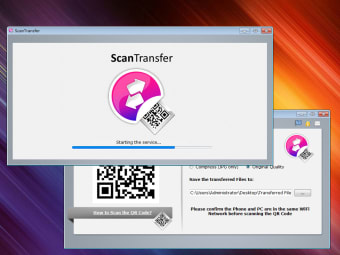
ScanTransfer is a free tool for Windows desktop that lets you transfer images and videos to your laptop or desktop computer from your phone. The highlight feature is you need not install any app on your phone to use ScanTransfer.

Instant Transfer

As aforementioned, you do not need a dedicated app on your mobile device to use this program. All you have to do is use your Facebook/Twitter or camera to scan ScanTransfer’s QR code. Once done, the transfer process would begin. The program also lets you transfer files in batches, and it should not take more than a minute to get such massive file transfers done. The program supports multiple devices, which lets you transfer files from two or more smart devices simultaneously. Moreover, your privacy and personal files are safeguarded since the tool is a local area network (LAN) application, which means your data will never leak out.

Makes Editing Easier

Smartphones are getting bigger in display size, but they still are no way as convenient as the larger screens of traditional computers for editing reasons. Traditional transfers require a USB cable, but ScanTransfer eliminates that requirement. The tool supports many languages, including English, German, French, Portuguese, Spanish and Dutch. Also, there is a portable variant of the program on the home page. It’s in the ZIP format and is ideal for advanced users.


  • Pros

    • Need not install any app on your phone
    • Supports multiple languages
  • Cons

    • Free version limits the number of file transfers for every session
    • A strong WiFi network is mandatory
Image
 0/1

App specs

  • License

    Free

  • Version

    1.3.0.0

  • Latest update

  • Platform

    Windows

  • OS

    Windows 8

  • Language

    English

    Available languages

    • Arabic
    • Chinese
    • Danish
    • German
    • Greek
    • English
    • Spanish
    • French
    • Italian
    • Japanese
    • Korean
    • Dutch
    • Polish
    • Portuguese
    • Turkish
  • Downloads

    2.2K

    Last month's downloads

    • 5
  • Size

    19.19 MB

  • Developer

Program available in other languages


User reviews about Scan Transfer

Have you tried Scan Transfer? Be the first to leave your opinion!

Add review

You may also like

Alternatives to Scan Transfer

Explore Apps

Latest articles

Laws concerning the use of this software vary from country to country. We do not encourage or condone the use of this program if it is in violation of these laws.
Softonic

Is Scan Transfer safe?

100/100

Score result: Clean

This file passed a comprehensive security scan using VirusTotal technology. It is safe to download.

  • Virus free
  • Spyware free
  • Malware free
  • Verified by Security Partners

    VirusTotal logo

Scan Info

Last scan
Thursday, November 9, 2023
Scan provider
VirusTotal

Softonic security commitment

Scan Transfer has been thoroughly scanned by our advanced security systems and verified by industry-leading partners. This file comes from the official developer and has passed all our security checks, showing no signs of viruses, malware, or spyware. For more information, visit our Security and Trust Center