The chief difference between normal, sequential programming and game programming is that most video games have to make a framerate target, and have to split their processes between frames. Lots of little things are usually happening concurrently, and you can’t rely on normal program flow to keep track of things. Instead, each of those little processes has to remember what it’s doing between frames, and that memory takes the form of state machines, reminders of what each routine is in the middle of doing.
Drawing it out with circles like in this video I think makes it seem a bit more complicated than it actually is, but it does require a different way of thinking about your code than you may be used to in other programming disciplines.
Displaced Gamers’ Behind the Code series is back, with an under-the-hood look at another NES Capcom game, following their examinations of Ghosts & Goblins and Strider, links are to our previous pointers to their peerless product.
G&G was implemented by popular early NES anonymous developer and target of player recrimination Micronics, but Commando can’t use them as an excuse, as it was developed in-house at Capcom. They were still learning the ropes of the NES at the time (Strider has no such excuse), and it shows. Displaced Gamers thinks that the game was shipped while the programmers were still working on optimizing it. As they do sometimes, DG implemented their own optimizations, improving the game substantially. You can see the product of their work in a 31-minute video they made about it, here. There is a substantial amount of 6502 assembly code involved, but if you skip around I think you might be able to get the gist of why the glitches happen, and how Displaced Gamers fixes them.
As was often the case with your jankier NES games, the scroll stutters and character chaos were caused by the game failing to make its VBLANK timing targets. Thing is, despite the glitches, NES Commando is arguably the best version of the game! Characters sometimes disappear from the screen and backgrounds turn into garbage, but there’s so many cool secrets and things to find in it that I can forgive Capcom for it.
Note that Displaced Gamers doesn’t release patches with their fixes, preferring to focus on making videos. Their code is presented on-screen though, so it’s possible for others to insert the changed programming on their own. I hope someone does this soon, as a fixed version of NES Commando would be nice to play.
Via Kottke on Mastodon.* Alex Harri wrote an image-to-ASCII renderer that can translate generated 3D models in realtime, and on this page they explain how it works and some of the finer points of that conversion, specifically how not to make the rendered images seem blurry, instead giving edges clean outlines. It’s worth a look even if you’re not a programmer, and just want to see how the process is done. While it does descend into pretty heavy math later on, it starts out pretty approachable, and has interactive demonstrations throughout.
Render captured from the interactive toy on the linked site.
* Bluesky has a lot more users, but Mastodon is used by a good number of highly interested and knowledgeable people, especially people who care about the health of the web, although that’s also because I follow a lot of people like that on Mastodon. Overall I find it a good idea to read both.
The Amiga has hardware sprites, but they’re fairly limited. Most programmers prefer to use its powerful blitter hardware to simulate sprites, drawing them to screen memory much more rapidly than non-blitter hardware can. For more information, I refer you to the video.
That’s it for today, but there be something more substantial tomorrow….
People familiar with MS-DOS should be right at home, although some commands are different. (That’s because MS-DOS changed them; it was originally made as a CP/M clone.) One major difference is the absence, in this version, of disk directories. Instead there were up to 16 numbered “user areas,” each its own individual region on the disk, kept separate from the others. CP/M was an amazingly compact system, a single floppy disk could host a half-dozen compilers and have room to spare.
#2: Speeding Up PETSCII
Commodore BASIC was notoriously slow, but also feature-poor. A version of the same Microsoft BASIC that was co-written by Bill Gates himself, and was later ported to MS-DOS as QuickBasic. This page is a collection of different ways to speed up printing PETSCII characters, covering several optimization techniques, one of them, avoiding IF statements, being non-obvious.
This one, I won’t lie to you, is pretty dry. It’s an hour and a half of the Retro Game Mechanics Explained narrator describing, in precise detail, how Super Mario Bros. 2 builds each of its rooms from a couple hundred-or-so bytes in the game’s ROM. It’s an hour and 39 minutes, actually:
Even I began to drift off a few times through this one. It is exhaustive, and exhausting, but it’s very thorough.
I won’t even try to explicate it all in text, but here’s a few interesting tidbits of information:
Super Mario Bros., the original, built its levels on the fly. As you scrolled forward, the engine read the upcoming data and constructed it up ahead, off screen, in real time, always keeping ahead of the screen’s edge. This is why you can’t scroll backwards, the list is designed to be read going left to right. SMB2 instead includes extra RAM in the cartridge and uses it as a memory buffer to hold the entire current room, up to 10 screens in size. When you enter an area, the game takes a moment to construct the map in that buffer, and copies it to the PPU’s video RAM as you scroll around.
Instead of with stored as-is tilemaps, SMB2’s, as well as basically all of Nintendo’s scrolling games at the time, are constructed, made out of tile objects with different locations and parameters attached to them. This saves a substantial amount of ROM space, and functions as a kind of bespoke data compression.
The rooms are built screen by screen, although it’s possible for some items to extend horizontally or vertically outside of its home screen.
The format makes it seem like vertical rooms were designed first, and horizontal scrolling areas were then added to that functionality.
There are weird special cases everywhere in the building code! Some objects only work on certain levels, or serve different purposes in different worlds.
Birdo’s color, and behavior, depends on its initial spawning X tile position. If it’s 10 she’ll be a pink Birdo; if it’s 11 she’ll be red, and all other values mean a grey Birdo will be generated.
On the enemy list, entity numbers 92-127 are the same as the entities numbered 64 less than them, but with the property that, when they are despawned, the level ends! This property is used for world-ending bosses, but any entity in that range will end the level when it leaves play, even Mushrooms if one such existed.
Crawgrip, the boss to World 5, was added to Super Mario Bros. 2 during its conversion from Doki Doki Panic. The decorative rock background objects in its boss arena are especially hacky, like they were hastily added.
The stars in the sky in the night levels have a bug in their generation that prevents any from appearing on the first screen of their areas. They also aren’t placed specifically, but using a pseudo-random generation algorithm that always uses the same seed, so they’ll always appear in the same places in the sky.
Games From Scratch is a prolific Youtube channel dedicated to helping solo and small team gamedevs with tutorials and tools. They really do post frequently, so if I linked to everything they made it’d overwhelm the blog, but it’s been a while since I referred to them, and they just made a nice omnibus video of free tools. There is a sponsored section in it, but if that kind of thing bothers you I suggest using the browser extension SponsorBlock, which shows time-wasting sections on the Youtube timeline in different colors.
Indie studio Polygon Treehouse (which doesn’t seem related to the news site Polygon) has created a seal for indie devs to use to indicate that no AI-generated assets were used in the construction of their game. This is it:
Polygon Treehouse’s NO GEN AI seal.
Generative AI is a blight upon all the creative industries, but few are affected as keenly as small team game development, which is under constant pressure to produce, and as easily and cheaply as possible.
There is an animus among the clueless game-buying public against “asset flips,” games that use premade resources made by others and obtained in packs or bundles. If I might speak directly to people who do this, ahem:
While you can find egregious examples, sure, generally this attitude harms a lot of indie devs, who often don’t have the personpower or energy to create large amounts of assets themselves. If you’re going to be upset at people who use cheaply-acquired material, then aim your ire toward people who use generative AI, which isn’t sustainable, and cribs off the websites of literally millions of internet users who didn’t consent to their use in its training.
And if, deep in your musty heart, you’re mumbling to yourself that they’re doing this for publicity: sure! I’m glad! Why not? What else can they do to make people aware of this issue, other than not using generative AI themselves? The real power to change things is in the hands of the people who use gen AI (which, if they are, have already indicated they don’t care about the issues involved) and those of consumers who have the option to buy games from them. Which is you. So, don’t do that!
Eschew the generative AI trend! Help prevent a future full of content slop! Don’t roll over and accept it! Tell the awful moneymen of the field this is wrong! (Not all, but so many of them are men.) And don’t forget about your stance the moment a game in a series you really like uses it for assets. This is about something bigger than games-yes, such things exist. Open your damned eyes. Things are moving around you, and they’re making the world worse, for artists, for you, for everyone. You don’t have to accept it.
And tell others! You don’t have to become loud and annoying about it. (Unless you really want to, join our team!) A quiet word of support, a positive comment on a thread, in the aggregate it can make a difference, but only if lots of people do it.
There, that’s said. Don’t forget now! I don’t bring up these issues often here, there are so many other fun and interesting things to show you. We’ll move on, for now….
Displaced Gamers is one of the best NES gaming channels on Youtube. They do sterling work diving into the very code of the games, to figure out what they are like they are. We link to nearly every video they do. Here’s a recap:
Well here’s another, and it actually is a follow-up to a video that I don’t think we linked to before. So here’s that video first, on Micronics’ port of Ghosts n’ Goblins to NES. (32 minutes)
Pretty long already, exquisitely geeky! Well its successor is even more geeky, as they actually reprogrammed the game to have a more optimized sprite engine. Although it’s a shorter video, at 24 minutes!
Ghost n’ Goblins is designed around being a 20fps game, so no amount of optimization will change that, it requires more substantial modification. But the time visualizations they use indicate that it may be possible to change that to 30fps, and with other changes 60fps may be possible. Mind you, the logic for the player, enemies and weapons all assume 20fps, so unless they’re changed to account moving to 60 frames per second will triple the speed of the game, so that obviously would need to be changed as well. I look forward to seeing the next chapter in this retrocoding saga.
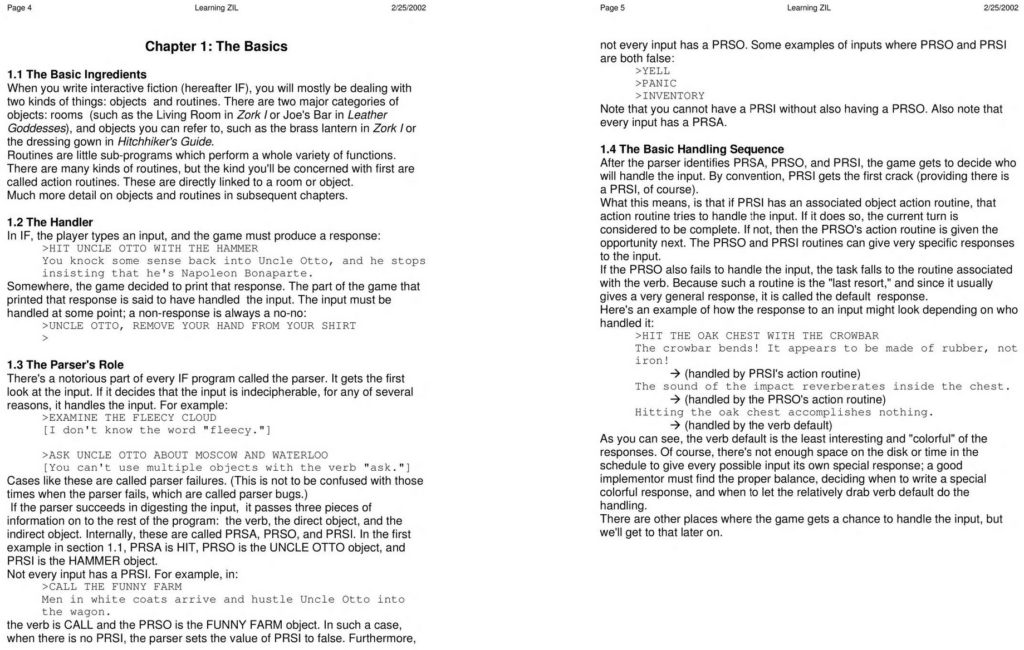
Back in the days of hallowed Infocom, the people who made a living making text adventures better than anyone else ever has before or since, life was often pretty harrowing. They had some huge hits, like Zork, Planetfall and The Hitchhiker’s Guide to the Galaxy, but as time passed and graphic adventures took up more and more of the market, It became harder to make the case for a purely textual medium.
Infocom tried different things to diversify, like a weird computer and board game called Fooblitzky, and an office software package called Cornerstone. In the end they got bought out by Activision, which had renamed itself to “Mediagenic.” But that’s a story for another time.
There was a period where earlier Implementors, or “imps,” had left the company, so it was left to remaining employee Steve Meretzsky, the creator of the afore-mentioned Planetfall, and co-author with Douglas Adams of the Hitchhiker’s Guide game, to write a manual to tell new hires how to use their bespoke development tool, ZIL, to make text adventure games.
This is that manual (78 pages), preserved on the Internet Archive. And it’s great! Steve had made multiple successful games with it and knew his stuff. He didn’t know everything about it, and at multiple points appeals to a mystery Stu, who was probably Stu Galley, fellow imp. We don’t know if he ever filled in those holes when talking to people. Stu passed away in 2018, so I guess it’s a moot point now.
Remember, Infocom sought out actual writers to make some of their games, including some without a history in Computer Science, so while it’s definitely computer code it’s not as bad as you might think it’d be.
Meretzky is a fine and funny writer, and his personality shines through the document. And he’s a good teacher too, I feel like I could use this to make games with ZIL, while Inform 7, while I understand it is also great and has extensive documentation with lots of examples, I couldn’t handle.
ZIL is a Lisp-like language, where everything is lists. It compiles to “Z-code,” a virtual machine that was run by Infocom’s interpreter (which is the secret of their many ports to different computer platforms of that era), and of which there are now many different free and open source ports like Frotz and Gargoyle. So you could use this to write a ZIL game, use ZILF and ZAPF to build it, and run it in Frotz. As Exercise Three in the manual, Meretzsky tasks the read with building a complete game, collaborating with the Infocom marketing department to design a box for it, and then selling 250,000 copies. That’s pretty difficult since Infocom is gone and it’s essentially impossible now to sell text adventures for money. Maybe you’ll find a way.
Not a damnable Youtube video this time, but an honest-to-frog text post I’m linking to! A 2021 post from the blog Brandon’s Thoughts explains what you might be wondering if you watched such events like AGDQ 2025’s Super Mario Bros. race. Well, okay, I’ll give you a video (33 minutes), but it’s not the point of the post this time:
The analogy often given is to think of a bus that leaves every 21 frames, and levels can only end by getting on that bus, and so other than in the last level (which has no new level to load at the end of it), improvements in Super Mario Bros. can only happen in 21 frame increments. If you save a frame or two in a level, but it’s not enough to make the previous frame rule, it’s not enough to take the previous bus, you’ll just end up waiting for it to happen anyway.
But what a weird thing to have! Lots of games don’t have frame rules like this, so why does Super Mario Bros? What advantage did it give the game’s code to be implemented this way? Why did the game’s programmers, according to MobyGames Toshihiko Nakago or Kazuaki Morita, do it?
I’m not completely sure, but Brandon explains why they happen in his blog post. I can summarize the the details here, and give a theory.
Super Mario Bros. uses a bunch of timers in its code. Quite sensibly, they’re laid out in a region of memory so they can all be updated by the same bit of code, a loop that cycles through them and counts them all down, one per frame, until they reach zero. It doesn’t do anything itself when they reach zero; the timers are each checked in other places by the code that needs to know if enough time has elapsed, and which then resets the timer so the countdown can continue on the next frame.
Many of these timers are short, like the code that determines when Mario emits a bubble in an underwater area. But all of these timers are single bytes, so the longest they can last are 255 frames, which at 60 fps is just a few seconds.
In order to track longer periods of time, but keep the same mechanism, there’s a subset of these timers that don’t count down every second. These timers are only checked and decremented every 21 frames, which is triggered when a special extra timer goes off. The intent was probably every 20 frames, but it uses BMI, Branch if result MInus, for the check instead of BEQ, Branch if EQual to zero, meaning it takes an extra frame.
Long timers are a bit less precise than short ones. When a long timer is set, the inner timer, the one that decides when long timers count down, could be at any point in its cycle.
This timer exists to determine when the second set, of longer timers, counts down. So, those timers’ lengths are around 21 times longer than the other timers. This is the source of the frame rule. After a level has finished, the game displays a black status screen with text announcing the number of the next level (“WORLD 1-2”) and the number of lives Mario has left. This code uses a long timer to keep the message on screen for longer than 255 frames. But it has the side effect that levels can only begin at 21-frame intervals.
Other periods of time tracked by long timers, such as Mario’s invulnerability time after taking damage and and duration of invincibility powerups, are also framerule based, and can vary by around a third of a second in length.
Super Mario Bros.’ ROM space is a bit cramped, and the timers are probably implemented in this way for space efficiency. Brandon points to evidence that the game had been optimized to save space to as to squeeze in more level data. In most cases it doesn’t matter that long times vary slightly in length. Gross duration matters more than precision here, but the implication is that framerules exist. Funny, that.
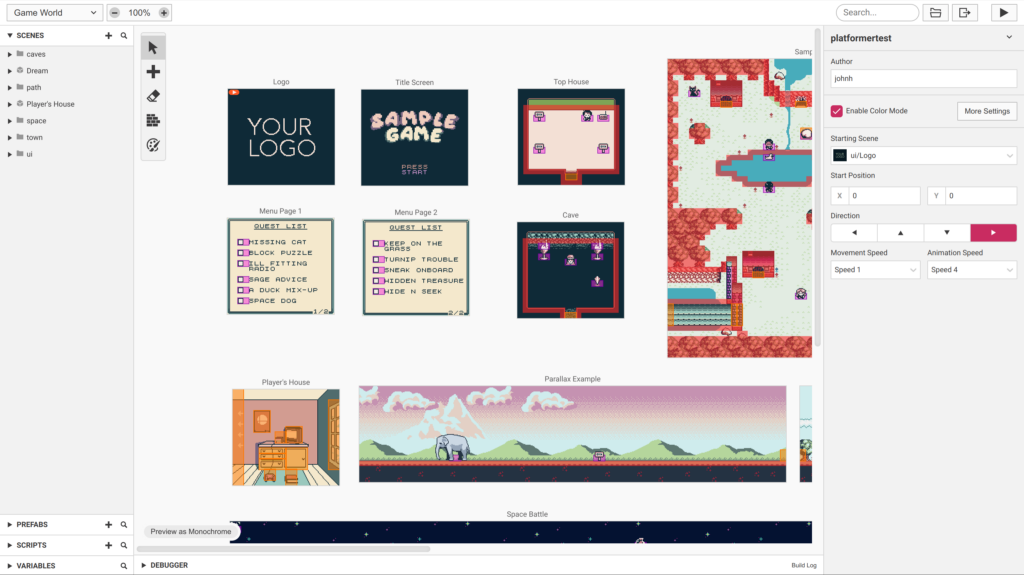
GB Studio, by Chris Maltby, is fairly well-known now, isn’t it? It’s a free and open source solution to fairly easily making Gameboy roms on your own, that are properly termed not romhacks but homebrew. It has its own website and it’s available on itch.io. It was what Grimace’s Birthday, which we linked to last year, was made with.
GB Studio, from its platformer template
Now there’s a heavily-modified version of GB Studio, called BB Studio, that produces NES roms in a similar manner! It’s made by Michel Iwaniec, and can be gotten from Github here. It’s recommended that you be familiar with GB Studio first, and to read the list of caveats on the page. Particularly, the NES supports fewer sprites per scanline than the Gameboy hardware does, and runs at a slower clock speed. BB Studio is also “early alpha software,” meaning, it might or might not work well for you at the moment.
While we’re on the topic I should also mention NES Maker, which isn’t free, but it also isn’t “early alpha software,” and at $36 isn’t expensive either, and is custom-built for generating runnable NES games.