

Опис
Get detailed Exif information about the media file.
Data Selection
- FILE
- EXIF
- GPS
Sibling plugin
- Can use the tags generated by this plugin in the following plugin.
- Exif Caption.
Special Thanks! Test data provider
Sample using snippet 1 & 3
Sample of how to use the filter hook and action hook
- Sample snippet 1
/**  ==================================================
 * Sample snippet 1
 *
 * The original filter hook('exif_details_data'),
 * which changes the display when retrieving an Exif and storing it in metadata.
 * The following changes the display of the shooting date and time.
 *
 * @param array $exifdatas  exifdatas.
 * @param int   $id  id.
 */
function exif_details_change( $exifdatas, $id ) {
    if ( array_key_exists( 'DateTimeOriginal', $exifdatas ) ) {
        $shooting_date = str_replace( ':', '-', substr( $exifdatas['DateTimeOriginal'], 0, 10 ) );
        $shooting_time = substr( $exifdatas['DateTimeOriginal'], 10 );
        $exifdatas['DateTimeOriginal'] = $shooting_date . $shooting_time;
    }
    return $exifdatas;
}
add_filter( 'exif_details_data', 'exif_details_change', 10, 2 );
- Sample snippet 2
/**  ==================================================
 * Sample snippet 2
 *
 * Retrieve the post metadata and add the date and time of the shooting to the title of the media page.
 * Execute the original action hook('exif_details_update') in the function.
 *
 * @param array $title  title.
 * @param int   $id  id.
 */
function media_title( $title, $id ) {
    $datetime = null;
    if ( is_attachment() ) {
        do_action( 'exif_details_update', $id );
        $exifdatas = get_post_meta( $id, '_exif_details', true );
        if ( ! empty( $exifdatas ) && array_key_exists( 'DateTimeOriginal', $exifdatas ) ) {
            $datetime = ' Date:' . $exifdatas['DateTimeOriginal'];
        }
    }
    return $title . $datetime;
}
add_filter( 'the_title', 'media_title', 10, 2 );
- Sample snippet 3
/**  ==================================================
 * Sample snippet 3
 *
 * When adding new media, insert the processed data into the caption.
 * Use the original action hook ('exif_details_update') with function.
 *
 * @param array $metadata  metadata.
 * @param int   $id  id.
 */
function media_caption( $metadata, $id ) {
    $mime_type = get_post_mime_type( $id );
    if ( in_array( $mime_type, array( 'image/jpeg', 'image/tiff' ) ) ) {
        do_action( 'exif_details_update', $id );
        $exifdatas = get_post_meta( $id, '_exif_details', true );
        if ( ! empty( $exifdatas ) ) {
            $camera = null;
            $f_number = null;
            $s_speed = null;
            $iso = null;
            $date = null;
            $googlemap = null;
            if ( array_key_exists( 'Model', $exifdatas ) ) {
                $camera = 'Camera:' . $exifdatas['Model'];
            }
            if ( array_key_exists( 'ApertureFNumber', $exifdatas ) ) {
                $f_number = 'F-number:' . $exifdatas['ApertureFNumber'];
            }
            if ( array_key_exists( 'ExposureTime', $exifdatas ) ) {
                $s_speed = 'Shutter speed:' . $exifdatas['ExposureTime'];
            }
            if ( array_key_exists( 'ISOSpeedRatings', $exifdatas ) ) {
                $isodata = json_decode( $exifdatas['ISOSpeedRatings'] );
                if ( is_array( $isodata ) ) {
                    $iso = 'ISO:' . $isodata[0];
                } else {
                    $iso = 'ISO:' . $isodata;
                }
            }
            if ( array_key_exists( 'DateTimeOriginal', $exifdatas ) ) {
                $date = 'Date:' . $exifdatas['DateTimeOriginal'];
            }
            if ( array_key_exists( 'latitude_dd', $exifdatas ) && array_key_exists( 'longtitude_dd', $exifdatas ) ) {
                $googlemap = '<a href="https://www.google.com/maps?q=' . $exifdatas['latitude_dd'] . ',' . $exifdatas['longtitude_dd'] . '">Google Map</a>';
            }
            $caption = sprintf( '%1$s %2$s %3$s %4$s %5$s %6$s', $camera, $f_number, $s_speed, $iso, $date, $googlemap );
            $caption = rtrim( $caption );
            $caption = preg_replace( '/\s(?=\s)/', '', $caption );
            $media_post = array(
                'ID'           => $id,
                'post_excerpt' => $caption,
            );
            wp_update_post( $media_post );
        }
    }
    return $metadata;
}
add_filter( 'wp_generate_attachment_metadata', 'media_caption', 10, 2 );
Снимци екрана
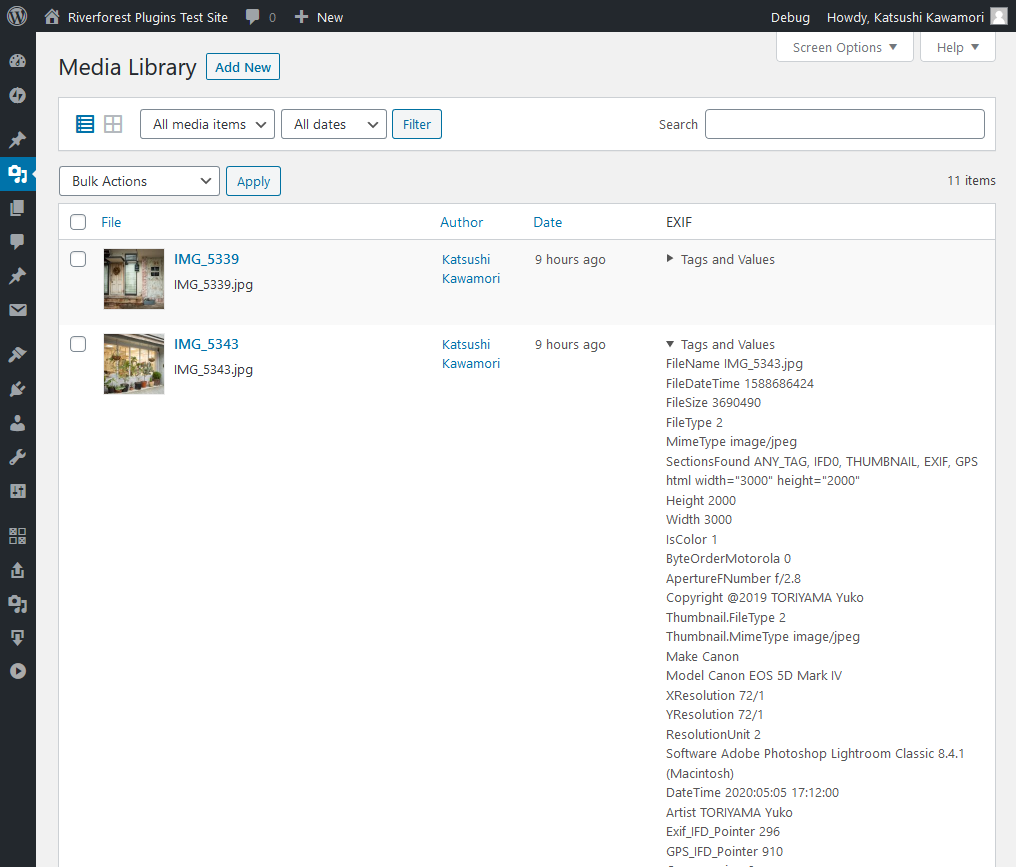
Display screen 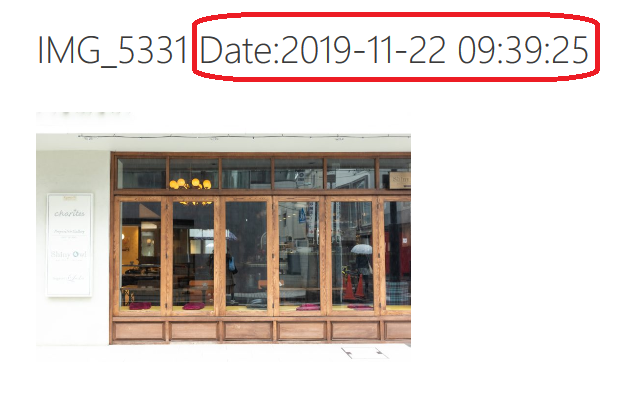
Sample using snippet 1 & 2 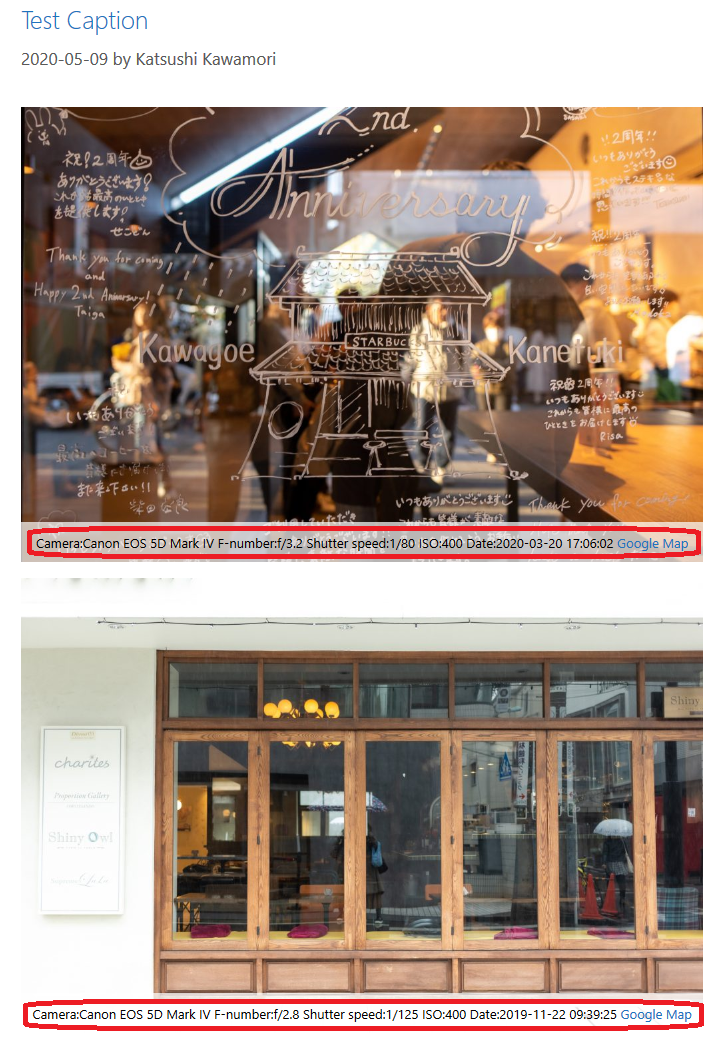
Sample using snippet 1 & 3


Постављање
- Upload
exif-detailsdirectory to the/wp-content/plugins/directory - Activate the plugin through the ‘Plugins’ menu in WordPress
ЧПП
none
Прегледи

1. септембар 2024.
This is plain and simple EXIF details plugin that we use in Media gallery.
Updated recently – thanks.
Сарадници и градитељи
„Exif Details“ је софтвер отвореног кода. Следећи људи су допринели овом додатку.
Сарадници
„Exif Details“ је преведен на 8 језика. Хвала преводиоцима за њихове доприносе.
Преведите „Exif Details“ на свој језик.
Заинтересовани сте за градњу?
Прегледајте код, проверите SVN складиште или се пријавите на белешку градње преко RSS-а.
Белешка о изменама
[1.11] 2025/06/11
- Fix – Issues related to data acquisition.
[1.10] 2025/04/17
- Fix – Loading the management screen.
1.09
Changed json_encode to wp_json_encode.
1.08
Supported WordPress 6.4.
PHP 8.0 is now required.
1.07
PHP 8.0 or higher is now supported.
1.06
Supported WordPress 5.6.
1.05
Fixed problem of original image.
1.04
Change readme.txt.
1.03
Fixed GPS data.
1.02
Fixed a problem with slash-separated data.
Change readme.txt.
1.01
If the value is an array, it is saved as JSON.
1.00
Initial release.
