
Опис
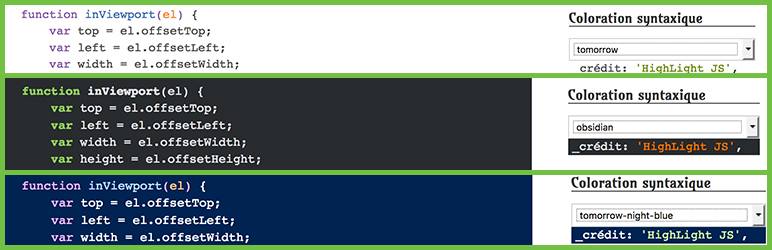
The plugin is based on the javascript library HighLight Js, it offers the possibility to choose among 70 styles of coloring. You can choose a default color in the back office. You can also add a widget to let the choice of coloring to visitors.
Features Include
- Add syntax highlighting to your code snippets.
- Choose style from more than 50 choices.
- A widget allows visitors to make their choice on the front
Configuration
- Activate the plugin through the „Plugins“ menu in WordPress.
- Go to the plugin setting page and add the types of articles or add syntax highlighting.
- Then choose a theme for the coloring, demo here :HighLight JS.
- To let visitors change the coloring style, go to your dashboard to add the widget to the sidebar of your choice.
- Finally, when you add a code in a publication, do not forget to check ON in the Syntax Highlighting metabox.
Credits
- Pictures by Hélène titre „graphic designer“
Постављање
We now offer an installation service to assist you in this process. We will install any or all of our plugins and spend up to 2 hours with you for consultation and training. Visit our website for details.
My Local Webstop Plugin
Or
- Navigate to Add New Plugin page within your WordPress
- Search for Quiz Master Next
- Click Install Now link on the plugin and follow the prompts
- Activate the plugin through the ‘Plugins’ menu in WordPress
Or
- Upload plugin dir to the
/wp-content/plugins/directory - Activate the plugin through the ‘Plugins’ menu in WordPress
ЧПП
No question, it is very simple to use :).
- Installation Instructions
-
We now offer an installation service to assist you in this process. We will install any or all of our plugins and spend up to 2 hours with you for consultation and training. Visit our website for details.
My Local Webstop PluginOr
- Navigate to Add New Plugin page within your WordPress
- Search for Quiz Master Next
- Click Install Now link on the plugin and follow the prompts
- Activate the plugin through the ‘Plugins’ menu in WordPress
Or
- Upload plugin dir to the
/wp-content/plugins/directory - Activate the plugin through the ‘Plugins’ menu in WordPress

Сарадници и градитељи
„Syntax Highlighting“ је софтвер отвореног кода. Следећи људи су допринели овом додатку.
Сарадници

Преведите „Syntax Highlighting“ на свој језик.
Заинтересовани сте за градњу?
Прегледајте код, проверите SVN складиште или се пријавите на белешку градње преко RSS-а.
Белешка о изменама
v 0.1
- First release!
