

Опис
Is your website acting strangely? Seeing ‘Deceptive Site Ahead’ warnings, Japanese spam, SEO spam, or random redirects? Time to fix and monitor your site with Malcure Malware Shield.
Malware Removal, Hack Repair & SEO Spam Cleanup
Malware attacks are evolving. Standard scanners often miss hidden backdoors and database infections. If your current security plugin says „All Clear“ but your site is still broken, you need Malcure Malware Shield.
Malcure Malware Shield is the intelligent, lightweight security solution. We believe security should be simple on the surface but deep under the hood. No complex settings. No bloat. Just activate and scan.
Lightweight, API-driven scanning runs only on demand or on scheduled scans — no persistent background processes.
Unlike scanners that delay new malware definitions for days, Malcure delivers real-time threat intelligence to every user so you’re protected against the latest threats as soon as they emerge.
What Our Users Say
„Best by far, better than W******** and other giants… I spent hours trying to find a plugin like this… Simple and effective.“ — @dalingzaf
„The ONLY plugin that scans files in real time. I am a web developer and have tried many malware removal plugins, including popular ones like W******** and S*****. However, none of them detected some unusual files that were actually malware causing regular attacks.“ — @devzeeshanx
„Accurately shows which Database table row is infected and it helps resolve the hacking attempt instantly. Saves a lot of time for the developers.“ — @s3630
„It’s not just a “teaser”. This plugin really found the malware, and removed it. Really for free.“ — @halucska
Malware Removal & Hack Repair
- Checksum Verification: We verify core, plugin, and theme file integrity against the official repository checksums served by our SaaS API endpoint.
- Deep Scan: If checksums fail, Malcure runs a full scan against malware detection signatures detecting estimated 50,000+ variants.
- Inspect & Repair: Inspect infected database records and files. Assists in cleaning compromised files and database entries.
- SEO Spam Specialist: Detects and removes the notorious “Japanese Keyword Hack” and pharma spam from your files and database, helping restore your Google rankings.
Virus Scanner & Threat Detection
- Database Scan: Scans database tables for malicious injections and spam links.
- File Scan: Scans core files, themes, plugins, images, and uploads for backdoors and obfuscated code.
- Vulnerability Detection: Checks your core, plugins, and themes for known security flaws.
- DeepScan™ Technology: Scans backups, archives, images, and hidden files where malware hides.
- Ultra-High Precision: Uses intelligent checksum verification (comparing your files to official core/plugin/theme checksums) to dramatically reduce false alarms compared to heuristic-only scanners.
Intelligent Health Monitor
- Always-On Guard: Continuous monitoring via Scheduled Scans (daily/weekly/monthly) configurable cadence.
- Instant Alerts: Every time a scheduled scan completes, you get an instant email report telling you if your site is clean or infected.
- Event Log: Track the events leading up to a malware incident for faster root-cause analysis.
Powered by Malcure API: Real-Time Threat Intelligence
Hackers don’t sleep, and neither do we. Malcure Malware Shield connects to our real-time API to fetch the latest threat definitions.
This plugin relies on the Malcure API to provide real-time threat intelligence and checksum verification.
- Data Transmission: To perform scans, the plugin sends file checksums and your site’s domain to Malcure servers. No sensitive user data is transmitted.
- Terms & Privacy: Use of the API is subject to our Terms of Use and Privacy Policy.
- Zero-Day Alerts: Our API serves new threat-intelligence in real-time, ensuring the site is scanned against the latest vulnerabilities.
- Smart Checksums: We verify your core files, themes, and plugins against the official repository checksums using our API, ensuring absolute integrity.
- Lightweight: The scanner only uses minimum resources to keep your server fast and responsive.
Why Keep Malcure Malware Shield Installed?
Reinfection Risk & Continuous Monitoring
Malware cleanup is not a one-and-done task. New vulnerabilities and reinfections can appear without warning, so continuous monitoring and scheduled scans help catch issues early—before SEO damage, blacklists, or downtime. You get email notification with the results to rest assured that the site is clean or when immediate action is required.
Cleaning your site is just step one. Malcure is your anti-malware health monitor.
- Continuous Monitoring: Scheduled scans watch your site for changes so you don’t have to.
- Real-Time Event Log: See exactly what’s happening on your site.
- Early Warning: Catch new infections before Google blacklists you.
- Recurrence Prevention: Scheduled scans and integrity checks catch reinfections before they spread.
- No Bloat: Designed to run on-demand or as per schedule without slowing down your site.
Who This Plugin Is For
- Site owners who want clear, actionable results (what was flagged and where).
- Agencies & developers who need fast triage across multiple sites.
- WooCommerce / membership / lead-gen sites where downtime, SEO brand-reputation damage are expensive.
- Anyone who wants a scanner that cuts through the noise to focus on signal—real threats with practical remediation paths.
How It Works (Scan Review Clean Monitor)
-
Scan
- Go to Malcure Scanner in your Admin Dashboard.
- Run a scan to check your files and database for vulnerabilities, malware, backdoors, suspicious code, and integrity issues.
-
Review
- Malcure reports findings with clear locations (file paths / database records) so you can verify what changed and why it was flagged.
- Use the results to decide what should be repaired, deleted, or kept (for example, legitimate custom code).
-
Clean & Recover
- The free edition helps you identify issues, inspect data and understand what needs fixing.
- The Advanced Edition adds Whitelisting, Advanced Scan Filters, File Operations, WP CLI Automation, Deployment, Bulk Client-Servicing Features, Background Scan & Premium Support (Expertise).
-
Monitor
- Set up scheduled scans to keep your site continuously monitored.
- Get email alerts for new infections or integrity issues.
Is It Free?
We believe in 100% transparency.
- Free Forever: Professional-grade Detection (Knowledge). You see every infected file and database row (exact file path & line number), so you can clean it yourself for free.
- Free Forever: Real-time Threat Intelligence & Monitoring.
- Pro Upgrade: Whitelisting, Advanced Scan Filters, File Operations, WP CLI Automation, Deployment, Bulk Client-Servicing Features, Background Scan & Premium Support (Expertise).
You are never forced to pay to find a hack.
Core Features (Free Forever)
- Deep Malware Scan: Scans core files, themes, plugins, images, and your entire database for vulnerabilities, viruses, trojans, backdoors, and malicious redirects.
- Files: Scans core files, themes, plugins, images, and uploads for backdoors, shells including variants like C99, R57, RootShell, dolohan, Crystal Shell, Matamu, Cybershell, W4cking, Sniper, Predator, Jackal, Phantasma, GFS, Dive, Dx, obfuscated code and many more known and unknown variants.
- Database: Scans database tables for malicious injections, recurring malware and spam links.
- SEO Spam Detection: Specifically checks page titles and database records for „Japanese Keyword Hack“, „Pharma Hack“ and other SEO spam symptoms.
- Vulnerability Scanner: Checks your installed plugins and themes against our real-time database of known security vulnerabilities.
- Intelligent Checksum Verification: Automatically verifies your core files, themes, and plugins against the official checksums. If a file has been tampered with, we know instantly.
- Uncompromising Detection: Detects variants like C99, R57, RootShell, dolohan, Crystal Shell, Matamu, Cybershell, W4cking, Sniper, Predator, Jackal, Phantasma, GFS, Dive, Dx, obfuscated code and many more known and unknown variants.
- Attack Surface Hardening & Firewall:
- Block Path Traversal: Stops attackers from accessing sensitive system files.
- Block PHP Uploads: Prevents malicious scripts from being uploaded to your site.
- Stop User Enumeration: Blocks bots from fishing for your username.
- REST API Protection: Prevents user data leakage via the WP REST API.
- Security Hardening: Learn more about securing your site.
- Recurrence Watchdog (Background Monitor):
- Set it and forget it: Malcure runs silently in the background using scheduled scans (configurable cadence) + integrity baseline to monitor changes.
- Stay Ahead: Automatically catch new infections before they spread or damage your SEO rankings.
- Incident Response Toolkit:
- Nuke User Sessions: Instantly force-logout every user on the site to kick out intruders.
- Salt Shuffler: One-click rotation of security keys (salts) to invalidate all browser cookies.
- Forensic Flight Recorder (Event Log): Track every security event. Know exactly when and how a breach might have occurred with our 100-day event log.
- Google Search Console Integration: Connect directly to Google to fetch security warnings and blacklist status in real-time.
- Real-Time API Updates: Connects to the Malcure Cloud to fetch the latest threats and vulnerabilities.
Upgrade to Advanced Edition
For mission-critical websites that demand comprehensive protection and recovery tools.
- 1-Click Surgical Repair: Inspect, Delete, or Repair infected files instantly.
- Advanced Whitelisting: Stop false alarms. Supports files, folders, and Database Records.
- WP-CLI Integration: Complete command-line control for automated scanning and reporting.
- Automatic Definition Updates: Definitions update automatically in the background.
- On-Demand Background Scans: Trigger deep scans immediately without keeping your browser open.
- Advanced Scan Filters: For when you are specifically looking for something in the files or database or want to include, exclude specific files & directories
- File Operations: Critical file operations like deletion.
- Bulk Client-Servicing Features: Like copying scan results to generate report for clients.
- Background Scan: For when you want to trigger a scan and forget it. The scan continues and emails you upon completion.
- Premium Support (Expertise): When you want to consult or want to exploit advanced features or need help troubleshooting.
- High-Priority Support: Direct access to our security analysts.
Additional Resources for Malware Removal
Follow these expert guides to remove malware, recover lost traffic, and restore your online reputation:
- A step by step guide to remove the malware
- Japanese Keyword Hack: How to Remove SEO Spam
- What is the Pharma Hack & How to fix it
- How to Fix Google Ads Disapproved for Malicious Software
- How to Prevent SQL Injection Attacks
- Live Malware Infection Removal & Analysis
- How to Fix “This Site May Harm Your Computer” Warning
- Comprehensive Guide to Removing JavaScript Redirect Malware
- How to Fix a Blank WP-Admin Page
- Malcure WP CLI Integration & Cheatsheet
- How to Prevent Brute Force Attacks
- How to Change Salt Keys
Expert Malware Removal Service
In over your head? Our security analysts are on standby. We offer a complete Malware Removal Service that includes:
- 100% Removal Guarantee: We guarantee to remove all malware from your website.
- Same Day Service: Fast turnaround time to get your business back online.
- Manual Inspection: Our experts manually inspect critical files (htaccess, wp-config, index.php) and your database.
- Blacklist Removal: We handle the removal of your site from blacklists like Google, Norton, McAfee, etc.
- Security Hardening: We identify the root cause and patch vulnerabilities to prevent future infections.
- 15-Day Cover: Security analysts available 24/7/365 to ensure your site stays clean.
Troubleshooting
Some files are detected by Malcure Malware Shield as „suspicious“. What gives?
Malcure’s DeepScan checks each file for malware. However some files aren’t pure malware but may contain code that is suspicious and could potentially do nasty things. You should carefully review and analyse them to see if they indeed do anything nasty.
I can’t get Malcure Malware Shield to work. It hangs / doesn’t complete the scan / breaks for some reason.
If you think that the plugin is broken, please report it here.
Malcure Malware Shield (or for that matter other plugins) may break on malware affected / broken websites. Malcure Advanced Edition integrates with WP CLI and allows you to complete the scan from WP CLI even when the site is blocked by the webhost or when you are unable to login to the website.
My site is infected however Malcure Malware Shield doesn’t detect the infection.
Malware keeps evolving. If you come across malware that Malcure Malware Shield is not able to identify, you may please report it here.
The scan gets stuck midway. What should I do?
In case of such an event, please file a support request with us and we’ll be more than happy to troubleshoot the issue.
Please visit this page.
I cleaned my site but it got infected again. What should I do?
Malware cleanup is a waste of time and effort unless you find the root cause behind the malware infection and monitor for recurrence. How was someone able to infect your website? Have you plugged in that security hole?
Please read Why Do Websites Get Hacked.
Google Safe Browsing site status (or some other scanner) still shows my site as infected. What should I do?
First make sure you purge your site cache. Second, Google (and other scanners) cache the results for some time. You’ll need to force or refresh the scan. You can also file a request with us to get your site off any blacklists.
I found a suspicious file, what now?
If Malcure flags it, it’s likely malicious. You can inspect the file content using our built-in inspector. If you’re unsure, consider our Expert Malware Removal Service.
Снимци екрана
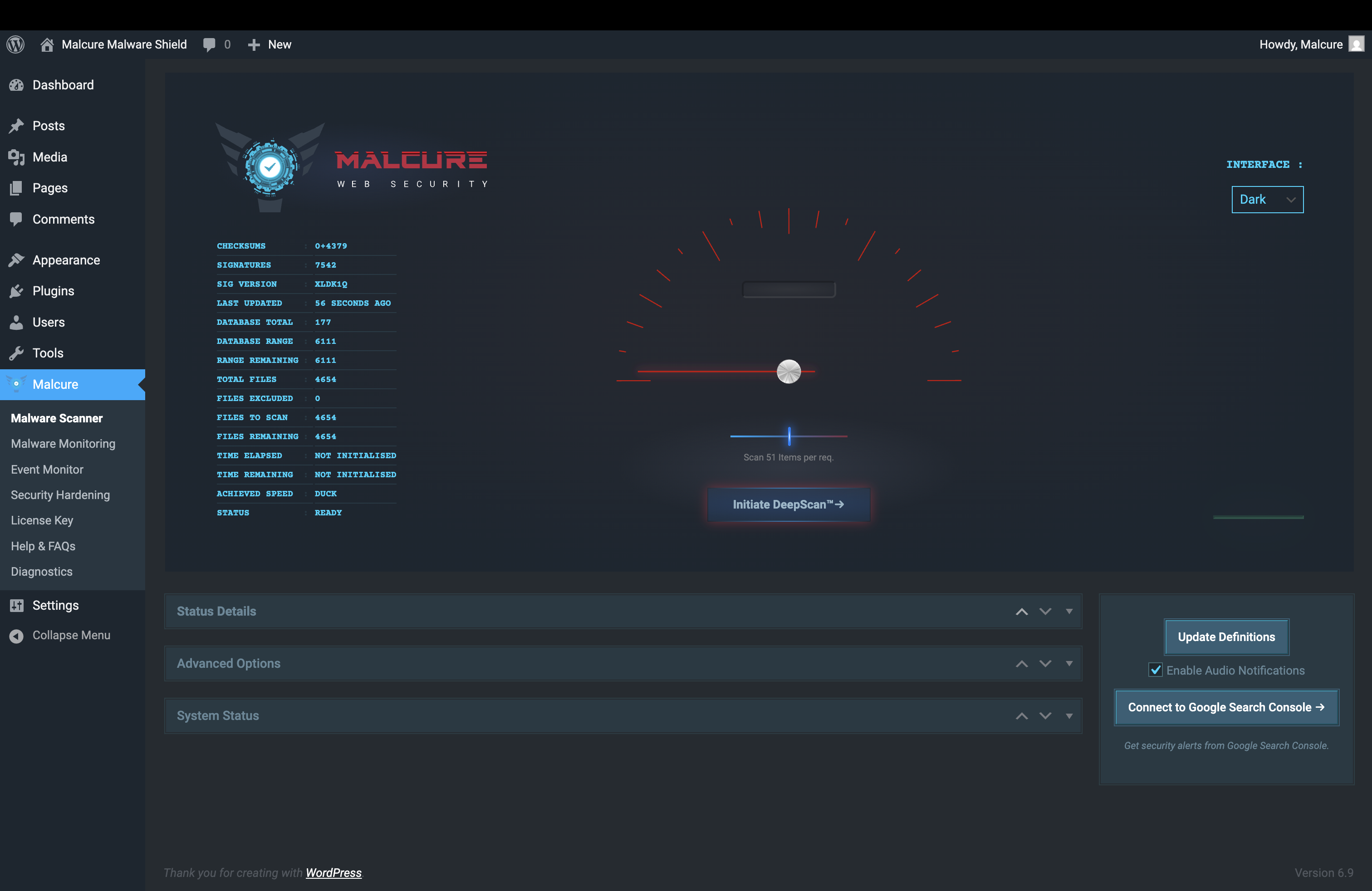
Start a scan in one click. Simple. 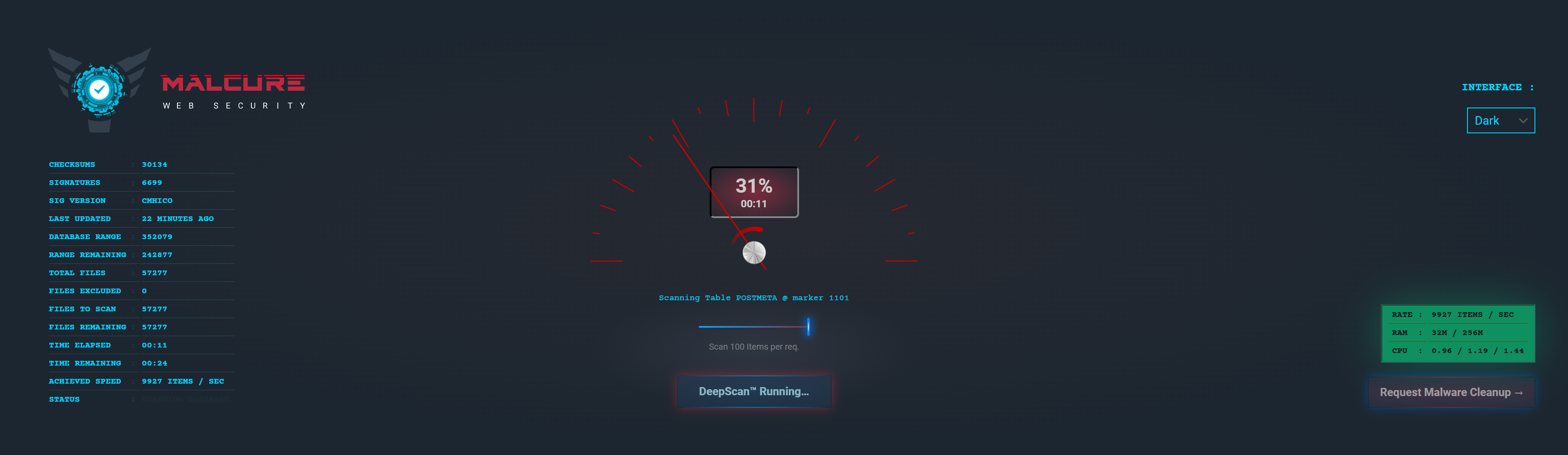
Scan in progress, detecting malware. 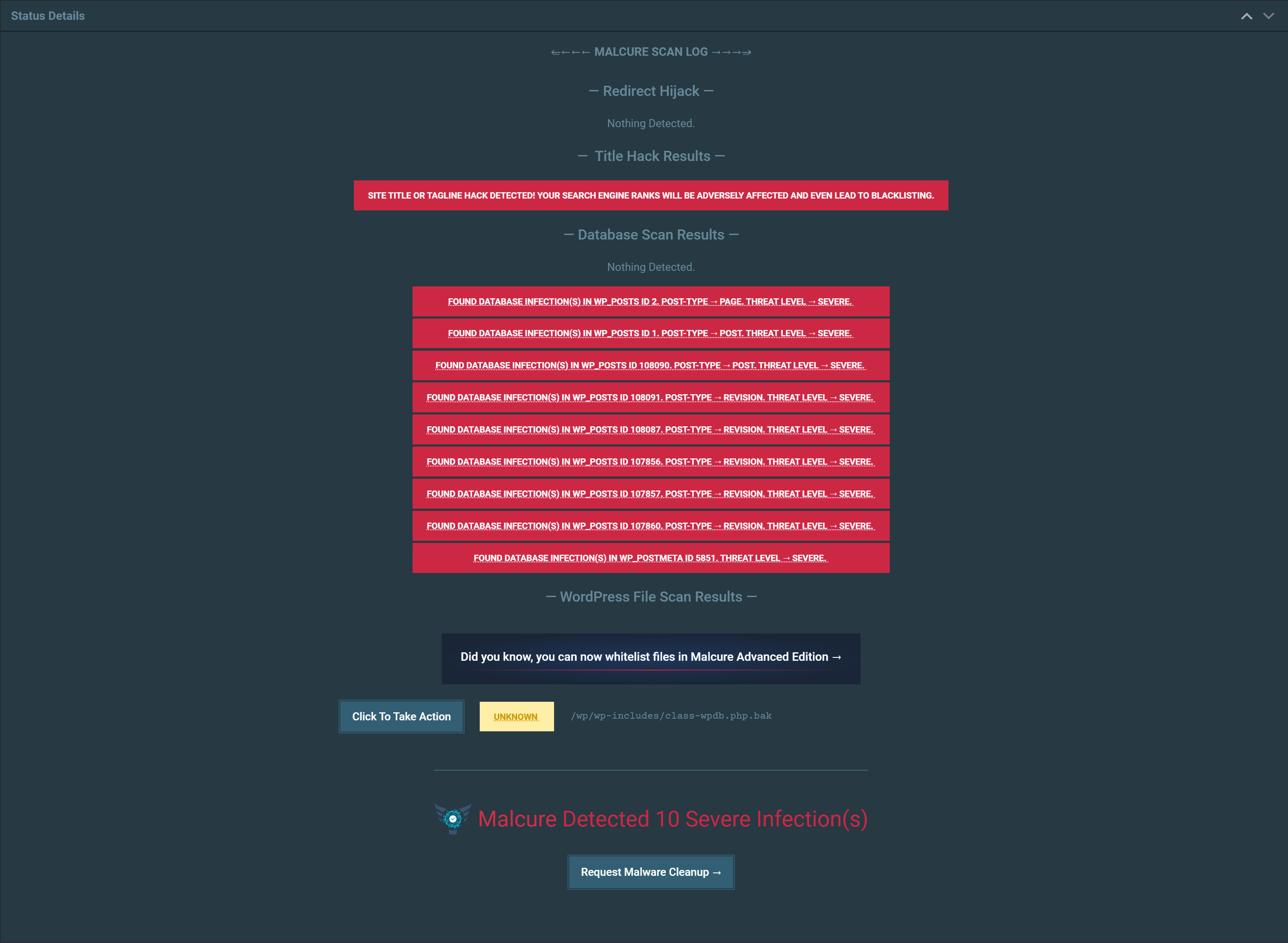
Finds Hidden Database Malware others miss. 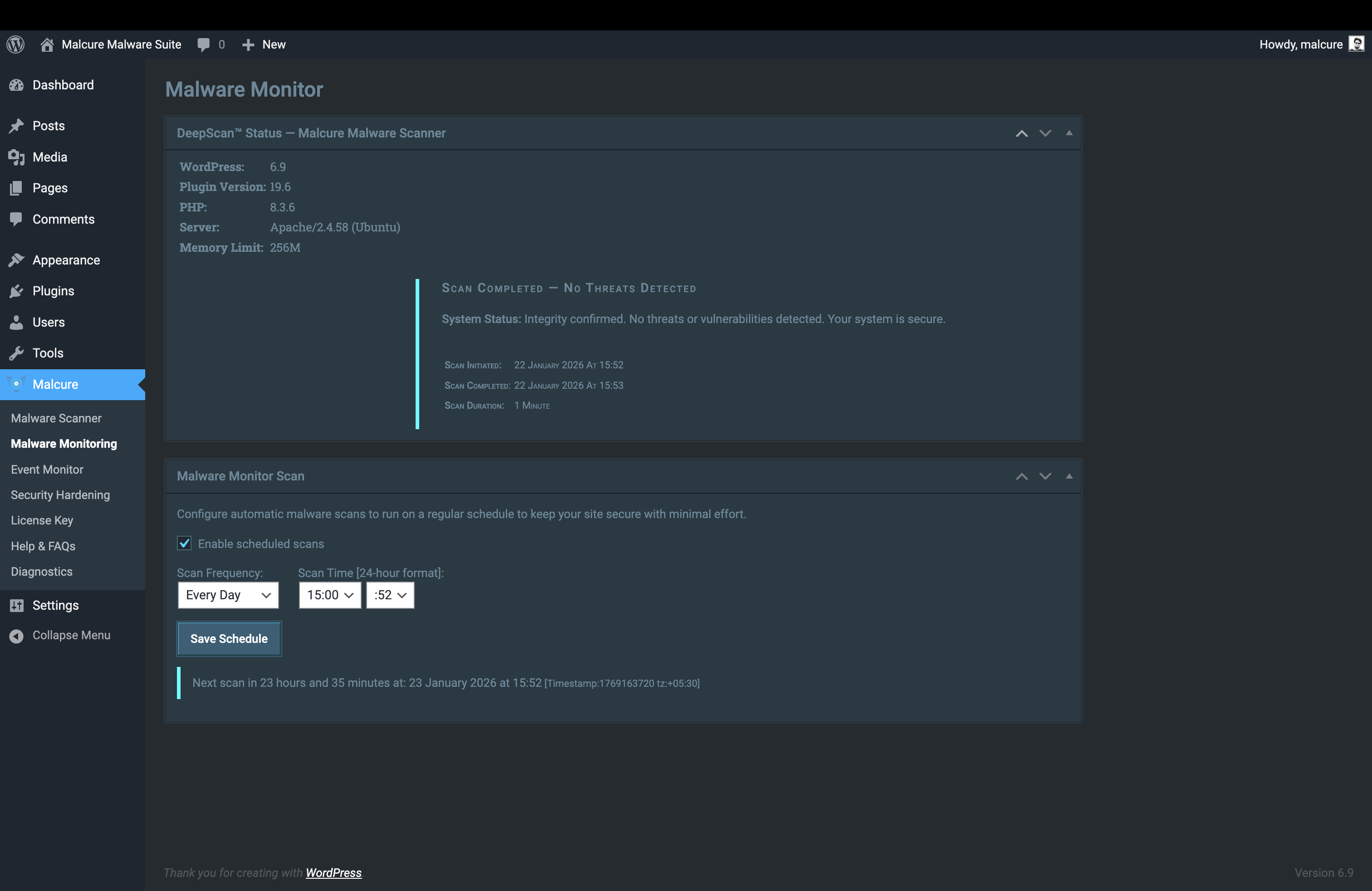
Real-time Monitoring. 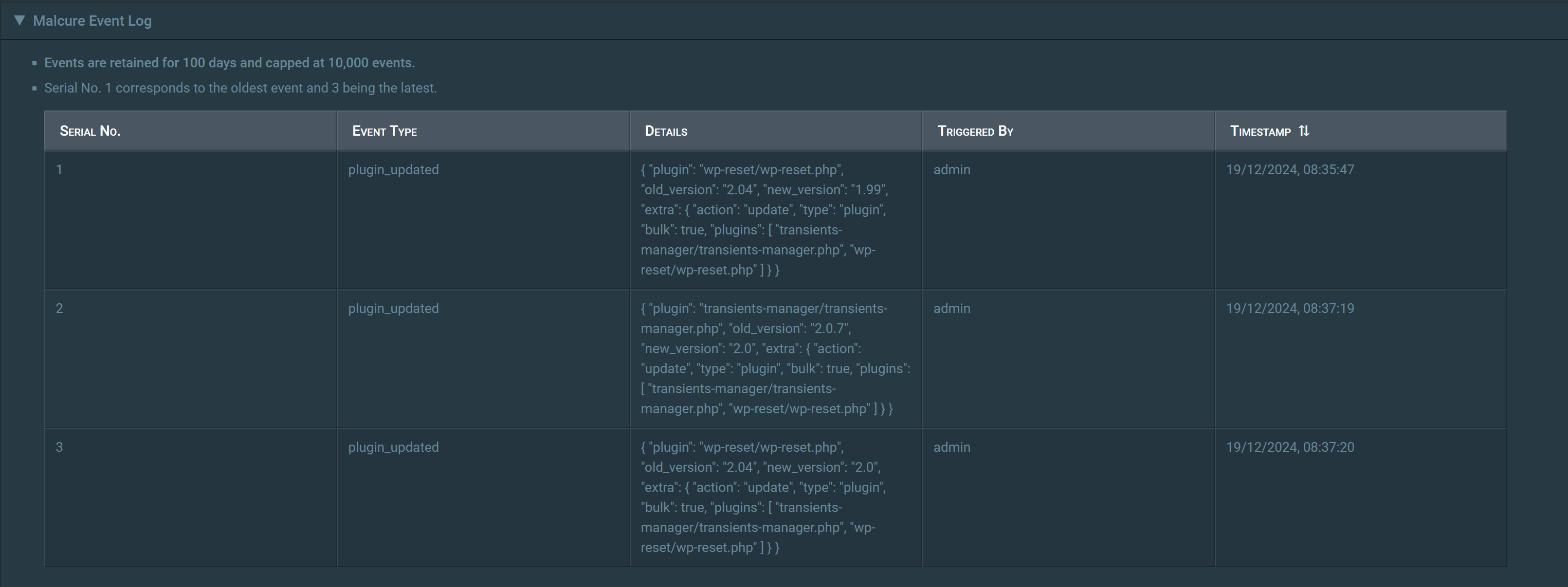
Event Log showing security-relevant site activity (updates and actions). 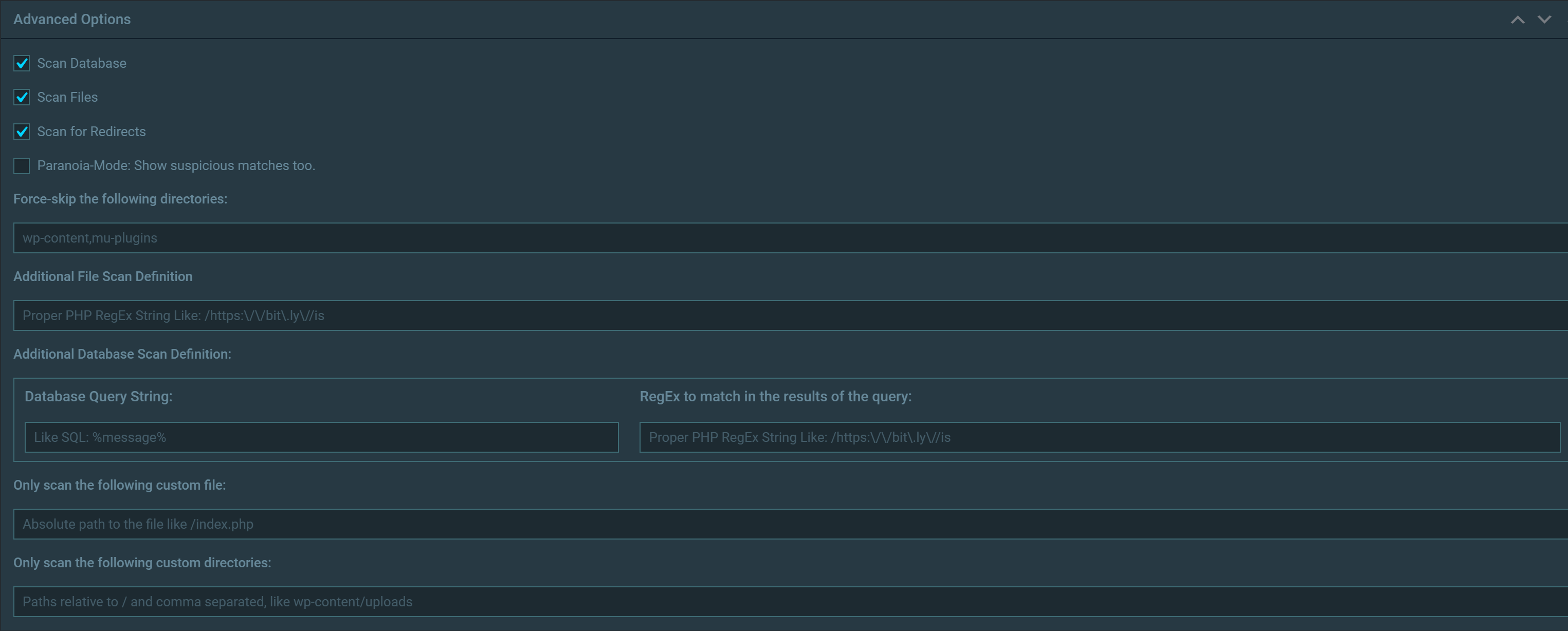
Scan filters to help narrow results by type and severity. 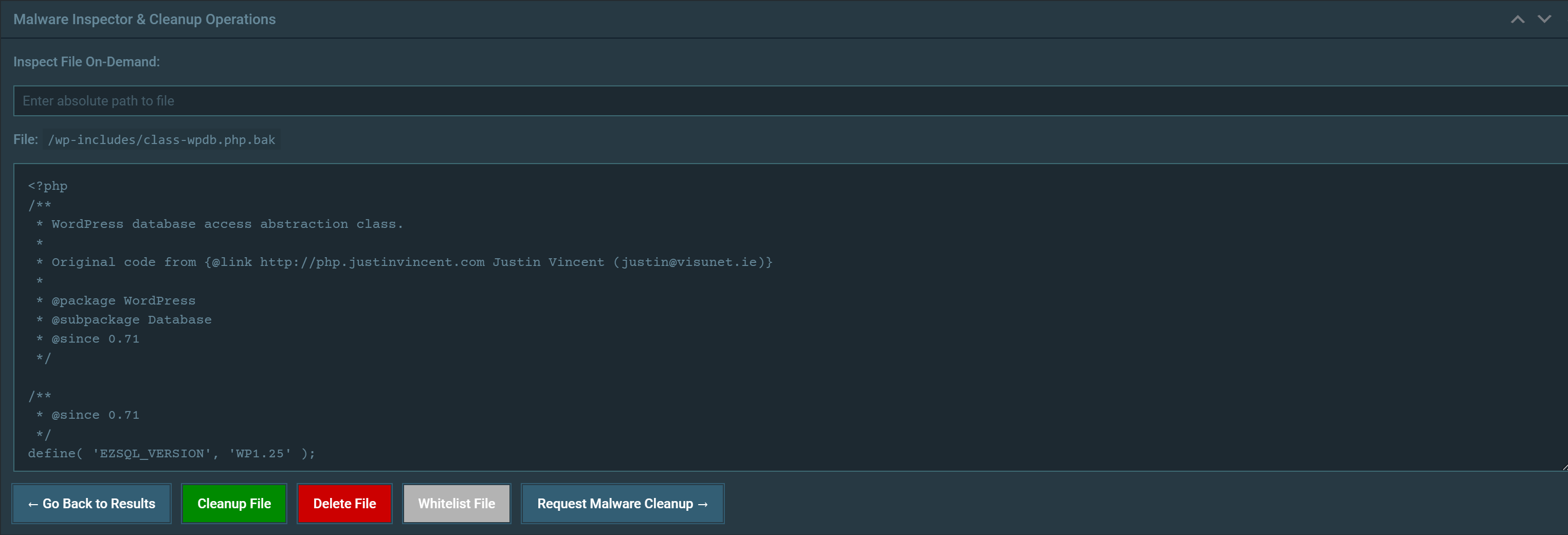
File Inspector to review suspicious or infected files. 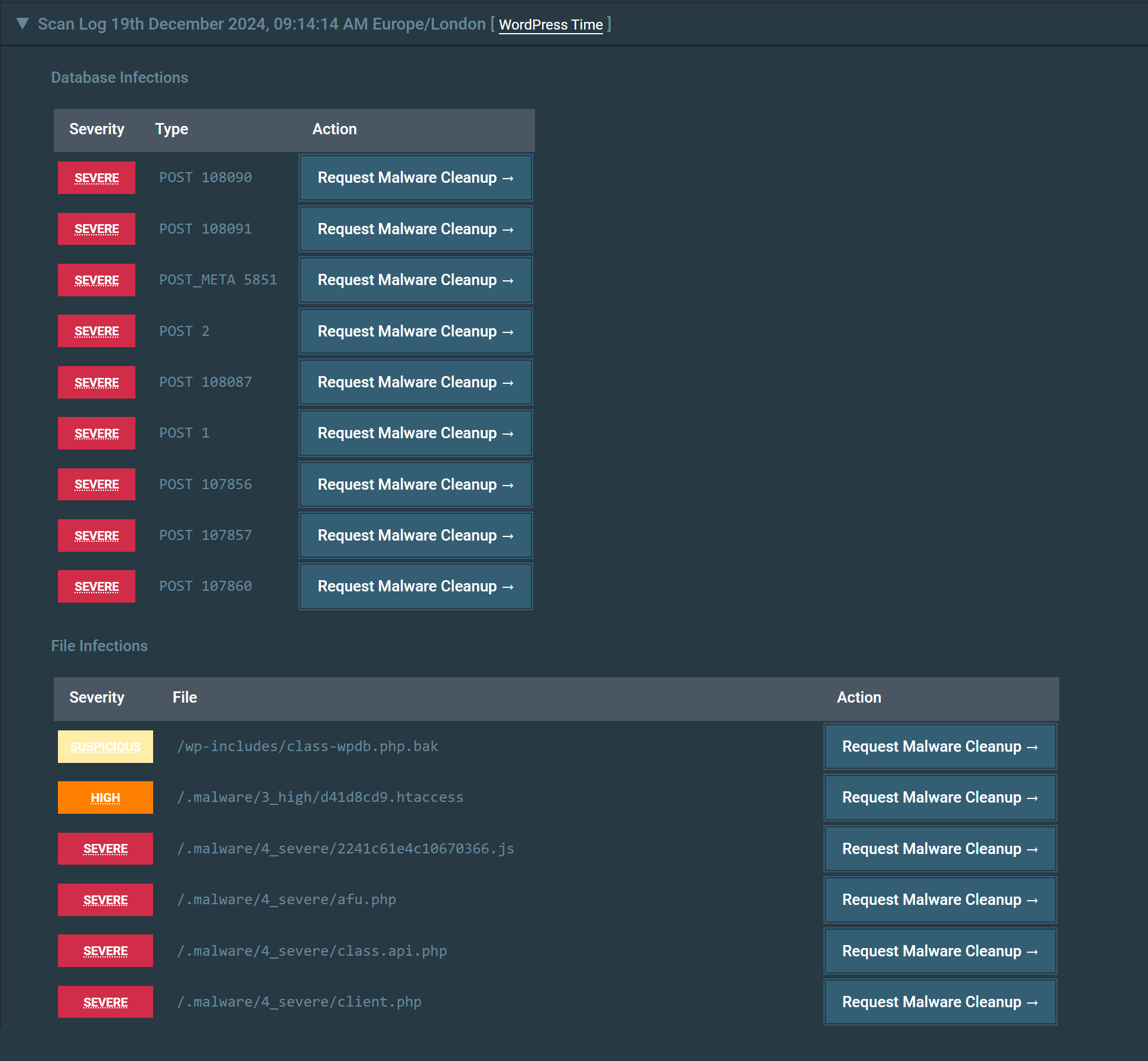
Scan Log / activity history to track what ran and when. 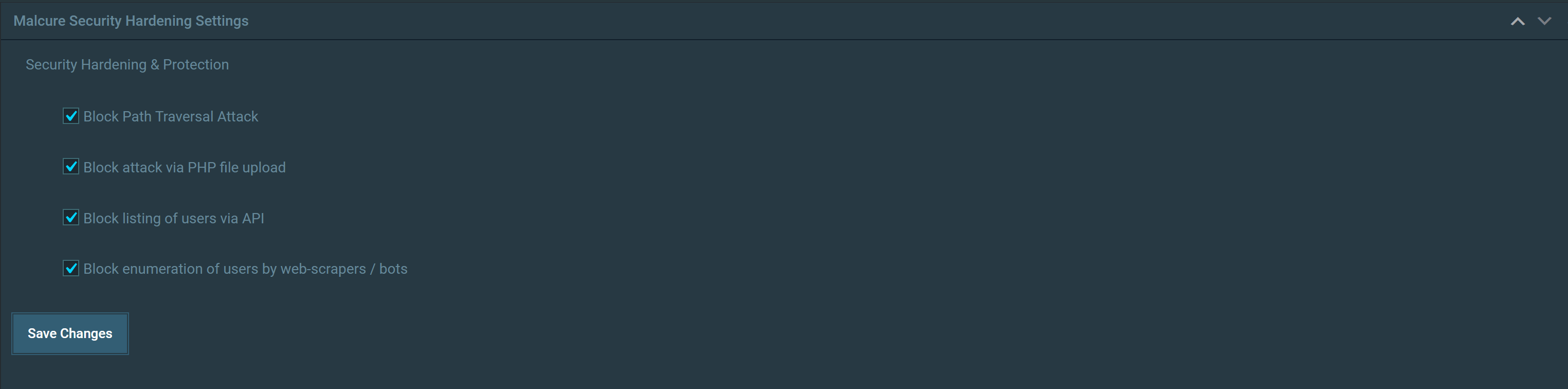
Hardening settings and firewall rules. 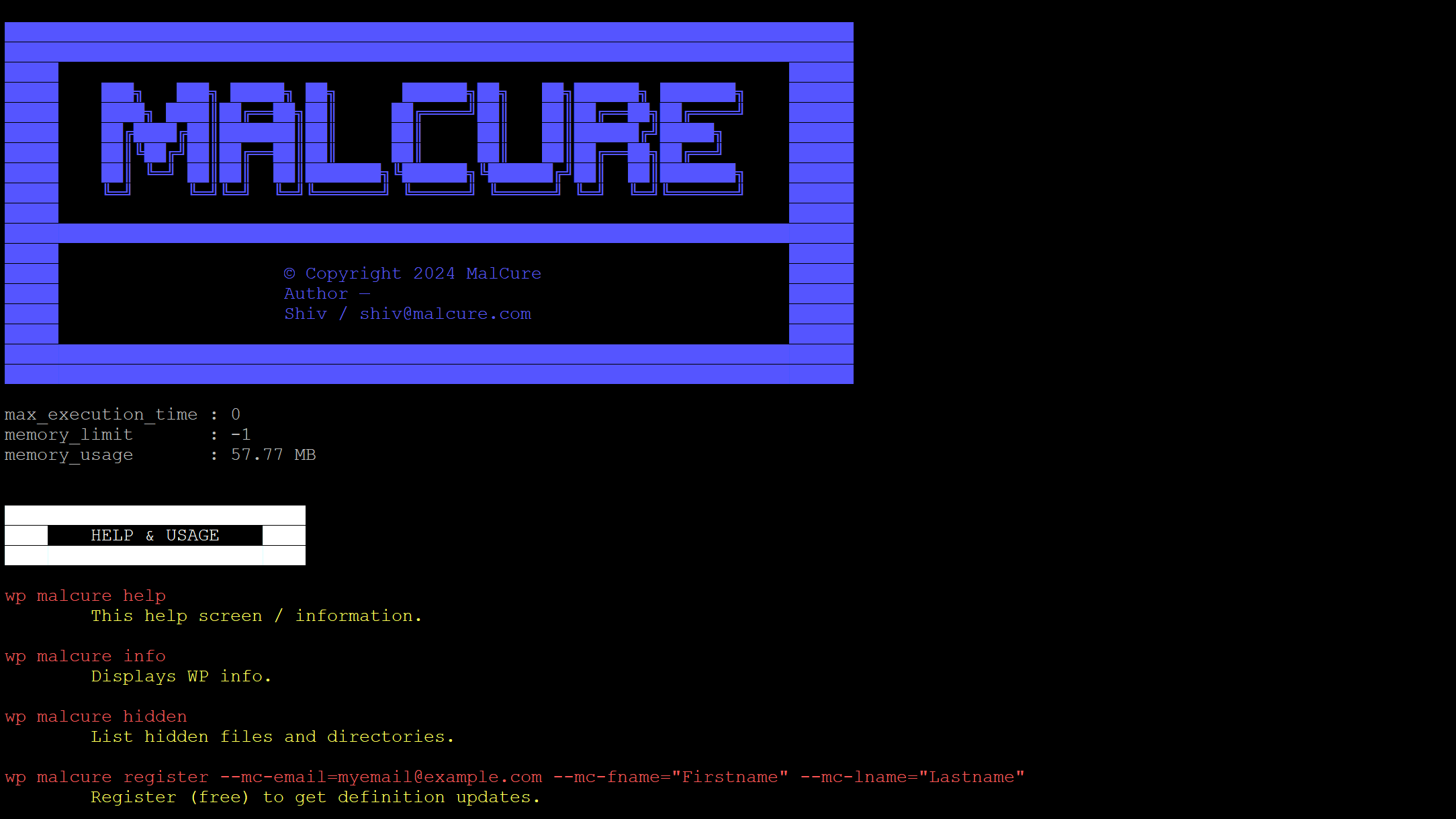
Running scans via WP-CLI. 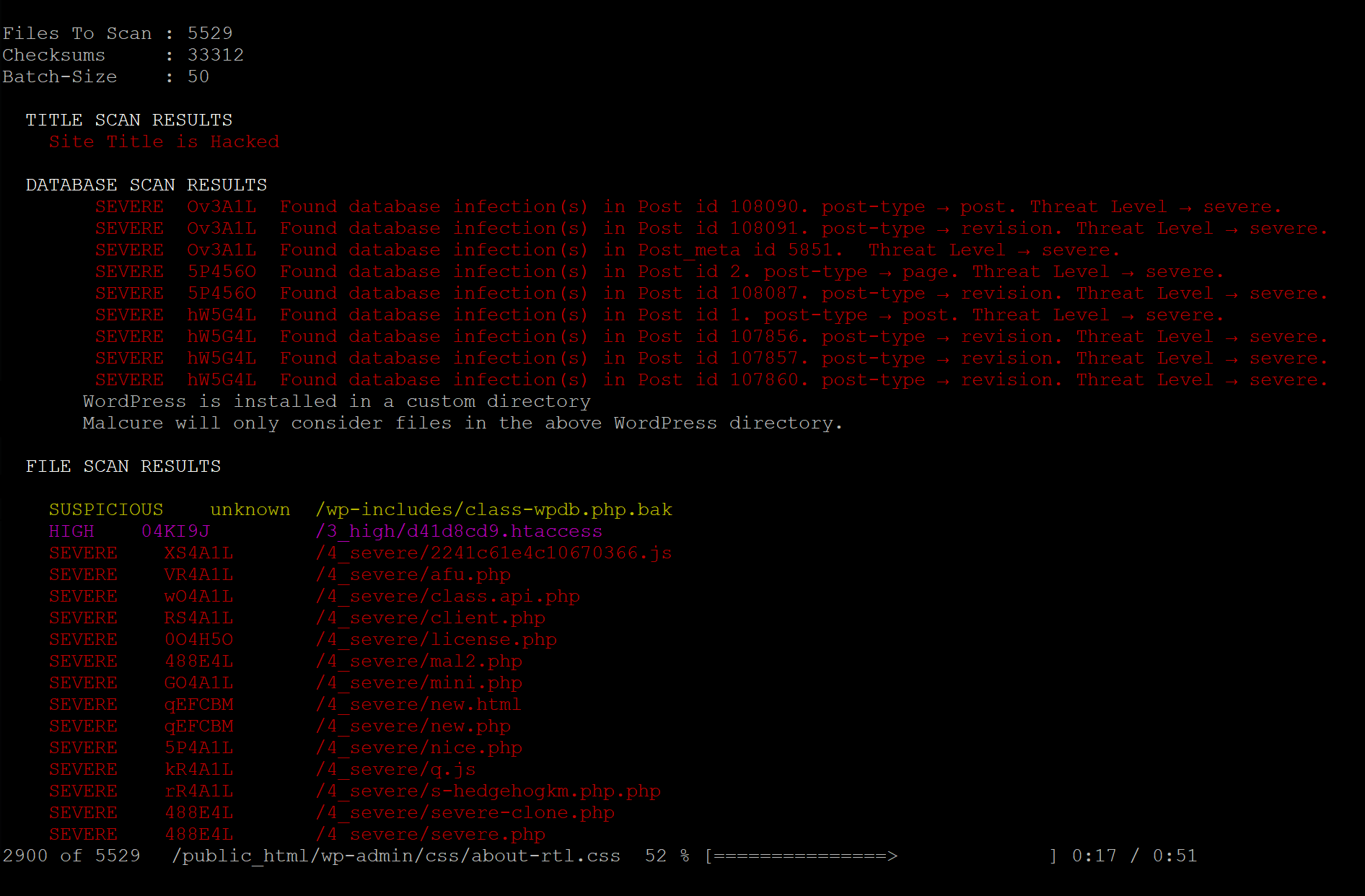
Reviewing scan results via WP-CLI.


Постављање
- Upload the
wp-malware-removalfolder to the/wp-content/plugins/directory. - Activate the plugin through the ‘Plugins’ menu in Admin Dashboard.
- Go to the Malcure menu to start your first scan.
ЧПП
-
My site is hacked. What should I do?
-
Option 1: If you are tech-savvy, you can use this plugin, analyse the results and remove malware yourself.
Option 2: You can file a service request with us. Don’t delay—malware spreads fast! Our service includes malware cleanup and blacklist removal by our security analysts. Please click here to file a support request.
-
How to remove malware from website?
-
Please see How to use Malcure Malware Shield Plugin for website Malware Removal and 10-Step Guide to Removing Malware from Your Site. Follow these steps for a permanent fix to secure your site and recover lost traffic.
-
Why should I use Malcure Malware Shield?
-
Several reasons:
a) Malcure Malware Shield scans all: database, vulnerabilities, files, even images and archives so deep hidden malware is also easily detected.
b) Checks all core, theme and plugin files for integrity.
c) Scans over 50,000+ known malware including variants like C99, R57, RootShell, dolohan, Crystal Shell, Matamu, Cybershell, W4cking, Sniper, Predator, Jackal, Phantasma, GFS, Dive, Dx, obfuscated code and many more known and unknown variants.
d) Hybrid scan ensures unknown threats are also identified.
In short, Malcure Malware Shield detects everything. It’s fast, simple to use and extremely thorough. With improved security, your site remains trustworthy, boosting SEO rankings, user confidence, and conversions.
-
What support options are available for Malcure Malware Shield users?
-
Providing excellent support is extremely important to us. You can report the issue at Malcure forums and our dedicated web-security specialist will ensure that the matter is resolved to your satisfaction.
-
What makes Malcure Malware Shield different from other security plugins?
-
Malcure Malware Shield is a local website Shield with comprehensive file and database scanning capabilities. Malcure Malware Shield does its job very well. If you have feedback, please do not hesitate to share with us.
Also Malcure Malware Shield scans every file regardless of whether it’s an image, archive etc. Modern malware hides in unsuspicious, genuine looking files and Malcure Malware Shield makes sure those are not missed. Malcure Malware Shield is extremely thorough and leaves no aspect of the site to speculation. Try Malcure Malware Shield to experience exceptional thoroughness and speed in removing website malware and ongoing security.
-
Will Malcure Malware Shield impact the performance of my website?
-
Malcure Malware Shield only runs when you want it to or when it is scheduled to utilizing minimal resources. At all other times it sleeps silently. The firewall triggers extremely quickly and is optimized for performance.
-
Where can I find the Malcure Terms of Use and Privacy Policy?
-
These are available on our website: Terms of Use and Privacy Policy
-
Will this slow down my website?
-
No. Malcure is engineered to be lightweight. We don’t run heavy background processes that eat up your server CPU like other „bloated“ security plugins.
-
Can I clean my hacked site for free?
-
Yes. The free version identifies every single infection (file path & line number). You can use this report to manually clean your site. The premium Malcure Advanced version offers deletion of irreparable files if you want to save time.
-
How is this different from other plugins?
-
Malcure is focused on simplicity and performance. We don’t have days of delay on detection signatures—you get updated signatures instantly for free. We also scan your database for hacks, which many file-only scanners miss.
-
Does it match „False Positives“ like other scanners?
-
Malcure Malware Shield uses intelligent checksum verification against the official core/pugin/theme files. This drastically reduces false alarms. We focus on being precise so you don’t get false alerts and anxiety.
-
Why do I need to register?
-
Registration connects your site to the Malcure API enabling real-time threat intelligence. It’s free and ensures you get the best protection.
-
Does this plugin remove malware automatically?
-
The free version detects malware with high precision and allows repair of official core/plugin/theme files. The Advanced Edition offers deletion, whitelisting as well as advanced features for infected files.
-
Will it slow down my site?
-
No. Malcure is designed to be lightweight and runs only when you trigger a scan or schedule one.
-
What data is sent to the Malcure API?
-
To perform scans, the plugin sends file checksums and your site’s domain to Malcure servers. No sensitive user data or file contents are transmitted unless you explicitly use the „Inspect File“ feature.
-
What’s the difference between Free and Advanced?
-
Both editions scan files and the database, verify core/plugins/themes integrity, and include firewall/hardening features.
The Advanced Edition adds Whitelisting, Advanced Scan Filters, File Operations, WP CLI Automation, Deployment, Bulk Client-Servicing Features, Background Scan & Premium Support (Expertise), and high-priority support.
-
How should I interpret results like „infected“ vs „suspicious“?
-
„Infected“ generally means that Malcure has high confidence the code matches malicious patterns.
„Suspicious“ can indicate risky/obfuscated behavior or something that warrants review (for example, heavily minified code or unusual PHP patterns). If you’re unsure, use Inspect (Advanced) or contact support.
Прегледи


Сарадници и градитељи
„Malcure Malware Shield“ је софтвер отвореног кода. Следећи људи су допринели овом додатку.
Сарадници

Преведите „Malcure Malware Shield“ на свој језик.
Заинтересовани сте за градњу?
Прегледајте код, проверите SVN складиште или се пријавите на белешку градње преко RSS-а.
Белешка о изменама
19.6
- Fixed issues not clearing when initializing scan.
- Fixed low confidence issues being saved.
- Fixed database issues not being saved.
- Fixed compatibility testing transients.
- Minor UI improvements.
- Updated readme with respect to recent features, functionality and updates.
19.5
- New: Clearer admin UI labeling.
- Bugfix: Styles not loading on Scan Scheduler page.
- Stability: Several other stability fixes.
19.4
- Major Bugfix: Fatal error during auto-upgrade.
- Updated readme.
19.3
- Major Bugfix: The very initial database record was never scanned.
- Feature: New DB-record inspection + (Advanced Edition) DB-record whitelisting.
- Improvement: Smart Checksum Refresh — Updates only modified components during upgrades for faster performance.
- Major: Checksum system overhaul: more robust payload handling, better core vs non-core validation, and automatic checksum refresh after WP/plugin/theme upgrades.
19.2
- Feature: Major performance optimization for checksums.
- Feature: Enhanced SaaS API integration with signature verification.
- Feature: Compatibility check for plugin version.
- UX: Improved license validation and error messages.
- UX: Better handling of database vs file infections in UI.
19.1
- Feature: Introducing enhanced cleanup operations.
19.0
- Bugfix: Enhanced detection of suspicious empty files in core directories.
