Ionic ist ein Frontend-Framework, mit welchem man via HTML5 / JavaScript und CSS native Apps bauen kann. Diese Apps können via “Apache Cordova” auf native Funktionen (Kamera, GPS, etc.) der Geräte zugreifen. Zudem wird Google’s JavaScript Framework “AnguarJS” genutzt und natürlich wird auch “SASS” unterstützt.
Vorbereitung
Man kann Multi-Platform Mobile Apps sowohl unter Windows, Linux oder Mac OS X entwickeln, jedoch ist die Vorbereitung unter Linux / Mac OS X um einiges einfacher.
Ich empfehle an dieser Stelle mal wieder die “.dotfiles” zu installieren.
cd ~
git clone https://github.com/voku/dotfiles.git
cd dotfiles
source bootstrap.sh
Man kann die App nun im Browser (ionic serve), im Android Emulator (ionic emulate android) oder direkt auf seinem Android-Gerät (ionic run android) ausprobieren!!!
Links
Es folgen ein paar Links zur App / API / Dokumentation und zum Beispiel-Quellcode
Vor einiger Zeit habe ich ein kleines Shell-Script (SSSwitch – auto-switch settings) geschrieben, welches mein Android Handy beim Start optimiert und die Kernel-Einstellungen anpasst, wenn der Bildschirm an bzw. aus ist. Einige der Einstellungen kann man auch unter Linux verwenden. Als Beispiel beschreibe ich hier kurz, wie man die I/O Leistung verbessern kann und wer allgemein etwas zum optimieren von Linux / Ubuntu lesen möchte, dem hilft ggf. folgender Blog-Post weiter -> SpeedUp-Ubuntu ;)
Ein Ausschnitt aus dem besagtem Skript …
# =========
# One-time tweaks to apply on every boot;
# =========
STL=`ls -d /sys/block/stl*`;
BML=`ls -d /sys/block/bml*`;
MMC=`ls -d /sys/block/mmc*`;
… hier wurde der externe / interne Speicher von Android angegeben unter meinem Linux-System würde ich hier also z.B. folgendes angeben.
SDA=`ls -d /sys/block/sda/*`;
# =========
# Remount all partitions
# =========
for k in $(busybox mount | cut -d " " -f3);
do
	sync;
	busybox mount -o remount,noatime,nodiratime $k;
done;
“atime – Update inode access time for each access. See also the strictatime mount option.” – man mount Hier schalten wir die Funktion aus, welche aufzeichnet wann ein Datei oder Verzeichnis zuletzt angesehen wurde, da wir diese Funktionalität unter Android selten benötigen werden. ;) Ggf. kann man diesen Abschnitt komplett so unter Linux / Ubuntu verwenden z.B.:
mount
/dev/sda5 on / type ext4 (rw,errors=remount-ro,commit=0)
[...]
/dev/sda3 on /boot type ext2 (rw)
/dev/sda6 on /home type ext4 (rw,commit=0)
[...]
for k in $(busybox mount | cut -d " " -f3); do sync; mount -o remount,noatime,nodiratime $k; done;
mount
/dev/sda5 on / type ext4 (rw,noatime,nodiratime,errors=remount-ro)
[...]
/dev/sda3 on /boot type ext2 (rw,noatime,nodiratime)
/dev/sda6 on /home type ext4 (rw,noatime,nodiratime)
[...]
… wie man sieht sind die neuen Mount-Optionen nun aktiv. Wer mehr dazu erfahren möchte findet in dem bereits erwähnten “SpeedUp Ubuntu“-Beitrag unter dem Punkt “3.1) Filesystem” mehr Infos.
# =========
# check enabled/disabled status for IO settings
# =========
if [ "$IO_SETTINGS_ENABLED" -eq "1" ];
then
	# =========
	# Optimize non-rotating storage
	# =========
	for i in $STL $BML $MMC;
	do
		/system/xbin/echo "1" > $i/queue/iosched/rq_affinity;
		/system/xbin/echo "1" > $i/queue/iosched/low_latency;
		/system/xbin/echo "64" > $i/queue/max_sectors_kb;
		/system/xbin/echo "$READ_AHEAD_ALL" > $i/queue/read_ahead_kb;
	done;
Hier legen wir unter anderem die Puffergröße von unseren Speichermedien ein. Als Beispiel zeige ich kurz wie sich der Buffer auf die Lesegeschwindigkeit auswirkt, wenn eine Datei z.B. erneut geöffnet wird. ;) Dazu benötigen wir zuerst einen Compiler (gcc)
… und in eine leere Datei (io_speed_buffer.c) einfügen, nun compilieren wir noch schnell das Programm mit folgendem Befehl …
gcc io_speed_buffer.c -o io_speed_buffer
… als nächsten benötigen wir eine etwa 10 MB große Datei als Eingabe, diese erzeugen wir mittels “dd” im aktuellen Verzeichnis.
dd if=/dev/zero of=./test count=20000
Und schon können wir mittels folgenden Befehl die optimale Buffer-Größe herausfinden. Wobei man bei minimaler Verbesserung nicht den höheren Wert nutzen sollte.
Ggf. kann man diese Einstellungen auch unter Linux direkt beim start ausführen lassen z.B. könnte man den zuvor gezeigten “echo”-Befehl in der “rc.local”-Datei einfügen. (/etc/rc.local)
	# =========
	# Optimize io scheduler
	# =========
	for i in $STL $BML $MMC;
	do
		/system/xbin/echo "$IO_SCHEDULER" > $i/queue/scheduler;
Welcher I/O Scheduler der beste für das Speichermedium ist kann man am betesten selber testen, indem man z.B. wieder den “dd”-Befehl verwendet. -> [Discussion] SSSwitch – auto-switch settings PS: Für mein Android-System nutze ich momentan “bfq” wobei “noop” gerade für SSD-Speichermedien schneller sein soll …
Hier noch ein-wenig Feintuning für die entsprechenden I/O Scheduler ;) ggf. müssen diese Werte auf anderen Systemen (Hardware) angepasst werden, dies habe ich bisher nur auf meinem Android System getestet. Falls euch / jemanden dieser Blog-Beitrag gefallen hat, werde ich weitere Einstellungen von dem Skript erklären … :)
Wenn man auf seinem Android beispielsweise einen Kernel mit 24bpp Unterstützung installiert, kann man auch wenn man root-Rechte hat, keine Screenshot via App machen. Um dies zu umgehen kann man die “Android Debug Bridge (adb)” verwenden.
In dem “CyanogenMod” (CM) ist bereits ein SSH-Server eingebaut (Dropbear), dieser ist jedoch standardmäßig abgeschaltet. Hier zeige ich kurz wie du diesen unter Linux / Windows nutzen kannst und dich somit ohne Kabel mit deinem Android (funktioniert nach meinen Tests, nur im lokalen W-Lan) verbinden kannst … ;-)
Klick auf “Generate” und füge die Zeichenkette, welche du nun im Fenster von puttygen siehst (Beispiel: “ssh-rsa AAAAB3…hclQ==rsa-key-20100227”) in eine Text-Datei auf deinem Desktop ein -> “id_rsa.pub” und speichere (beschütze) deinen “private key”!!!
2.2.3) Übertrage den SSH-Schlüssel (öffentlich / public) zu Android
Ich habe hier ein kleines HowTo zum beschleunigen von Android / Spica geschrieben und wollte euch das Tweak-Skript für “bfs-Kernel” / “cfs-Kernel” / “Dateisystem” (ext2) / “3G/Edge Speed” … zur Verfügung stellen. -> Forum-Link & Download
Ich habe meine apps mit dem folgenden Bash-Skript optimiert, welches die Bild- & Sound-Dateien komprimiert, so dass die Apps kleiner werden und weniger Speicher verbrauchen… :-)
Habe die optimierten Apps zu meinem Update-Pack für Spica hinzugefügt -> cyanogenmod + x
1.) Bash-Skript in einer Textdatei unter Linux speichern (Tweak_app.sh) & Ausführrechte setzen (chmod +x Tweak_app.sh)
I will publish my work (files) here because different forums all over the world use it and I have to update all the posts so that everybody find out that there is a new version of “Mod + X” (SpicagenMod) | here you can get more infos & help from the “Samdroid.Net”-Commuity -> [Dev] SpicagenMod BETA3 & HELPDESK + FAQs + HOW-TO GUIDES
Current version: Mod+X => SpicagenMod RC1
[stextbox id=”alert” caption=”Warning”]Even if this update should have worked for me without problems, I can not guarantee that this will work for you, so you maybe create a backup of your files before the installation![/stextbox]
INSTALLATION If you are updating from any other Android-Version than Froyo (2.2) do wipe data/cache BEFORE installing SGM. 1. Push it to your SDcard, go to recovery and apply pushed file. 2. After complete boot make reboot one more time!
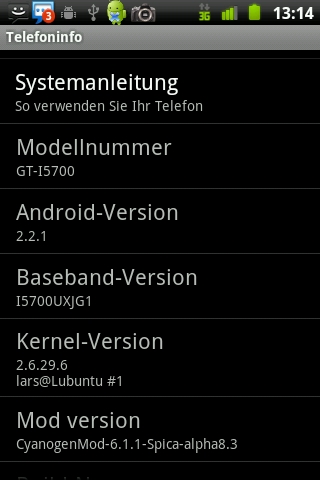
SpicagenMod Froyo, based on CyanogenMod 6.1.1 & Android 2.2.3
========

RC1
* added "VOKU"-kernel v3.4 (24bpp) as default
* edit sound -> louder [need testing] (asound.conf)
* updated DalvikVM (github.com/voku/android_dalvik)
* updated Bionic-lib (github.com/voku/android_bionic)
* updated WebKit (github.com/voku/android_external_webkit)
* updated png-lib v1.2.47 (github.com/AOKP/external_libpng)
* updated some Apps (Contacts, LatinIME, Browser, ES File Explore, Nemus Launcher,
* .... MediaProvider [gingerbread], Google Maps, YouTube, GoogleVoice,
* .... GooglePlayStore [Market], Music)
* removed some Apps (DSPManager, VpnServices, OpenVPN, QQPlayer)
* fixed SQLite problems - revert last changes (github.com/voku/android_external_sqlite)
* fixed Contakt problem - revert to SM-version (github.com/voku/android_packages_apps_Contacts)
* updated framework -> added "app.keeping for services" (github.com/voku/sm_android_frameworks_base)
* updated framework -> revert "User-to-User signaling Info" (github.com/voku/sm_android_frameworks_base)
* revert orientation-backport from CM9 (github.com/voku/sm_android_frameworks_base)
* added some framework-fixes from CyanogenMod [isc] (github.com/voku/sm_android_frameworks_base)
* added ICS theme (madoreq)
* added new instal-scripts (mpjoe2000)
* default build flags (github.com/voku/sm_android_build)
* updated "SpicaTweak Lite" v1.7.5 (github.com/voku/Android-Tweak) (thx @kiryl)
  - added "fix_permissions"
  - 3G/Edge Tweaks
  - SQLite Tweaks
  - added zipalign-Tweaks

BETA6
* added "VOKU"-kernel v3.2 (24bpp) as default
* updated some Apps (ES File Explore, k-9 Mail, Gallery3D, DSPManager, Terminal Emulator, Music,
* .... Barcode Scanner v4, QQPlayer, Google Maps, Browser, Phone, DownloadProvider,
* .... UserDictionaryProvider, ApplicationsProvider)
* updated Bionic-lib (github.com/voku/android_bionic)
* updated Busybox (github.com/voku/android_external_busybox)
* updated "Skia Graphics Engine" (github.com/voku/android_external_skia)
* updated WebKit (github.com/voku/android_external_webkit)
* updated "libFLAC" (github.com/voku/android_external_flac)
* updated zoneinfo - 2012b
* updated SQLite (github.com/voku/android_external_sqlite)
* updated DalvikVM (github.com/voku/android_dalvik)
* fixed "su"-problem
* fixed "GPS"-problem
* fixed longgg... boot time
* added new default settings (keep apps [Launcher, MMS, ... ] in memory by default)
* revert framework -> tweak SQLite-settings [need testing] (github.com/voku/sm_android_frameworks_base)
* added framework-features from milaq [froyo] (github.com/milaq/android_frameworks_base)
  - keep apps in memory (e.g.: echo "sys.keep_app_2=com.whatsapp" >> /system/build.prop;)
  - don't start gmaps network location service, if gmaps main isn't running
* added some framework-fixes from CyanogenMod [isc] (github.com/voku/sm_android_frameworks_base)
  - improved widget scrolling speed
* added framework-fixes from codeaurora.org [froyo]
  (https://www.codeaurora.org/gitweb/quic/la/?p=platform/frameworks/base.git;a=shortlog;h=refs/heads/froyo)
* added framework-fixes from peteralfonso [gingerbread] (github.com/peteralfonso/platform_frameworks_base)
* updated "SpicaTweak Lite" v1.7.1 (voku1987)
  - removed SQLite-Settings
  - edit TCP read/write
  - cleaned up the script
  - more I/O-Tweaks
  - removed zipalign-Tweaks
  - removed extra CPU-settings for Apps
  - Firewall-Tweaks [need testing]

BETA5
* added "VOKU"-kernel v1.7C [with Qbanin's touch driver] (24bpp) as default
* increased default audio-volume [/system/etc/asound_default.conf]
* updated install-script from SpicagenMod
* updated Android 2.2.2 -> Android 2.2.3 (voku1987)
* updated APN-config [apns-conf.xml] (voku1987)
* updated "block advertising" [hosts] (voku1987)
* updated "SpicaTweak Lite" v1.4.1 (voku1987)
* updated DalvikVM (github.com/voku/android_dalvik)
* updated "Skia Graphics Engine" (github.com/voku/android_external_skia)
* updated Bionic-lib (github.com/voku/android_bionic)
* updated SQLite v3.7.9 (with sync off) (github.com/voku/android_external_sqlite)
* updated su-binary [v3.0.3]
* updated some Apps (Google Maps 6.0.3, Market 3.4.4, k-9 Mail 4.103, Camera, Settings, SMParts,
* .... Phone, LatinIME, RealCalc, Browser, Gallery3D, Superuser 3.0.7, QQPlayer, Google Voice,
* .... ES File Explorer, YouTube, MediaProvider)
* added all default Apps (OpenVPN, "LiveWallpapers"-Apps, DSPManager, ...)
* added "QuickSearchBox"-App => removed "Google QuickSearch"-App
* removed "ApplicationsProvider"-App (mpjoe2000)
* removed Roboto-Font -> added CyanogenMod-Font (voku1987)
* removed auto "zipalign"-script (voku1987)
* updated "Music"-App (github.com/voku/android_packages_apps_Music)
* updated "Gallery3D"-App (github.com/voku/android_packages_apps_Gallery3D)
* fixed safe factory reset [need testing] (mpjoe2000)
* fixed force close -> menu-settings (voku1987)
* fixed DeskClock-App (voku1987)
* updated framework -> tweak SQLite-settings [need testing] (github.com/voku/sm_android_frameworks_base)
* added framework-fixes from CyanogenMod [gingerbread] (github.com/voku/sm_android_frameworks_base)
* added framework-fixes from Android [master] (github.com/voku/sm_android_frameworks_base)
  - but again no theme-compatibility to SGM BETA2.1 !!

BETA4
* added "FrozenLake v3 with default touch driver" as default (darth_llamah)
* added modified Transpa-Theme (eksajlee & voku1987)
* added Roboto-Font from Android 4.0 (voku1987)
* updated APN-config [apns-conf.xml] (voku1987)
* added boot-sound [off by default] (voku1987)
* added new SGM boot_logo/boot_animation (samdroid.net community)
* added optimized "Gallery3D"-App => removed "QuickPic"-App
* added "Music"-App => removed "MIUI-Music"-App
* added keyboard with multi-language => removed default keyboard (github.com/voku/android_packages_inputmethods_LatinIME)
* added "k-9 Mail"-app v3.800 => removed "Email"-App (code.google.com/p/k9mail/downloads/)
* updated some Apps (Browser, DownloadProvider, Gallery3D, RealCalc, Google Maps, Superuser, ES File Explorer, ...)
* removed some Apps (Facebook, DSPManager, VPN) | if you need it, you can add it by yourself
* updated su-binary [v3]
* updated DalvikVM (github.com/voku/android_dalvik)
* updated Bionic-lib (github.com/voku/android_bionic)
* updated jpeg-lib optimized (github.com/voku/android_external_jpeg)
* updated WebKit (github.com/voku/android_external_webkit)
* update Opencore [optimized mp3] (github.com/voku/sm_android_external_opencore)
* fixed Gallery3D [zoom by pictures from camera] (voku/android_packages_apps_Gallery3D)
* fixed Bluetooth-CarKit-problem
* fixed wifi-dns (LordManta)
* code fixes (voku1987)
  - fixed GPS-Bug
  - fixed YouTube-Bug
  - theme-compatibility to SGM BETA2.1
* added "SpicaTweak Lite" v1.1 -> removed "SSSwitch" (voku1987)
  - some default tweaks without config via ssscfg
* added & updated translations (voku1987)
* added gingerbread backport native power manager service module
* added many framework-fixes via "Fork Queue" from froyo (github.com/voku/sm_android_frameworks_base)
* added framework-fixes from kernelzilla [froyo] (github.com/kernelzilla/android_frameworks_base)
* added framework-fixes from CyanogenMod [gingerbread] (github.com/voku/sm_android_frameworks_base)
* added framework-fixes from LiquidSmoothROMs (gingerbread) (github.com/LiquidSmoothROMs/android_frameworks_base)

BETA3
* added "VOKU"-kernel v1.7A [with Qbanin's touch driver] (24bpp) as default
* converting to ALL2EXT2 only if it's at EXT2 (luismaf, voku1987)
* updated GPS-config / NTP-config  [gps.conf] (voku1987)
* updated APN-config [apns-conf.xml] (voku1987)
* SGM boot_logo/boot_animation [without yellow color ;)] (samdroid.net community)
* updated / added install-script (voku1987)
* code fixes & clean-up (voku1987)
* optimized build flags (voku1987)
* added Intercept 3D drivers
* added 640x480 Camera with 30FPS to MP4 (maciek4323)
* added "RealCalc"-App => removed "Calculator"-App
* added "LauncherPro"-App => removed "ADWLauncher"-App
* added "MIUI-Music"-App => removed default "Music"-App (jankomuz)
* added "Email"-App with policies fix for Exchange => removed default "Email"-App
* added "QQPlayer"-App => removed "RockPlayer"-App
* added "ES File Explorer"-App => removed default FileManager
* added "QuickPic"-App => removed "Gallery3D"-App
* added default keyboard (android.git.kernel.org/?p=platform/packages/inputmethods/LatinIME.git)
* removed "Genkiller"-App
* updated some Apps (Google Maps, Superuser, Mms, Phone, Contacts, SM-Settings, Settings, Terminal Emulator, Browser...)
* updated "block advertising" (voku1987)
* updated png-lib v1.2.46 (github.com/CyanogenMod/android_external_libpng)
* updated jpeg-lib optimized for armv6 (github.com/mansr/android_external_jpeg)
* updated zlib v1.2.5 (github.com/CyanogenMod/android_external_zlib)
* updated SQLite v3.7+ (with sync off) (voku1987)
* updated libcamera (without sources?!)
* updated dropbear [ssh-daemon] (github.com/tpruvot/android_external_dropbear)
* updated Memory-Cache for webkit (github.com/voku/android_external_webkit)
* updated Sound-Control / Sound-Mixer (github.com/voku/android_hardware_alsa_sound)
* updated default theme-images & animation (voku1987)
* fixed Bluetooth-bug (criminal)
* fixed Market-install-bug (voku1987)
  - download cache will be stored now on your SD-card (/sdcard/.cache/)
* fixed earphone without mic bug
  - hear your caller through the headphones and talking via Mobile
* added faster boot-animation (surV)
* added configurable Bluetooth timeout (voku1987)
* added Norwegian translation (AreEdw)
* added "About ROM" in "Settings"-App (github.com/DroidConcepts/android_packages_apps_DroidConceptsSettings)
* added quieter camera-click-sound (voku1987)
* added "vim" (github.com/CyanogenMod/android_external_vim)
* added "SSSwitch" v1.3.4 (voku1987)
  - I/O Scheduler = BFQ
  - optimized net-settings
  - optimized I/O-settings
  - "low-memory task killer" settings configurable via "ssscfg" in the "Terminal Emulator"-App
  - CPU-settings are disabled by default
  - "keep App in memory"-settings are disabled by default
* added framework-fixes from peteralfonso [gingerbread] (github.com/peteralfonso/platform_frameworks_base)
* added framework-fixes from CyanogenMod [gingerbread] (github.com/CyanogenMod/android_frameworks_base)
* added framework-fixes from android [gingerbread] (github.com/android/platform_frameworks_base)
* added framework-fixes from pcfighter [froyo] (github.com/pcfighter/platform_frameworks_base)

BETA2
* Android 2.2.2 (AOSP)
* big code clean-up (darth-llamah)
* Bluetooth discoverability configurable (CyanogenMod, nebkat)
* clock text color fixes (nebkat)
* CM FileManager enabled (cadavre)
* DownloadManager and Browser from Gingerbread (nebkat)
* Email policies fix for Exchange (cadavre)
* extended SMS/MMS writing area to 6 lines in portrait (cadavre)
* framework cleanups (nebkat)
* locking in memory fix for Phone, Contacts and Superuser (cadavre)
* modified build flags and scripts (CyanogenMod, LeshaK, guybrusht)
* power button disabled in lockscreen (cadavre)
* PowerWidget - more long-press options (cadavre)
* rotary answer for calls (nebkat)
> RTL for framework and webkit (Y6b, cadavre) [available as additional package]
* SGM logo/anim (samdroid.net community)
* SMParts cleanup (nebkat)
* SMS send to wrong recipient fix (cadavre)
* some build fixes (Piskor)
* status bar PowerWidget new options (nebkat)
* sync off for sqlite databases improves in speed (XDA, cadavre)
* xml importing from CM and SGM fixed (cadavre)
* lockscreen improvements: (CyanogenMod, nebkat)
  - rotary lockscreen unlock drag down
  - music addons
  - battery % info
  - tab vibration on/off
  - mms/phone tab custom apps
* Android fixes: (submitted by Piskor)
  - DNS fix for wifi
  - Change default DNS server for Tethering
  - Introduce a list of all the audio files
  - Telephony: Fix radio state printing
  - Telephony: Process MT SMS with MTI set to 3
  - Fixing counting the number of days in call log screen
  - Change in media scanner to set correct date
  - frameworks/base/telephony: Release wakelock on RIL request send error
  - Changing connect and response timeout
  - Bluetooth OBEX timeout problem
  - Avoid leaking sockets
  - Launcher is missing anti-aliasing
  - java.lang.RuntimeException:Unable to pause activity (com.android.settings.applications.StorageUse)

BETA1
* new kernel WLAN module to avoid SoDs (Lukiqq)
* final DPad music controls (cadavre)
* final framework theme text colors (cadavre)
* possibility of locking Phone and Contacts in memory so phone can be more like phone (cadavre)
* integrated Intercept3D drivers (cadavre)
* smooth YouTube HQ playing (cadavre thanks to Intercept)
* you can use CM and SM .xml theme files now (cadavre)
* Finnish localization (FI translation team) [fi-rFI]
* GB green clock text color (Freedom)
* Parrot autopairing fix (cadavre)
* latest ADWLauncher (nebkat)
* looping ringtone (criminal)
* avoid immediate turning on/off wifi freeze (cadavre)
* lockscreen overlap fix (cadavre)
* Live Wallpapers enabled (cadavre)
* using OpenVPN-android-settings app (cadavre)
* minor changes (nebkat, piskor, cadavre)

pre-beta-2 (alpha_b2)
* [source] vendor & device trees cleaning and fixing (LeshaK)
* DPad music controls fixes (cadavre)
* SMParts bug fixes (cadavre)
* YouTube hq play fix (cadavre)
* new gapps 20110301 (piskor)
* new Superuser and su lib (cadavre/criminal)
* fix for default statusbar text colors (cadavre)
* OpenVPN fixes (cadavre)
* HU translation (HU translation team)
* SMParts translations (Samdroid.net community)
* "Launcher settings" bug fix (cadavre)
* 3 secs long-press BACK to kill (cadavre)
* minor changes (SM team)

pre-beta-1 (alpha_b1)
* initial build of SM (cadavre)
* added SM-froyo specific prop settings (guybrusht)
* included official Gingerbread theme (cadavre)
* hi-res png for GB theme (Kyojin)
* Ubuntu fonts (cadavre)
* Statusbar music controls (cadavre)
* settings for HOLD button (cadavre)
* keep SU in memory to avoid non-granting su access (cadavre)
* volume button orientation mapping (cadavre)
* orientation listener changes (cadavre)
* wake screen on new notification (f.e. sms, reminder, usb...) (cadavre)
* new CMParts adapted from Gingerbread (cadavre)
* created SMParts based on new CMParts (nebkat)
* framework removals: (cadavre)
- Bluetooth HID
- mouse pointer
—————————————–
Battery Calibration
1.1) Battery Calibration? -> “Calibration needs to be done after flashing a new ROM, but you can calibrate any time you think your battery is miscalibrated. This program does it by removing the batterystats.bin system file. The OS generates a new clean batterystats file soon, thus any fake information from the previous ROM is removed. It’s suggested, but not necessary, to let the phone fully discharge after calibration, then charged to 100% without break.”
1.2) Battery Calibration! -> “If anyone has a battery drain after an update/kernel change, wipe batterystats via recovery. At first, charge your phone to 100% when it’s on. turn it off and connect the charger again. Wait till the battery on the screen says “battery fully charged”. Disconnect the charger & reboot directly into the recovery and wipe the batterystats.”
2.) More Battery Life Out of Your Android What do you do when your battery is about to die …??
2.1) Use the Power Widget to Easily Toggle GPS, Bluetooth, Wireless, and Screen Brightness
2.2) 3G – requires a lot of power, so you can choose “2G Only”
2.3) Backlight – adjust the backlight to be less bright (Settings –> Display –> Brightness)
2.4) Wi-Fi – disable Wi-Fi when you don’t need it
2.5) Bluetooth – disable Bluetooth when you don’t need it
2.6) GPS – disable GPS when you don’t need it
2.7) Disable Apps that Sync Constantly
For example you can use the “k-9”-Email App instead of the built-in Email application and activate the Push technology from “k-9” to get you mails.
2.8) Background-Apps
Try the OS Monitor-App to see how much resources your running Apps consume!!!
But also other background-apps like twitter, facebook etc. can reduce the battery-time, so you can change the Update-Interval (Settings –> Background Updates) or try e.g. “MinFreeManager”-app or “SSSwitch” and configure the kernel settings to kill background-apps without installing a app for killing apps BUT this will reducing the multitasking features from your phone!
Maybe you can also try a Battery Manager App, but I don’t need/use it and if you try the above tips I think you will also not need it – “SuperPower“ – “JuiceDefender“
cd ~
wget http://ymorin.is-a-geek.org/download/crosstool-ng/crosstool-ng-1.9.2.tar.bz2
tar -xjf crosstool-ng-1.9.2.tar.bz2
cd crosstool-ng-1.9.2/
./configure --prefix=${HOME}/ctng
make
make install
3.) Cross-Compiling installieren
export PATH=${PATH}:${HOME}/ctng/bin
cd ~
mkdir toolchain-build
cd toolchain-build

wget http://suckup.de/uClibc-0.9.31.config
wget http://suckup.de/toolchain-build.config
mv toolchain-build.config .config

ct-ng menuconfig
ggf. muss man vorher noch die Quellen ändern, falls der Server auf der Gegenseite mal gerade nicht antwortet, in diesem (meinen) Fall war dies “mpfr” …
cd ~/ctng
grep -Ri mpfr * | grep get
vim lib/ct-ng-1.9.2/scripts/build/companion_libs/mpfr.sh
… nun habe ich in der Funktion “do_mpfr_get” die URL zu der angegebenen Datei ersetzt, fertig! Alternativ kann man die Dateien auch per Hand herunterladen und in das Verzeichnis ~/toolchain-build/targets/tarballs/ kopieren… ;-)
———-
4.) Kernel-Quellen per git herunterladen und anpassen
cd ~
mkdir i5700.2
cd i5700.2
git clone git://github.com/ch33kybutt/i5700-initramfs-froyo-2.6.29.6
mkdir kernel
cd kernel
git clone git://github.com/ch33kybutt/i5700-kernel
cd i5700-kernel
In diesem kleinen HowTo möchte ich kurz zeigen, wie man Screencasts von seinem Android erstellen kann.
1.) “droid VNC server”-App installieren
Bevor wir das besagt App über den Market installieren können, müssen wir das Smartphone rooten, dass heißt uns vollen Zugriff auf das Gerät verschaffen. (z.B. für Samsung Spica: Android 2.2 Froyo (CyanogenMod))
2.) per ADB einen Port weiterleiten
Wie die “Android Debug Bidge” im allgemeinen funktioniert habe ich bereis in einem anderem Blog-Post erwähnt -> Android Debug Bridge (adb) – HowTo
In diesem Fall rufen wir folgenden Befehl auf, um einen TCP-Port von Andoid direkt mir einem TCP-Port von unserm Betriebssystem zu verbinden.
Nun müssen wir uns nur noch einen VNC-Programm und ein Bildschirm-Recorder installieren, ich habe mich z.B. für “RealVNC Viewer” und “CamStudio” entschieden. Besonders schön finde ich, dass man sein Android auch per VNC steuern kann und so während des Aufnahme das Smartphone gar nicht in die Hand nehmen muss… :-)
In diesem Blog-Post beschreibe ich ein wenig die Funktionen der “Android Debug Bridge” (adb), dies ist ein Programm um von einen PC (Linux, Windows, MAC) mit dem Android-Handy zu kommunizieren, ich habe in diesem HowTo Windows verwendet. Adb ist im “Android-SDK” enthalten.
1. Vorbereitung
Als erstes müssen wir uns die Android-SDK herunterladen und installieren.
1.1) Treiber
Wenn du dein Handy noch nie mit deinem PC verbunden hast, musst du ggf. auch noch die Treiber installieren.
“Windows XP” -> “SAMSUNG New PC Studio” -> Download-Link
— die nachfolgenden Befehle werden in der “adb shell” ausgeführt —
Dabei können die meisten der folgenden Befehle können auch in anderen Linux-Systemen verwendet werden… :-)
# zeigt das Android-Logfile an (~tail -f /var/log/everything)
logcat
# zeigt Kernel-Debug Infos an
dmesg
# zeigt die System-Apps an (ls = dir unter Windows)
ls /system/app/
# zeigt die installierten Apps an
ls /data/app/
# zeigt Daten auf deiner SD-Karte an
ls /mnt/sdcard/
# zeigt den Inhalt einer Datei an oder kopiert diese auch, wenn nötig
cat lall.txt
cat lall.txt > lall_copy.txt
# zeigt an wer du bist ;-)
whoami
# zeigt die laufenden Prozesse an
ps
#zeigt die Systemauslastung an
top | tail
# zeigt alle eingehängten Partitionan an
mount
# grep filtert z.B. Ausgaben
mount | grep system
# root-Rechte erhalten (su = substitute user)
su
# alle Partition können nun beschrieben werden
remount rw
# z.B. die Partition /system kann nun beschrieben werden (read & write)
remount rw /system
# die Partition /system kann nun nicht mehr beschrieben werden (read only)
remount ro /system
# z.B. löscht ein System-App (rm = del unter Windows)
rm /system/app/
# löscht ein installiertes App
rm /data/app/
PS: Da ich den “Cyanogenmod” bei mir installiert habe, stehen mir noch viele weitere Programme wie z.B. einen SSH-Server (dropbear), wget… zur Verfügung, :-) die hier gezeigten Befehle sollten aber auch ohne diesen Mod funktionieren.
In order to optimize the website and to continuously improve it, this site uses cookies. By continuing to use the website, you consent to the use of cookies.