

外掛說明
Duo Security provides two-factor authentication as a service to protect against account takeover and data theft. Using the Duo plugin you can easily add Duo two-factor authentication to your WordPress website in just a few minutes!
Rather than relying on a password alone, which can be phished or guessed, Duo’s authentication service adds a second layer of security to your WordPress accounts. Duo enables your admins or users to verify their identities using something they have—like their mobile phone or a hardware token—which provides strong authentication and dramatically enhances account security.
Duo is easy to setup and use. With Duo there’s no extra hardware or complicated software to install, just sign up for Duo’s service and install the plugin. Then you can set which user roles you want to enable two-factor authentication for—admins, editors, authors, contributors, and/or subscribers—without setting up user accounts, directory synchronization, servers, or hardware.
When they log in, your users have multiple ways they can authenticate, including:
- One-tap authentication using Duo’s mobile app (our fastest, easiest way to authenticate)
- One-time passcodes generated by Duo’s mobile app (works even with no cell coverage)
- One-time passcodes delivered to any SMS-enabled phone (works even with no cell coverage)
- Phone callback to any phone (mobile or landline!)
- One-time passcodes generated by an OATH-compliant hardware token (if you’re feeling all old school)
Protect your WordPress website in minutes with Duo.
End of Support Notice
Support for the traditional Duo Prompt experience using the Duo WordPress plugin ended on September 30, 2024. Please use the new Duo Universal plugin for WordPress. Read more about the End of Suppport and migration to the new plugin on our Duo for WordPress – Duo Universal Prompt documentation page
螢幕擷圖
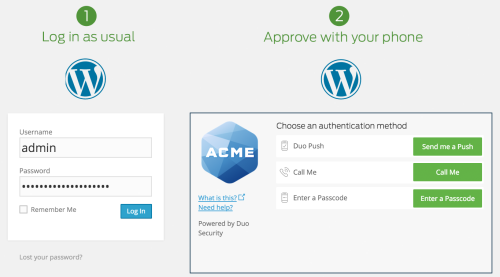
Duo’s WordPress plugin adds strong two-factor authentication to any WordPress login. Your users will log in as usual with their primary credentials (their WordPress username and password). Then they’ll be challenged to complete secondary authentication via Duo Push, phone callback, or one-time passcodes generated via the Duo Mobile app or delivered via SMS.

The Duo Mobile application allows users to generate passcodes or use Duo Push to perform secondary authentication using their mobile device.


安裝方式
Integrating Duo two-factor authentication with WordPress is a breeze.
See our instructions at duo.com
常見問題集
-
How do I get started with Duo?
-
Before installing the plugin, you’ll need to sign up for a free account at https://duo.com/.
-
Is Duo’s two-factor service really free?
-
Yes, Duo is free up to 10 users and no credit card is required to get started! Paid plans for more than 10 users start at only $1/user/month.
-
WordPress integration is great, but what if I want to protect my own web applications with two-factor?
-
If you’re interested in protecting other web applications with Duo’s two-factor authentication, check out all our online documentation to see all of our drop-in integrations and to access our APIs and web SDK.
使用者評論


參與者及開發者

變更記錄
2.5.7
- WordPress 5.6 support
2.5.6
- Bug fixes
2.5.5
- Bug fixes
2.5.4
- Update Duo WebSDK to version 2.6
2.5.3
- Update Duo-Web-v2.js
2.5.2
- WordPress 4.5 support
- Updated iframe style to be consistent with documentation
2.5.1
- WordPress 4.4 support
2.5
- Duo Web V2
- Adaptive iframe
- Duo PHP update
- Bug fixes
2.4.1
- WordPress 4.1 support
2.4
- Fix an IE9 compatibility issue
- WordPress 4.0 support
- Add a plugin icon
2.3.1
- Fix an issue that caused errors on some sites
2.3
- Add support for WordPress 3.9
- Update CA cert bundle
- Send user-agent with API requests
2.2
- Fix an issue that caused users to see ‘Access Denied’ when WordPress secret keys are not set correctly
- Fix ‘Access Denied’ issue due to a plugin caching our old JavaScript file
- Fix an issue that forced users to log in multiple times when going to a non-secure page from an SSL page
- Minor fix for sites using a proxy
2.1
- Fix an issue that caused 503 errors for some users
- Add support for proxy servers
- Fix an issue where the “Remember Me” checkbox on the login page was being ignored
- Use an application-specific key when signing Duo requests
- Add debug mode which enables verbose logging
- Remove unnecessary assets to reduce package size
2.0
- Fix an issue that allowed some users to bypass 2FA on multisite networks
1.8.1
- Fix multi-site login issue
1.8
- Add support for modal login pages in wordpress 3.8
1.7
- Fix various single-site and multi-site compatability issues with WordPress instances running 3.0 and 3.2
- Support for WordPress 3.7.1
- Compatability with WP-Engine WordPress hosting service
- Fix some style issues on the settings page
1.6.2
- Fix a rare conflict with other plugins
1.6.1
- Add support for WordPress 3.6.1
- Fix an issue that prevented admins from enabling XMLRPC on multisite instances
- Remove Duo configurations when the plugin is uninstalled from a multisite wordpress instance
- Better support for some custom themes
- Make Duo skey setting a password field
1.6
- Add support for Duo’s new user enrollment frame
1.5.3
- Improve the way we ping Duo servers
1.5.2
- Included the root cert we validate agianst for better ssl certificate validation
1.5.1
- Add better SSL certificate validation when fetching server time
- Modify duo_web to remove the need for NTP
1.5
- Removed NTP sync requirement
- All duo options will now be removed when plugin is uninstalled
1.4.2
- Better compatibility with other plugins
- Added setting for enabling/disabling XML-RPC access
1.4.1
- Improved handling of enabling Duo for specific roles
1.4
- Improved WordPress Multisite compatibility
1.3.4
- Compatibility with >3.3
1.3.3
- Added additional error checking
1.3.2
- Verified compatibility with WordPress 3.2
1.3.1
- Fixed a bug with user roles
1.3
- Default all roles to enable Duo login for upgraded users (same as new installs).
- Require the API hostname setting
- Code cleanups
1.2
- Select which roles need to authenticate with Duo
1.1.1
- CSS fixes for IE 6, 7, and 8
1.1
- Minor tweaks
1.0
- Initial release!
