
تفصیل
Is a plugin where you can display the number of popular posts, latest and random post with thumbnail image on your sidebar or page/post using short code.
Feature :
– Random post, Popular Posts and Latest posts
– Thumbnail image, support 3rdparty source image
– Widget ready
– Short code support
– Tabview menu with jQuery
اسکرین شاٹس
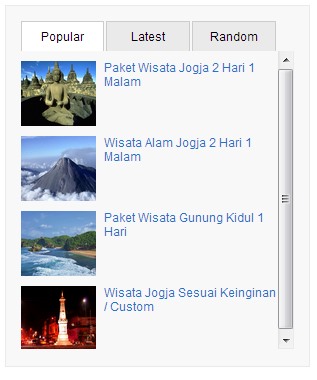
Post Widget form in the sidebar 
Post Widget form in the Page/Post 


انسٹالیشن
- Upload the ‘sup-post-widget’ folder to the ‘/wp-content/plugins/’ directory
- Activate the plugin through the ‘Plugins’ menu in WordPress
- Go to the Appearance -> Widgets -> Choose a "Posts Widget” and drag it to the sidebar where you wish it to appear.
- You are done.
More info about this plugin >> SPW Plugin
عمومی سوالات
Q : How can I add a list of posts widget to my sidebar?
A : Go to the Appearance -> Widgets -> Choose a "Posts Widget” and drag it to the sidebar where you wish it to appear.
Q : How can I add a list of posts widget to my page or post?
A : You can use the short code to add a list popular, random or latest post to the page/post.
Manual widget code : <?php echo spw_display(''); ?>
Individual selection Use short codes below to your post/page :
Popular post   :  [sup_popular]
Latest post    :  [sup_latest]
Random post    :  [sup_random]
جائزے
There are no reviews for this plugin.
شراکت دار اور ڈیویلپرز
“Sup Post Widget” اوپن سورس سافٹ ویئر ہے۔ مندرجہ ذیل لوگوں نے اس پلگ ان میں حصہ لیا:
شراکت دار
“Sup Post Widget” کا اپنی زبان میں ترجمہ کریں۔
ڈویلپمینٹ میں دلچسپی ہے؟
کوڈ براؤز کریں، ایس این وی ریپوزیٹری کو چیک کریں یا ڈویلپمینٹ لاگ کو سبسکرائب کریں بذریعہ آر ایس ایس۔
چینج لاگ
1.0
- Initial release
1.1
- Fixed little bug on widget
1.2
- Fixed little bug on style class
1.3
- Added new style
1.4
- Added post widgets options
- Default image if no thumbnail
1.5
- NA
1.6
- NA
1.7
- NA
1.8
- Fixed bug error for not found links
- New options feature
- Post Comments count
- Post date
