
Free software to customize Windows desktop displays

WindowsBlinds is a free software package that allows users to customize the appearance of their Windows desktop. Not only will this application add a bit of personality to any operating system, but it can be very useful for those who are looking to streamline navigation processes. There is no charge to install this program.

Main Features and Design Options

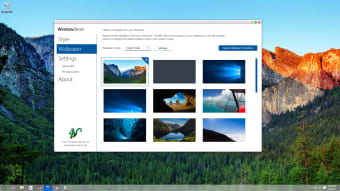
WindowsBlinds provides all users with tailor-made design solutions based around their desires. This is primarily accomplished through the ability to select from a host of skins. However, there are many bespoke options that are not offered by other versions of this freeware. One example can be seen in the ability for the user to apply 'force blur' effects to various portions of a window. Taskbar sizes, refresh rates and access to other common icons such as the start button can likewise be modified. As a result, it is now possible to provide Windows with an entirely unique appearance.

Additional Tools

Users can access all design options from a centralized portal, so making individual adjustments is simple. A handful of other areas which can be addressed by WindowsBlinds include the start bar, borders, tile bars and the overall appearance of Explorer. The total size of this file is 54.3 megabytes.

  • Pros

    • This is freeware
    • so no fees or charges apply.
    • All changes can be made thanks to a user-friendly interface.
  • Cons

    • Will not work with operating systems that are older than Windows XP.
    • There is no version currently available for smartphone users.
Image
 0/1

App specs

  • License

    Free

  • Version

    10.62

  • Latest update

  • Platform

    Windows

  • OS

    Windows 7

  • Language

    English

    Available languages

    • English
    • Spanish
  • Downloads

    796

    Last month's downloads

    • 11
  • Developer

Program available in other languages


Icon of program: Windows Blinds

Windows Blinds

  • Free
  • 2.9
    4
  • 796
  • V10.62

User reviews about Windows Blinds

Have you tried Windows Blinds? Be the first to leave your opinion!

Add review

You may also like

Alternatives to Windows Blinds

Explore Apps

Latest articles

Laws concerning the use of this software vary from country to country. We do not encourage or condone the use of this program if it is in violation of these laws.
Softonic

Is Windows Blinds safe?

100/100

Score result: Clean

This file passed a comprehensive security scan using VirusTotal technology. It is safe to download.

  • Virus free
  • Spyware free
  • Malware free
  • Verified by Security Partners

    VirusTotal logo

Scan Info

Last scan
Wednesday, December 2, 2020
Scan provider
VirusTotal

Softonic security commitment

Windows Blinds has been thoroughly scanned by our advanced security systems and verified by industry-leading partners. This file comes from the official developer and has passed all our security checks, showing no signs of viruses, malware, or spyware. For more information, visit our Security and Trust Center