
How to Reset OneDrive on Windows (Quick Command Guide)


 2 min. read
  Updated on
If OneDrive is stuck, not syncing, or will not launch, a quick OneDrive reset command can bring it back to life. It takes seconds and often clears stubborn errors without affecting your files.
How can I use the OneDrive reset command?
Table of contents
1. Run the reset command
- Press Windows + R to open the Run dialog.
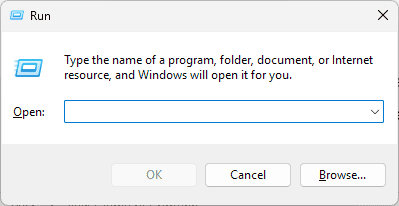
- Copy and paste the command below, then press Enter:
%localappdata%\Microsoft\OneDrive\onedrive.exe /reset


This closes OneDrive and reloads it with default settings.
We also have a complete guide on fixing OneDrive stuck on signing in, so don’t miss it for more information.
2. Confirm syncing
- Check that files start syncing and recent changes appear.
- If issues continue, sign out and sign back into your Microsoft account.
Having trouble signing in after a reset? Use our OneDrive login guide to reconnect your account quickly and resume syncing.
When should I use the reset command?
- If you face repeated OneDrive access issues.
- When encountering sync problems on Windows 11.
- If OneDrive will not open.
FAQs
Resetting OneDrive helps fix sync issues, missing files, or problems with the app not starting. It clears the local cache and reconnects your account without deleting files stored in the cloud.
Press Windows + R, type %localappdata%\Microsoft\OneDrive\onedrive.exe /reset, and hit Enter. This will restart the OneDrive client and re-sync your files automatically.
No. Resetting only refreshes the connection between your PC and the OneDrive cloud. Your files remain safe online and will sync again once the app restarts.
If OneDrive fails to open, run %localappdata%\Microsoft\OneDrive\onedrive.exe manually or reinstall the app from the Microsoft Store to restore normal functionality.
Resetting clears cached settings without deleting your files, which makes it one of the fastest ways to fix persistent OneDrive problems.

Read our disclosure page to find out how can you help Windows Report sustain the editorial team. Read more



Improve this guide


User forum
0 messages