
Description
Transform your WordPress site with an AI chatbot that understands your content and takes action. Train on unlimited website data using advanced RAG technology, trigger intelligent actions with agentic AI, seamlessly hand off to live agents when needed, choose from 15+ leading AI models, and customize everything to match your brand—no coding required.
Why Choose AI Chatbot?
⭐ Experience True Quality — Intuitive and 100% WordPress Native.
Professional-grade AI chatbot with clean code, polished UI, and extensible architecture built with industry best practices.
What You Get:
✅ Agentic AI Actions – Trigger actions (email, Slack notifications) based on user intent. Collect unlimited parameters conversationally and include in action execution
✅ Live Agent Handoff – Seamless transition to human support via Slack channel or Telegram group. Reply from your phone or desktop with full conversation context (WhatsApp coming soon)
✅ 15+ AI Models – GPT-5 Mini, Gemini 2.5 Flash, Gemini 2.5 Pro, GPT-4.1, GPT-4o, DeepSeek v3.2, Grok 4.1 Fast, and more
✅ Advanced RAG Technology – Intelligent retrieval for accurate, contextually relevant responses
✅ Cost-Optimized Usage – Smart token management minimizes API charges
✅ Knowledge Transparency – See exactly which content AI used for each response
✅ Unlimited Knowledge Base – Train on pages, posts, PDFs, text files, Q&A entries, or webpage content fetched from URLs. Auto-sync keeps WordPress sources up to date automatically
✅ Lead Capture Widget – Collect user name and email before conversation starts for lead generation and user identification
✅ Leads Management Board – Simple table to track and manage all leads collected through Lead Capture Widget or Actions -> Conversational forms (Beta – more powerful updates coming soon)
✅ Analytics Dashboard – Fast analytical board with real-time insights on new conversations, leads, visitors, action submissions, and more. Includes daily, weekly, and monthly charts for comprehensive reporting
✅ Conversations Dashboard – Complete chat history with AI source visibility
✅ 3-Step Setup Wizard – Live in under 5 minutes with guided onboarding
✅ Rate Limiting – Control usage for guests and logged-in users
✅ Theme Support – Light mode, dark mode, and system theme options
✅ True WordPress Native – Real platform integration, not an iframe
🚀 Designed to Scale
Flexible architecture that grows with your business. Start simple, expand seamlessly.
Core Features
Your AI chatbot includes everything you need for intelligent customer engagement:
✅ Agentic AI Actions System
Your AI doesn’t just answer questions—it takes action. Detects user intent and triggers real actions: send emails, fire Slack notifications. Conversationally collects unlimited custom parameters including smart recommendations (vector-searched WordPress CPTs—products, services, any custom post type) and includes them in action execution. No static forms needed—just natural conversation that gets things done.
✅ Live Agent Handoff via Slack & Telegram
Seamless AI-to-human transition when needed. When your AI can’t help, conversations transfer directly to your team via Slack channel or Telegram group with full context. Human agents see entire chat history and can respond in real-time from their phone or desktop. Setup is simple—create a Telegram group, attach a custom bot, and start receiving conversations directly in your Telegram app. WhatsApp support coming soon.
✅ Quick 3-Step AI Chatbot Setup
Guided wizard launches after activation. Connect your AI provider, configure personality, add knowledge sources, and customize appearance—live in under 5 minutes.
✅ Advanced AI Chatbot RAG Technology
Train on unlimited WordPress content using Retrieval-Augmented Generation. Supports pages, posts, custom post types, PDFs, text files, rich text input, Q&A entries, and webpage content fetched from URLs. Intelligent intent recognition retrieves the most relevant knowledge for accurate responses. Auto-sync keeps WordPress knowledge sources (pages, posts, custom post types) automatically up to date—no manual re-training needed when content changes. Knowledge Filtering lets you accurately filter and view which sources are available in your knowledge base. AI Agent can also render images from learned sources (Beta) for richer, more visual responses.
✅ Chat Discussions Dashboard
Complete conversation management with detailed insights. View all transcripts, see which knowledge sources AI used, add missing Q&A entries directly, and track user information including guest/logged-in status and IP addresses.
✅ Cost-Optimized AI Usage
Smart token management minimizes API charges. Intelligent request optimization ensures you pay only for what you need. Configure rate limits to control expenses.
✅ Streaming AI Responses
Real-time word-by-word AI replies for faster, more natural conversations. Especially useful when short answers setting is disabled – long responses are printed naturally and quickly instead of making users wait for the full response to be ready.
✅ Customizable Chat Experience
Unlimited widgets including Message Starters, Message Prompts, Chat History, Links, Lead Capture, and custom announcements. Lead Capture widget collects user name and email before allowing conversation to start—perfect for lead generation and user identification. Fully customizable greetings with emoji support. Simplified single-step widget publishing makes adding widgets effortless.
✅ Flexible Vector Storage
Choose local WordPress database (free, unlimited) or Pinecone for enterprise-scale knowledge bases. Vector embeddings enable fast, contextually relevant retrieval.
✅ Complete Customization
Customize colors, chatbot icon, AI avatar, chat box size, themes (light/dark/system), positioning, emojis, and greeting messages. Adapts seamlessly to all devices.
✅ Multi-Language Support
Conversations in multiple languages with RTL compatibility. The AI chatbot responds in your visitors’ language.
✅ GDPR Compliant
All conversation data stored locally on your WordPress site. You control data retention, export, and deletion policies.
Supported AI Models
Google Gemini
– Gemini 2.5 Flash, Gemini 2.5 Flash Lite, Gemini 2.5 Pro
– Gemini 2.0 Flash
– Gemini Embedding 001 (for knowledge base)
OpenAI GPT
– GPT-5 Mini, GPT-5 Nano
– GPT-4.1, GPT-4.1 Mini, GPT-4.1 Nano
– GPT-4o, GPT-4o Mini
– GPT-4 Turbo, GPT-4
– Text Embedding 3 Small, Text Embedding 3 Large, Text Embedding ada 002 (for knowledge base)
Claude (Anthropic)
– Claude Sonnet 4.5, Claude Haiku 4.5
– Claude Opus 4.5, Claude Opus 4.1
– Claude Sonnet 4.0, Claude Opus 4.0
– Claude 3 Haiku
DeepSeek
– DeepSeek Chat v3.2
Grok (X.AI)
– Grok 4.1 Fast (Reasoning), Grok 4.1 Fast (Non Reasoning)
– Grok 4 Fast (Reasoning), Grok 4 Fast (Non Reasoning)
– Grok 3 Mini, Grok 3 Mini Fast
Knowledge Sources
Train your AI chatbot on multiple content types:
- WordPress Pages & Posts
- Custom Post Types
- PDF Documents
- Text Files (.txt)
- Rich Text Editor (unlimited input)
- Simple Q&A Entries
- Webpage URLs
Content is processed using vector embeddings and stored in your WordPress database or Pinecone for fast, contextually relevant retrieval. Use the Knowledge Filtering feature to accurately filter and view which sources are available in your knowledge base.
Coming Soon
🛒 WooCommerce Integration – Product recommendations, add-to-cart, order status tracking, and inventory questions
🎓 OpenAI Fine-Tuning – Train custom models on your Q&A dataset for domain-specific conversations
Quick Setup
Your AI chatbot launches in 3 simple steps:
1️⃣ Activate Plugin – Setup wizard appears automatically
2️⃣ Connect AI Provider – Enter your API key and configure AI agent personality
3️⃣ Add Knowledge – Import pages, posts, upload documents, or paste webpage URLs for RAG training
Live in under 5 minutes with no technical knowledge required.
External Services
This plugin connects to third-party AI services to generate chatbot responses. You must provide your own API keys and comply with each provider’s terms of service.
AI Service Providers:
-
OpenAI – Chat completions, embeddings, image generation
- API Endpoint: https://api.openai.com
- Terms of Use
- Privacy Policy
-
Google Gemini – Chat completions, embeddings, image generation
- API Endpoint: https://generativelanguage.googleapis.com
- Terms of Service
- Privacy Policy
-
Pinecone (Optional) – Vector database for knowledge storage
- API Endpoint: https://api.pinecone.io
- Terms of Service
- Privacy Policy
-
DeepSeek – Chat completions
- API Endpoint: https://api.deepseek.com
- Terms of Service
- Privacy Policy
-
Claude (Anthropic) – Chat completions
- API Endpoint: https://api.anthropic.com
- Terms of Service
- Privacy Policy
-
Grok (X.AI) – Chat completions
- API Endpoint: https://api.x.ai
- Terms of Service
- Privacy Policy
You are responsible for:
– Obtaining and managing your own API keys
– Monitoring your API usage and costs
– Complying with each service provider’s terms and policies
– Ensuring your use case meets provider requirements
Libraries & Credits
Development Team:
AI Chatbot is developed and maintained by the team at wpaichatbot.com.
Support & Documentation
Need Help?
* 📚 Full Documentation
* 💬 Community Forum
* 🌐 Official Website
* 📧 Email Support
Privacy & Data
Your Data, Your Control:
– All chat conversations are stored locally in your WordPress database
– No data is sent to external services except AI providers (OpenAI, Gemini, DeepSeek, Claude, Grok) for response generation
– You have complete control over data retention and deletion policies
– GDPR-compliant data handling with export and erasure capabilities
– User data is handled according to WordPress privacy standards
Roadmap
Launching Soon:
🛒 WooCommerce & SureCart Integration – Shopping assistance and order tracking
Coming Later:
🎓 OpenAI fine-tuning support
🔗 Additional integrations
Upgrade to Pro
⭐ The Pro version includes advanced features:
- 🤖 Multi-Agent Publishing – Deploy multiple AI agents across different sites
- 🎨 White Label Branding – Custom logos and icons for chatbot and AI agent
- ⚡ Advanced Smart Actions – Multiple callbacks per action, premium parameters
- 🧩 Chatbot & Prompt Blocks – Gutenberg integration for inline chat and prompt inputs
- 🎯 Premium Widgets – Advanced UI components and interactive elements
Screenshots
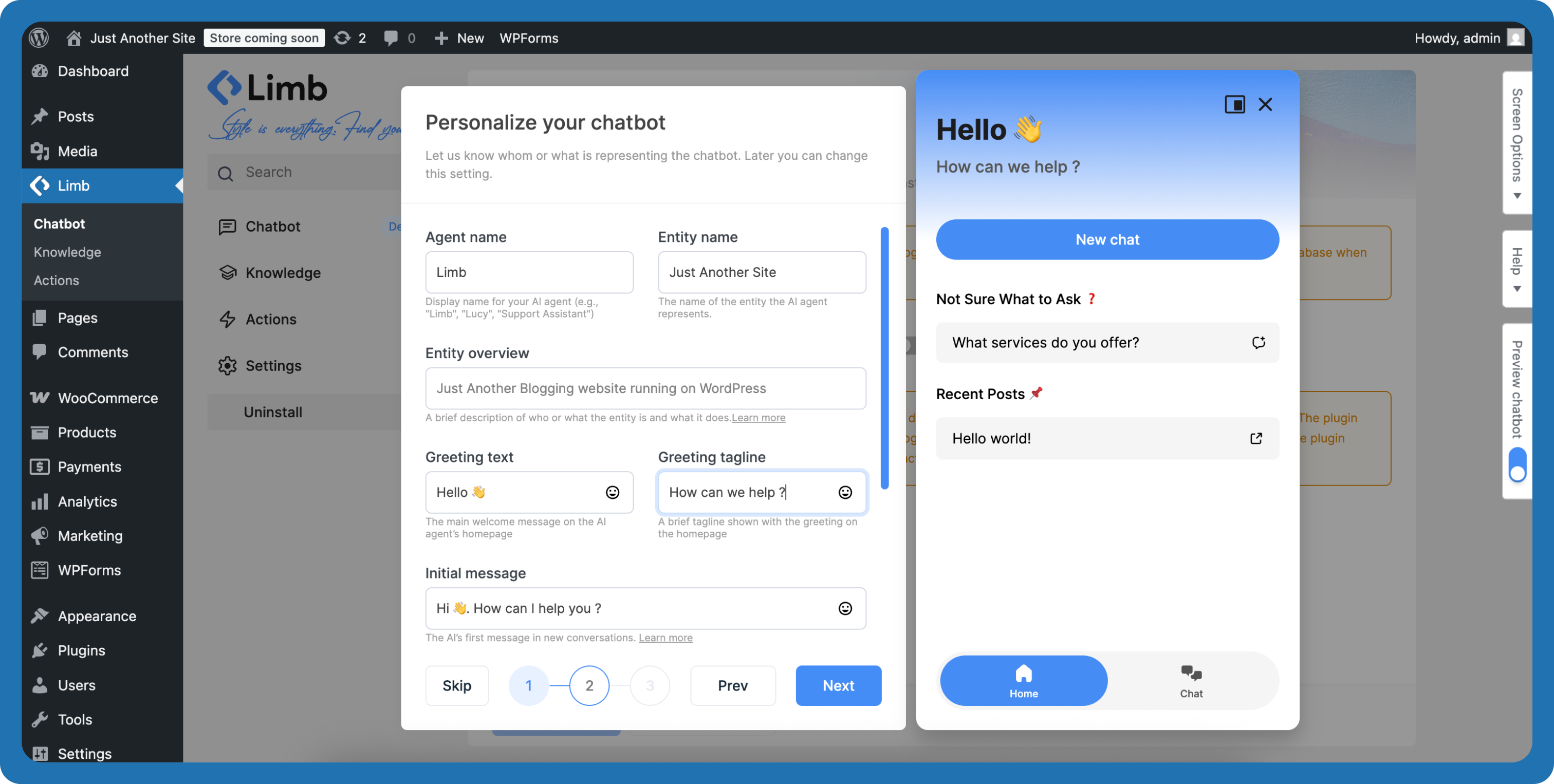
3-Step Setup Wizard – Connect AI provider, configure personality, and add knowledge sources 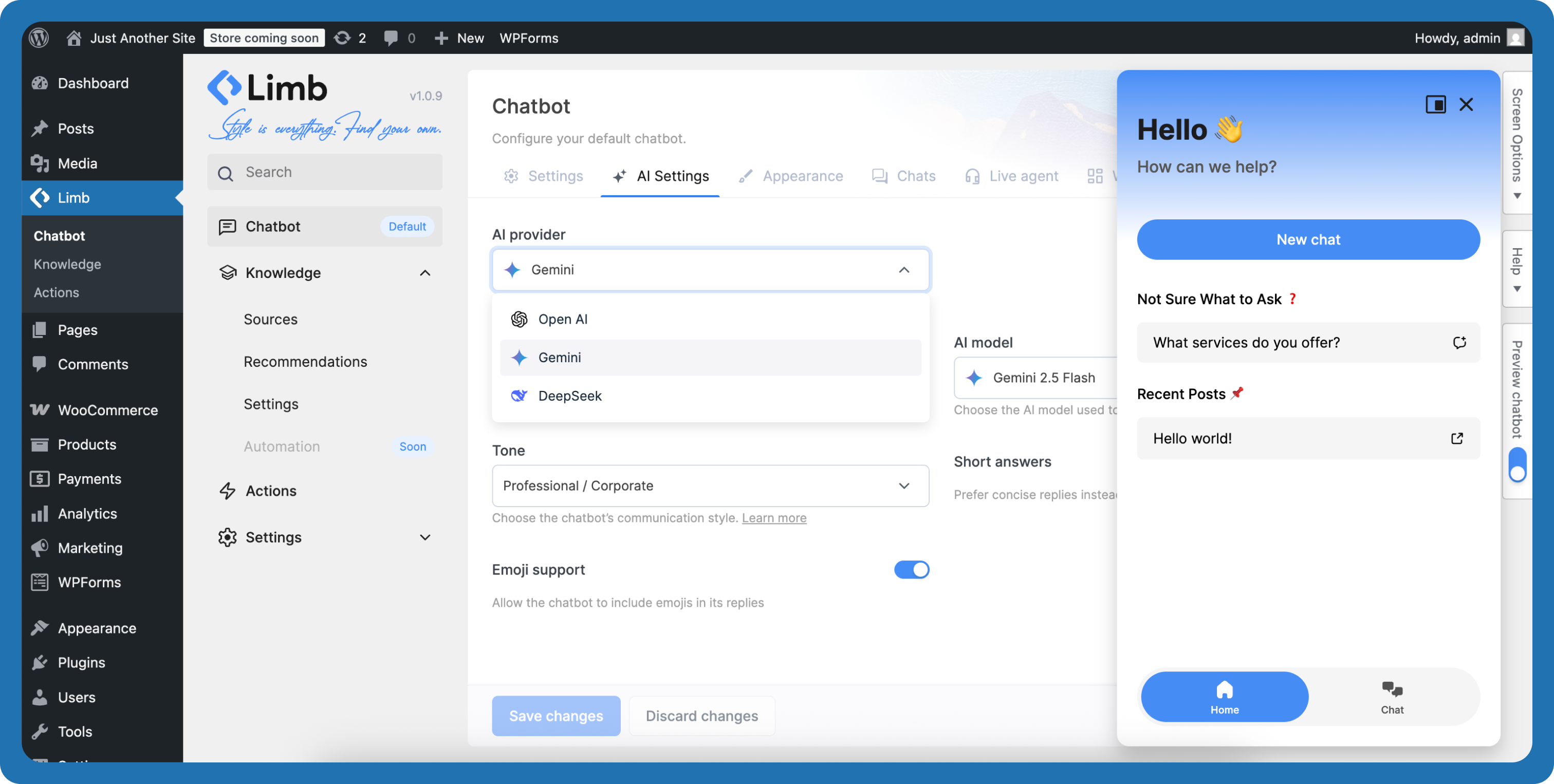
AI Settings – Configure AI provider, models, and chatbot behavior 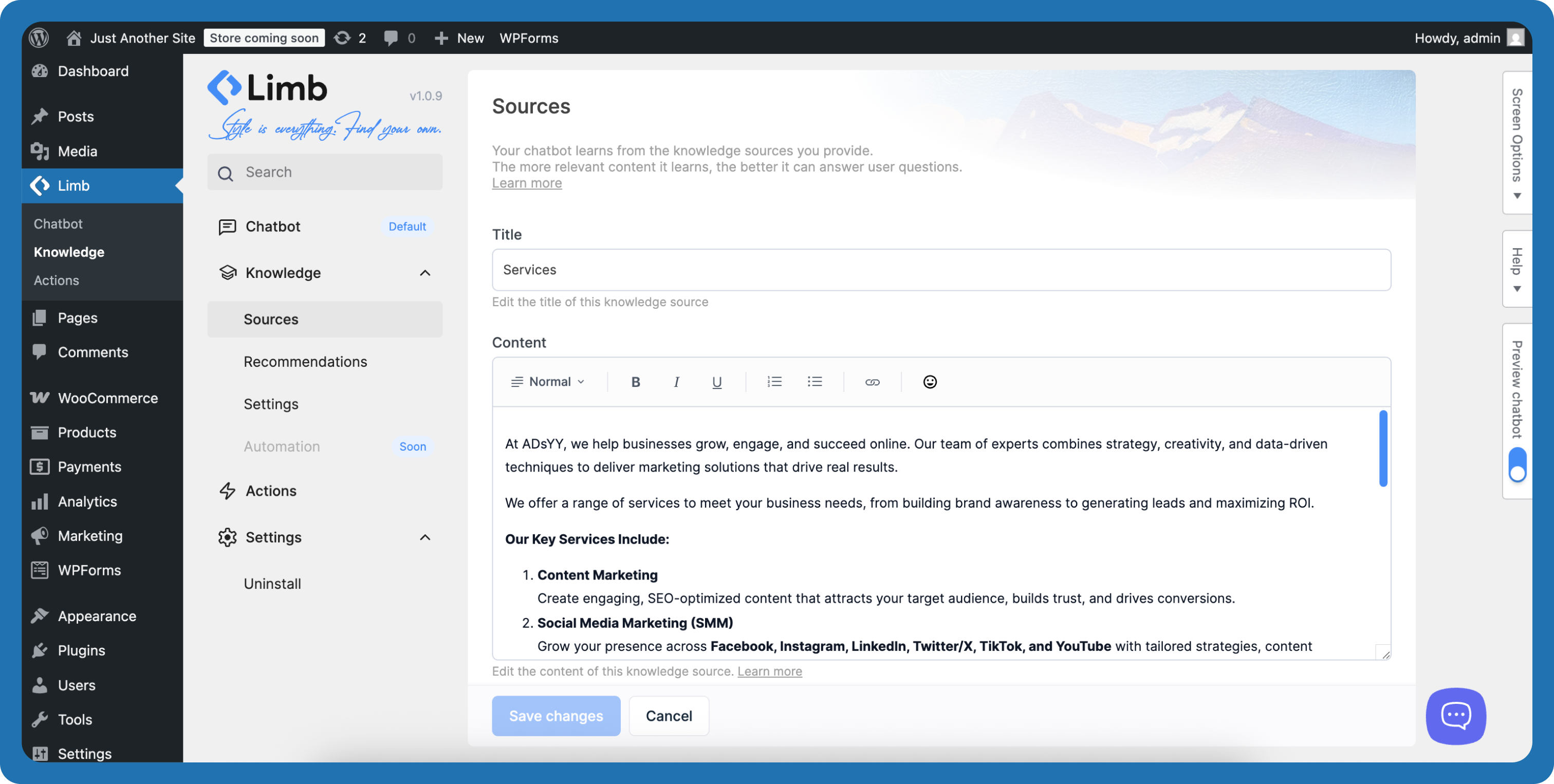
Edit Knowledge Source – Manage knowledge sources including pages, posts, PDFs, text files, Q&A entries, and webpage URLs 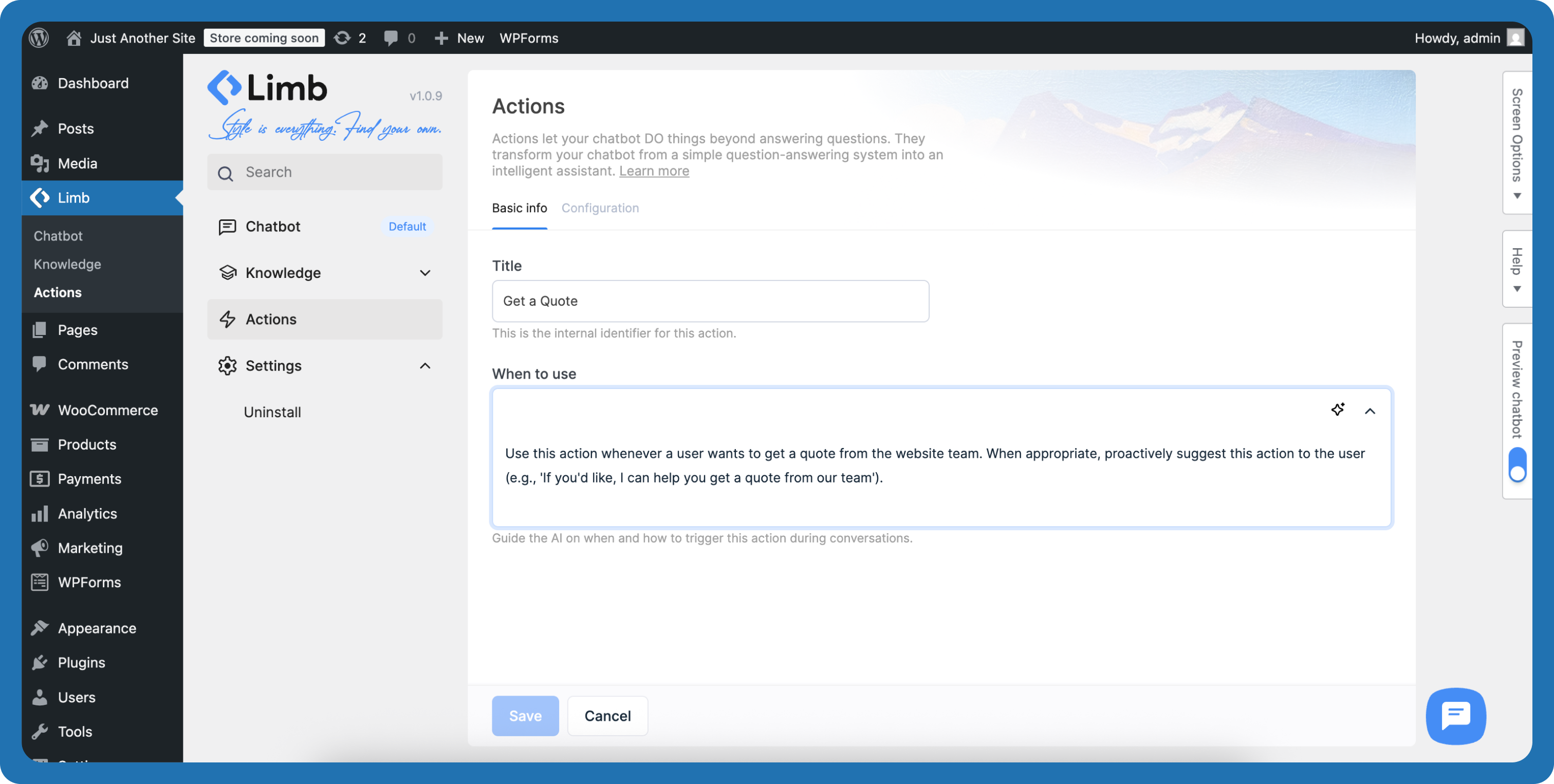
Setup Get Quote Action – Create and configure AI actions to trigger based on user intent 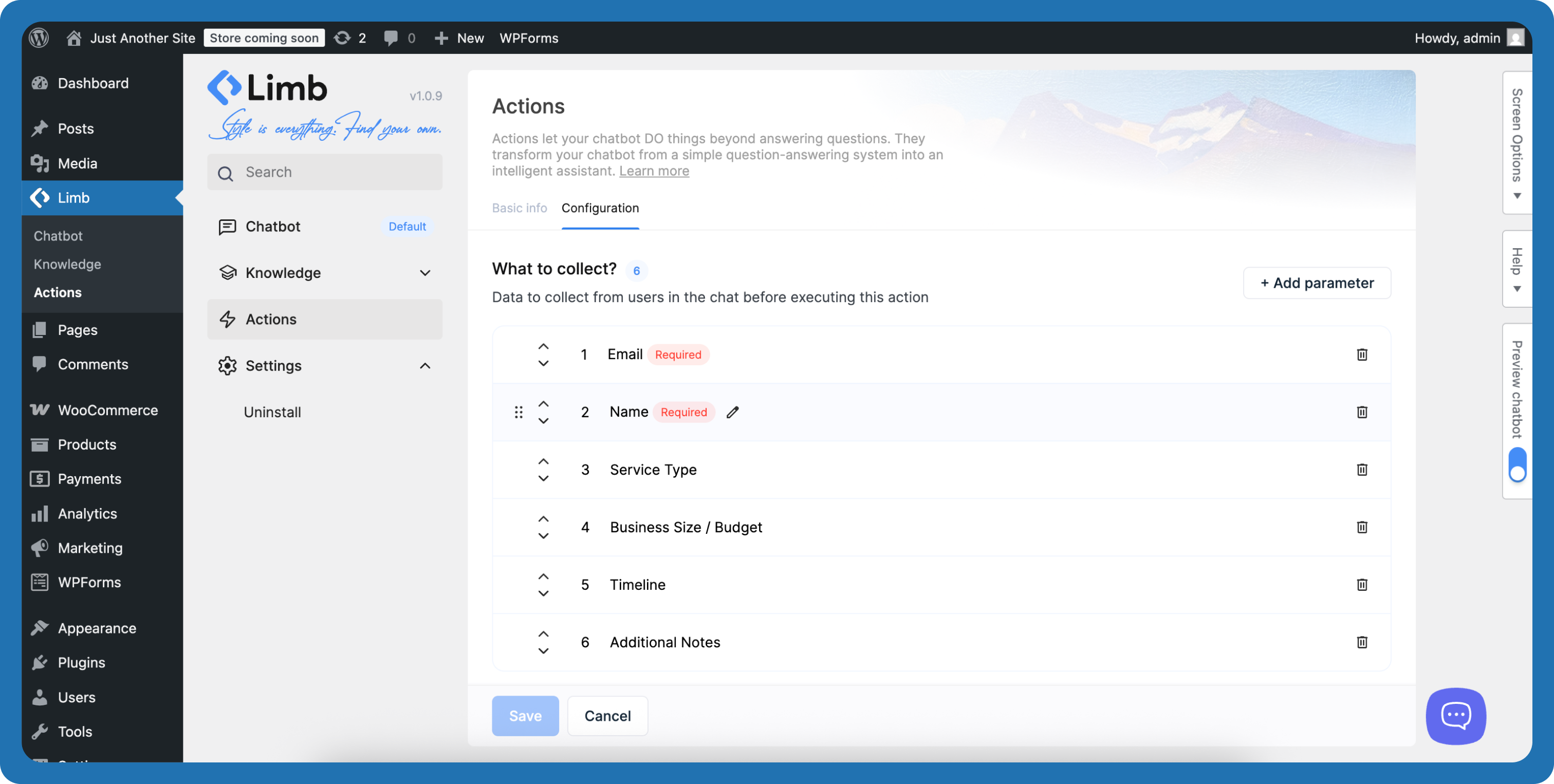
Get Quote – Conversational Form Setup – Configure conversational form parameters 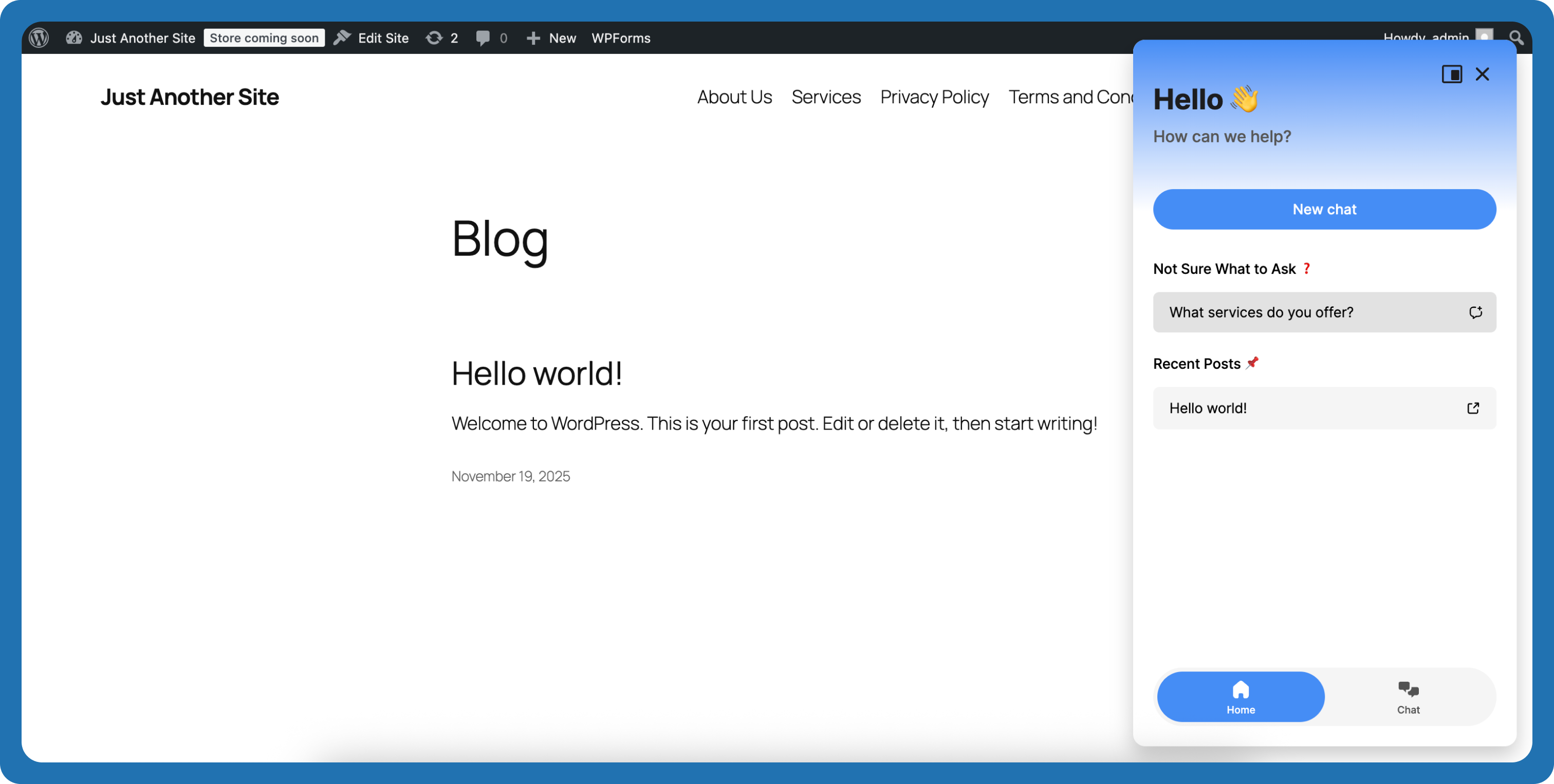
Published Chatbot – AI chatbot widget on website frontend 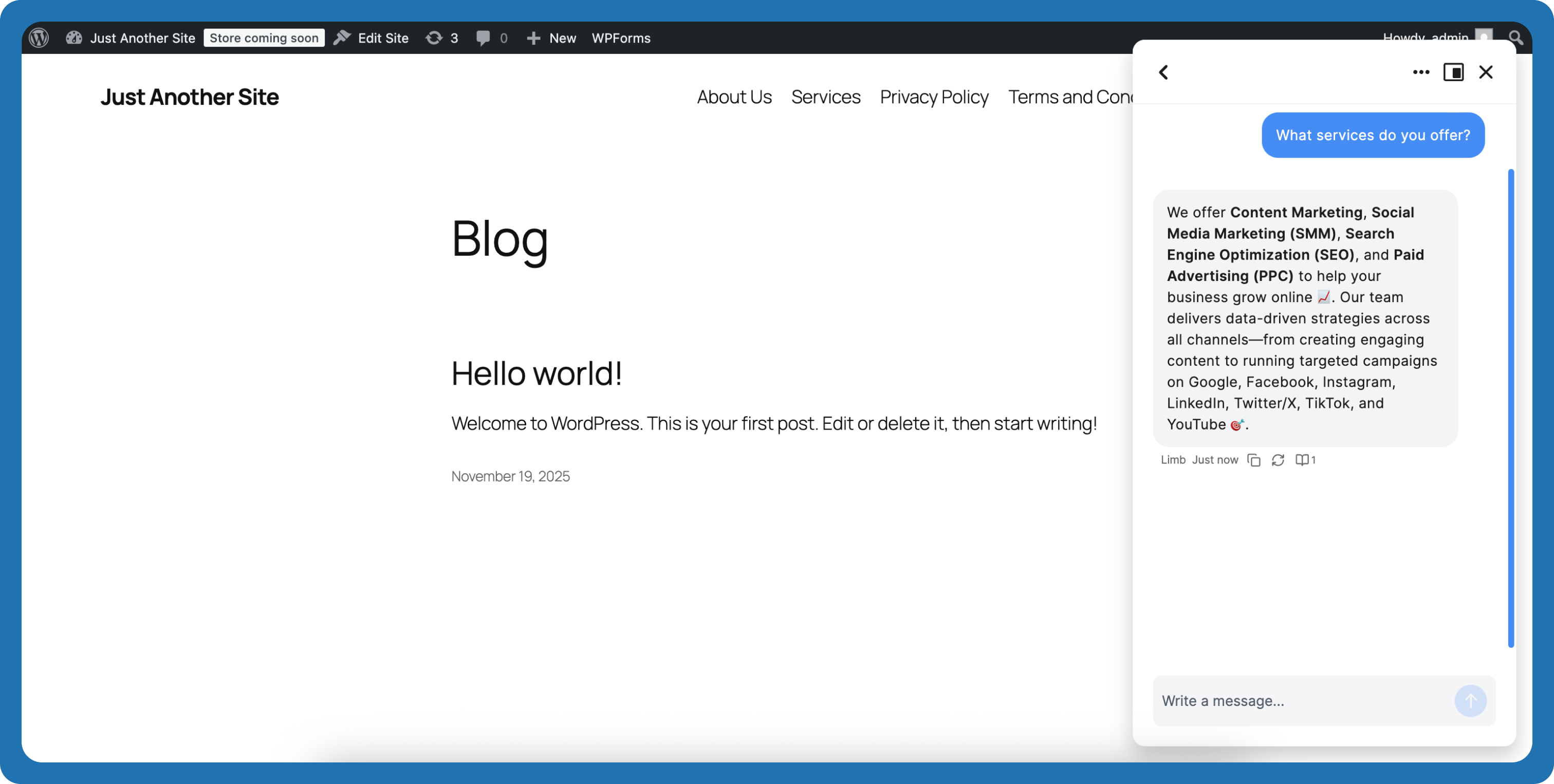
Talking to AI Agent – User conversation interface with real-time AI interaction 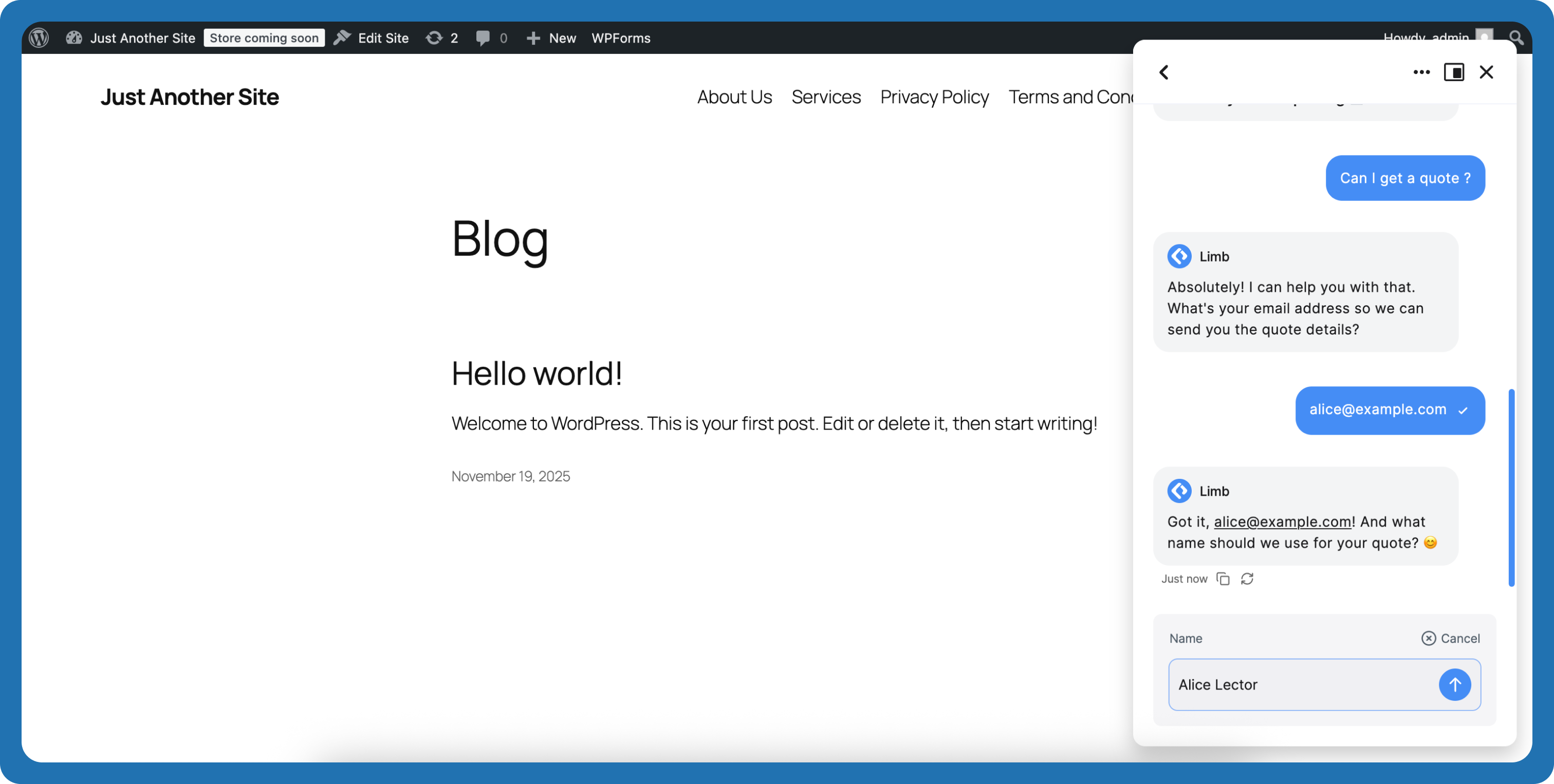
Get Quote Action Processing Start – Action triggered and beginning to collect user information 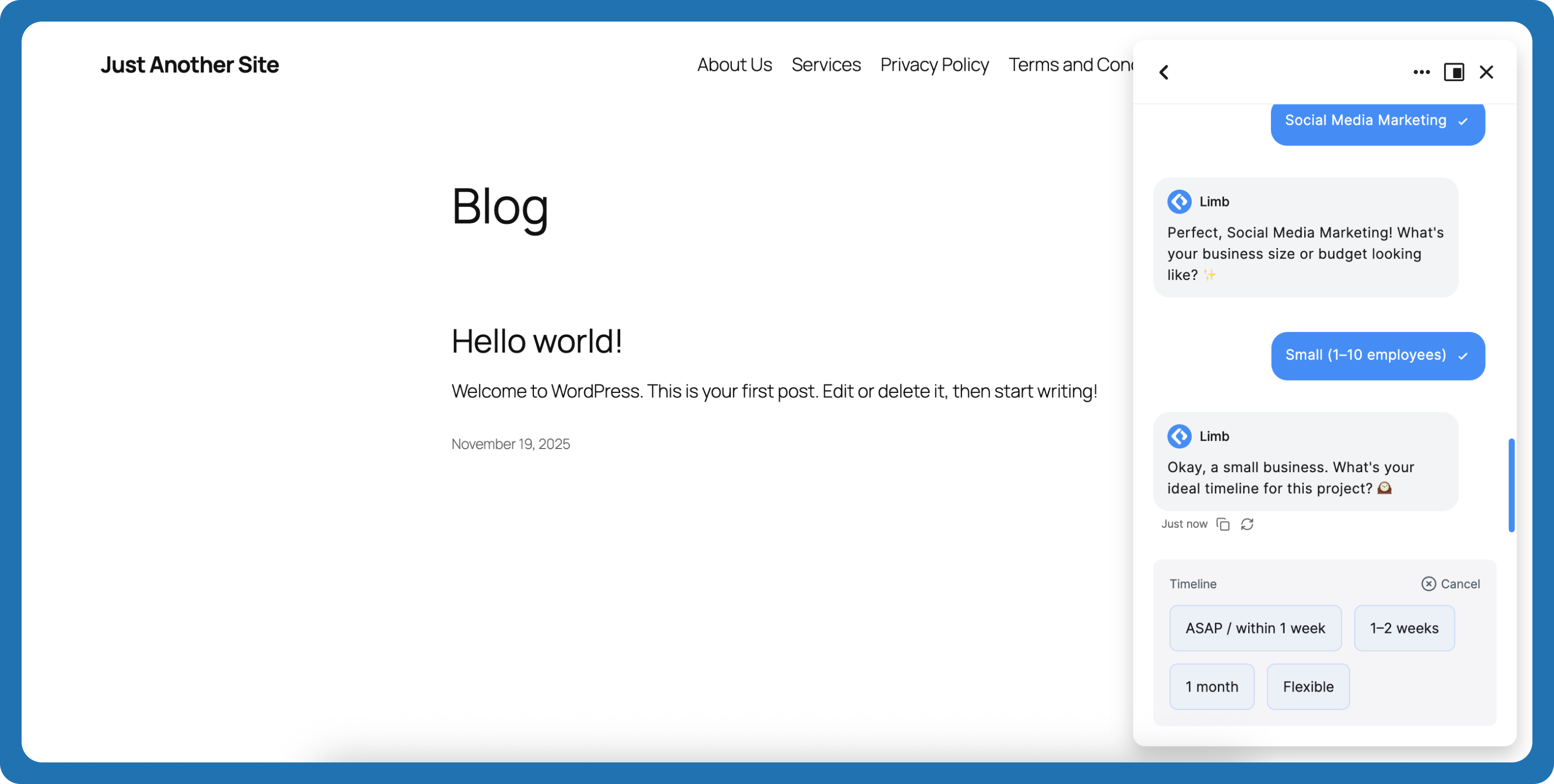
Get Quote Action Process – Action in progress, collecting parameters from conversation 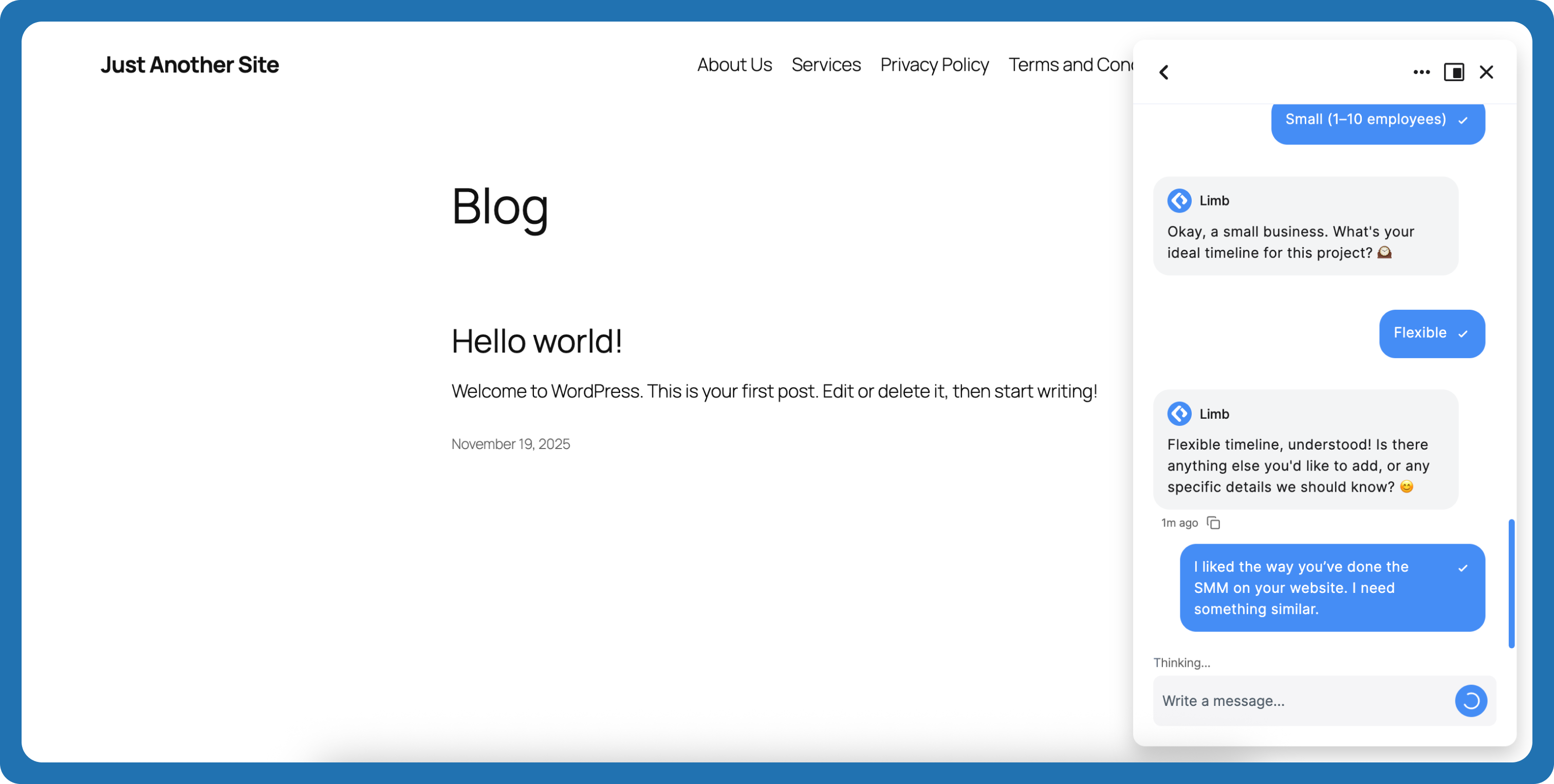
Get Quote Action Finalized – Action completed with collected information and confirmation 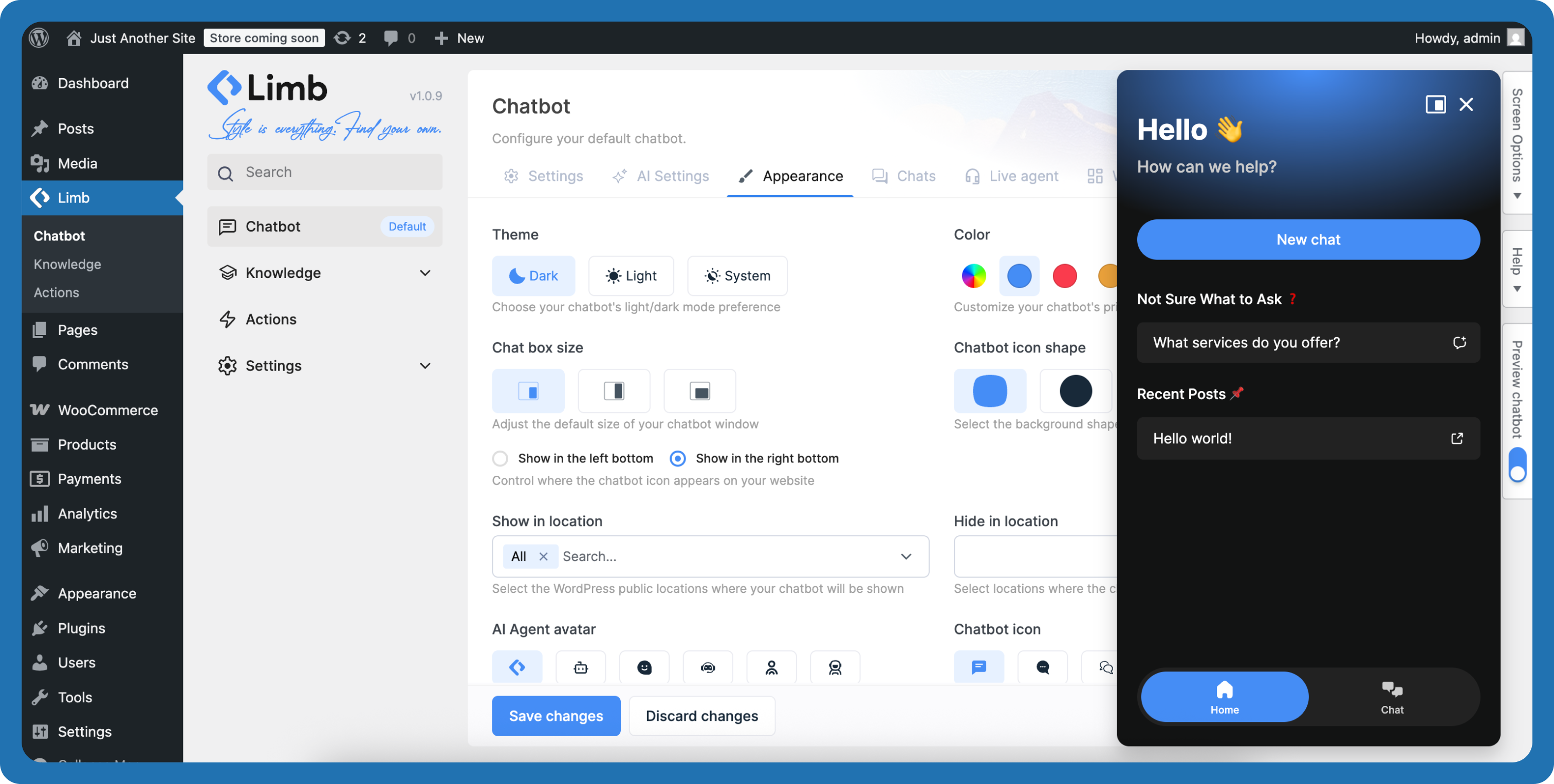
Change Chatbot Theme – Customize chatbot theme, colors, and visual style 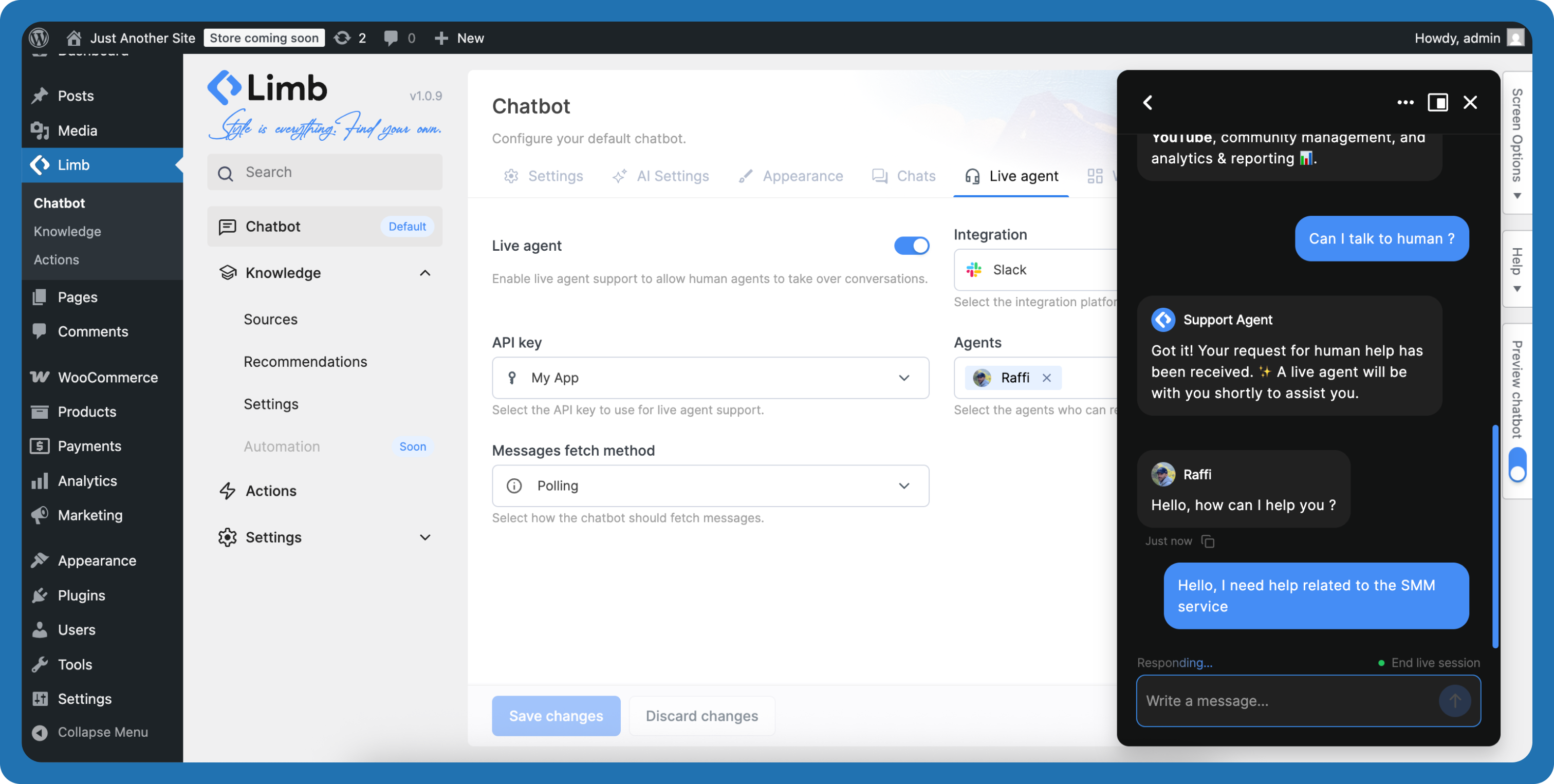
Live Agent Connected – Live agent handoff from AI to human support via Slack 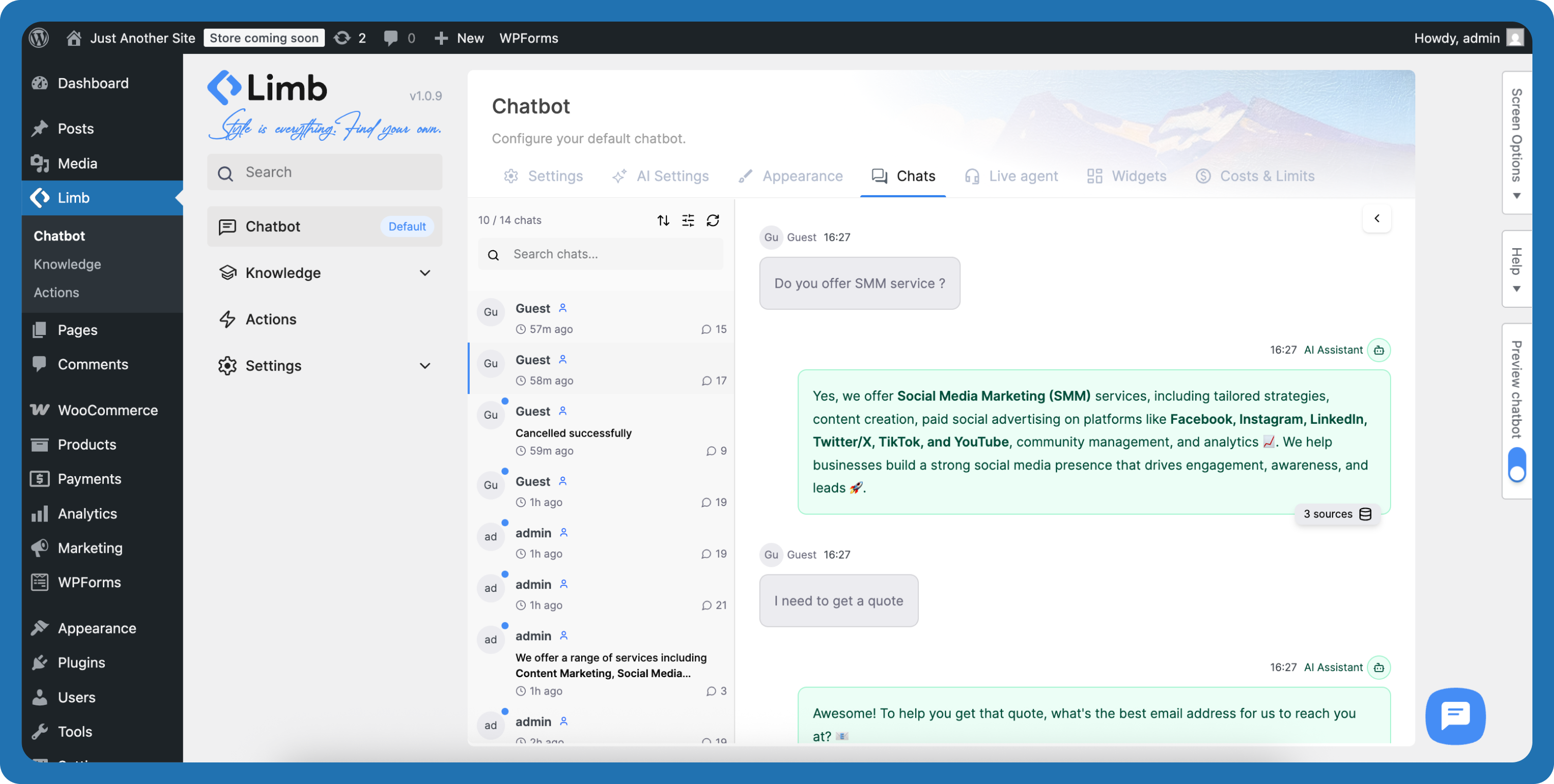
Chats Log – Chat logs dashboard with conversation history and knowledge source visibility 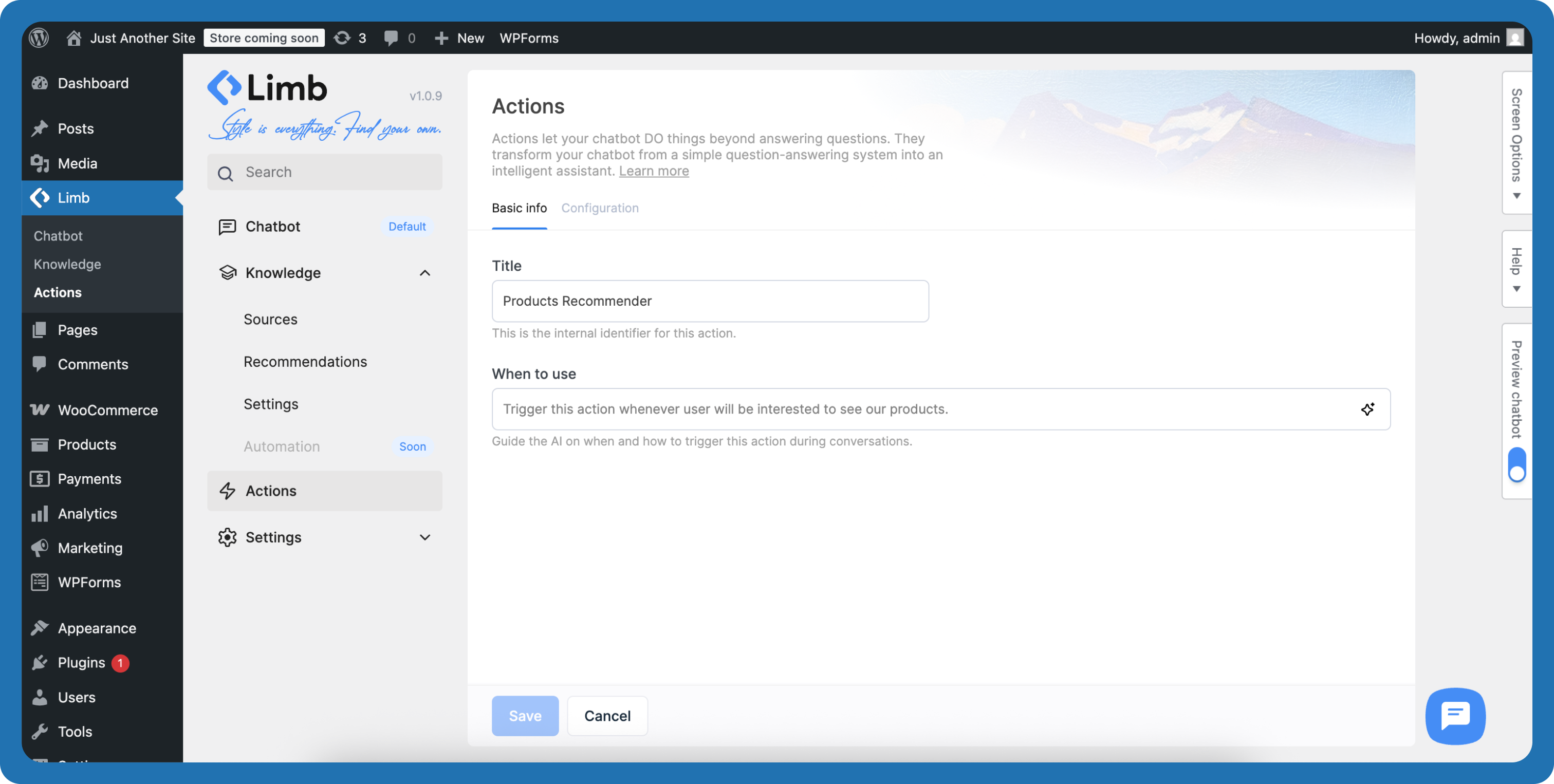
Setup Product Recommendation Action – Configure product recommendation with WordPress custom post types 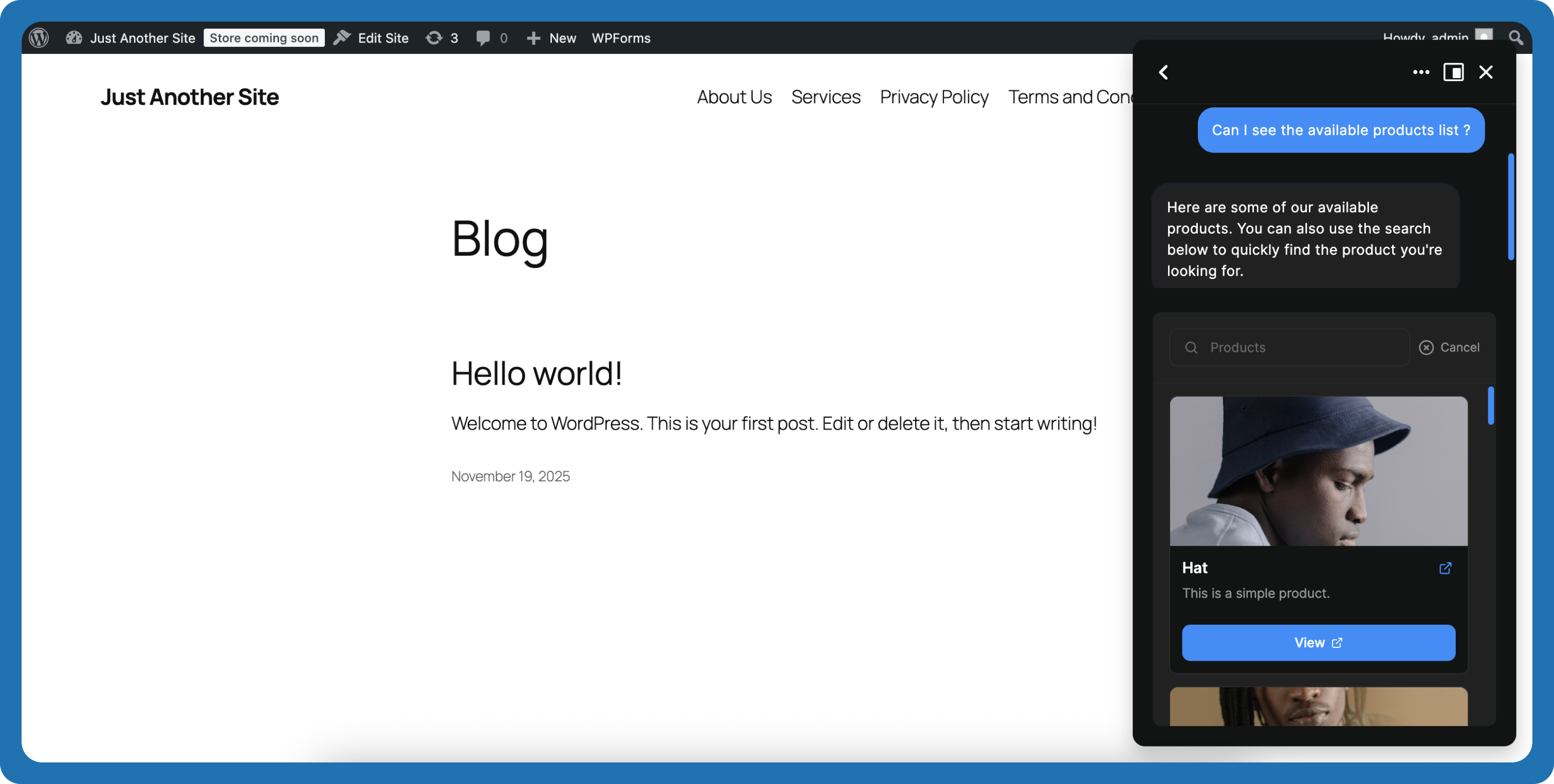
Product Recommendation Triggered – Product recommendation showing recommended products from conversation


Installation
Automatic Installation
- Go to your WordPress dashboard
- Navigate to Plugins > Add New
- Search for “AI Chatbot” or “Limb Chatbot”
- Click Install Now, then Activate
- Follow the setup wizard to configure your chatbot
Manual Installation
- Download the plugin ZIP file
- Upload to
/wp-content/plugins/directory - Extract the files
- Activate through the Plugins menu in WordPress
- Follow the setup wizard to configure your chatbot
Getting Your API Keys
OpenAI:
Visit platform.openai.com, sign up, navigate to API keys, create a new key, and paste into the plugin setup wizard.
Google Gemini:
Visit ai.google.dev, get started with Gemini API, generate your key, and paste into the plugin setup wizard.
DeepSeek:
Visit platform.deepseek.com, sign up, navigate to API keys, create a new key, and paste into the plugin setup wizard.
Claude (Anthropic):
Visit platform.claude.com, sign up, navigate to API keys, create a new key, and paste into the plugin setup wizard.
Grok (X.AI):
Visit console.x.ai, sign up, navigate to API keys, create a new key, and paste into the plugin setup wizard.
Pinecone (Optional):
Visit pinecone.io, sign up for free, create a new index, copy your API key, and paste into plugin settings.
FAQ
-
What AI models does the AI chatbot support?
-
The AI chatbot supports 15+ models including GPT-5 Mini, Gemini 2.5 Pro, GPT-4o, Claude Sonnet 4.5, Claude Opus 4.5, DeepSeek Chat v3.2, Grok 4.1 Fast, and various embedding models.
-
How do I get API keys?
-
For OpenAI, visit platform.openai.com and create an account. For Google Gemini, visit ai.google.dev and follow the setup process. For DeepSeek, visit platform.deepseek.com and create an account. For Claude (Anthropic), visit platform.claude.com and create an account.
-
Can I train the chatbot on my website content?
-
Yes. The AI chatbot supports unlimited knowledge training using RAG technology from WordPress pages, posts, custom post types, PDFs, text files, manual Q&A entries, and webpage URLs.
-
What is RAG technology?
-
RAG (Retrieval-Augmented Generation) retrieves relevant information from your knowledge base before generating responses, ensuring accurate, contextually appropriate answers based on your actual content.
-
Is there a setup wizard?
-
Yes. A guided 3-step setup wizard appears automatically after activation, walking you through AI provider connection, personality configuration, knowledge sources, and customization.
-
How long does setup take?
-
Most users complete setup in under 5 minutes. The wizard guides you through each step with clear instructions.
-
How does cost optimization work?
-
The AI chatbot uses intelligent token management to minimize API charges through optimized requests and efficient caching. Configure rate limits for guests and logged-in users to control costs.
-
What is the Chat Discussions Dashboard?
-
A comprehensive conversation management interface showing all chat transcripts with detailed conversation views. See which knowledge sources AI used for each response, add missing Q&A entries directly, and track user information.
-
Can I see which content the AI used?
-
Yes. The Chat Discussions Dashboard shows knowledge source transparency—you can see exactly which pages, posts, or Q&A entries the AI chatbot used to generate each response.
-
Is Pinecone required?
-
No. The AI chatbot includes free, unlimited local vector storage in your WordPress database. Pinecone is optional for enterprise-scale knowledge bases with 10,000+ entries.
-
Is the plugin GDPR compliant?
-
Yes. The AI chatbot stores conversation data locally on your WordPress site, giving you complete control. Configure data retention policies and export or delete conversations as needed.
-
Can I customize the AI chatbot appearance?
-
Yes. Customize colors, chatbot icon, AI agent avatar, chat box size, themes (light/dark/system), positioning, emojis, greeting messages, and widget layouts without coding.
-
Does it support multiple languages?
-
Yes. The AI chatbot supports multi-language conversations and right-to-left (RTL) languages, responding in the language your visitors use.
-
How much do API calls cost?
-
API usage depends on your chosen provider and models. OpenAI, Google Gemini, DeepSeek, Claude (Anthropic), and Grok (X.AI) charge based on token usage with rates varying by model. Gemini and DeepSeek offer generous free tiers. The AI chatbot’s intelligent cost optimization minimizes charges by reducing unnecessary calls and optimizing token usage. Check current pricing: platform.openai.com, ai.google.dev, platform.deepseek.com, platform.claude.com, and console.x.ai
-
Can I control costs?
-
Yes. Configure rate limits for guests and logged-in users. The AI chatbot’s intelligent token management minimizes costs automatically.
-
Can I see conversation history?
-
Yes. The Chat Discussions Dashboard includes comprehensive chat transcripts with conversation history, user context, knowledge sources used, and detailed analytics.
-
When are WooCommerce integration launching?
-
WooCommerce integration, Slack integration, and streaming responses are launching soon as free updates.
Reviews


Contributors & Developers
“Limb AI Chatbot” is open source software. The following people have contributed to this plugin.
Contributors


Translate “Limb AI Chatbot” into your language.
Interested in development?
Browse the code, check out the SVN repository, or subscribe to the development log by RSS.
Changelog
1.0.13 – January 24, 2026
- Fixed: Dashboard stats
- Added: Leads management – simple table (Beta version). More powerful updates coming soon
- Added: Possibility to collect Leads through Actions -> Conversational forms
- Improved: Telegram Live Agent Integration simplified
- Improved: Admin UI
1.0.12
- Fixed: Onboarding initial message bug
- Fixed: Knowledge settings missing models issue
- Added: Dashboard page with fast reporting about conversations, leads, visitors. Including charts showing daily, weekly, monthly graphics
- Added: Grok AI (X.AI) support
- Added: Actions entries support – now you can see the submissions. The actions reporting is also included in the dashboard
1.0.11
- Fixed: Removed autocomplete from admin input fields
- Fixed: Prompt triggering and active Action conflict
- Fixed: Some fields were missing from Chatbot Preview state – added them back
- Added: New widget type “Lead Capture” which collects user name and email before allowing conversation to start
- Added: New Telegram Live Agent integration – setup telegram group, attach custom bot, users can connect through chatbot, reply from phone telegram app
- Added: Auto-sync for WordPress Knowledge sources – WordPress related knowledge sources are now kept up to date automatically
- Added: AI Agent can now render images from learned sources (Beta mode)
- Added: Knowledge Filtering functionality – accurately filter sources to see their availability in the knowledge base
- Changed: Removed required flag from Entity Overview field
- Improved: Onboarding experience
- Improved: Simplified widgets publishing – now single step add widget without parent layer
1.0.10
- Fixed: Various bug fixes and stability improvements
- Added: Streaming support – Real-time word-by-word AI replies. Especially useful when short answers setting is disabled
- Added: Claude (Anthropic) AI provider support with 7 models (Claude Sonnet 4.5, Claude Haiku 4.5, Claude Opus 4.5, Claude Opus 4.1, Claude Sonnet 4.0, Claude Opus 4.0, Claude 3 Haiku)
- Added: URL source type for knowledge collection – paste a webpage URL and click Learn to fetch and process content for training
- Added: Unseen messages badge near chatbot icon – displays unread message count, can be enabled/disabled in Appearance settings
- Added: Show/hide AI Agent Avatar toggle in Appearance settings
- Added: Scroll down arrow support inside chat interface
- Improved: Chatting experience (UX) – new user message scrolls to top, gaining space for AI reply
- Improved: Admin UI enhancements
1.0.9
- Fixed: Compatibility issue with WP Rocket when JavaScript minification is enabled
- Fixed: UX issues related to API key removal process
- Added: DeepSeek Chat v3.2 support – new AI provider option for chat completions
- Added: Similarity threshold setting to control relevance matching between user questions and chatbot knowledge
- Added: Sound notification settings to alert users when they switch tabs or close the chatbot while new messages arrive
- Added: Knowledge Settings page (Knowledge Settings) for managing knowledge-related configurations
- Added: Short answer toggle to control whether AI responds with brief or detailed answers
- Added: Ability to customize Action success messages in Action callback handlers
- Added: Actions sub-menu under the Limb menu in WordPress dashboard sidebar
- Added: Contextual user guides throughout the knowledge management interface with links to detailed documentation
- Changed: Knowledge generation flow from Q/A generation per source to source segmentation algorithm
- Improved: Chatbot knowledge learning process, increasing speed by 10x
- Improved: Chatbot dashboard UI with more recognizable and intuitive input labels
- Improved: AI response speed for faster reply generation
1.0.8
- Fixed: Knowledge base sources pagination issue
- Fixed: Chatbot temporary permission issue for guest users
- Improved: CPT recommendations interface inside the chatbot
- Improved: Admin interface
1.0.7
- Fixed: Admin interface display issue when using en_GB locale
- Fixed: Storage provider visibility issue during recommendation collection
- Improved: Locale compatibility across all language settings
1.0.6
- Fixed: Permission errors inside chatbot
- Fixed: WordPress search issue upon onboarding or knowledge collecting
- Added: Slack notification Action handler
- Added: Live agent support through Slack channel
- Added: Collecting WordPress custom post types as Recommendations and using them inside Actions as parameter
- Improved: Actions admin UI
1.0.5
- Fixed: Critical error fixed
1.0.4
- Fixed: AI Agent replies with users language
- Added: Actions support. Do actions based on user intent. Collect parameters and pass them to handlers
- Added: AI reply’s knowledge sources now are visible under the message
- Changed: UI changes related to ai-providers
- Improved: Knowledge collecting
1.0.3
- Fixed: PDF knowledge collecting timeout issue
- Fixed: Assets caching issue
- Fixed: Chatbot buttons hover bg-color issue
- Added: AI reply reload button
- Added: OpenAI GPT-5 support
- Changed: Chatbot admin menu ordering
- Improved: Knowledge collecting
1.0.2
- Fixed: UI/UX issues on iOS Safari with latest update
- Added: “Text” knowledge source type for flexible content input (old “Manual” is now “Q&A”)
- Added: Uninstall page for clean plugin removal
- Changed: Removed “Storage” page from menu (consolidated into settings)
- Changed: “Informational” page renamed to “Sources” for clarity
- Changed: Training page temporarily marked as “Coming Soon” while we refine features
- Improved: Overall admin interface clarity and navigation
- Improved: Cost optimization for API token usage
1.0.1
- Fixed: Hub theme custom post type fetching issue resolved
- Changed: Redesigned message layout for better readability
- Added: Feature preview with upcoming launches
- Added: Knowledge source transparency in chat logs
1.0.0
- Initial release of AI Chatbot
- Feature: Multi-provider AI support (OpenAI GPT, Google Gemini)
- Feature: Unlimited knowledge base with RAG technology
- Feature: Customizable widgets (Message Starters, Prompts, Links, Chat History)
- Feature: Chat Discussions Dashboard with knowledge source visibility
- Feature: Full appearance customization with theme support
- Feature: Cost-optimized API usage
- Feature: Conversation logging and chat transcripts
- Feature: GDPR-compliant data handling
- Feature: Multi-language and RTL support
- Feature: Responsive mobile-first design
- Feature: Rate limiting and cost control
