

Description
A simple plugin to add block data in json format into the rest api. Once installed, there will be two new fields added to the rest api, has_blocks and blocks.
For example output.
"has_blocks": true,

"block_data": [

  {

    "blockName": "core/image",

    "attrs": {

      "url": "https://www.spacedmonkey.com/wp-content/uploads/2018/12/test-image.jpg",

      "alt": "Terminal de aeropuerto",

      "caption": "fsfsdfdsfdssfd",

      "href": "https://www.spacedmonkey.com/test-image",

      "rel": "noreferrer noopener",

      "linkClass": "jonny-123",

      "linkTarget": "_blank",

      "id": 147355,

      "width": 582,

      "height": 327,

      "linkDestination": "attachment"

    },

    "innerBlocks": [

    ],

    "innerHTML": "\n<figure class=\"wp-block-image is-resized\"><a class=\"jonny-123\" href=\"https://www.spacedmonkey.com/test-image\" target=\"_blank\" rel=\"noreferrer noopener\"><img src=\"https://www.spacedmonkey.com/wp-content/uploads/2018/12/test-image.jpg\" alt=\"Terminal de aeropuerto\" class=\"wp-image-147355\" width=\"582\" height=\"327\"/></a><figcaption>fsfsdfdsfdssfd</figcaption></figure>\n",

    "innerContent": [

      "\n<figure class=\"wp-block-image is-resized\"><a class=\"jonny-123\" href=\"https://www.spacedmonkey.com/test-image\" target=\"_blank\" rel=\"noreferrer noopener\"><img src=\"https://www.spacedmonkey.com/wp-content/uploads/2018/12/test-image.jpg\" alt=\"Terminal de aeropuerto\" class=\"wp-image-147355\" width=\"582\" height=\"327\"/></a><figcaption>fsfsdfdsfdssfd</figcaption></figure>\n"

    ],

    "rendered": "\n<figure class=\"wp-block-image is-resized\"><a class=\"jonny-123\" href=\"https://www.spacedmonkey.com/test-image\" target=\"_blank\" rel=\"noreferrer noopener\"><img src=\"https://www.spacedmonkey.com/wp-content/uploads/2018/12/test-image.jpg\" alt=\"Terminal de aeropuerto\" class=\"wp-image-147355\" width=\"582\" height=\"327\"/></a><figcaption>fsfsdfdsfdssfd</figcaption></figure>\n"

  }

],
Technical Notes
- Requires PHP 5.6+.
- Requires WordPress 5.5+.
- Issues and Pull requests welcome on the GitHub repository: https://github.com/spacedmonkey/wp-rest-blocks
Development
This plugin uses @wordpress/env for local development and testing.
Prerequisites
- Node.js 20+ and npm
- Docker Desktop (must be installed and running)
Setup
- Clone the repository
-
Install dependencies:
bash

npm install

composer install -
Start the WordPress environment:
bash

npm run env:start
This will start a local WordPress instance at
http://localhost:8888(admin:http://localhost:8888/wp-adminwith usernameadminand passwordpassword)Note: Docker must be running for this to work. The first time you run this, it will download WordPress and set up the database, which may take a few minutes.
Available Commands
npm run env:start– Start the WordPress environmentnpm run env:stop– Stop the WordPress environmentnpm run env:reset– Reset the environment (clean database)npm run env:destroy– Destroy the environment completelynpm run test:php– Run PHPUnit testsnpm run test:php:multisite– Run PHPUnit tests in multisite modenpm run lint:php– Run PHP CodeSniffernpm run lint:php:fix– Fix PHP coding standards issues automatically
Running Tests
After starting the environment with npm run env:start, you can run the tests:
`bash
npm run test:php
`
For multisite tests:
`bash
npm run test:php:multisite
`
Accessing the Site
- Development site: http://localhost:8888
- Admin dashboard: http://localhost:8888/wp-admin (admin/password)
- Test site: http://localhost:8889
- Test admin: http://localhost:8889/wp-admin (admin/password)
Screenshots
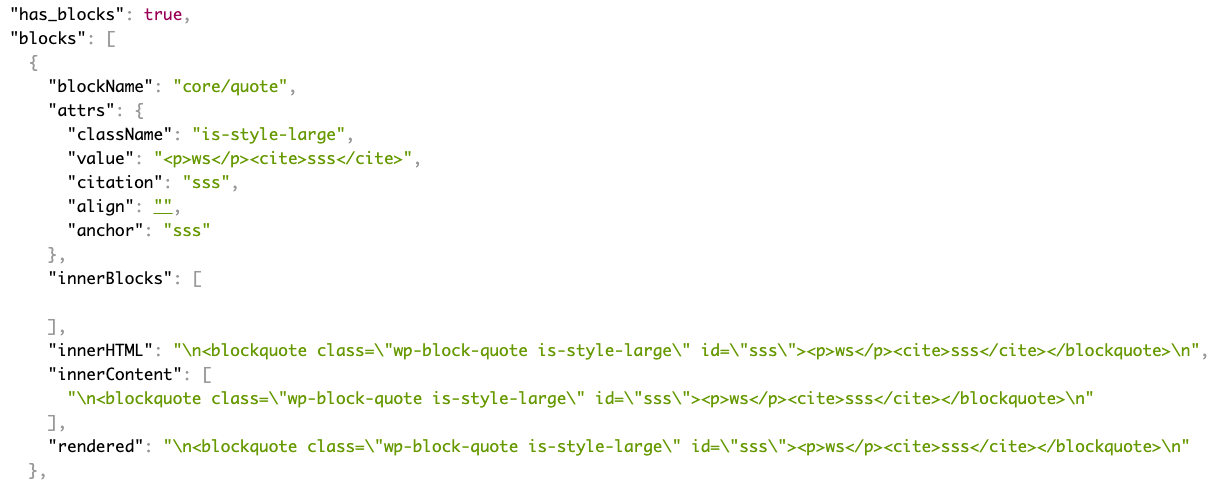
Add fields to the rest api.

Installation
Using The WordPress Dashboard
- Navigate to the ‘Add New’ in the plugins dashboard
- Search for ‘wp-rest-blocks’
- Click ‘Install Now’
- Activate the plugin on the Plugin dashboard
Uploading in WordPress Dashboard
- Navigate to the ‘Add New’ in the plugins dashboard
- Navigate to the ‘Upload’ area
- Select
wp-rest-blocks.zipfrom your computer - Click ‘Install Now’
- Activate the plugin in the Plugin dashboard
Using FTP
- Download
wp-rest-blocks.zip - Extract the
wp-rest-blocksdirectory to your computer - Upload the
wp-rest-blocksdirectory to the/wp-content/plugins/directory - Activate the plugin in the Plugin dashboard
Reviews


Contributors & Developers
“REST API blocks” is open source software. The following people have contributed to this plugin.
Contributors
Translate “REST API blocks” into your language.
Interested in development?
Browse the code, check out the SVN repository, or subscribe to the development log by RSS.
Changelog
1.0.2
- Fix issue with WordPress 6.5
- Update coding standards to WP coding standards 3.1.0
- Mark tested up to WP 6.5
1.0.1
- Update coding standards to WP coding standards 3.0.1
- Mark tested up to WP 6.4
1.0.0
Breaking change!
The field in the REST API is changed from blocks to block_data.
0.5.0
- Add support for new post types added in WordPress 5.9.
0.4.0
- Added support for block based widget, added in WordPress 5.8. Block data is added to the /wp/v2/widgets endpoint.
0.3.2
- Update translations
0.3.1
- Hot fix.
0.3.0
- Improve support for block that have attributes that use query source type.
- Improve error handling for those that install this plugin without using composer.
0.2.1
- Update dependency.
0.2.0
- Breaking change. Field names have changed and required WordPress 5.5+
0.1.0
- First version.
