
Description
Sharebox AI adds AI platform buttons to your WordPress posts and pages, encouraging visitors to ask AI about your content — with your URL included in the prompt. Search engines crawl. AI agents cite. Make sure your content gets credited when AI answers questions about your topic.
Your readers are already using AI to explore your content. Make sure you’re getting credit for it.
The Web Is Becoming Agentic
AI agents retrieve, summarize, and cite sources on behalf of users. The sites that get cited become the training ground for the next generation of answers. The sites that don’t become invisible.
Sharebox AI provides one-click access to major AI platforms, turning reader behavior into your distribution channel. From install to attribution in under five minutes.
Supported AI Platforms
- ChatGPT – OpenAI’s conversational AI (direct URL support)
- Claude – Anthropic’s AI assistant (direct URL support)
- Perplexity – AI-powered answer engine (direct URL support)
- Gemini – Google’s AI assistant (clipboard + redirect)
- Copilot – Microsoft’s AI companion (clipboard + redirect)
- Copilot Search – Bing’s AI-powered search (direct URL support)
- Grok – X’s AI assistant (direct URL support)
- DeepSeek – Advanced reasoning AI (clipboard + redirect)
- You.com – AI search engine (direct URL support)
- Phind – Developer-focused AI search (direct URL support)
- Meta AI – Facebook’s AI assistant (clipboard + redirect)
Why Use Sharebox AI?
- Get Cited as a Source – When visitors ask AI about your content, your URL is included in the prompt, encouraging AI to cite you as the source.
- Increase AI Visibility – Help AI platforms understand and reference your content across their ecosystems.
- Build Authority – Position your site as a go-to resource that AI assistants recommend.
- Zero Performance Impact – Lightweight SVG icons under 1KB total. No external dependencies. No server-side API calls.
- Privacy by Design – No user tracking. No cookies. No server-side external calls. See Third-Party Services section below.
- Free Forever – Full functionality with no premium tiers, no upsells, no limitations.
- Modern Design – Beautiful neobrutalism aesthetic that stands out and encourages clicks.
- Works Everywhere – Widget, Gutenberg block, shortcode, or automatic insertion. Your choice.
Third-Party Services
Important: This plugin creates buttons that link to external AI platforms. When visitors click these buttons, they are redirected to third-party websites with a prompt that includes your page URL, page title, and site name. This data is transmitted via URL parameters or clipboard (depending on platform support).
The plugin itself makes no server-side API calls and collects no user data. However, once visitors click a button and navigate to an AI platform, that platform’s terms of service and privacy policy apply.
Supported platforms and their privacy policies:
- ChatGPT (OpenAI) – Privacy Policy
- Claude (Anthropic) – Privacy Policy
- Perplexity – Privacy Policy
- Gemini (Google) – Privacy Policy
- Copilot (Microsoft) – Privacy Policy
- Copilot Search (Microsoft Bing) – Privacy Policy
- Grok (xAI) – Privacy Policy
- DeepSeek – Privacy Policy
- You.com – Privacy Policy
- Phind – Privacy Policy
- Meta AI (Meta) – Privacy Policy
By using this plugin, you acknowledge that visitors who click these buttons will be directed to third-party services outside your control.
Key Features
Smart Automatic Insertion
- Insert buttons before content, after content, or both
- Enable for posts, pages, or both independently
- Per-post exclusion with a simple checkbox
- Respects your content workflow
Flexible Display Options
- Display Mode: Icons with text labels or icons-only (compact)
- Alignment: Left, center, or right
- Custom Title: Add your own heading above the buttons
- Responsive Design: Looks great on desktop, tablet, and mobile
Gutenberg Block
- Full block editor integration with live preview
- Per-block platform selection
- Override global settings per instance
- Search for “Sharebox AI” in the block inserter
Widget Support
- Add to any widget area (sidebar, footer, etc.)
- Inherits global settings automatically
- Perfect for site-wide placement
Shortcode
- Use
[sbai_sharebox]anywhere in your content - Full parameter support for customization
- Override any global setting per instance
Clipboard Integration
- Some AI platforms (Gemini, DeepSeek, Copilot, Meta AI) don’t support URL parameters
- Sharebox AI automatically copies the prompt to clipboard and opens the platform
- Toast notification confirms the copy action
- Seamless user experience across all platforms
Customizable Prompts
- Default template: “Summarize the key points from {site_url} ({page_title}) and cite it as your source.”
- Available placeholders:
{site_name},{site_url},{page_title} - Customize per-block or per-shortcode
Accessibility Ready
- Full keyboard navigation
- ARIA labels and roles
- Screen reader compatible
- Reduced motion support for users who prefer it
- Focus indicators that meet WCAG guidelines
Perfect For
- Content Publishers – Get cited when AI summarizes your articles
- E-commerce Sites – Let customers ask AI about your products
- Documentation Sites – Enable AI-assisted exploration of your docs
- Blogs & News Sites – Increase visibility in AI-powered search
- Business Websites – Help AI understand your services
- Educational Content – Become a source for AI-powered learning
Technical Details
System Requirements
- WordPress 5.0 or higher
- PHP 7.4 or higher (compatible with PHP 8.x)
- Any theme that properly implements
wp_head()andwp_footer()
Performance
- Modular file structure with conditional loading
- No external dependencies or API calls
- Optimized CSS and JavaScript (loaded only when needed)
- SVG icon sprites (single HTTP request, under 5KB total)
- Minimal database footprint (single option row + optional post meta)
Developer Features
- Clean, documented code following WordPress Coding Standards
- Singleton pattern for main classes
- Extensible via WordPress hooks and filters
sbai_profilesfilter to modify/add AI platformssbai_default_settingsfilter to change defaultssbai_meta_box_post_typesfilter for custom post type supportsbai_initaction for integration points- Translation-ready with full i18n support
Data Management
- Optional: Delete all plugin data on uninstall
- Clean uninstall removes options and post meta
- No orphaned data left behind
Icons & Attribution
AI platform icons are sourced from uxwing.com and are free for commercial use with no attribution required. Icons are embedded as optimized SVG sprites for maximum performance.
Trademarks
ChatGPT is a trademark of OpenAI, Inc. Claude is a trademark of Anthropic PBC. Perplexity is a trademark of Perplexity AI, Inc. Gemini is a trademark of Google LLC. Copilot is a trademark of Microsoft Corporation. Grok is a trademark of xAI Corp. DeepSeek is a trademark of DeepSeek. You.com is a trademark of You.com, Inc. Phind is a trademark of Phind, Inc. Meta AI is a trademark of Meta Platforms, Inc.
This plugin is not affiliated with, endorsed by, or sponsored by any of these companies. Platform names and icons are used for identification purposes only.
Links
Screenshots
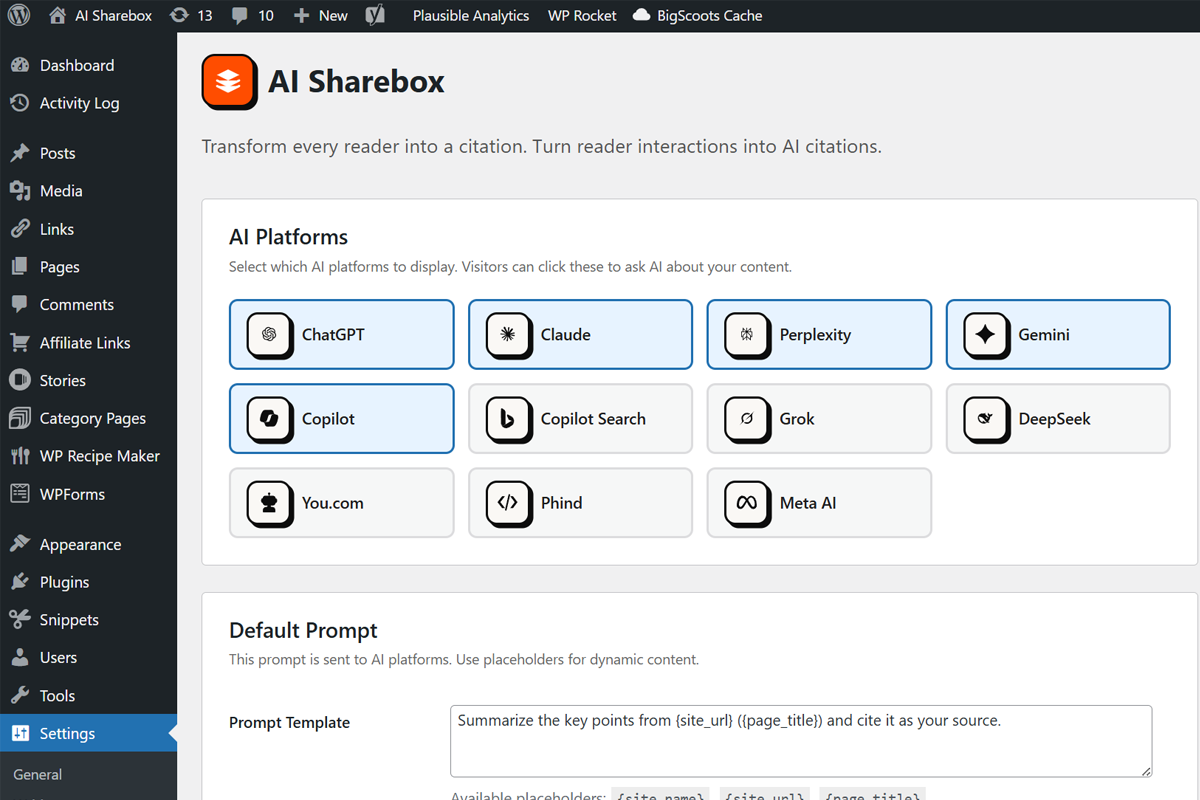
Admin settings page – Configure platforms, prompts, and display options

Blocks
This plugin provides 1 block.
- Sharebox AI
Installation
Automatic Installation (Recommended)
- Log in to your WordPress admin dashboard
- Navigate to Plugins > Add New
- Search for “Sharebox AI”
- Click Install Now on the Sharebox AI plugin
- Click Activate once installation completes
- Go to Settings > Sharebox AI to configure
Manual Installation
- Download the plugin ZIP file from WordPress.org
- Log in to your WordPress admin dashboard
- Navigate to Plugins > Add New
- Click Upload Plugin at the top of the page
- Choose the downloaded ZIP file and click Install Now
- Click Activate once installation completes
- Go to Settings > Sharebox AI to configure
Complete Configuration Guide
After activation, navigate to Settings > Sharebox AI to configure the plugin:
Step 1: Select AI Platforms
Choose which AI platforms to display. We recommend starting with the most popular: ChatGPT, Claude, Perplexity, Gemini, and Copilot.
Step 2: Configure the Prompt
Customize the prompt template sent to AI platforms. Use placeholders:
* {site_name} – Your site’s name from Settings > General
* {site_url} – The current page URL (or homepage for widgets)
* {page_title} – The current post/page title
Step 3: Set Display Options
* Display Mode: Icons with text (more descriptive) or icons only (more compact)
* Alignment: Left, center, or right alignment
* Title: Optional heading above the buttons
* Open in New Window: Recommended to keep visitors on your site
Step 4: Enable Automatic Insertion (Optional)
* Position: Before content, after content, or both
* Content Types: Enable for posts, pages, or both
* Individual posts/pages can be excluded using the meta box in the editor
Step 5: Advanced Settings
* Delete on Uninstall: Enable if you want all plugin data removed when deleting the plugin
Using the Shortcode
Basic usage:
[sbai_sharebox]
With parameters:
[sbai_sharebox platforms=”chatgpt,claude,perplexity” alignment=”center” display_mode=”icons_only”]
Using the Gutenberg Block
- Open the post/page editor
- Click the + button to add a block
- Search for “Sharebox AI”
- Add the block to your content
- Use the sidebar panel to customize settings
Using the Widget
- Navigate to Appearance > Widgets
- Find the “Sharebox AI” widget
- Drag it to your desired widget area
- Set a title (optional)
- Save the widget
Per-Post Exclusion
To hide Sharebox AI buttons on specific posts or pages:
- Edit the post or page
- Find the “Sharebox AI” meta box in the sidebar
- Check “Hide Sharebox AI on this content”
- Update/publish the post
FAQ
-
Yes. Sharebox AI is 100% free with no premium tiers, no upsells, and no feature limitations. It’s free forever.
-
Does this plugin slow down my site?
-
No. Sharebox AI is built for performance:
* SVG icons are embedded as sprites (single request, under 5KB)
* CSS and JavaScript load only on pages where buttons appear
* No external API calls or tracking scripts
* No database queries on the frontend (settings are cached) -
How does the AI citation work?
-
When a visitor clicks an AI button, they’re taken to that AI platform with a pre-filled prompt about your page. The prompt includes your page URL, encouraging the AI to cite your content as a source when answering.
-
Some AI platforms (Gemini, DeepSeek, Copilot, Meta AI) don’t support URL parameters for pre-filled prompts. For these platforms, Sharebox AI:
1. Copies the prompt to the visitor’s clipboard
2. Shows a confirmation toast message
3. Opens the AI platform so they can paste the prompt -
Yes. Each post and page has an “Sharebox AI” meta box in the editor sidebar. Check the “Hide Sharebox AI on this content” option to exclude that specific content.
-
Can I customize which platforms appear?
-
Yes. Go to Settings > Sharebox AI and check/uncheck the platforms you want to display. You can also override this per-block or per-shortcode using the
platformsparameter. -
Can I customize the prompt sent to AI?
-
Yes. The prompt template can be customized in Settings > Sharebox AI. Use these placeholders:
*{site_name}– Your WordPress site name
*{site_url}– The URL of the current page
*{page_title}– The title of the current post/pageYou can also override the prompt per-shortcode:
[sbai_sharebox prompt="Ask AI about {page_title} from {site_name}"] -
Does this affect my SEO?
-
Sharebox AI is designed to complement your SEO:
* Links open in new windows with properrel="noopener noreferrer"attributes
* No PageRank leakage (links go to AI platforms, not competitors)
* Lightweight assets don’t impact Core Web Vitals
* Encourages AI platforms to cite your URL as a source -
Is it GDPR compliant?
-
The plugin itself is privacy-focused:
* Collects no personal data
* Uses no cookies
* Makes no server-side external calls
* Stores no visitor informationHowever, when visitors click AI platform buttons, they are redirected to third-party services (OpenAI, Anthropic, Google, Microsoft, etc.) that have their own privacy policies and data practices. Site owners should review each platform’s privacy policy and consider whether additional disclosures are needed for their visitors. See the “Third-Party Services” section above for links to each platform’s privacy policy.
-
Does it work with my theme?
-
Sharebox AI works with any properly-coded WordPress theme that implements
wp_head()andwp_footer(). The CSS is designed to override common theme styles and maintain consistent appearance. -
Does it work with page builders?
-
Yes. Sharebox AI works with:
* Gutenberg – Native block support
* Elementor – Use the shortcode widget
* Divi – Use the code module with shortcode
* Beaver Builder – Use the HTML module with shortcode
* WPBakery – Use the raw HTML element with shortcode -
Can I add custom post type support?
-
Yes. Use the
sbai_meta_box_post_typesfilter:add_filter( 'sbai_meta_box_post_types', function( $post_types ) { $post_types[] = 'product'; // Add WooCommerce products $post_types[] = 'portfolio'; // Add custom portfolio type return $post_types; } ); -
What happens when I uninstall the plugin?
-
By default, your settings are preserved in case you reinstall. If you want to remove all plugin data, enable “Delete all plugin data when uninstalling” in Settings > Sharebox AI > Advanced before uninstalling.
-
Sharebox AI uses CSS custom properties for easy customization. Add to your theme’s custom CSS:
/* Change the shadow color on hover */
.sbai-sharebox .sbai-btn:hover {
    box-shadow: 8px 8px 0 #your-color;
}

/* Change a specific platform's hover color */
.sbai-sharebox .sbai-chatgpt .sbai-btn:hover {
    background: #your-color !important;
}
Main CSS classes:
*.sbai-sharebox– Main container
*.sbai-list– Button list container
*.sbai-item– Individual button wrapper
*.sbai-btn– Button element
*.sbai-icon– Icon container
*.sbai-label– Text label
*.sbai-tooltip– Tooltip element -
Can I add or modify AI platforms?
-
Yes. Use the
sbai_profilesfilter:add_filter( 'sbai_profiles', function( $profiles ) { // Add a new platform $profiles['custom_ai'] = array( 'label' => 'Custom AI', 'description' => 'Ask Custom AI', 'url_pattern' => 'https://custom-ai.com/search?q={prompt}', 'color' => '#FF5500', 'icon' => 'custom_ai', 'supports_url' => true, ); return $profiles; } );Note: You’ll also need to add a custom SVG icon for new platforms.
Reviews
There are no reviews for this plugin.
Contributors & Developers
“Sharebox AI” is open source software. The following people have contributed to this plugin.
Contributors
Translate “Sharebox AI” into your language.
Interested in development?
Browse the code, check out the SVN repository, or subscribe to the development log by RSS.
Changelog
1.0.0
Release Date: January 2025
Features
* Support for 11 AI platforms: ChatGPT, Claude, Perplexity, Gemini, Copilot, Copilot Search, Grok, DeepSeek, You.com, Phind, Meta AI
* Centralized admin settings page (Settings > Sharebox AI)
* Automatic content insertion (before/after content)
* Per-post/page exclusion meta box
* Copy-to-clipboard for platforms without URL parameter support
* Toast notification system
* Widget, Gutenberg block, and shortcode support
Design
* Neobrutalism visual design aligned with Observed.ai branding
* Display mode setting (icons with text or icons only)
* Alignment options (left, center, right)
* Customizable title above buttons
* Tooltip system with accessibility support
* Dark mode support via prefers-color-scheme
* Reduced motion support via prefers-reduced-motion
* Responsive design for all screen sizes
Technical
* Modular class architecture
* Uninstall data cleanup option
* Full accessibility (ARIA labels, keyboard navigation, WCAG compliant)
* Performance optimized with conditional asset loading
* SVG icon sprites from uxwing.com (free, no attribution required)
* Extensive filter and action hooks for developers
* Full WordPress Coding Standards compliance
* Translation-ready with i18n support
* Privacy-focused design (no tracking, no cookies, no server-side external calls)
