

Description
WCPOS (formerly WooCommerce POS) is a simple application for taking orders at the Point of Sale using your WooCommerce store. It’s great for phone orders too!
🕒 Install and start taking orders in less than 2 minutes.
🎥 DEMO
You can see a demo of the WCPOS plugin in action by going to demo.wcpos.com/pos with 🔑login/pass : demo/demo
Desktop Apps:
⬇️ Windows
⬇️ Mac (Intel)
⬇️ Mac (Apple Silicon)
Mobile Apps (Beta):
📱 iOS (TestFlight)
📱 Android (Google Play)
✨ FEATURES
- Cross-platform: Accessible via browser, desktop, iOS & Android (mobile apps in beta)
- Offline Storage: Fast product search and order processing
- Flexible Cart: Add products not listed in WooCommerce
- Barcode Support: Scan products directly into the cart
- Custom Receipts: Tailor receipt templates with PHP
- Multilingual: Available in most major languages
- Built-in Support: Access live chat for instant help
🔓 PRO FEATURES
- Stock Management: quickly adjust stock levels, pricing and more
- Order Management: re-open and print receipts for older orders
- Customer Management: create new customers and edit customer details
- Payment Gateways: use any gateway for checkout
- End of Day Reports: summarise daily sales, transactions, and cash flow for reconciliation
- Stores: Manage locations with unique tax settings, pricing and receipts
- Priority Discord support: one-on-one support via private chat
Discover all PRO features at wcpos.com/pro
📋 REQUIREMENTS
- WordPress >= 5.6
- WooCommerce >= 5.3
- PHP >= 7.4
Screenshots
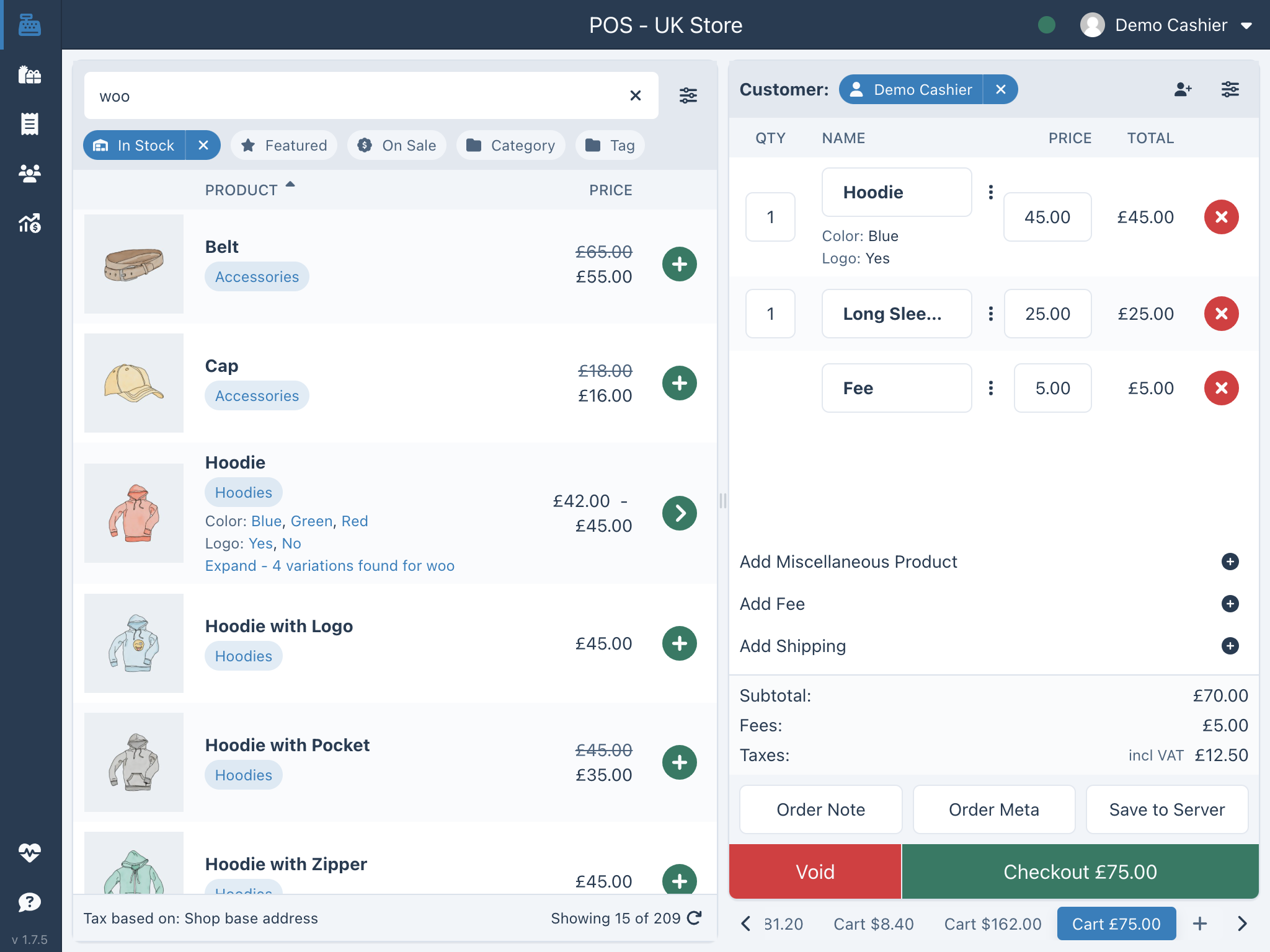
WCPOS main screen

Installation
Automatic installation
- Go to Plugins screen and select Add New.
- Search for “WCPOS” in the WordPress Plugin Directory.
- Install the plugin
- Click Activate Plugin to activate it.
Pro installation
If you have purchased a license for WCPOS Pro please follow the steps below to install and activate the plugin:
- Go to: http://wcpos.com/my-account/
- Under My Downloads, click the download link and save the plugin to your desktop.
- Then go to your site, login and go to the Add New Plugin page, eg: http://<yourstore.com>/wp-admin/plugin-install.php?tab=upload
- Upload the plugin zip file from your desktop and activate.
- Next, go to the POS Settings page and enter your License Key and License Email to complete the activation.
Manual installation
To install a WordPress Plugin manually:
- Download the WCPOS plugin to your desktop.
- If downloaded as a zip archive, extract the Plugin folder to your desktop.
- With your FTP program, upload the Plugin folder to the wp-content/plugins folder in your WordPress directory online.
- Go to Plugins screen and find the newly uploaded Plugin in the list.
- Click Activate Plugin to activate it.
FAQ
-
Where can I find more information on WCPOS?
-
There is more information on our website at https://wcpos.com.
- FAQ – https://wcpos.com/faq
- Documentation – https://wcpos.com/docs
- Blog – https://wcpos.com/blog
Reviews


Contributors & Developers
“WCPOS – Point of Sale (POS) plugin for WooCommerce” is open source software. The following people have contributed to this plugin.
Contributors
“WCPOS – Point of Sale (POS) plugin for WooCommerce” has been translated into 12 locales. Thank you to the translators for their contributions.
Translate “WCPOS – Point of Sale (POS) plugin for WooCommerce” into your language.
Interested in development?
Browse the code, check out the SVN repository, or subscribe to the development log by RSS.
Changelog
1.8.14 – 2026/02/19
- Hardened DB migration locking — upgrade now uses the WordPress core upgrader lock (
WP_Upgrading) with an atomic acquisition check and a shutdown fallback, preventing concurrent migrations on high-traffic sites (#540) - Fixed offline gateway ignoring POS checkout status — orders placed with the Cash or Card gateway while offline now respect the configured POS checkout status instead of defaulting to “processing” (#544)
- Fixed i18n locale fallback and caching — translation lookups no longer retry locales that returned a definitive 404, reducing unnecessary network requests on every page load (#543)
- Fixed settings page clipping on some WordPress themes — the left side of the settings panel was being cut off on sites where
#wpcontenthas extra padding (#545) - Reduced extensions catalog cache TTL — the extension directory now refreshes every hour instead of daily, so newly published extensions appear faster (#546)
- Allowed php-jwt advisory on PHP 7.4 — resolved a PHP Scoper install failure caused by a security advisory that only affects newer PHP versions (#541)
1.8.13 – 2026/02/17
- Fixed root cause of duplicate product metadata — POS order processing no longer clones product objects in the stock/coupon path, preventing repeated meta rows from being re-saved on each stock update (#537)
- Added a safer duplicate-meta repair migration — a new one-time cleanup removes only exact duplicate
(post_id, meta_key, meta_value)rows for POS-touched products/variations, reducing API payload size and memory pressure without deleting distinct meta values (#537) - Expanded regression coverage for discount and stock edge cases — added tests for coupon recalculation behavior, variation pricing paths, and stock-reduction lifecycle to prevent regressions (#537)
- Reduced diagnostic log noise — high-volume top-meta-key context is now opt-in so normal logs stay readable while deep diagnostics remain available when needed (#537)
1.8.12 – 2026/02/13
- One-time cleanup of duplicate metadata — a migration automatically removes thousands of junk meta rows that accumulated on POS-touched products and orders, resolving memory exhaustion and slow API responses on affected stores (#532)
- Reduced redundant order saves in payment gateways — Card and Cash gateways no longer call
$order->save()beforepayment_complete()/update_status(), which already save internally (#532)
1.8.11 – 2026/02/13
- Fixed critical memory exhaustion on large stores — API responses were re-reading all metadata from the database on every request, causing extreme memory usage on stores with large catalogs (#519)
- Fixed O(n²) loop in order tax calculation — variable shadowing caused quadratic iteration over line item meta (#519)
- New meta data monitoring — REST API responses now detect resources with excessive metadata and fall back to a safe response mode, preventing out-of-memory crashes (#521)
- Security hardening — masked auth tokens in test endpoint, added directory protection for temp receipt templates (#519)
- Updated all JS and PHP dependencies to latest stable versions (#521, #526)
- Pro: Redesigned Edit Store page with modern React/Tailwind UI
- Pro: Fixed SQL injection vulnerability in analytics and store authorization bypass
1.8.9 – 2026/02/11
- Completely rebuilt settings page — new modern architecture with Vite, TanStack Router, headless UI components, zustand state management, and responsive layout with grouped sidebar navigation (#495, #498, #505)
- New Extensions directory — browse, discover, and manage extensions directly from POS settings, with Pro integration hooks, GitHub links, and new-extension badges (#497, #500, #510)
- New Logs page — view, filter, and paginate log entries from file and database sources with expandable details and unread counts (#504, #511)
- Redesigned email settings — granular per-email toggles replace the old on/off switch, with new cashier notification options (#502, #508)
- Fixed POS prices persisting to product database — price modifications made at the POS no longer overwrite the stored product price (#509)
- Fixed coupon calculations ignoring tax — coupon subtotal filters are now tax-aware, preventing incorrect discount amounts (#507)
- Fixed security plugin conflicts — CSP headers are now stripped on POS pages so Content-Security-Policy rules from security plugins no longer break the interface (#503)
- Fixed WordPress 6.7+ compatibility — deferred translation calls in the Activator to avoid the “too early” notice (#498)
1.8.8 – 2026/02/06
- Completely rebuilt translation system — switched to i18next with proper plural handling and regional locale fallback, loaded on-demand from jsDelivr and decoupled from plugin version updates (#37, #75, #76, #438, #439, #474)
- Fixed conflict with REST API caching plugins — POS requests could break entirely when a REST API caching plugin was active, this is now resolved (#421)
- Fixed expired JWT overriding valid authentication — an expired token could silently override a valid cookie session, locking users out unnecessarily (#472)
- POS discounts no longer wiped by coupons — applying a coupon to an order with POS-discounted items no longer resets those discounts back to the original price (#464)
- Fixed misc products showing $0 on receipts — miscellaneous products now display the correct price on receipts and order emails (#436)
- Fixed checkout-to-receipt navigation — no more crashes or lost order links when completing a sale (#77)
- Fixed token refresh on 403 errors — sessions that appeared “stuck” requiring a re-login should now refresh automatically (#74)
- Fixed store switching issues — switching between stores no longer causes errors or blank screens (da8c05d)
- Fixed missing data in received template — the order received page was missing link data, now restored (#476)
- Tightened permission checks — capability checks now properly match what’s configured on the Access settings page (#467)
- Improved performance during large syncs — the UI stays responsive while syncing large product catalogs (8657e1f)
- Fixed web hydration in standalone mode — the web app loads correctly when accessed directly without the desktop wrapper (#19)
