Best Binary Options Brokers With TradingView in 2026
TradingView is a charting and social trading platform that can be linked to various brokers, with a number of binary options firms integrating its charting package in recent years. It is by far the most complete, easy to use charting platform we have seen. It provides tools and market data for major underlying asset classes including stocks, commodities, indices, forex and cryptocurrency.
TradingView is typically browser-based with no download needed if you use a binary broker that offers it, though they have brought in a desktop client for Windows, MacOS and Linux. If you are thinking about using an MT4 binary broker, we suggest you take a look at TradingView first, which we now prefer for analyzing markets and making binary trades.
Top Binary Options Brokers With TradingView
We opened accounts, fired up their platforms, and explored every inch of their TradingView-powered charts and tools, with these providers standing out as the best:
| Broker |  | Min Deposit | Expiry Times | ||
|---|---|---|---|---|---|
 |
Videforex | $250 | 5 seconds - 1 month | » Visit | |
 |
IQCent | $250 | 5 seconds - 1 month | » Visit | |
 |
RaceOption | $200 | 5 seconds - 30 days | » Visit | |
 |
BinaryCent | $250 | 5 seconds - 30 days | » Visit | |
 |
Deriv | $5 | 15 seconds - 365 days | ||
 |
Binarium | $5 | 60 seconds - 3 months |
Videforex TradingView Integration
Videforex does not offer full TradingView trading integration but provides it alongside proprietary charting tools. Toggle to 'TradingView' from within the platform and you get a fast, responsive chart from TradingView for your chosen asset. Over 80 indicators, chart timeframes from 1 second to 1 day, and the quick zoom function makes it optimal for short-term market analysis.
IQCent TradingView Integration
IQcent does not offer full TradingView trading integration but provides charting tools powered by TradingView within its platform. During our hands-on testing, load times for charts were a little slow but then easy to customize, with indicators working as expected. We also found adding text labels to charts a neat addition.
RaceOption TradingView Integration
RaceOption offers charts from TradingView, alongside its own tick and candlestick charts. The layout is clean, keeping the RaceOption platform’s light colours and design, but packing a punch in the tooling department with over 100 indicators from TradingView, while it was easy to draw trend lines and configure charts to our liking during testing.
BinaryCent TradingView Integration
BinaryCent offers one of the cleanest TradingView integrations for binary traders. The design is slick with its charts fast and responsive. During testing, Bollinger Bands were easy to set up, timeframes were easy to change, and identifying price levels before hitting ‘Up’ or ‘Down’ was user friendly.
Deriv TradingView Integration
Deriv offers charting tools inspired by TradingView but lacks full TradingView integration. During testing, trading 50+ forex and CFD assets involved wider spreads starting around 1.2 pips, but with zero minimum deposits and no inactivity fees. Its TradingView-powered platform ultimately provides flexible tools for casual traders.
Binarium TradingView Integration
Binarium provides binary trading through TradingView charts in its web-based platform. Click ‘TradingView’ and you get a much-improved charting experience with 12 chart types, chart timeframes from 5 seconds to 12 hours, and over 80 indicators vs the 4 chart types, chart timeframes from 5 seconds to 6 hours, and the 16 indicators you get in the standard charting solution. The TradingView binary trading experience was also reliable during testing, allowing us to take notes and save strategy templates.
Visit
How We Picked The Top Binary Options Firms That Offer TradingView
We looked at the platforms of every provider in our evolving binary options broker database, noting which ones offer some form of integration with TradingView. Then we rolled up our sleeves and started exploring:
- We looked at how many indicators, drawing tools, chart time frames, and other features were available
- We cutomized charts, overlaying indicators like Bollinger Bands, checking for ease of use and any glitches
- We placed binary trades in either demo or live accounts to confirm opening and closing alerts and prices overlaid onto charts
- We documented our TradingView-specific findings and then listed brokers by their overall ratings
Note that not all binary brokers offer the full TradingView experience – often they provide a pared down charting package, but these are still more feature-rich and more enjoyable to use than most of the fully, in-house platforms we’ve used at binary firms.
Features
Charts
The central feature of TradingView is the charts. The charts are the most functional I’ve ever used. If they look familiar they should, TradingView was created by the same community that brought us Multicharts.
The charts are 100% customizable, can be used in many time frames and come with lots of features.
TradingView has grown in popularity with both binary traders and the wider trading community, and it’s advanced, slick charts are one of the key drivers.
Assets
The first thing I noticed when using the charts is the incredible array of assets. Not only does TradingView list many assets traded on public exchanges around the world, it often lists lots of variations of each asset.
When you go to look for the EUR/USD you will be able to choose from different exchanges and that is true for most assets. In the case of cryptocurrency you would be able to pull up a chart of BTC/USD prices from different exchanges.
The vast majority of traditional assets available at binary options brokers, except some proprietary, simulated products, can generally be found on TradingView via different exchanges and pricing providers. That said, the binary assets you can actually trade via TradingView charts depends on the broker itself, and their product offering.
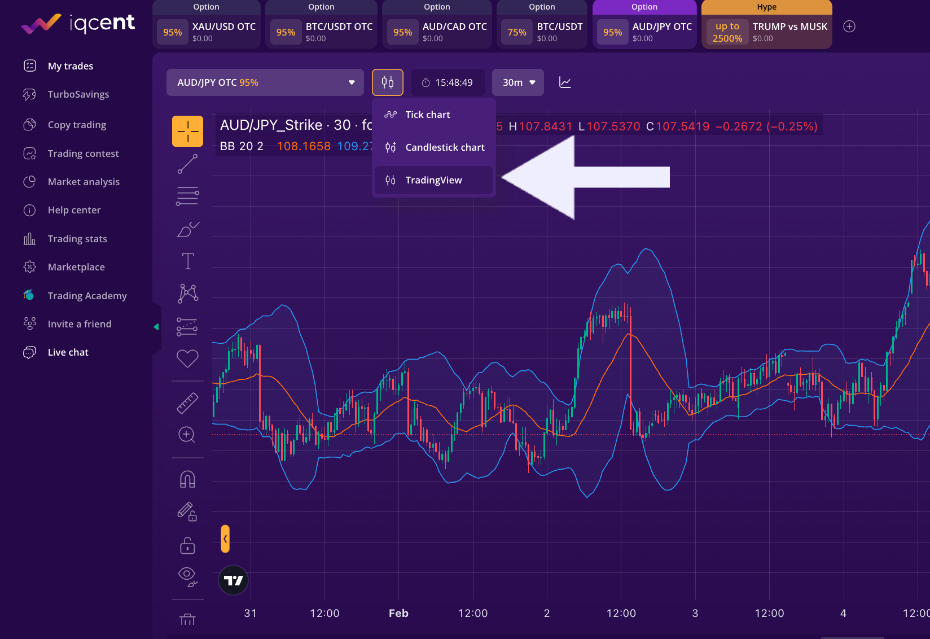
Many brokers, like IQCent above, require you to toggle to ‘TradingView’ charts
Tools
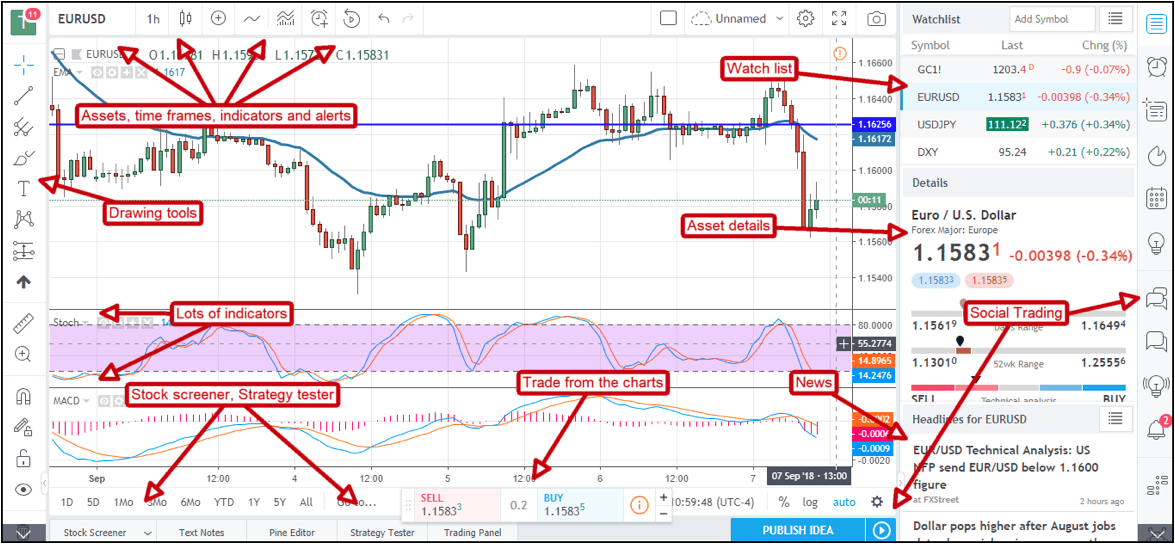
TradingView has an excellent suite of tools. To the left of the chart interface are choices for drawing tools like trendlines, Fibonacci Retracements, rectangles, pitchforks and more.
At the top of the charts are settings for chart type (candle, bar, heiken ashi, etc), time frame, indicators (more than 400 standard plus the ability to install custom indicators), and alerts/alarms. That said, most TradingView binary brokers we’ve used don’t offer all the standard 400 indicators.
To the right of the chart is a window with watchlists and tabs for data windows, hotlists, economic/earnings calendars and a trading diary.
The charting power, paired with the slick look and feel, is where it beats out most of the in-house platforms binary firms offer. Those that have offer some sort of TradingView package tend to provide many more technical indicators, drawing tools, and all in a slicker, more customizable terminal.
Social Trading
What also makes TradingView complete is the social trading aspect. These guys did it right, you can post trading ideas to the TradingView feed right from your chart as well as participate in chat-rooms tied to each of the assets.
Additional features include a screener that can be used to find trades on stocks, forex and cryptocurrency. Along with that is a strategy tester that can be applied to standard indicator strategies (provided with the tools) or used with a custom strategy. In the Pine Editor you can set up criteria for your own strategies and have them applied to your charts for back-testing.
The best part about TradingView is that you can use most of the features for free. All you have to do is sign up and understand they’ll be showing you some ads from time to time (it’s not too bad, don’t worry about that).
If you want to link to your account and do things like use more than a set number of indicators, or use additional data subscriptions, you may have to pay. You can upgrade to ‘Essential’ access for about $12.95 a month, billed annually, or a cost of about $199.95 a month, billed annually, for the ‘Ultimate’ package.
You can join TradingView directly. Alternatively, jump to our top binary options brokers that have TradingView.
