
C++ structures allow you to define custom data types that group related variables—of the same or different data types—under a single name, making complex data easier to organize and manage.
- To define a structure, we use the struct keyword, which allows grouping data members and member functions into a single user-defined type. Variables can be declared without repeating the struct keyword.
- Structures are used to build linked lists and trees and to represent real-world objects like students and faculty in software systems.
#include <iostream>
using namespace std;
struct Point{
    int x, y;
};

int main(){
    // Struct keyword is not needed here
    Point p = {0, 1};

    // Accessing members
    cout << p.x << " ";
    cout << p.y << endl;

    // Updating members
    p.x = 99;

    // Accessing members again
    cout << p.x << " ";
    cout << p.y;

    return 0;
}
Output
0 1
99 1
Syntax:
struct name
{
type1 mem1;
type2 mem2;
...
};
where structure name is name and mem1, mem2 and mem3 are the items it groups. They are also called its members or fields.
Example:
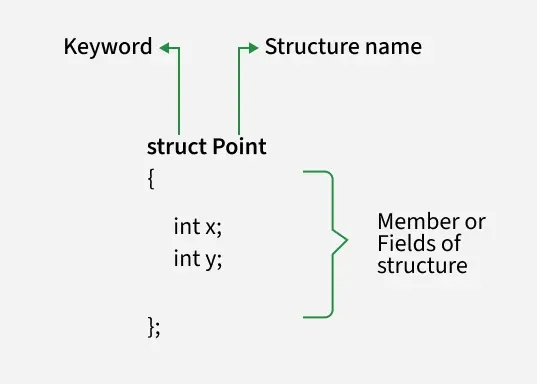
The above is also called Structure Definition. It is not allocated any memory and cannot be used in the program directly. We have to create its variables to use it.
Structure Variable
Once the structure is defined, its variable can be created in a similar way as basic data type variables.
struct_name var_name;
where struct_name is the name of the structure and var_name is the name of the variable.
A variable can also be declared with the definition of the structure:
struct name
{
type1 mem1;
type2 mem2;
...
} var1, var2;
Initialize Structure Members
Structure members cannot be initialized with declaration. For example, the following C++ program fails in compilation.
struct Point
{
int x = 0;
int y = 0;
};
Structure members can be initialized to values provided in the curly braces '{}'.
struct Point{
    int x, y;
};

int main(){

    // Initialize data members of structure using curly braces
    Point p1 = {0, 1};
    return 0;
}
The values provided in the curly braces {} are sequentially assigned to the members of the structure. In the above example, 0 is assigned to member x, and 1 is assigned to member y.
Since C++ 20, we can also use Designated Initializers to initialize the structure members.
Access and Modify Members
Structure members are accessed using dot operator (.) and a new value can also be assigned using assignment operator.
Syntax:
var_name.member_name;
var_name.member_name = new_val;
#include <iostream>
using namespace std;
struct Point{
    int x, y;
};

int main(){
    Point p = {0, 1};

    // Accessing members
    cout << p.x << " ";
    cout << p.y << endl;

    // Updating members
    p.x = 99;

    // Accessing members again
    cout << p.x << " ";
    cout << p.y;

    return 0;
}
Output
0 1
99 1
Member Functions
In C structures, functions were not allowed inside the structure but in C++, we can declare the function inside the structure. They are called member functions while the variables are called data members. C++ structure is way more similar to C++ classes as compared to C structures.
#include <iostream>
using namespace std;

struct Point{
    int x, y;

    // Member function
    int sum(){
        return x + y;
    }
};

int main(){
    Point s = {0, 1};
    // Call member function using (.) operator
    cout << s.sum();
    return 0;
}
Output
1
C++ structures also support other class components such as constructor, destructor, access specifiers, etc.
#include <iostream>
using namespace std;

struct Point{
  private:
    int x, y;

  public:

    // Constructors
    Point(int a, int b){
        x = a;
        y = b;
    }

    // Member function
    void show(){
        cout << x << " " << y << endl;
    }

    // Destructor
    ~Point(){
        cout << "Destroyed Point Variable" << endl;
    }
};

int main(){
    // Creating Point variables using constructors
    Point s1(1, 1);
    Point s2(99, 1001);

    s1.show();
    s2.show();
    return 0;
}
Output
1 1
99 1001
Destroyed Point var
Destroyed Point var
Size of Structure
The size of a structure is determined by the sum of the sizes of its individual data members, with additional padding added by the compiler to ensure proper memory alignment.
#include <iostream>
using namespace std;
struct GfG{
    char c;
    int x, y;
};

int main(){

    // Finding the size
    cout << sizeof(GfG);
    return 0;
}
Output
12
Explanation: Ideally, the size should be the size of all data members i.e. sizeof(char) + 2 * sizeof(int) = 1 + 8 = 9 bytes. But the size comes out to be 12 bytes. This is due to the mentioned structure padding.
Note: Member functions does not contribute to the size of the structure. Also, in C++, size of the structure cannot be 0. Refer to this article to know more - Why empty Structure has size 1 byte in C++ but 0 byte in C?
typedef
In C++, typedef is used to create an alias for an existing variable. Similarly, with structures, typedef creates an alias for the original name of the structure.
#include <iostream>
using namespace std;

typedef struct GeeksforGeeks{
    int x, y;

    // Alias is specified here
} GfG;

int main()
{

    // Using alias
    GfG s = {0, 1};

    cout << s.x << " " << s.y << endl;
    return 0;
}
Output
0 1
Nested Structure
Nested structure in C++ refers to a structure that is defined inside another structure. Just as structure members are declared within a structure, one structure can be declared as a member inside another structure.
#include <iostream>
using namespace std;

// Define inner structure
struct inner{
    int a, b;
};

// Define the outer structure that contains the inner strucute
struct outer{
    inner in;
    int x, y;
};

int main(){
    outer obj = {{1, 2}, 10, 20};
    cout << "Inner: " << obj.in.a << " " << obj.in.b << endl;
    cout << "Outer: " << obj.x << " " << obj.y;
    return 0;
}
Output
Inner: 1 2
Outer: 10 20
The inner structure can also be defined directly inside the outer structure even without naming the structure and just by creating a variable name.
#include <iostream>
using namespace std;

// Define the outer structure that contains inner structure
struct outer{

    // Nested structure
    struct inner{
        int a, b;
    } in;
    int x, y;
};

int main(){
    outer obj = {{1, 2}, 10, 20};
    cout << "Inner: " << obj.in.a << " " << obj.in.b << endl;
    cout << "Outer: " << obj.x << " " << obj.y;

    return 0;
}
Output
Inner: 1 2
Outer: 10 20
Pointer to Structure
A structure pointer stores the address of a structure. Its members can be accessed using the -> operator instead of dereferencing and using the dot operator.
#include <iostream>
using namespace std;

struct GfG{
    int count;
    void showCount(){
        cout << count << endl;
    }
};

int main(){
    GfG gfg = {224};

    // Creating pointer
    GfG *sptr = &gfg;

    // Accessing using arrow operator
    sptr->showCount();
    return 0;
}
Output
224
Self-Referential Structures
Self-referential structures are those structures that contains the pointer to the same type as a member. For example,
// Self referential structures
struct GfG {
    int val;

    // Pointer to same type
    GfG *next;
}

Such kind of structures are used in data structures such as linked list, trees, etc.
Note: A structure can only contain pointer to the same type but not variable of same type. It is because it is impossible to derive the size information in the structure before complete definition.
Structure with Function
Structures can be passed to and returned from functions. They can be passed by value or by reference, but passing by reference is preferred for efficiency and for returning multiple values together.
Bit Fields
Bit fields in structures allows us to define the number of bits that a particular data member will occupy. Basically, it specifies the manual size of the structure member in bits. It is useful in memory critical applications such as embedded systems.
