
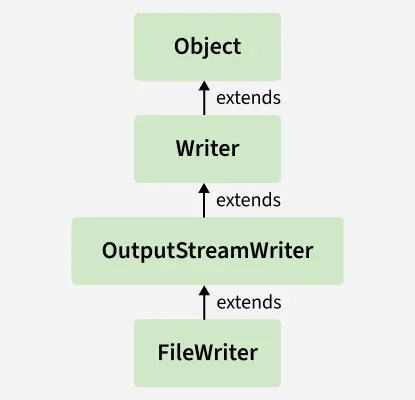
The FileWriter class in Java is used to write character data to files. It extends OutputStreamWriter and handles characters directly, making it ideal for writing text files with either the default or a specified encoding.
- Character-Oriented Stream: Designed for writing text (characters).
- Convenient for Text Files: Works with char, String and char[].
- Append Option Available: Can open a file in append mode to add content.
Class Declaration
public class FileWriter extends OutputStreamWriter
FileWriter extends OutputStreamWriter, which implements the Writer abstract class.
Example 1: Writing Characters to a File using FileWriter class
import java.io.FileWriter;
import java.io.IOException;
import java.util.*;

class WriteFile {

    public static void main(String[] args)
    {

        Scanner scn = new Scanner(System.in);
        String path = scn.nextLine();

        try (FileWriter writer = new FileWriter(path)){

            String str
                = "Hello Geeks!\nThis is about Programming";
            writer.write(str);

            System.out.println(
                "Data written to the file successfully.");
        }

        catch (IOException e){

            System.out.println(
                "An error occurred while writing"
                + " to the file: " + e.getMessage());
        }
    }
}
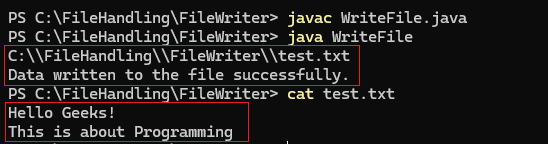
Output:
FileWriter Class Hierarchy
Constructors of FileWriter Class
1. FileWriter(String fileName): Creates a FileWriter for the given file name.
FileWriter fw = new FileWriter("example.txt");
2. FileWriter(String fileName, boolean append): Creates a FileWriter for a given File. If append is true, data is added to the end instead of overwriting.
FileWriter fw = new FileWriter("example.txt", true); // append mode
3. FileWriter(File file): Creates a FileWriter for a given File. Throws IOException if the file is a directory, cannot be created, or opened.
File file = new File("example.txt");
FileWriter fw = new FileWriter(file);
4. FileWriter(File file, boolean append): Creates a FileWriter for a given File. If append is true, data is added to the end instead of overwriting.
FileWriter fw = new FileWriter(file, true);
5. FileWriter(FileDescriptor fdObj): Creates a FileWriter linked to the given file descriptor.
FileWriter fw = new FileWriter(FileDescriptor.out);
Appending Data to a File
import java.io.*;

class AppendingFile
{
    public static void main (String[] args)
    {
        String fileName = "output.txt";
      	// Appending Data in the File
       	try (FileWriter writer = new FileWriter(fileName, true)) {

          	// true for append mode
          	writer.write("\nAppending this line to the file.");
          	System.out.println("Data appended to the file successfully.");
		}
      	catch (IOException e) {
    		System.out.println("An error occurred while appending"
                               + " to the file: " + e.getMessage());
		}
    }
}
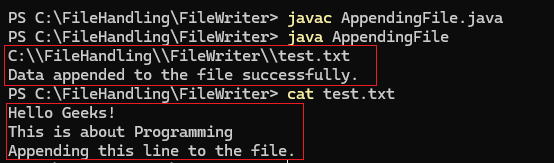
Output:
Methods of FileWriter Class
| Method | Description |
|---|---|
| write(int c) | Writes a single character. |
| write(char[] cbuf) | Writes an array of characters. |
| write(char[] cbuf, int off, int len) | Writes a portion of a character array. |
| write(String str) | Writes a string. |
| write(String str, int off, int len) | Writes a portion of a string. |
| append(char c) | Appends the specified character to the writer. |
| append(CharSequence csq) | Appends the specified character sequence. |
| append(CharSequence csq, int start, int end) | Appends a subsequence of the specified character sequence. |
| flush() | Flushes the writer (forces any buffered characters to be written). |
| close() | Closes the writer, flushing it first. |
FileWriter vs FileOutputStream
| Basis | FileWriter | FileOutputStream |
|---|---|---|
| Stream Type | Character-oriented | Byte-oriented |
| Used For | Writing text data | Writing binary data |
| Data Format | Writes characters (char, String) | Writes raw bytes (byte[]) |
| Encoding Support | Uses platform default encoding | Does not handle character encoding |
| Best Suited For | Text files (.txt, .log) | Binary files (.jpg, .mp3, .pdf) |

