
JavaScript conditional statements are used to make decisions in a program based on given conditions. They control the flow of execution by running different code blocks depending on whether a condition is true or false.
- Conditions are evaluated using comparison and logical operators.
- They help in building dynamic and interactive applications by responding to different inputs.
Types of Conditional Statements
1. if Statement
The if statement checks a condition written inside parentheses. If the condition evaluates to true, the code inside {} is executed; otherwise, it is skipped.
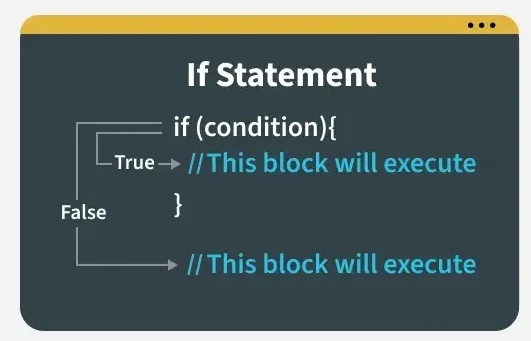
- Executes code only when a specified condition is true.
- Useful for making simple decisions in a program.
Syntax:
if (condition) {
  // code runs if condition is true
}
let x = 20;

if (x % 2 === 0) {
    console.log("Even");
}

if (x % 2 !== 0) {
    console.log("Odd");
};
Output
Even
2. if-else Statement
The if-else statement executes one block of code if a condition is true and another block if it is false. It ensures that exactly one of the two code blocks runs.
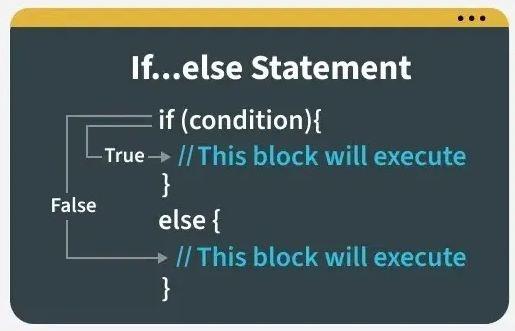
- Used when there are two possible outcomes.
- The else block runs when the if condition is not satisfied.
let age = 25;

if (age >= 18) {
    console.log("Adult")
} else {
    console.log("Not an Adult")
};
Output
Adult
3. else if Statement
The else if statement is used to test multiple conditions in sequence. It executes the first block whose condition evaluates to true.
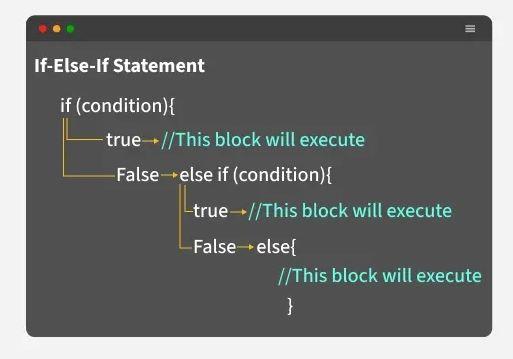
- Allows checking more than two conditions.
- Evaluated from top to bottom until a true condition is found.
const x = 0;

if (x > 0) {
    console.log("Positive.");
} else if (x < 0) {
    console.log("Negative.");
} else {
    console.log("Zero.");
};
Output
Zero.
4. Using Switch Statement (JavaScript Switch Case)
The switch statement evaluates an expression and executes the matching case block based on its value. It provides a clean and readable way to handle multiple conditions for a single variable.
- Used when one variable needs to be compared against multiple fixed values.
- Improves readability compared to long if...else if chains.
const marks = 85;

let Branch;

switch (true) {
    case marks >= 90:
        Branch = "Computer science engineering";
        break;
    case marks >= 80:
        Branch = "Mechanical engineering";
        break;
    case marks >= 70:
        Branch = "Chemical engineering";
        break;
    case marks >= 60:
        Branch = "Electronics and communication";
        break;
    case marks >= 50:
        Branch = "Civil engineering";
        break;
    default:
        Branch = "Bio technology";
        break;
}

console.log(`Student Branch name is : ${Branch}`);
Output
Student Branch name is : Mechanical engineering
5. Using Ternary Operator ( ?: )
The ternary operator is a compact shorthand for an if...else statement. It is called “ternary” because it takes three operands:
- A condition to test.
- An expression to evaluate if the condition is true.
- An expression to evaluate if the condition is false.
Syntax
condition ? expressionIfTrue : expressionIfFalselet age = 21;
const result =
(age >= 18) ? "You are eligible to vote."
: "You are not eligible to vote.";
console.log(result);
Output
You are eligible to vote.
6. Nested if...else
A nested if...else statement is an if...else block written inside another if or else. It is used to evaluate multiple related conditions in a hierarchical manner.
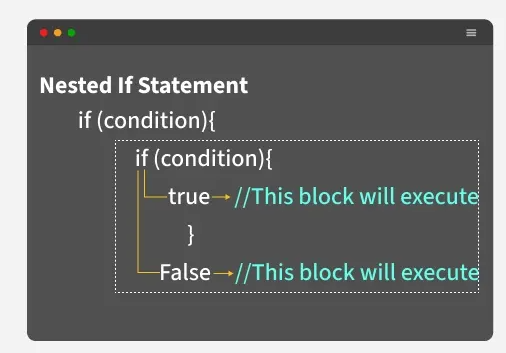
- Useful for handling complex decision-making logic.
- Deep nesting should be avoided to maintain code readability.
let weather = "sunny";
let temp = 25;

if (weather === "sunny") {
    if (temp > 30) {
        console.log("It's a hot day!");
    } else if (temp > 20) {
        console.log("It's a warm day.");
    } else {
        console.log("It's a bit cool today.");
    }
} else if (weather === "rainy") {
    console.log("Don't forget your umbrella!");
} else {
    console.log("Check the weather forecast!");
};
Output
It's a warm day.
Summary
| Conditional Statement | Description |
|---|---|
| if statement | Executes a block of code if a specified condition is true. |
| else statement | Executes a block of code if the same condition of the preceding if statement is false. |
| else if statement | Adds more conditions to the if statement, allowing for multiple alternative conditions to be tested. |
| switch statement | Evaluates an expression, then executes the case statement that matches the expression's value. |
| ternary operator | Provides a concise way to write if-else statements in a single line. |
| Nested if else statement | Allows for multiple conditions to be checked in a hierarchical manner. |
Reasons to Use Conditional Statements
- Control Program Flow: Decide which code to execute based on different situations.
- Make Decisions: React differently to user input, data values, or system states.
- Enhance Interactivity: Enable dynamic behavior in apps and websites.
- Handle Multiple Scenarios: Manage different outcomes or error handling paths.
- Improve Code Flexibility: Write adaptable, reusable code that can respond to change.
Best Practices
Here are some best practices while working with conditional statements:
- Keep Conditions Simple and Clear: Write straightforward expressions to improve readability and reduce errors.
- Use Strict Equality (===) Over Loose Equality (==): Prevent unexpected type coercion bugs.
- Always Use Curly Braces {}: Even for single-line blocks, to avoid mistakes and improve maintainability.
- Prefer else if or switch for Multiple Conditions: Organize your code better and enhance readability.
- Avoid Deep Nesting: Use logical operators (&&, ||) or early returns to flatten your code structure.
- Include Default Cases: Use else or default to handle unexpected conditions.
- Comment Complex Conditions: Explain the logic for future reference and easier maintenance.
- Test All Possible Paths: Make sure every branch of your condition executes as expected during testing.
