
Wikipedia scraping by title means searching for a topic on Wikipedia and automatically extracting its content using Python. Instead of manually opening a web page and copying information, this process allows Python to fetch and collect the data for us.
In this article, we will build a Python program that takes a topic name from the user, finds its Wikipedia page using Google Search and then extracts the text content from that page.
Prerequisites
Before running this project, make sure the following requirements are installed:
- Python
- requests
- beautifulsoup4
If the required libraries are not installed, you can install them using the following commands:
pip install requests
pip install beautifulsoup4
Step-by-Step Implementation
Step 1: Import Required Libraries
This step loads the libraries that are needed to send web requests and read the HTML content of the Wikipedia page.
- requests is used to send a request to the Wikipedia website.
- BeautifulSoup is used to read and extract data from the webpage.
import requests
from bs4 import BeautifulSoup
Step 2: Take Topic Input and Create Wikipedia URL
In this step, the user enters a topic name, and Python converts it into a valid Wikipedia page URL.
- input() takes the topic name from the user and strip() removes extra spaces from the input.
- replace(' ', '_') converts spaces into underscores so the topic fits Wikipedia’s URL format.
- wiki_link builds the correct Wikipedia page link.
title = input("Enter the topic: ").strip().replace(' ', '_')
wiki_link = f"https://en.wikipedia.org/wiki/{title}"
print("Wikipedia Link:", wiki_link)
Step 3: Send Request to the Wikipedia Page
This step connects to Wikipedia and loads the page so that its content can be extracted.
- headers makes the request look like it is coming from a browser and requests.get() sends the request to Wikipedia.
- res.text contains the webpage HTML and BeautifulSoup() parses the page so it can be searched.
headers = {'User-Agent': 'Mozilla/5.0'}
res = requests.get(wiki_link, headers=headers)
soup = BeautifulSoup(res.text, 'html.parser')
Step 4: Extract the Page Heading
This step fetches the main heading of the Wikipedia article.
- soup.find('h1') finds the main page title.
- .text extracts only the readable text.
- A default message is shown if no heading is found.
heading = soup.find('h1').text if soup.find('h1') else "Heading not found"
print("Heading:", heading)
Step 5: Extract All Paragraph Text
This step collects the full article content from all paragraph tags.
- find_all('p') finds all paragraphs.
- p.text extracts readable text.
- corpus stores the complete article text.
corpus = ''
for p in soup.find_all('p'):
    corpus += p.text + '\n'
Step 6: Remove Reference Numbers
This step removes citation numbers like [1], [2], etc. from the text.
- The loop checks for common reference numbers.
- replace() removes them from the text for cleaner output.
for i in range(500):
    corpus = corpus.replace(f'[{i}]', '')
Step 7: Display the Final Wikipedia Content
In this final step, the cleaned Wikipedia article is printed on the screen.
- strip() removes extra spaces and blank lines.
- print() shows the final scraped Wikipedia content.
print(corpus.strip())
Output:
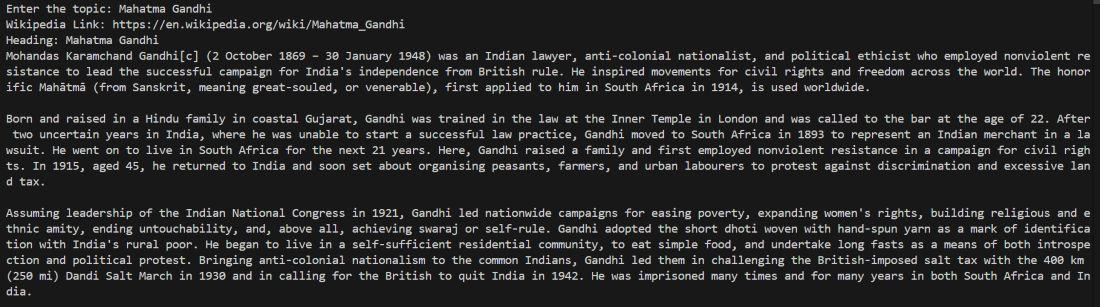
After entering a topic such as Mahatma Gandhi, the program automatically finds the Wikipedia page and prints the full article content in the terminal.
