
API testing has become a crucial part of modern software development, especially with the rise of microservices architectures, cloud-based systems, and interconnected web applications. In the era of dynamic and scalable applications, ensuring the proper functionality, performance, and security of APIs is vital.
What is an API?
An API (Application Programming Interface) acts as a bridge that allows two software systems to communicate with each other. APIs allow different systems, including web and mobile applications, databases, and external services, to exchange data programmatically, enabling functionality without direct user intervention.
API testing Types:
- Unit Testing
- Integration Testing
- End-to-End Testing
- Performance Testing
- Functional testing
- Security Testing
- Load testing
- Penetration testing
- Reliability testing
- Fuzz testing
What exactly do we check during API testing :
- Data accuracy.
- Response time.
- Duplicate or missing functionality.
- Authorization checks.
- Multithreaded issues.
- Security and performance issues.
- Error codes if the API returns.
- Reliability issues.
Key Characteristics of APIs:
- Integration Enabler: APIs allow different systems and services to work together. For instance, e-commerce websites use APIs to interact with payment gateways like PayPal or Stripe to process transactions.
- Usability: APIs are reusable across various platforms, such as web applications, mobile apps, and third-party integrations.
- Data Exchange: APIs are the backbone of data exchange in modern applications, ensuring that the client-side user interface (UI) and backend servers remain decoupled.
Example: Consider the scenario of an online payment system using APIs like PayPal or PhonePe to integrate payment processing into platforms like Amazon or Flipkart.
Why API Testing is Important
APIs play a central role in the communication between different components of an application. Whether it's retrieving data, updating records, or managing user authentication, APIs drive backend processes that influence the overall user experience. Hence, it’s essential to thoroughly test APIs to ensure they function correctly, securely, and perform as expected.
Key Reasons for API Testing:
- Core Functionality: Verifying that APIs correctly perform the expected operations (e.g., data retrieval, update, delete).
- Scalability: Ensuring that APIs can handle large volumes of requests without degradation in performance.
- Security: Identifying vulnerabilities that could lead to unauthorized access or data breaches.
- Faster Regression Cycles: API tests are generally quicker to execute than UI tests, enabling more frequent testing during development cycles.
- Cross-Platform Compatibility: APIs can be tested regardless of the frontend technology, making them more versatile than UI-based testing.
Architectures and Principles of APIs
Client-Server Architecture
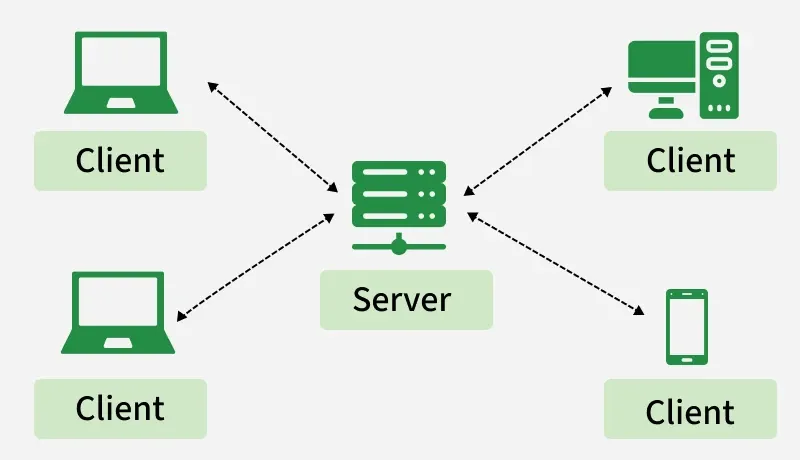
At the heart of most APIs is the Client-Server architecture. This model divides the system into two main components:
- Client: Initiates requests, usually a user application or web client.
- Server: Processes the client’s request and returns the appropriate response.
Benefits:
- Scalability: A central server can serve multiple clients simultaneously.
- Security: Centralized control of data and services provides better protection against unauthorized access.
REST Architecture
The REST (Representational State Transfer) architecture is the most widely used approach for designing networked applications. RESTful APIs follow specific principles to ensure statelessness and scalability:
- Statelessness: Each request from a client contains all the necessary information (no server-side session storage).
- Client-Server Separation: Clients and servers are separate entities, improving scalability and maintainability.
- Uniform Interface: Resources (such as data) are represented by unique URIs (Uniform Resource Identifiers).
- Cacheability: Responses are marked as cacheable or non-cacheable, reducing unnecessary server load.
HTTP Methods and Status Codes
APIs use HTTP methods to define the actions that a client wants to perform on the server:
| HTTP Method | Description | Use Case |
|---|---|---|
| GET | Retrieves data from the server (e.g., a web page or API data). | Used to fetch resources without making changes to the server. |
| POST | Submits data to the server (e.g., form data, file upload). | Used to create resources or submit data for processing. |
| PUT | Replaces the current resource with the new data provided. | Used to update an existing resource or create it if it doesn't exist. |
| DELETE | Deletes the specified resource from the server. | Used to remove a resource (e.g., deleting a user or record). |
| PATCH | Partially updates the resource with the given data. | Used to apply partial modifications to a resource. |
| HEAD | Retrieves the headers of a resource without the body (like GET but no data). | Used to check metadata about a resource (e.g., to check existence or last-modified date). |
| OPTIONS | Used to determine allowed operations or request methods on a resource. | Describes the communication options for the target resource. |
| CONNECT | Establishes a tunnel to the server, typically used for SSL/TLS connections. | Used for proxying connections, often in HTTPS communications. |
| TRACE | Echoes back the received request for diagnostic purposes. | Used to trace the request path to the server (e.g., debugging). |
HTTP Response Code
| HTTP Response Code Category | Description |
|---|---|
| 1xx: Informational | Communicates transfer protocol-level information. |
| 2xx: Success | Indicates that the REST web-service successfully carried out the requested action. |
| 3xx: Redirection | Indicates that the client must take some additional action to complete their request. |
| 4xx: Client Error | Points to errors caused by the client, such as bad requests or unauthorized access attempts. |
| 5xx: Server Error | Indicates server-side issues where the server takes responsibility for the error. |
| HTTP Response Code | Description |
|---|---|
| 200 | For a successful request. |
| 201 | For a successful request where data was created. |
| 204 | For an empty response. |
| 400 | For a bad request. The request could not be understood or was missing required parameters. |
| 401 | For unauthorized access. Authentication failed, or the user does not have permissions for the requested operation. |
| 403 | For forbidden access. Access is denied. |
| 404 | For data not found. |
| 405 | For a method not allowed or the requested method is not supported. |
| 500 | For an internal server error. |
| 503 | For a service unavailable error. |
HTTP URI and Resources
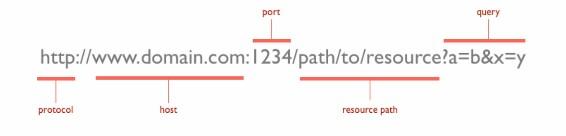
In REST architecture, URIs (Uniform Resource Identifiers) are used to identify resources. These URIs follow a hierarchical structure, allowing navigation from generic to specific data:
- http://localhost/books/ – Represents a collection of books.
- http://localhost/books/ISBN-0011 – Identifies a specific book using its ISBN.
- http://localhost/books/ISBN-0011/authors – Refers to the authors of the specific book.
Why Test APIs?
Testing APIs is essential to ensure the reliability, efficiency, and security of modern software applications. APIs act as the bridge between systems, making their accuracy crucial for seamless communication.
Benefits of API Testing
- Test the Core Functionality: Verifies if the API meets the expected requirements.
- Improved Test Coverage: Covers multiple scenarios beyond UI testing.
- Time Effective: Allows faster execution, reducing regression cycle durations.
- Early Defect Detection: Identifies issues in the development phase, saving time and cost.
- Language Independent: Can test APIs irrespective of the language in which they were developed.
Types of API Testing
- Functional Testing: Ensures the API performs expected operations correctly.
- Performance Testing: Measures API response times under various load conditions.
- Security Testing: Identifies vulnerabilities, such as unauthorized access or data breaches.
API testing is a critical step in delivering high-quality software solutions.
Tools for API Testing
There are several tools available to automate and streamline API testing. Here are a few popular ones:
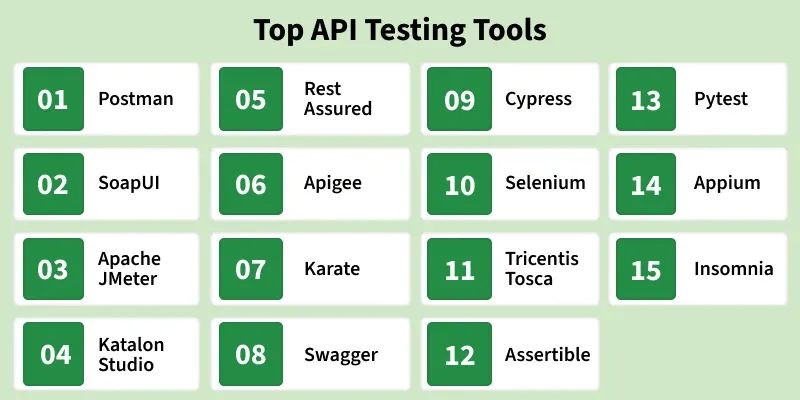
1. Postman
Postman is one of the most popular tools for API testing, particularly for manual testing and automated API workflows. It allows developers to create requests, validate responses, and set up collections for API testing.
Features:
- User-friendly interface for composing requests.
- Supports integration with CI/CD pipelines.
- Enables testing of REST, SOAP, and GraphQL APIs.
2. Rest Assured
Rest Assured is a Java-based library for automating REST API testing. It offers robust features like validation of JSON and XML responses, schema validation, and complex request handling.
Features:
- Comprehensive support for API tests in Java.
- Allows easy assertions on JSON/XML responses.
- Integrates seamlessly with testing frameworks like JUnit and TestNG.
3. Swagger
Swagger is primarily used for API documentation but also provides tools for testing APIs in live environments through a web interface.
4. JMeter
JMeter is designed for performance and load testing, making it ideal for testing API response times and scalability under load.
Best Practices in API Testing
1. Understand API Specifications
Before testing, it's essential to thoroughly read the API documentation to understand the available endpoints, methods, and data formats.
2. Test Core Functionality
Ensure that essential API operations, such as login or data retrieval, are working as expected.
3. Test All Scenarios
Include tests for both valid and invalid requests:
- Success (2xx codes).
- Client errors (4xx codes).
- Server errors (5xx codes).
4. Automate Repetitive Tests
Use tools like Rest Assured to automate API tests for regression testing and continuous integration.
5. Validate Response Codes and Body
Check that the API responds with the correct status code and returns the expected response body.
6. Perform Security Testing
Test authentication, authorization, and data encryption to prevent security vulnerabilities.
7. Performance Testing
Measure the response times of API requests under different loads to ensure the API can handle high traffic.
Real-World API Testing Example
Scenario: Checking Weather Data
Client Request: A user queries the weather for a specific location. HTTP Request:
GET /weather?location=New+DelhiServer Response (in JSON format):
{
  "location": "New Delhi",
  "temperature": "28°C",
  "condition": "Cloudy"
}
Test Cases:
- Verify that the response structure matches the expected JSON schema.
- Ensure that the HTTP status code is
200 OK. - Check that the response time meets SLA, i.e.,
<1 second.
The Test Pyramid
The test pyramid is a guideline for prioritizing test types:
- Unit Tests (70%): Validate individual components to ensure core functionality.
- Service/API Tests (25%): Focus on backend operations to test API functionality, speed, and coverage.
- UI Tests (5%): Test end-to-end workflows to minimize maintenance costs.
Types of Bugs that may occur in API Testing
- Performance Issues - API response Time can be very high, and they may have latency.
- Response data may not structure correctly ( JSON or XML )
- Security Issues
- Incorrect handling of valid argument values
- Improper errors/warning to caller
- Missing or Duplicate Functionality
- Reliability Issues : Difficulty in connecting and getting a response from API
