

Desktop search is a software application which searches the contents of computer files, rather than searching the internet. The purpose of this software is to enable the user to locate information on their computer that they just cannot seem to find. Typically, this data includes emails, chat logs, documents, contact lists, graphics files, as well as multimedia files including video and audio.
Searching a hard disk can be slow, especially bearing in mind the large storage capacities of modern hard disks. To ensure considerably better performance, desktop search engines build and maintain an index database. Populating this database is a system intensive activity. Consequently, desktop search engines can carry out indexing when the computer is not being used.
One of the key benefits of this type of software is that it allows the user to locate data stored on their hard disk almost instantaneously. They are designed to be fast. They are not integrated with a different application, such as a file manager.
We have included command-line tools. And if you prefer using the command-line, don’t forget the venerable find and locate utilities that are found in all popular distributions. While find is a very useful utility, it can be slow searching. Locate searches for files very quickly using a database file.
Here’s our verdict captured in a legendary LinuxLinks-style ratings chart. They are all published under an open source license.
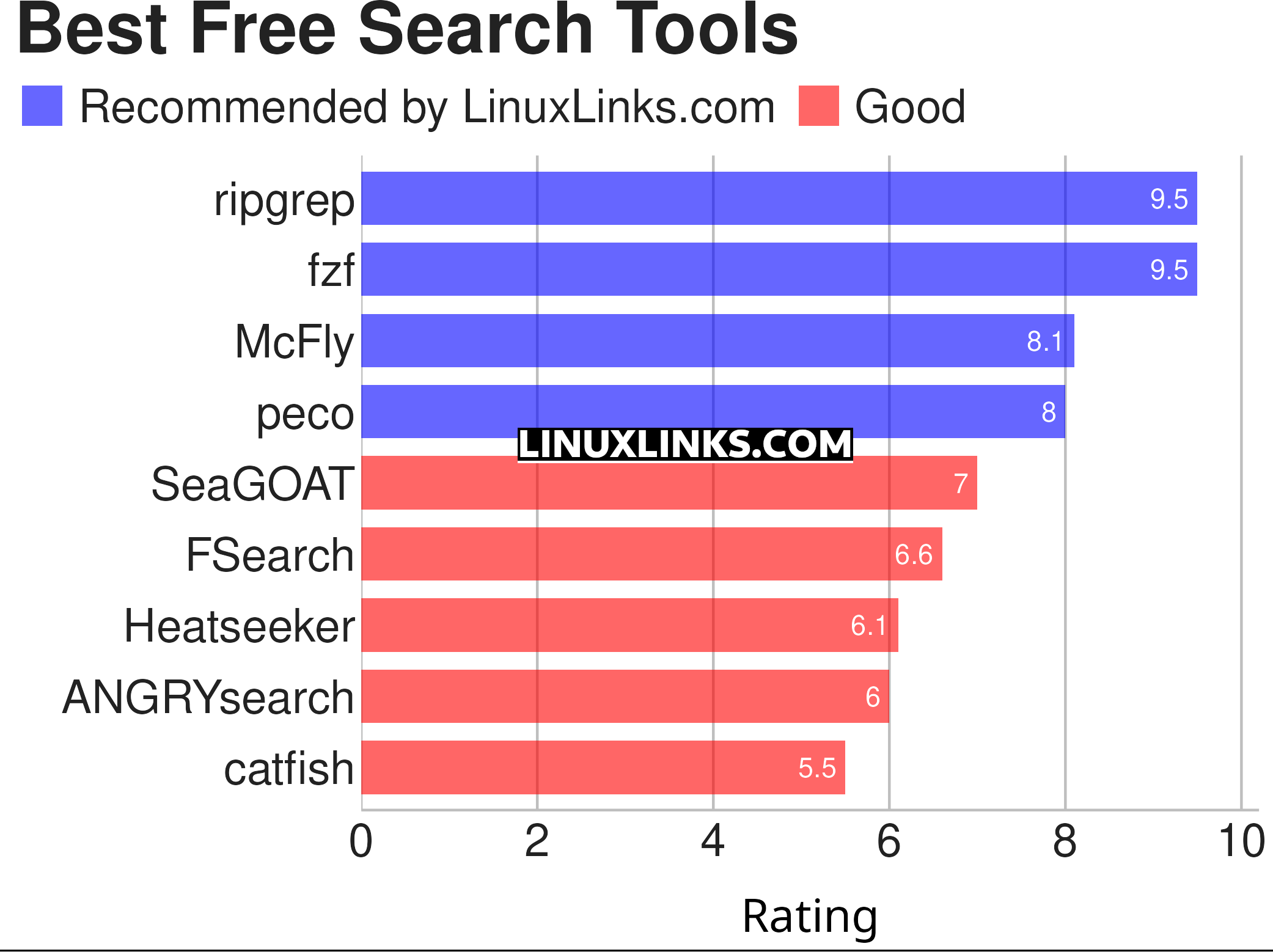
Let’s explore the 9 tools at hand. For each title we have compiled its own portal page, a full description with an in-depth analysis of its features, a screenshot of the software in action, together with links to relevant resources.
| Search Tools | |
|---|---|
| ripgrep | Recursively search directories for a regex pattern |
| fzf | Command-line fuzzy finder for your shell |
| McFly | Navigate through your shell history |
| peco | Interactive filtering tool |
| SeaGOAT | Semantic-code search engine |
| FSearch | Fast file search utility based on GTK+3 |
| Heatseeker | General-purpose fuzzy selector |
| ANGRYsearch | Like FSearch, a search tool inspired by Everything Search Engine |
| catfish | Versatile search GUI powered by locate and find |
This article has been updated to reflect the changes outlined in our recent announcement.
 Explore our comprehensive directory of recommended free and open source software. Our carefully curated collection spans every major software category. Explore our comprehensive directory of recommended free and open source software. Our carefully curated collection spans every major software category.This directory is part of our ongoing series of informative articles for Linux enthusiasts. It features hundreds of detailed reviews, along with open source alternatives to proprietary solutions from major corporations such as Google, Microsoft, Apple, Adobe, IBM, Cisco, Oracle, and Autodesk. You’ll also find interesting projects to try, hardware coverage, free programming books and tutorials, and much more. Know a useful open source Linux program that we haven’t covered yet? Let us know by completing this form. |

i often simply use locate/plocate because it’s so very fast.
if i need more control, i use
brootthat said, i find the scope of this article a bit weird. It mixes everything, grep tools, cli-history, filesearch … 🙂
It’s a representative sample.