List of the Best Knowledge Management Systems with Comparison:
Knowledge management software is an application that is used to store, retrieve, and share information.
We can also say that Knowledge management software is a sub-category of the enterprise content management system. It is for sharing the information and in turn, helps employees, managers, agents, and customers by making the knowledge available.
Table of Contents:
- Introduction – Knowledge Management Software
- Top Knowledge Management Systems Worldwide
- Comparison of Knowledge Management Software
- #1) monday.com
- #2) Zendesk
- #3) Confluence
- #4) Zoho Desk
- #5) Jira Service Management
- #6) ClickUp
- #7) ServiceNow Knowledge Management
- #8) Guru
- #9) ComAround Knowledge
- #10) Inkling
- #11) KnowledgeOwl
- #12) KBPublisher
- #13) Knowmax
- #14) Scribe
- #15) Document360
- #16) ProProfs Knowledge Base
- #17) LiveAgent
- Additional Knowledge Management Software
- Conclusion
Introduction – Knowledge Management Software

Many knowledge management software is cloud-based and hence they are platform-independent. It can be accessed on mobiles and tablets. Thus You can read the information anywhere, and at any time. The advanced or intelligent search feature of this software saves a lot of time that is involved in searching for information.
With the help of this software, companies can also share important information or FAQs with their employees and customers. As the information is easily available through knowledge management software, people can work more effectively.
Knowledge management software is used by companies for creating white papers, user manuals, articles, and business processes.

[image source]
Our TOP Recommendations:
 |  |  |  |
 | | | |
| monday.com | Zendesk | Jira Service Management | ClickUp |
| • Store data in a workspace • Quickly search for answers • Automate processes easily | • Ticketing System • Community Forum • Live Client Interaction | • Service Desk • Editing Tools | • Plan, track, collaborate • Ready-made templates • Automate repetitive tasks |
| Price: $8 monthly Trial version: 14 days | Price: $89 monthly Trial version: 14 days | Price: $49 monthly Trial version: Free for 3 agents | Price: $5 monthly Trial version: Infinite |
| Visit Site >> | Visit Site >> | Visit Site >> | Visit Site >> |
Features
The most prominent features that knowledge management software should have include powerful search, collaboration, and integration with the other systems. Knowledge management software will be more useful and will save more time if it is accessible anytime, anywhere.
Hence it should be available on tablets and mobile devices.
Further Reading => Most Popular Knowledge Base Software of the Year
Benefits
- You can easily update the information.
- Accuracy and consistency.
- You can quickly find the required information, hence it saves a lot of time.
- It helps in training new employees.
This article will explain all about the top Knowledge Management tools in detail.
Top Knowledge Management Systems Worldwide
Enlisted below are the top Knowledge Management Software that is most commonly used worldwide.
- monday.com
- Zendesk
- Confluence
- Zoho Desk
- Jira Service Management
- ClickUp
- LiveAgent
- ServiceNow Knowledge Management
- Guru
- ComAround Knowledge
- Inkling
- KnowledgeOwl
- KBPublisher
- Knowmax
- Scribe
- Document360
- ProProfs Knowledge Base
Comparison of Knowledge Management Software
| KM Software | Platform | Ratings | Verdict | Price |
|---|---|---|---|---|
monday.com | Web-based | 5 Stars | Simple, intuitive, and customizable Work OS. | Free plan, the price starts at $8 per seat per month. |
Zendesk | Web-based, Android, iOS. | 5 Stars | The system is good. It performs all the required functions and is worth for the price. | Starts at $89. |
Confluence | Android, iOS, Linux, Windows. | 4.5 stars | Knowledge and document sharing is easy. It provides many useful features like exporting to PDF and copy & paste of images etc. | The price for upto 10 users will be $10 per month. For 11 to 100 users, the cost will be $5 per user/month. |
Zoho Desk | Web-based, iOS, Android | 4.6 stars | Multi-brand help center, portal customization, domain mapping and secure access. | Free plan, the price starts at $7 per user per month. |
Jira Service Management | Windows, Mac, Web-Based, Android, iOS | 4.5 stars | A collaborative tool that makes setting up a knowledge base for self-service easy. | Premium plan starts at $47 per agent. Custom enterprise plan is also available. |
ClickUp | Windows, Mac, Linux, iOS, Android, Web-based. | 5 Stars | ClickUp Docs will keep all your documents in one place. | Free plan, Free trial, The price starts at $5/member/month. |
Let’s Explore!!
#1) monday.com

monday.com offers an open platform to help organizations create the tools according to their needs. It is a Work Operating System for managing all the work from one workspace. It offers a lot of visual as well as customizable templates. It gets seamlessly integrated with the existing tool.
Best Features:
- Knowledge Base library board gives an overview of all the articles.
- Knowledge Base Backlog Board helps with managing the workload.
- With monday.com, navigating the knowledge database becomes easier as it has features of custom statuses, hashtags, advanced filters, etc.
- monday.com has features to automate the workspaces that can be used to remind the team members to maintain the workspaces.
Price: monday.com offers a free plan for individuals. There are four pricing plans, Basic ($8 per seat per month), Standard ($10 per seat per month), Pro ($16 per seat per month), and Enterprise (Get a quote).
Verdict: monday.com is a customizable Work OS that can help you with almost all use cases. It can be used for precise project planning to detailed jargon.
#2) Zendesk
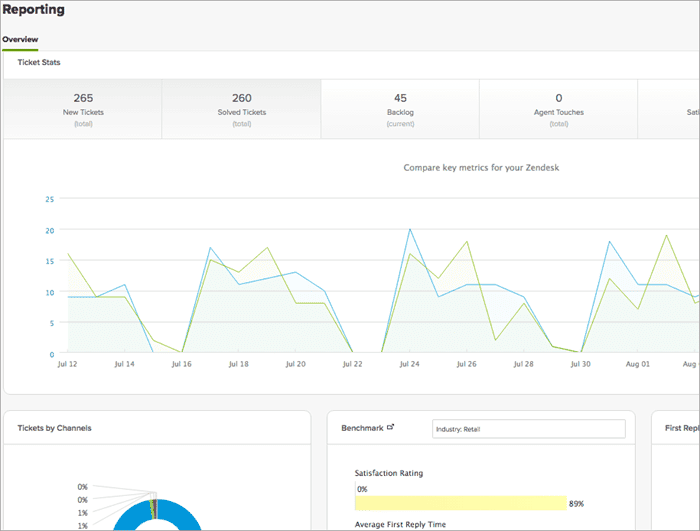
Zendesk provides an open, flexible, and extensible platform for the knowledge base. It will help you in creating self-help customer service. It offers solutions to small, mid-size, and large companies. This software supports more than 30 languages.
It is best for Help Desk, Customer Support, SaaS, Customer Community, and Customer Service.
Best Features
- It will allow you to interact with customers through phone, email, chat, social media, etc.
- Easy to use.
- Easy to scale and implement.
- It has a ticketing system and a community forum.
Price: Starts at $89.
Verdict: The system is good. It performs all the required functions and is worth the price.
#3) Confluence
[image source]
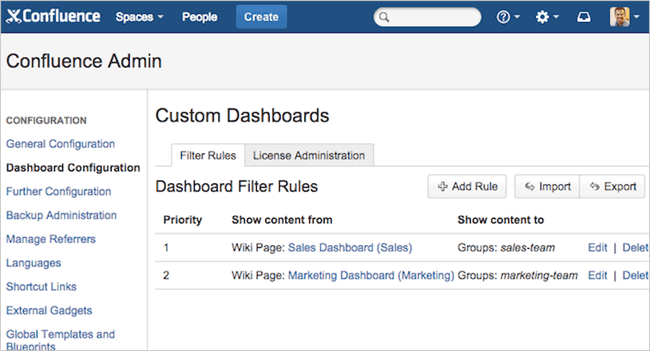
Confluence is a content collaboration software by Atlassian. The system can be used on Android, iOS, Linux, and Windows. It is a cloud-based system. This will help you to publish, organize, and access knowledge from one place.
Creating a document, providing feedback, and iterating to update the document is easier with the help of this tool.
Best Features
- With the help of this software, you can collaborate on a project level.
- You can create documentation.
- You will be able to access and publish information at a centralized location.
- It can be integrated with Jira.
Price: The price for up to 10 users will be $10 per month. For 11 to 100 users, the cost will be $5 per user/month. You can try the software for free for 7 days.
Verdict: Knowledge and document sharing are easy. It provides many useful features like exporting to PDF and copy & paste of images.
#4) Zoho Desk
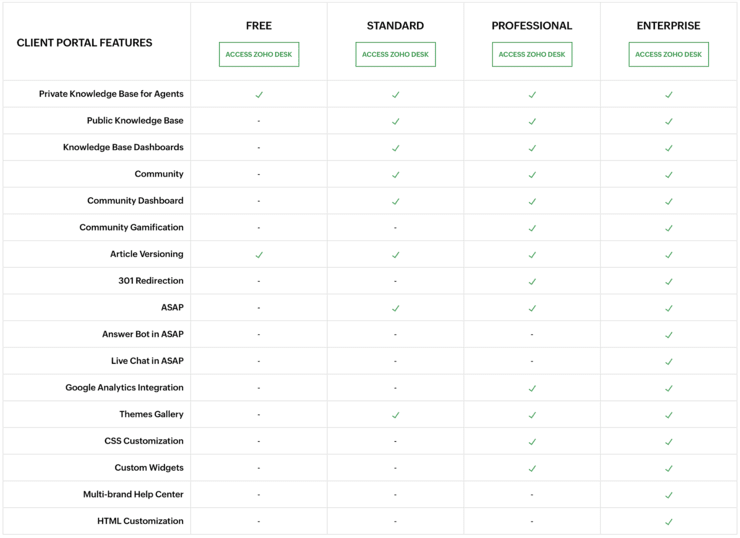
Zoho Desk is the industry’s first context-aware software built to resolve everyday customer service challenges. This omni-channel customer service software is easy to sign up and use.
It has one of the best Knowledge Management tools for creating lasting experiences for your customers. You can set up content in your KMS quickly and easily through the easy-to-use UI. Zoho Desk’s Knowledge Management System is available in multiple languages.
The Zoho Desk KB offers a multi-brand help center, portal customization, domain mapping, and secure access. It enables the customers to find their answers from the repository of articles and FAQs uploaded on the company’s website.
Best Features:
- Multi-brand help center
- Multi-lingual support
- Omni-channel ticket management
- Dedicated Reports and Analytics for KB
- Security and role-based access
Price: Zoho Desk offers a 15-day free trial after which teams can continue with the free plan for 3 agents or choose from the paid editions ranging from US $7 – US $40 per agent per month.
Verdict: It is a cloud-based system. Ticket tracking is easy. The overall system is also easy to use.
#5) Jira Service Management

Jira Service Management provides IT teams with all the tools they need to set up a knowledge base that facilitates self-service. The platform allows you to surface self-service articles on websites so employees and customers can find them easily and help themselves.
The platform can also be used to trace knowledge usage in a bid to identify content gaps, optimize articles, and identify articles that just aren’t working. Perhaps the best part of Jira Service Management is the ML-powered search that can provide customers and employees with a curated search result.
Features:
- Service Desk Creation
- Rich Editing and Formatting tools
- Knowledge Insights
- Machine Learning Powered Search
- Incident Response Management
Verdict: With Jira Service Management, you get a knowledge management system that allows IT teams to enable self-service, manage content, and deflect more requests seamlessly.
Price: Jira Service Management is free for up to 3 agents. Its premium plan starts at $47 per agent. A custom enterprise plan is also available.
#6) ClickUp

ClickUp is an all-in-one platform for project, process, task, and time management. It is a feature-rich platform and contains a lot of capabilities like collaboration & reporting and Docs & Wikis. You can create knowledge bases, docs, and wikis. Teams can leave comments and collaborate in real time.
Features:
- ClickUp has functionalities for assigning comments and tasks from the docs themselves.
- You can set the custom permissions for viewing, commenting, and editing the document.
- It has multi-player editing capabilities to collaborate efficiently.
Price: ClickUp offers the solution with four pricing plans, Free plan, Unlimited ($5 per member per month), Business ($9 per member per month), and Enterprise (Get a quote). A free trial is available for Unlimited and Business plans.
Verdict: ClickUp Docs will keep all your documents in one place. It will let you import the work from external applications.
#7) ServiceNow Knowledge Management

This tool will allow organizations to maintain a knowledge base, department-wise. It allows customizing workflows department-wise.
It is for customers, employees, and agents. Agents can create a knowledge base while resolving the issues. The system can be accessed from desktops and mobiles. It will help in improving productivity by solving issues and documenting answers.
Further Reading => BEST School Management Software of the Year
Best Features
- Agents can search and create information.
- The system can be integrated with service portals.
- You will be able to import the Word document.
- You can customize the search.
- It allows for creating versions of the articles.
- It has contextual search and extended search capabilities.
Price: Contact them for more pricing information.
Verdict: The system provides good features and functionalities. It is easy to use. Supported languages include English, German, Spanish, Japanese, French, Italian, Dutch, and Portuguese.
#8) Guru

Guru is a cloud-based system. It can be used through all the major browsers. It can be used on tablets and mobiles.
This system is for customer-facing teams. The tool will give you a reminder to update the knowledge base. Reports and analytics will give you information about the knowledge base like which knowledge base is mostly used, etc.
Best Features
- You can define roles and groups.
- The tool provides recommendations for content.
- It has a web application as well as a browser extension.
- The browser extension is for many browsers like Firefox, Chrome, and Opera.
- You can find, record, and share knowledge while chatting with your team.
Price: Price plans start at $380 per month.
Verdict: The system is easy to use with good functionalities. However, the Search feature is not that good, and it needs improvement.
#9) ComAround Knowledge

[image source]
ComAround provides you with the platform for creating a knowledge base and self-service solution. It is a cloud-based tool.
The system can be integrated with your existing tools. It provides the articles for Windows, Outlook, Office, Apple, and Adobe. It can be integrated with ComAround Connect. Important features provided by this tool include language translation, Screen recording, and multiple searches.
Best Features
- The system can be integrated with Business applications, Incident management systems, and service management tools.
- Articles can be translated into any language.
- Facility to record the video.
Price: Contact them for more pricing information. The price depends on the company size, user volumes, and subscription term.
Verdict: It supports including images and videos in the article. The system is easy to use.
#10) Inkling

Inkling is a system for front-line employees. The system is for Restaurants, Retail, and Enterprise L & D. It works on Mobiles. It will provide you with one platform for content creation, storing, and distributing0 the knowledge. It also has a collaboration tool that can be used on mobiles.
To improve performance, the tool will help you to create training. There is a personalized library for every user from where he can search and find the information.
Best Features
- Intelligent search.
- Simple and automatic content updates.
- Interactive training can be made available on mobile as well.
Price: Contact them for more pricing information.
Verdict: System with good functionalities. It only supports the English language.
#11) KnowledgeOwl

KnowledgeOwl helps in creating a knowledge base. It supports customization. It is a customer support software. With the help of this tool, you can build sites, manuals, knowledge bases, and much more.
You can also create FAQs for the application or website. It provides an open API to create your integration. It allows you to create a PDF for the complete knowledge base. While creating this PDF, you can exclude private articles and videos.
Best Features:
- APIs can be used for several different purposes using the methods GET, PUT, POST, and DELETE.
- For content creation, the tool provides a WYSIWYG editor.
- Using third-party tools, you can include videos.
- You can set access permissions.
- It provides many other features like auto-save, levels and hierarchy, and PDF format for download, etc.
Price: There are three pricing plans, i.e. Solo ($79 per month), Team ($99 per month), and Business ($299 per month).
Verdict: Easy to use. Good features and functionalities. Good customer support. 5-star rating.
#12) KBPublisher

This knowledge management software helps you to create articles, white papers, user manuals, and business processes. It can be accessed from mobiles and tablets. It is a web-based application. It will help you to share the information with customers, employees, partners, and colleagues.
It helps you in creating a customer self-service knowledge base, thereby saving a lot of your time of answering phones.
Best Features:
- It has a full-text search.
- You can add hyperlinks, images, and videos to your content.
- You can define roles and groups for security purposes.
- It supports automated processes for reviewing, approving and publishing articles.
- For the content, it has spell-check, word variation, and partial-word recognition features.
Price: Pricing starts from $198.
Verdict: It is a web-based application. The system is easy to use. It only supports the English language.
#13) Knowmax

Knowmax is an AI-backed knowledge management platform that helps accelerate the customer experience with access to the right information at the right time.
It organizes data that is spread in silos and creates a consistent flow of internal and external information across all touchpoints.
The cloud-based knowledge platform helps you create decision trees, articles, FAQs and visual guides for seamless customer service.
Here is a list of must-have features of an enterprise-grade scalable and relevant knowledge base for you. This checklist can act as a go-to resource for key considerations when selecting a robust and future-ready KM platform.
Best Features:
- A no-code, DIY cognitive decision tree that helps reduce AHT by up to 15%.
- Intuitive search with keywords and meta tags for quick information access.
- A visual guide for step-by-step troubleshooting for improved CX.
- Knowmax’s Chrome widget reduces screen toggles resulting in faster resolution.
- Content migration via an AI engine in split seconds.
Pricing: Request a free demo for modules and pricing details.
Verdict: Knowmax is an easy-to-use, cloud-based knowledge management software that drives customer experiences with excellent value for money.
#14) Scribe

Scribe is both a knowledge-based article tool and a lightweight knowledge management tool itself. Its core functionality is creating instant step-by-step guides, capturing your screen while you complete a process, taking screenshots, and writing instructions for you.
These Scribes can be embedded in any tool, including an existing knowledge base. Scribe also offers knowledge management functionality for internal use – folders, labeling, analytics, permissions, and more. For small, agile teams, Scribe’s library can serve as a knowledge base.
For larger, more advanced teams, Scribe guides should be used to build out your knowledge base, not to replace it.
Best Features:
- Instantly created step-by-step guides.
- Embeddable guides within knowledge bases, wikis, CMS, or project management tools.
- Automated screenshot highlighting.
- Recommended guides appear in your Chrome extension.
Price: Free Chrome extension with unlimited guides and users. The Pro version costs $29/month per user and offers desktop recording, screenshot editing, and other features.
Verdict: The core tool is genuinely free and simple to create knowledge management guides. It integrates with other knowledge management tools. It is a good option for teams that need a simple knowledge base.
#15) Document360

Document360 is the Knowledge base software that helps you to create a self-service knowledge base for your customers and internal users (public or private knowledge bases). A powerful search module is a must-have feature for any knowledge management software.
Document360 comes with a powerful AI-based real-time search. This helps your customers to find solutions for their problems instantaneously using the AI-powered search.
Also, it comes with robust features like an uncompromised authoring experience, rich theme, built-in analytics, enterprise-grade restore, back-up, and versioning functionalities, etc.
Best Features
- Multiple knowledge bases – It supports numerous projects or documentation websites so that you do not have to look anywhere else when your product list expands.
- Best-in-class Markdown editor for efficient and structured writing.
- Security at the category level – In addition, advanced security access at multiple levels to cover all your scenarios. You can provide access to your Readers at different levels.
Price: Price plans start at $99 per month. You can also try Document360’s free trial.
Verdict: The knowledge base is easy to use with good functionalities. It has the facility to define roles and access. Also, you can restrict access via IP address as well. It can be integrated with Intercom, Freshdesk, Microsoft and Zendesk, and many more. It supports International languages and third-party Integrations.
#16) ProProfs Knowledge Base

ProProfs Knowledge Base is a simple yet powerful, carefully designed to boost your customer support and internal team collaboration. It helps you build a self-service knowledge base for your customers and an internal knowledge base for your employees.
It is easy to set up and use, with no coding skills required at your end. You can get started right away with its 40+ templates that make content creation fast and easy.
Whether you are a startup, small business, or enterprise looking to create a knowledge base for your customers, support staff, HR department, or any other team, ProProfs Knowledge Base is the right fit.
Best Features
- MS Word-like editor for effortless writing and editing.
- Insightful reports to measure and improve article performance.
- AI-powered search that gives quick and relevant answers.
- 40+ free knowledge base templates.
- Roles and permissions to help teams work in collaboration.
- Single sign-on and password control system.
- Page and folder level restrictions.
- The tool supports over 90 languages.
Pricing:
The tool offers three pricing plans:
- Forever Free
- Essentials: $0.30/page/month
- Premium: $0.50/page/month
Verdict: It is easy to use and has got the best-in-class features. It also offers great value for money.
#17) LiveAgent

LiveAgent is a great knowledge base software that gives you the option to create multiple stunning knowledge bases as a part of your self-service solution.
The software is equipped with a powerful WYSIWYG editor that lets you create and fully customize articles, forums, feedback & suggestion boxes, and FAQs. The software is ideal for teams of all sizes and industries.
Best Features
- LiveAgent gives you the option to create multiple internal and external knowledge bases complete with articles, forums, and FAQs.
- In addition to knowledge bases, LiveAgent is equipped with powerful ticketing software, a native live chat, a built-in call center, and advanced automation & reporting features.
- The software offers endless customization options, and easily scales and adapts to your business needs.
- LiveAgent offers concierge data migrations and implementation of the software.
- 24/7 support
- The software is offered in more than 40 language translations.
Price: All LiveAgent plans include knowledge base capabilities. The cheapest plan costs $15/mo per agent, but you can get all that LiveAgent has to offer for just $39/mo per agent.
Verdict: The price-to-value ratio is great.
Additional Knowledge Management Software
#18) Freshdesk
It is a customer support software that is available for free.
It allows you to collaborate with other teams. It has a ticketing system and many other features like helpdesk reports, portal customization, automatic solution suggestions, etc. For more advanced features, you can select paid plans. The pricing plans start at $19 per agent per month.
#19) Bloomfire
Bloomfire provides a solution for knowledge sharing and customer insights. It is knowledge management as well as collaboration software. It has an intelligent search that makes use of Scarlet. It can be integrated with popular online storage devices. It has multiple levels of categorization.
You can schedule the posts and set reminders for updating or reviewing the knowledge base.
#20) Elium
Elium is for consulting firms and industries. It allows you to share information easily and you can take information from any source. It is for employees, customers, and partners. It has mobile applications, search and filter options, content tagging, and many more features. It also allows you to use multiple filters.
Conclusion
Zendesk can be used by any sized company and it supports more than 30 languages. ProProfs Knowledgebase provides nice features with affordable pricing plans. Zoho Desk is good for customer support activities. Confluence can provide advanced features such as content collaboration software.
Inkling provides good features for content creation as a collaboration tool. KnowledgeOwl provides good features, functionalities, and ease of use at an affordable price. All the other tools that are mentioned in this article also have some unique features and functionalities.
Hope this article will help you in knowing more about the top knowledge management software and indeed assist you in choosing the right one.
Was this helpful?
Recommended Reading
-

Explore the top-rated Talent Management System (TMS) with pricing and features. Read these reviews from experts and pick the right Talent Management Software of your choice: Talent management is important for organizations. Aligning human resources with the overall business strategy is a critical element for the success of a company.…
-
Manage and execute the operations of Warehouse Management excellently with these top Warehouse Management Software Systems. Wisely pick the right WMS Software as per your needs: In today's modern world, almost everything is available online. We buy items from shopping sites, pay for the items from anywhere and if we…
-

Best Retail POS System for Small Businesses: Reviews and Pricing Comparison A retail POS system is a system that includes a customer display, barcode scanner, receipt printer, cash drawer, monitor, computer, and debit/credit card reader. POS systems offer the functionalities of CRM to interact with the customers or integration with…
-

Comparison and Review of the Top Online Employee Appraisal and Performance Management Software Systems: Performance management is a complete process of defining a job as required until an employee leaves that job. Performance management is about developing clear job descriptions, recruiting skilled personnel, selecting employees, training new employees, compensation, and…