Summary: in this tutorial, you’ll learn how to use the SQL CROSS JOIN clause to combine every row from the first table with every row in the second table.
Introduction to SQL CROSS JOIN clause #
The CROSS JOIN clause is an optional clause of the SELECT statement. The CROSS JOIN clause allows you to create combinations of all rows from two tables.
Here’s the syntax of the CROSS JOIN clause:
SELECT
  select_list
FROM
  table1
  CROSS JOIN table2;Code language: SQL (Structured Query Language) (sql)
In this syntax:
- First, provide the first table in the
FROMclause. - Second, specify the second table you want to merge the rows of the first table in the
CROSS JOINclause.
Unlike a left join, right join, inner join, and full join, the cross join does not have a condition.
The CROSS JOIN clause merges every row from the first table (table1) with every row in the second table (table2). It returns a result set that includes all possible combinations of the rows in both tables.
The result set of a CROSS JOIN is often called the Cartesian product of two tables.
If the table1 has n rows and table2 has m rows, the CROSS JOIN will return a result set that includes n * m rows.
For example, if the table1 has two rows and table2 has three rows, the result of the cross-join of the two tables will have 6 rows (2 * 3).
Alternatively, you can perform a cross-join by listing the tables in the FROM clause of the SELECT statement as follows:
SELECT
  select_list
FROM
  table1,
  table2;Code language: SQL (Structured Query Language) (sql)
Understanding the cross join #
Suppose you have two tables:
- The
Xtable has two columnsid(key) andx. - The
Ytable also has two columnsid(key) andy.
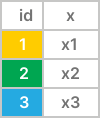

The cross join combines every row from the left table (X) and the right table (Y) to create the final result set:
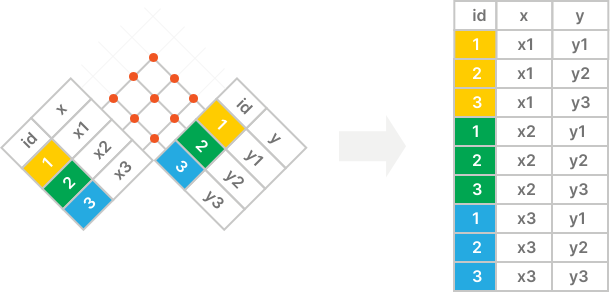
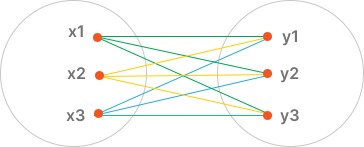
The following diagram is another way to illustrate a cross join:
SQL CROSS JOIN clause example #
First, create a new table called trainings to store the training programs:
CREATE TABLE trainings (
  id INT PRIMARY KEY,
  program_name VARCHAR(255) NOT NULL,
  duration INT NOT NULL
);Code language: SQL (Structured Query Language) (sql)Second, insert some rows into the trainings table:
INSERT INTO
  trainings (id, program_name, duration)
VALUES
  (1, 'Leadership Skills', 1),
(2, 'Communication Skills', 2);Code language: SQL (Structured Query Language) (sql)Third, use a CROSS JOIN clause to generate all possible combinations of employees and training programs:
SELECT
  first_name,
  program_name
FROM
  employees
  CROSS JOIN trainings
ORDER BY
first_name;Code language: SQL (Structured Query Language) (sql)Output:
 first_name  |     program_name
-------------+----------------------
 Adam        | Communication Skills
 Adam        | Leadership Skills
 Alexander   | Leadership Skills
 Alexander   | Communication Skills
 Alexander   | Communication Skills
 Alexander   | Leadership Skills
 Britney     | Communication Skills
 Britney     | Leadership Skills
...Code language: plaintext (plaintext)
The following query performs the same CROSS JOIN clause as the example above but uses the alternative syntax:
SELECT
  first_name,
  program_name
FROM
  employees,
  trainings
ORDER BY
first_name;Code language: SQL (Structured Query Language) (sql)Summary #
- Use the SQL
CROSS JOINclause to combine every row in the first table with every row from the second table.
Quiz #
<iframe
  name="quiz"
  src="/quiz/?quiz=cross-join"
  height="700"
  width="600"
  class="iframe"
></iframe>
Code language: HTML, XML (xml)
Databases #
- PostgreSQL CROSS JOIN
- MySQL CROSS JOIN
- SQLite CROSS JOIN
- Db2 CROSS JOIN
- Oracle CROSS JOIN
- SQL Server CROSS JOIN


