Summary: in this tutorial, you will learn how to use the SQL GROUP BY clause to group rows based on one or more columns.
Introduction to SQL GROUP BY clause #
The GROUP BY is an optional clause of the SELECT statement. The GROUP BY clause allows you to group rows based on values of one or more columns. It returns one row for each group.
The following shows the basic syntax of the GROUP BY clause:
SELECT
  column1,
  column2,
  aggregate_function (column3)
FROM
  table_name
GROUP BY
  column1,
  column2;Code language: SQL (Structured Query Language) (sql)
The following picture illustrates shows how the GROUP BY clause works:
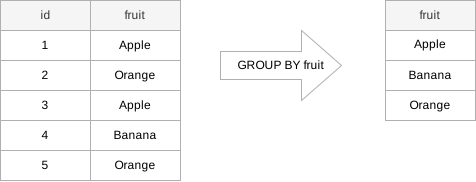
The table on the left side has two columns id and fruit. When you apply the GROUP BY clause to the fruit column, it returns the result set that includes unique values from the fruit column:
SELECT
  fruit
FROM
  sample_table
GROUP BY
  fruit;
In practice, you often use the GROUP BY clause with an aggregate function such as MIN, MAX, AVG, SUM, or COUNT to calculate a measure that provides the information for each group.
For example, the following illustrates how the GROUP BY clause works with the COUNT aggregate function:
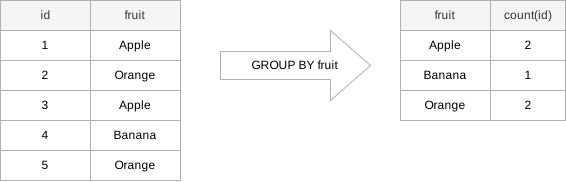
In this example, we group the rows by the values of the fruit column and apply the COUNT function to the id column. The result set includes the unique values of the fruit columns and the number of the corresponding rows.
SELECT
  fruit,
  COUNT(id)
FROM
  sample_table
GROUP BY
  fruit;
The columns that appear in the GROUP BY clause are called grouping columns. If a grouping column contains NULL values, all NULL values are summarized into a single group because the GROUP BY clause considers all NULL values equal.
SQL GROUP BY examples #
We will use the employees and departments tables in the sample database to demonstrate how the GROUP BY clause works.
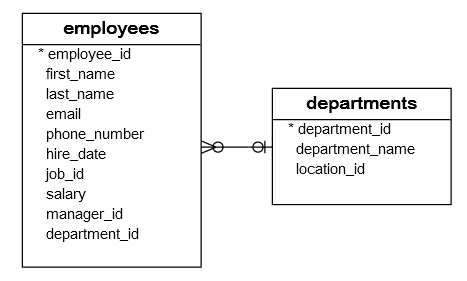
The following example uses the GROUP BY clause to group the values in department_id column of the employees table:
SELECT
  department_id
FROM
  employees
GROUP BY
  department_id
ORDER BY
department_id;Code language: SQL (Structured Query Language) (sql)Output:
 department_id
---------------
             1
             2
             3
             4
             5
             6
             7
             8
             9
            10
            11
In this example:
- First, the
SELECTclause returns all values from thedepartment_idcolumn ofemployeestable. - Second, the
GROUP BYclause groups all values into groups.
The department_id column of the employees table has 40 rows, including duplicate department_id values. However, the GROUP BY groups these values into groups.
Without an aggregate function, the GROUP BY behaves like the DISTINCT keyword:
SELECT DISTINCT
  department_id
FROM
  employees
ORDER BY
department_id;Code language: SQL (Structured Query Language) (sql)The GROUP BY clause will be more useful when you use it with an aggregate function.
For example, the following statement uses the GROUP BY clause with the COUNT function to count the number of employees by department:
SELECT
  department_id,
  COUNT(employee_id) headcount
FROM
  employees
GROUP BY
department_id;Code language: SQL (Structured Query Language) (sql)Output:
 department_id | headcount
---------------+-----------
            11 |         2
             9 |         3
             3 |         6
             5 |         7
             4 |         1
            10 |         6
             6 |         5
             2 |         2
             7 |         1
             1 |         1
             8 |         6
How it works.
- First, the
GROUP BYclause groups the rows in theemployeestable by department id. - Second, the
COUNT(employee_id)returns the number of employee id values in each group.
SQL GROUP BY with INNER JOIN example #
The following example returns the number of employees by department. And it uses an INNER JOIN clause to include the department name in the result:
SELECT
  department_name,
  COUNT(employee_id) headcount
FROM
  employees e
  INNER JOIN departments d ON d.department_id = e.department_id
GROUP BY
department_name;Code language: SQL (Structured Query Language) (sql)Output:
 department_name  | headcount
------------------+-----------
 Accounting       |         2
 Purchasing       |         6
 Marketing        |         2
 Administration   |         1
 Finance          |         6
 Human Resources  |         1
 Public Relations |         1
 Executive        |         3
 Shipping         |         7
 Sales            |         6
 IT               |         5Code language: PHP (php)
SQL GROUP BY with HAVING example #
The following example uses the HAVING clause to find departments with headcounts are greater than 5:
SELECT
  department_name,
  COUNT(employee_id) headcount
FROM
  employees e
  INNER JOIN departments d ON d.department_id = e.department_id
GROUP BY
  department_name
HAVING
  COUNT(employee_id) > 5
ORDER BY
headcount DESC;Code language: SQL (Structured Query Language) (sql)Output:
 department_name | headcount
-----------------+-----------
 Shipping        |         7
 Purchasing      |         6
 Finance         |         6
 Sales           |         6
SQL GROUP BY with MIN, MAX, and AVG example #
The following query returns the minimum, maximum, and average salary of employees in each department.
SELECT
  department_name,
  MIN(salary) min_salary,
  MAX(salary) max_salary,
  ROUND(AVG(salary), 2) average_salary
FROM
  employees e
  INNER JOIN departments d ON d.department_id = e.department_id
GROUP BY
department_name;Code language: SQL (Structured Query Language) (sql)Output:
 department_name  | min_salary | max_salary | average_salary
------------------+------------+------------+----------------
 Accounting       |    8300.00 |   12000.00 |       10150.00
 Purchasing       |    2500.00 |   11000.00 |        4150.00
 Marketing        |    6000.00 |   13000.00 |        9500.00
 Administration   |    4400.00 |    4400.00 |        4400.00
 Finance          |    6900.00 |   12000.00 |        8600.00
 Human Resources  |    6500.00 |    6500.00 |        6500.00
 Public Relations |   10000.00 |   10000.00 |       10000.00
 Executive        |   17000.00 |   24000.00 |       19333.33
 Shipping         |    2700.00 |    8200.00 |        5885.71
 Sales            |    6200.00 |   14000.00 |        9616.67
 IT               |    4200.00 |    9000.00 |        5760.00Code language: PHP (php)
SQL GROUP BY with SUM function example #
To get the total salary per department, you apply the SUM function to the salary column and group employees by the department_id column as follows:
SELECT
  department_name,
  SUM(salary) total_salary
FROM
  employees e
  INNER JOIN departments d ON d.department_id = e.department_id
GROUP BY
department_name;Code language: SQL (Structured Query Language) (sql)Output:
 department_name  | total_salary
------------------+--------------
 Accounting       |     20300.00
 Purchasing       |     24900.00
 Marketing        |     19000.00
 Administration   |      4400.00
 Finance          |     51600.00
 Human Resources  |      6500.00
 Public Relations |     10000.00
 Executive        |     58000.00
 Shipping         |     41200.00
 Sales            |     57700.00
 IT               |     28800.00Code language: PHP (php)
SQL GROUP BY multiple columns #
So far, you have seen that we have grouped all employees by one column. For example, the following clause places all rows with the same values in the department_id column in one group.
GROUP BY department_idCode language: SQL (Structured Query Language) (sql)How about grouping employees by values in both department_id and job_id columns?
GROUP BY department_id, job_idCode language: SQL (Structured Query Language) (sql)This clause will group all employees with the same values in both department_id and job_id columns in one group.
The following statement groups rows with the same values in both department_id and job_id columns in the same group then return the rows for each of these groups.
SELECT
  department_name,
  job_title,
  COUNT(employee_id)
FROM
  employees e
  INNER JOIN departments d ON d.department_id = e.department_id
  INNER JOIN jobs j ON j.job_id = e.job_id
GROUP BY
  department_name,
job_title;Code language: SQL (Structured Query Language) (sql) department_name | job_title | count
------------------+---------------------------------+-------
Purchasing | Purchasing Clerk | 5
Public Relations | Public Relations Representative | 1
Administration | Administration Assistant | 1
Marketing | Marketing Representative | 1
Shipping | Shipping Clerk | 2
Shipping | Stock Clerk | 1
Purchasing | Purchasing Manager | 1
IT | Programmer | 5
Accounting | Accounting Manager | 1
Accounting | Public Accountant | 1
Finance | Accountant | 5
Sales | Sales Manager | 2
Human Resources | Human Resources Representative | 1
Sales | Sales Representative | 4
Executive | President | 1
Shipping | Stock Manager | 4
Marketing | Marketing Manager | 1
Finance | Finance Manager | 1
Executive | Administration Vice President | 2Code language: PHP (php)Summary #
- The
GROUP BYclause groups the rows into groups based on the values of one or more columns. - Use an aggregate function with the
GROUP BYclause to calculate the summarized value for each group.
Databases #
- PostgreSQL GROUP BY clause
- Oracle GROUP BY clause
- SQL Server GROUP BY clause
- MySQL GROUP BY clause
- SQLite GROUP BY clause
- Db2 GROUP BY clause
- MariaDB GROUP BY clause


