Summary: in this tutorial, you will learn how to use the SQL REPLACE function to replace all occurrences of a substring within a string with another substring.
Introduction to the SQL REPLACE function #
In SQL, the REPLACE() function to replace all occurrences of a substring within a string with a new substring.
Here’s the syntax of the REPLACE function:
REPLACE(string, search_string, replacement_string);Code language: SQL (Structured Query Language) (sql)The the REPLACE() function takes three parameters:
string: The string in which you want to replace all occurrences of the substrings.search_string: The substring you want to replace.replacement_string: The new substring you want to replace thesearch_string.
The REPLACE function returns a new string with all the occurrences of the search_substring replaced with the replacement_string.
In practice, you’ll find the REPLACE() function is useful in replacing a string in a query or updating data in a table.
Basic REPLACE function example #
The following statement uses the REPLACE() function to all the occurrences of the word We with the word SQL :
SELECT
REPLACE('We Will, We Will Rock You!', 'We', 'SQL') message;Code language: SQL (Structured Query Language) (sql)Output:
           message
------------------------------
 SQL Will, SQL Will Rock You!
Note that the REPLACE function searches for the substring case-sensitively.
For example, the following statement replaces the word We with the word SQL. However, it does not replace the word we with the word SQL:
SELECT
REPLACE('We will, we will rock you!', 'We', 'SQL') message;Code language: SQL (Structured Query Language) (sql)Output:
           message
-----------------------------
 SQL will, we will rock you!
If the REPLACE the function does not find the substring; it does nothing and returns the original string.
For example, the following statement returns the original string because the input string does not contain the word WE:
SELECT
  REPLACE('We will, We will rock you!', 'WE', 'SQL') message;Code language: SQL (Structured Query Language) (sql)
Output:
          message
----------------------------
 We will, We will rock you!
Using SQL REPLACE function with the UPDATE statement #
We’ll use the employees table in the sample database:
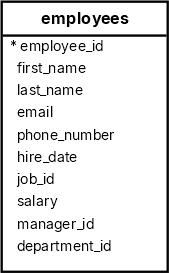
The following statement uses the REPLACE() function to replace the character . in the phone numbers with the character - :
SELECT
  first_name,
  last_name,
  REPLACE(phone_number, '.', '-') formatted_phone_number
FROM
  employees
ORDER BY
  first_name,
last_name;Code language: SQL (Structured Query Language) (sql)To replace the character . with the character - in the phone_number column of the employees table, you can use the UPDATE statement:
UPDATE employees
SET
phone_number = REPLACE(phone_number, '.', '-');Code language: SQL (Structured Query Language) (sql)The following SELECT statement retrieves the data from the employees table to verify the update:
SELECT
  first_name,
  last_name,
  phone_number
FROM
  employees
ORDER BY
  first_name,
  last_name;
Output:
 first_name  |  last_name  | phone_number
-------------+-------------+--------------
 Adam        | Fripp       | 650-123-2234
 Alexander   | Hunold      | 590-423-4567
 Alexander   | Khoo        | 515-127-4562
 Britney     | Everett     | 650-501-2876
 Bruce       | Ernst       | 590-423-4568
...
Summary #
- Use the SQL
REPLACEfunction to replace all occurrences of a substring within a string with another substring.
Databases #
- PostgreSQL REPLACE Function
- Oracle REPLACE Function
- SQL Server REPLACE Function
- SQLite REPLACE Function
- Db2 REPLACE Function
- MySQL REPLACE function


