Summary: in this tutorial, you will learn how to use the SQL SUBSTRING function to extract a substring from a string.
Introduction to the SQL SUBSTRING function #
The SUBSTRING function extracts a substring that starts at a specified position with a given length.
Here’s the syntax of the SUBSTRING function:
SUBSTRING(string, position, length)Code language: SQL (Structured Query Language) (sql)The SUBSTRING function accepts three arguments:
- The
stringis the string from which you want to extract the substring. - The
positionis the starting position where the substring begins. The first position of the string is one (1). - The
lengthis the length of the substring.
The SUBSTRING() function returns a substring. It returns NULL if any arguments (string, position, and length) are NULL.
Basic SQL SUBSTRING function examples #
The following example uses the substring function to return a substring starting at position 1 with length 3:
SELECT
SUBSTRING('SQLTutorial.org', 1, 3) result;Code language: SQL (Structured Query Language) (sql)Output:
 result
--------
 SQLCode language: SQL (Structured Query Language) (sql)
The following statement uses the SUBSTRING() function to return a substring starting at position 4 with length 8:
SELECT
SUBSTRING('SQLTutorial.org', 4, 8) result;Code language: SQL (Structured Query Language) (sql)Output:
 substring
-----------
 Tutorial
(1 row)
Code language: SQL (Structured Query Language) (sql)
The following statement uses the SUBSTRING() function with the POSITION function to return the extension of the domain name sqlutorial.org:
SELECT
  SUBSTRING(
    'SQLTutorial.org',
    POSITION('.' IN 'SQLTutorial.org'),
    4
) extension;Code language: SQL (Structured Query Language) (sql)Output:
 extension
-----------
 .orgCode language: SQL (Structured Query Language) (sql)
How the query works:
- First, find the position of the dot character (
.) using thePOSITION()function. - Second, retrieve the extension by extracting a substring from the position of the dot character (
.) to the end of the domain name.
Using the SQL SUBSTRING function with table data #
We’ll use the following employees table in the sample database.
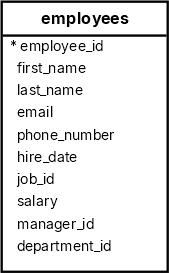
The following query uses the SUBSTRING function to extract the first character of each employee’s first name (initial):
SELECT
  first_name,
  substring(first_name, 1, 1) initial
FROM
  employees
ORDER BY
first_name;Output:
first_name  | initial
-------------+---------
 Adam        | A
 Alexander   | A
 Alexander   | A
 Britney     | B
 Bruce       | B
 Charles     | C
Using the SUBSTRING function with aggregate functions #
The following example uses the SUBSTRING function with the COUNT function to count employees by initials:
SELECT
  SUBSTRING(first_name, 1, 1) initial,
  COUNT(employee_id)
FROM
  employees
GROUP BY
  initial
ORDER BY
initial;Code language: SQL (Structured Query Language) (sql)Output:
 initial | count
---------+-------
 A       |     3
 B       |     2
 C       |     1
 D       |     4
 G       |     1
 H       |     1
 I       |     2
...
Summary #
- Use the SQL
SUBSTRING()function to extract a substring from a string.
Databases #
- PostgreSQL SUBSTRING Function
- MySQL SUBSTRING Function
- SQLite SUBSTR Function
- Db2 SUBSTRING Function
- Oracle SUBSTR Function
- SQL Server SUBSTRING Function


