Summary: in this tutorial, you’ll learn how to use the SQL TRIM function to remove specified characters from the start and the end of a string.
Introduction to SQL TRIM function #
In SQL, the TRIM function allows you to remove specified characters from the start and end of a string.
Here’s the syntax of the TRIM function:
TRIM([LEADING | TRAILING | BOTH] characters FROM string);Code language: SQL (Structured Query Language) (sql)In this syntax:
charactersare the characters you want to remove from the input string. If you do not specifycharacters, theTRIM()function will remove whitespace by default.stringis the input string you want to remove the specified characterLEADING,TRAILINGandBOTHspecifies which part of the string you want ot remove the specified characters. TheLEADING,TRAILING, andBOTHare the start, the end, or both ends of a string.
The TRIM() function returns NULL if characters or string is NULL.
Basic SQL TRIM function examples #
The following statement uses the TRIM function with the TRAILING option to remove the character * at the end of a string:
SELECT
  TRIM(
    TRAILING '*'
    FROM
      '***SQL**'
) result;Code language: SQL (Structured Query Language) (sql)Output:
 result
--------
 ***SQLCode language: plaintext (plaintext)
The following query uses the TRIM function with the LEADING option to remove all character * from the start of a string:
SELECT
  TRIM(
    LEADING '*'
    FROM
      '***SQL**'
) result;Code language: SQL (Structured Query Language) (sql)Output:
 result
--------
 SQL**Code language: plaintext (plaintext)
The following example uses the BOTH option to remove the character * from the start and the end of a string:
SELECT
  TRIM(
    BOTH '*'
    FROM
      '***SQL**'
) result;Code language: SQL (Structured Query Language) (sql)Output:
 result
--------
 SQL
Removing leading zeros #
The following query uses the TRIM function to remove the leading zeros of a string:
SELECT
  TRIM(
    LEADING '0'
    FROM
      '00001900'
  ) result;Code language: SQL (Structured Query Language) (sql)
Output:
 result
--------
 1900Code language: SQL (Structured Query Language) (sql)
Cleaning up data in the database #
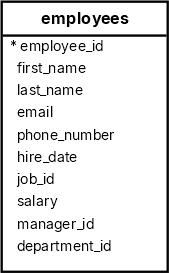
The following SELECT statement uses the TRIM function in the UPDATE statement to remove all leading and trailing spaces in the first_name, last_name, email, and phone_number columns of the employees table:
UPDATE employees
SET
    first_name = TRIM(first_name),
    last_name = TRIM(last_name),
    email = TRIM(email),
phone_number = TRIM(phone_number);Code language: SQL (Structured Query Language) (sql)Summary #
- Use the
TRIMfunction to remove a specified character from a string. - Use the
LEADINGoption to remove a specified character from the start of a string. - Use the
TRAILINGoption to remove a specified character from the end of a string. - Use the
BOTHoption to remove a specified character from both ends of a string.
Databases #
- PostgreSQL TRIM Function
- MySQL TRIM Function
- SQLite TRIM Function
- Db2 TRIM Function
- Oracle TRIM Function
- SQL Server TRIM Function


