-
-

our logo
-
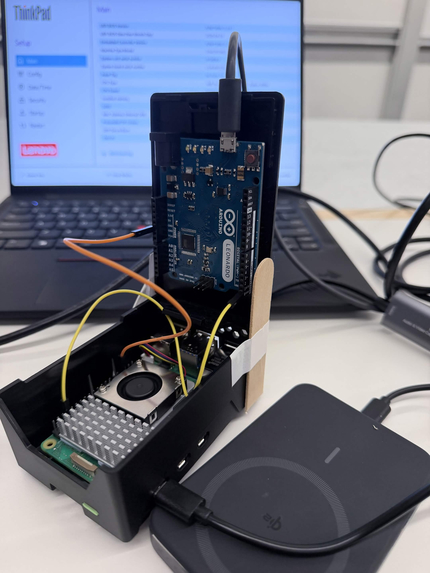
orca-ctl I/O controller
-
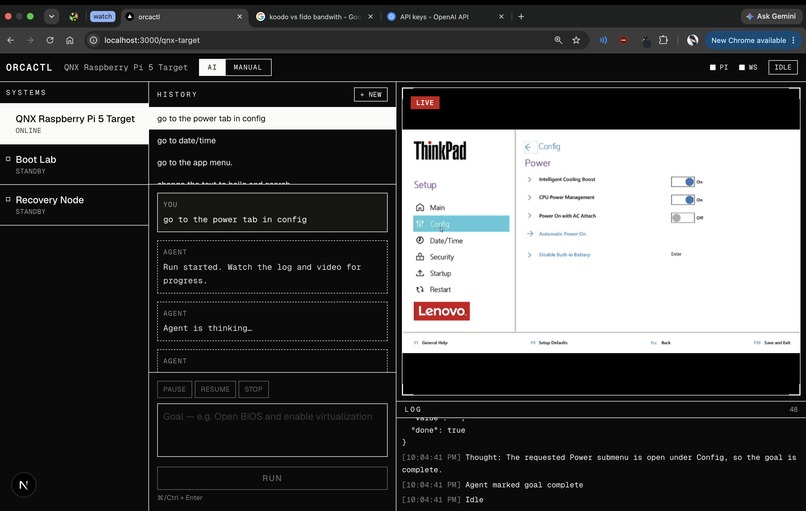
web dashboard
-
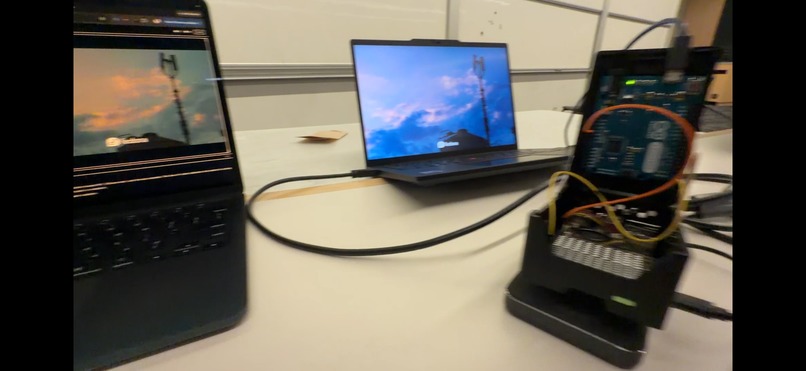
full setup


Inspiration
During a major data-center outage, tens to hundreds of servers can end up bricked or unreachable (from every remote tool on an OS level).
This could be due to a bad firmware/kernel update, and traditionally, troubleshooting may involve technicians many on site.
What it does
orca-ctl has an IO controller that connects to each machine via their hardware: reading directly from HDMI and emulating keyboard/mouse input as a USB peripheral.
This allows orca-ctl to remotely troubleshoot on any machine directly out of the box, with no software installed. You can easily switch between servers by just re-plugging!
On request, orca-ctl will autonomously iterate to solve an issue, capturing display and sending input. This can be scaled to diagnose and interpret several connected machines at once.
How we built it
orca-ctl uses a Raspberry Pi 5 running QNX connected by GPIO pins (on UART) to an Arduino Leonardo (Pi TX to Leonardo RX + ground).
The QNX RPi acts as a middle layer between our agent system and the machine, handling input and output.
As the RPi 5 does not support acting as a USB peripheral, the USB input commands are forwarded to the Leonardo which maps and sends keystrokes and mouse coordinates.
We wrote a C daemon on QNX to convert HDMI frame data (from a Guermok capture card sensor) to images and stream it over HTTP to our webserver.
On the input side, we forward commands over the RPi's GPIO UART to the Arduino which runs our C++ firmware to map commands to USB as keyboard and mouse. We used NicoHood's HID-project library to also emulate as a boot-protocol device when working on BIOS/UEFI menus (regular USB devices are generally not supported).
Our webserver has a client that run Next.js that hosts the dashboard, while the backend runs Go Gin's framework. We use the OpenAI API which continuously shares screenshots and gathers context on the display.
On autonomous mode, we have a master agent which drafts a plan, and a vision model which iterates over the steps, confirming each step was executed correctly.
Challenges we ran into
Some quirks on using QNX (using libraries, compiling and linking code). RPi 5 doesn't support device mode USBs so we had to pivot to also include an Arduino input controller, after much investigation into supported drivers. Configuring and troubleshooting network connections between devices, webapp, our laptops. Prompting our agent to navigate BIOS menus correctly.
Accomplishments that we're proud of
Making an embedded system and being able to see our hardware agent run remotely on all of our laptops!
What we learned
QNX development environment. AI agent design. USB protocols.
What's next for orca-ctl
Running on more devices concurrently :)
Built With
- arduino
- embedded
- gin
- go
- next.js
- qnx
- rpi5
- typescript


Log in or sign up for Devpost to join the conversation.