-
-
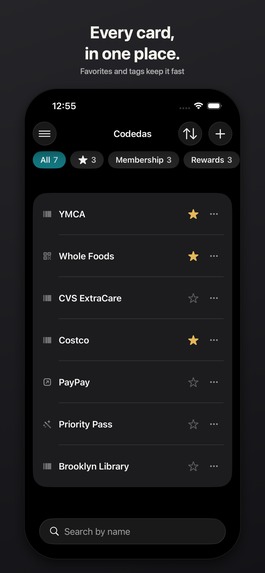
Every card, in one place.
-
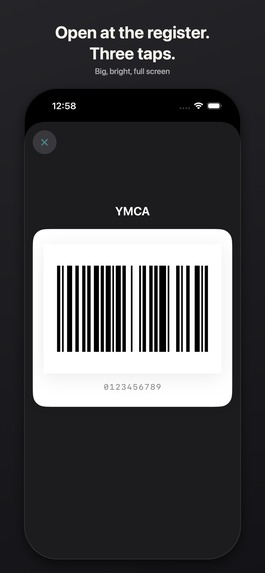
Open at the register. Three taps.
-
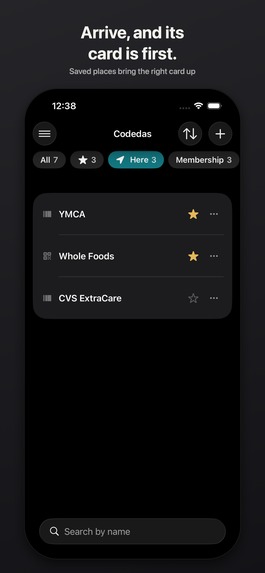
Arrive, and its card is first.
-
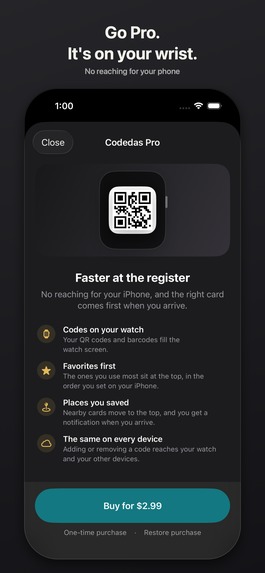
Go Pro. It's on your wrist.
-
Save the shops you use.
-

App icon


Inspiration
At the register, I kept doing the same dance: unlock the phone, hunt for the right app, wait for it to load, dig through menus to find the membership barcode — while a line forms behind me. Most of those cards are just a static number. The wallet apps that could hold them want a pass file the store never gave me. The rest of my cards live inside official apps that generate a fresh code every time, and those can't be copied at all.
So I wanted one list where the static codes are shown instantly, and the dynamic ones are a single tap that opens the right app.
What it does
Codedas (コードダス, "put out the code") keeps two kinds of entries side by side:
- Codes you can show — QR, Code 128, Code 39 and EAN-13. Scan an existing card with the camera or from a photo and the type and value fill in automatically. The image is never stored; it is redrawn from the value each time.
- Things you open — official apps (picked by name from the apps actually installed), Shortcuts, and web links, for cards whose codes are generated on the spot.
Tapping a row acts immediately. A code opens on a white background at maximum brightness with sleep disabled, and brightness goes back when you close it. Favorites and tags keep the list short; the top favorites also appear in a Live Activity on the Lock Screen and in the Home Screen quick actions, so you can get to a card without unlocking or searching.
Free covers the core promise: save your codes and get them out fast at the register — including scanning, the Lock Screen, and backup.
Codedas Pro is a single one-time purchase that unlocks three conveniences on top:
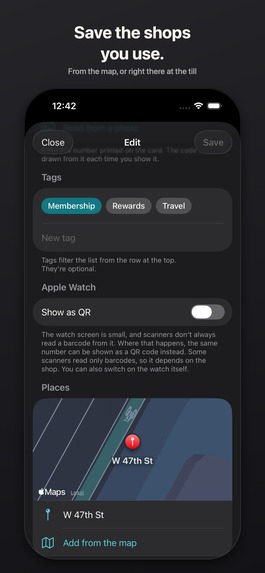
- Apple Watch — show the code full-screen on your wrist, with a switch to QR for the same number when a scanner won't read the barcode off the small screen.
- Places — remember the store where you use a card; it rises to the top when you're nearby, with a notification when you arrive.
- iCloud sync — the same cards on every device on your Apple Account, and they come back after reinstalling.
The rules I held every feature against:
- No ads
- No subscription (free + one-time purchase)
- No setup required on first launch
- No need to open Settings in normal use
- Three taps or fewer from saving a code to showing it
That's also why the upgrade is only offered in Settings and the edit screen. The list and the code screen are what you open in front of a cashier, so someone who hasn't bought Pro never sees anything there they can't use.
How we built it
- SwiftUI for iOS 18+ and watchOS, with a widget extension for the Live Activity.
- Core Image generates QR and Code 128; Code 39 and EAN-13 are encoded in-house. VisionKit/Vision read existing cards from the camera or a photo.
- Apple Watch has no Core Image, so the phone sends the watch the black/white module pattern instead of an image, and the watch draws it edge to edge (keeping the quiet zone intact).
- CKSyncEngine for iCloud sync, with the server as the single source of truth. Data otherwise stays on the device as JSON; nothing goes to a server of mine.
- Core Location region monitoring for arrival notifications.
- RevenueCat handles the Pro purchase end to end:
- The app never reads receipts and I run no backend. A single entitlement,
codedas_pro, is the only thing the app asks about. - The product is fetched through the current Offering, not by ID, so the price or product can change without an app update. The price shown on the button is RevenueCat's localized string.
customerInfoStreampicks up purchases made on another device and payments that clear later (Ask to Buy, etc.).- Debug builds use the RevenueCat Test Store key and Release builds use the App Store key, split by build configuration. That let me run the entire purchase flow in the simulator, where a StoreKit configuration file doesn't apply to command-line builds, and it means shipping a build with the wrong key can't happen by forgetting to swap it by hand.
- Restore always tells you what happened, whether it found a purchase or not.
- The app never reads receipts and I run no backend. A single entitlement,
Challenges we ran into
- Barcodes that look right but don't scan. My Code 39 start/stop characters were wrong, and it was invisible by eye — the kind of bug you only discover at a register. I added tests that decode every generated symbol and compare it to the original value; that's what caught it, and it now guards every change to encoding.
- Watch screens are bad at 1D barcodes. The screen is small and emissive, so there often isn't enough width per bar. I send a QR of the same number too, switchable per card on the phone and on the watch itself. I deliberately did not make QR the default: the store's reader decides the symbology, and many are still laser scanners that only read 1D codes.
- Apps whose codes can't be saved. Only a few publish URL schemes, so the app picker only lists apps that are actually installed, and the scheme table only includes entries with a source. For the rest, Shortcuts fill the gap, with ready-made examples you can add in one tap.
- Release plumbing. An extension version hard-coded to 0.1 got my upload rejected once the app moved to 1.0.1 (extensions must match the parent), so the version now lives in exactly one place. A launch screen set up via Info.plist with an SVG showed a blank black screen; it's now a storyboard with a PDF, generated by the same script as the animated splash logo so the logo doesn't jump on launch.
Accomplishments that we're proud of
- It genuinely gets a card on screen in three taps or fewer, and from the Lock Screen without unlocking.
- A paywall that stays out of the way: the free app is complete for its core job, and Pro is a one-time purchase with no ads anywhere.
- Round-trip decode tests for every symbology, so a scanning bug can't slip in silently again.
- Shipped in both Japanese and English.
What we learned
- For anything a machine has to read, "looks correct" means nothing — test by reading it back.
- Using RevenueCat Offerings and entitlements instead of product IDs and receipts made the monetization code small, and the Test Store made it testable without a device.
- Constraints written down up front (no ads, no subscription, three taps) made most feature decisions easy.
What's next for Codedas
- More official apps in the launch catalog, each with a verified URL scheme.
- More barcode symbologies as users ask for their cards.
- Better handling of stores that need a specific format on the watch.
Built With
- activitykit
- cloudkit
- core-location
- coreimage
- revenuecat
- storekit
- swift
- swiftui
- vision
- visionkit
- watchos
- widgetkit
- xcode


Log in or sign up for Devpost to join the conversation.