-
-
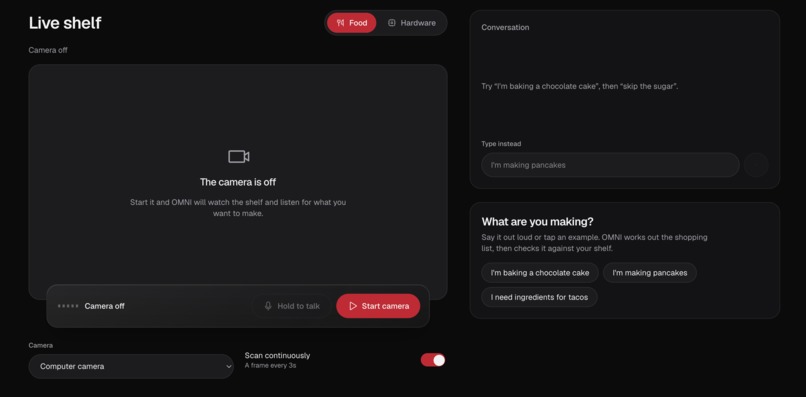
Frontend
-
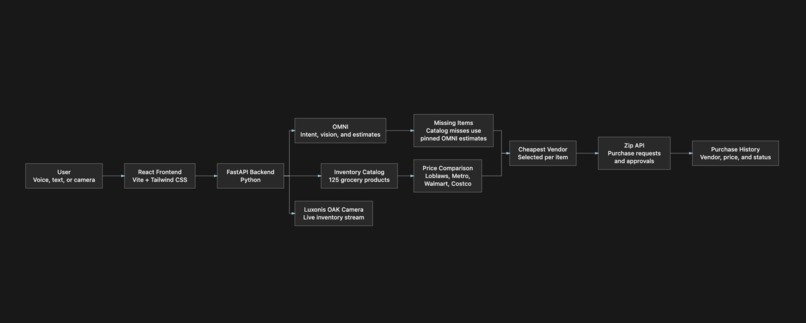
Framework


Inspiration
Imagine this: you are out grocery shopping, and you know you need to cook dinner tomorrow, but you are not quite sure what ingredients you already have at home. Do you have enough eggs? Is there still milk in the fridge? Did someone use the last of the butter?
Or maybe you are volunteering at the QNX Makerspace and need to check whether a specific sensor, development board, or cable is available in the back room before buying another one.
In both cases, the problem is the same: you need to know what is already in your inventory, but you are not there to check it yourself.
That inspired us to build Needy, an AI inventory assistant that can see what is available, understand what you are trying to make or build, identify what is missing, compare prices, and create purchase requests for the items you still need.
What it does
Needy combines voice, vision, and procurement into one workflow:
- Users say what they want to make, such as pancakes, tacos, or a Raspberry Pi Local Sensor Weather Station.
- OMNI converts the goal into a list of required ingredients.
- A live camera identifies which items are available and which are missing.
- Users can review or skip items before ordering.
- For food items, the app compares prices across Loblaws, Metro, Walmart, and Costco.
- Each item is routed to the vendor offering the lowest price.
- Items outside the catalogue receive a pinned OMNI price estimate.
- Zip creates and tracks the purchase requests.
- A purchase history page displays orders, vendors, prices, and approval statuses.
How we built it
We built the frontend with React, Vite, Tailwind CSS, and Framer Motion. It provides the live camera experience, voice and typed input, inventory results, price comparisons, and purchase history.
The backend uses FastAPI and Python. It coordinates:
- OMNI for speech understanding, goal decomposition, visual inventory checks, and fallback price estimates.
- Zip for vendors, products, vendor items, purchase requests, and approval statuses.
- A catalog of 125 grocery products, each priced at Loblaws, Metro, Walmart, and Costco.
- Per-item matching and vendor selection, allowing one basket to be split across multiple stores.
- Luxonis OAK camera support through an MJPEG stream.
Challenges we ran into
- Getting the model and the inventory to agree on names. OMNI names parts however it likes, such as "HC-SR04 Ultrasonic Sensor" or "5V 2A USB Power Supply", while the lab stocks them as "Ultrasonic Distance Sensor" or "12.5 W Micro USB Power Supply". On our first end-to-end test, none of our three demo projects could be ordered because of naming mismatches. We fixed it by giving the model the catalogue's exact part names and adding forgiving matching for anything it still invents.
- Deciding where the stock check belongs. We first showed the model the lab's stock, but then it never proposed anything unavailable and the app never had to say no. We moved the check to checkout. It checks the whole basket at once and, if anything is short, sends nothing to Zip and takes no stock. That way a half-filled order never reaches Zip.
- The camera seeing something and the app ordering it anyway. It could see a Raspberry Pi box on the desk and still order a Pi, because the vision prompt only counted the bare board. We taught it that retail and kit packaging counts as present, along with what the kit normally contains.
- Prices that changed between preview and order. An OMNI price estimate is a fresh guess every time, so an item could show one price and be ordered at another. We now pin the first estimate for each item and reuse it, and price food from a seeded catalogue.
- Zip's API limits. Zip can't list or delete products, so a re-run of our seeding script would create permanent duplicates. We keep a ledger of what we created. Purchase requests also needed a fallback path when the endpoint returned 405.
- The OAK camera dropping off. With USB3 the device vanished after boot, so we force USB2 by default.
- An AI that gives different answers. The same prompt occasionally picked a part that was out of stock, like an ESP32-CAM. A single passing test proved little, so we ran prompts repeatedly against the real model.
- Two people editing the same code. Food pricing and hardware stock checking both changed the purchase flow, so merging meant combining the two by hand and re-testing both modes.
Accomplishments that we're proud of
We are especially proud that InventoryChecker completes the entire workflow from intent to procurement:
- It understands a spoken cooking goal.
- It visually checks inventory in real time.
- It identifies missing items.
- It provides prices before ordering.
- It compares four vendors per catalogue item.
- It routes every item to its cheapest vendor.
- It creates real Zip purchase requests with the correct vendor, SKU, and amount.
What we learned
- Let the model propose and let code decide. Anything involving money or stock, such as who gets the last part or whether a request goes to Zip, has to be enforced in code. The model only suggests.
- Give the model vocabulary but not live state. Telling it the catalogue's names made its suggestions usable. Checking things that change, like stock, at the moment of action kept the answer honest.
- Make multi-step actions all-or-nothing. Reserving stock, calling Zip and putting stock back on failure was simpler and safer than cleaning up half-finished orders.
- Pin whatever must match between preview and purchase. Any number the user sees before ordering has to be the number that gets ordered.
- Prompts hold domain knowledge. A lot of our vision accuracy came from a few sentences about packaging and kits, not from a better model.
- Test against the real model, more than once. Mocked tests confirmed the logic, but only repeated live runs showed the naming problems.
- Keep secrets out of the repo. We found a live API key sitting in a committed example file. Use placeholders and rotate anything that was exposed.
What's next for InventoryChecker
- Connect to live retailer pricing and availability.
- Optimize entire baskets based on price, delivery fees, distance, and minimum order requirements.
- Support dietary restrictions, allergies, substitutions, and preferred brands.
Built With
- fastapi
- framer-motion
- javascript
- omni
- python
- react
- tailwind
- vite
- zip


Log in or sign up for Devpost to join the conversation.