-
-
1024 x 1024 app icon
-
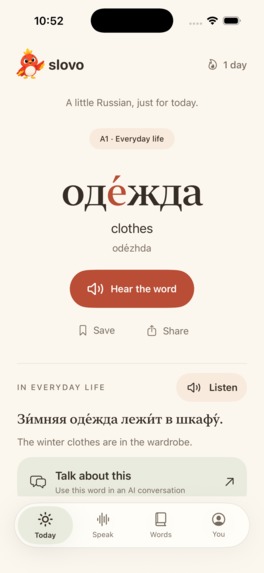
Today screen showing the daily Russian word
-
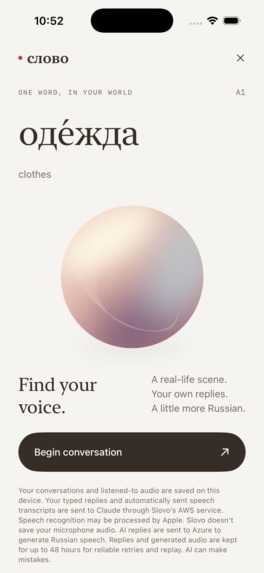
Speak screen. An AI voice conversation in Russian with a glowing orb and a "Begin conversation" button
-
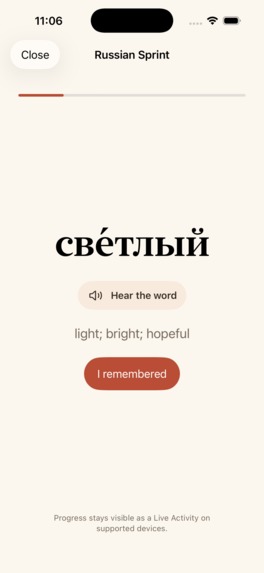
Review sprint showing the word
-
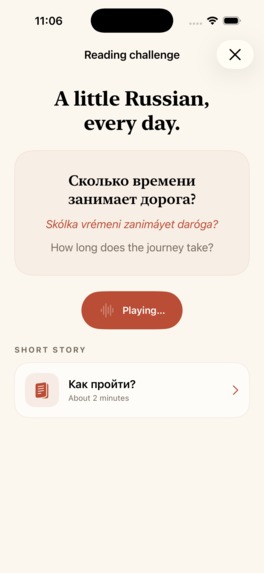
Daily reading challenge
-
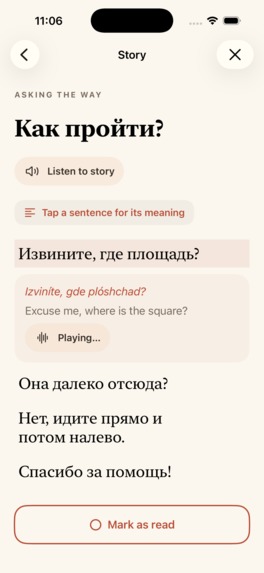
Short story
-
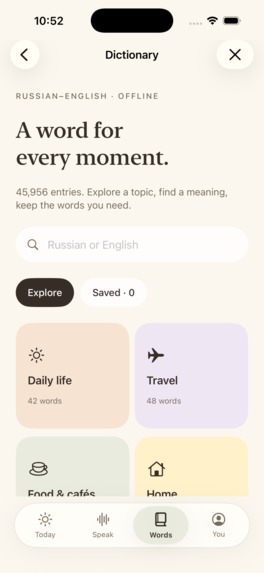
Offline Russian dictionary with 45,956 entries and topic tiles like Daily life and Travel
-
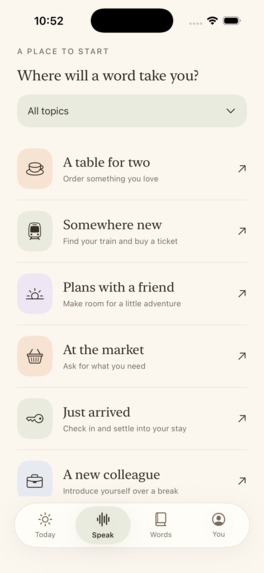
Browse Russian words by everyday topics


Inspiration
I'm learning Russian, and I kept forgetting the words I'd just studied. I'd finish a Duolingo lesson, then struggle to remember the vocabulary the next day.
I built Slovo around the places I already look: my Home Screen and Lock Screen. I wanted to see one Russian word throughout the day, hear how it sounds, and try using it in a conversation. Slovo means "word" in Russian.
I also wanted to make something I'd enjoy looking at every day. Cyrillic has beautiful letterforms, and the stress marks matter when you're learning to pronounce a word. Those details became the starting point for the design: large Russian type, warm paper colors, and enough space to focus on one word.
What it does
Each day, Slovo gives you a Russian word with its stressed vowel marked, pronunciation audio, an English meaning, an example sentence, and a short language note.
From there, you can:
- Use it in a conversation. Speak with an AI partner in Russian, hear the reply, and keep talking. You can type instead, reveal a translation, or look up an unfamiliar word.
- Review it later. Review intervals grow from 1 to 3, 7, 14, 30, and 60 days as you mark words learned. Words you find difficult come back sooner.
- Read something short. There are 45 reading sentences and 20 short stories, with audio and translations.
- Browse more vocabulary. The learning library has over 1,800 words across A1–C1. You can mark words you already know, and the daily selection moves toward harder vocabulary as you progress. A separate offline dictionary has 45,956 Russian–English entries, with topic collections for selected words.
- Keep a word on your screen. Home Screen and Lock Screen widgets show daily vocabulary and words due for review.
The daily word is free, and you don't need to create an account. The dictionary and bundled learning material work offline; AI conversations need an internet connection.
How we built it
I built the iPhone and iPad app in SwiftUI, with WidgetKit and App Groups to share learning data with the widgets.
The design uses warm paper backgrounds, dark brown text, and terracotta controls. Russian words use a serif face; navigation and labels use rounded system type. A small bird appears during onboarding and when you finish the day. I kept the same colors and typography through the reading screens, reviews, and paywall.
In Speak, a softly lit pearl responds to listening, thinking, and speech playback. It settles when the conversation is idle and stays still with Reduce Motion enabled. I wanted the changing states to be easy to read without filling the screen with controls.
Claude on Amazon Bedrock generates conversation replies, and Azure generates the Russian speech. The service runs on AWS Lambda with DynamoDB. Bundled word and sentence recordings let people listen without waiting for a network request.
RevenueCat handles subscription offerings, localized prices, purchases, trial eligibility, and restores. OneSignal handles remote reminders, learning-state tags, and in-app message triggers. The app also integrates OneSignal Live Activities for Russian Sprint progress on the Lock Screen and Dynamic Island.
Challenges we ran into
Hands-free conversation took several iterations. The app needed to notice when someone had finished speaking, send their answer, play the reply, and listen again. Echo, microphone permissions, and audio loading all affected that sequence. Testing exposed small but frustrating problems, including repeated pearl taps cancelling audio that was still loading.
Navigation needed work too. Word lookups and transcripts had become a stack of screens that each needed closing. I changed those flows so Back returns to the previous screen and Close exits the activity.
There were smaller problems throughout: keeping stress marks attached to the right vowel at large text sizes, fixing a widget that disappeared after a signing change, and fitting the same screens on a small iPhone and an iPad. Early layouts had too many boxes and headings. Removing them made the words easier to read.
Accomplishments that we're proud of
Slovo is published on the App Store, with working subscriptions and a free daily word. I'm especially happy with how the Russian typography carries through the app and its widgets. The stress marks, pronunciation buttons, and example sentences make each word useful beyond its English definition.
The conversation feature also gives people somewhere to use what they've learned. They can start with today's word, try a reply, and get help with a translation or an unfamiliar word. VoiceOver, Dynamic Type, and Reduce Motion support were part of the work on these screens.
What we learned
Testing on a phone changed my priorities. A screen could look finished in a screenshot and still be awkward to use: too many taps to hear a reply, a control hidden below the fold, or another sheet to dismiss. Those fixes mattered as much as the visual design.
I also learned to keep pronunciation and stress information in the content itself. Trying to add them later as a styling detail would have made the same word inconsistent across the app and widgets.
What's next for Slovo
I want to improve conversation topics and corrections, test the reminder schedule with more learners, and find out whether people remember the words a week later. I'd also like to make it easier to follow a word from the daily card into a sentence and then into saved vocabulary.
More languages and Android are longer-term plans. For now, the priority is making the Russian app easier to use and measuring what helps people learn.
Built With
- activitykit
- amazon-bedrock
- amazon-dynamodb
- amazon-web-services
- anthropic
- apns
- avfoundation
- aws-lambda
- azure
- azure-speech
- claude
- ios
- node.js
- onesignal
- revenuecat
- speech
- sqlite
- storekit
- swift
- swiftui
- vercel
- widgetkit
- xcode


Log in or sign up for Devpost to join the conversation.