-
-
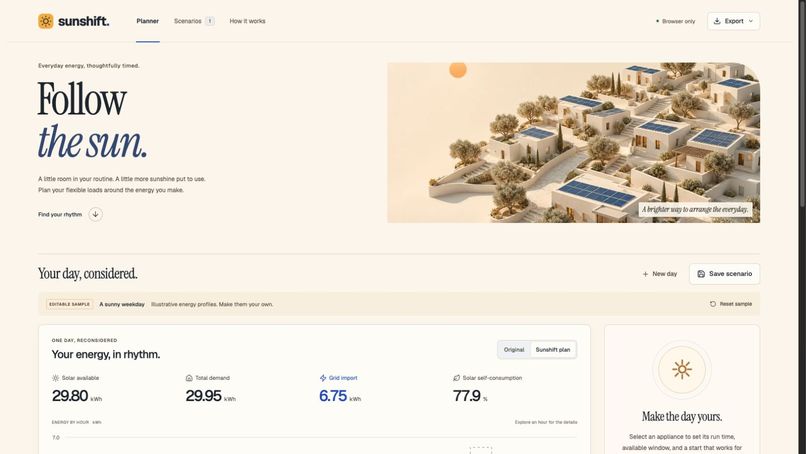
Sunshift opening and illustrative planning workspace; original generated solar artwork.
-
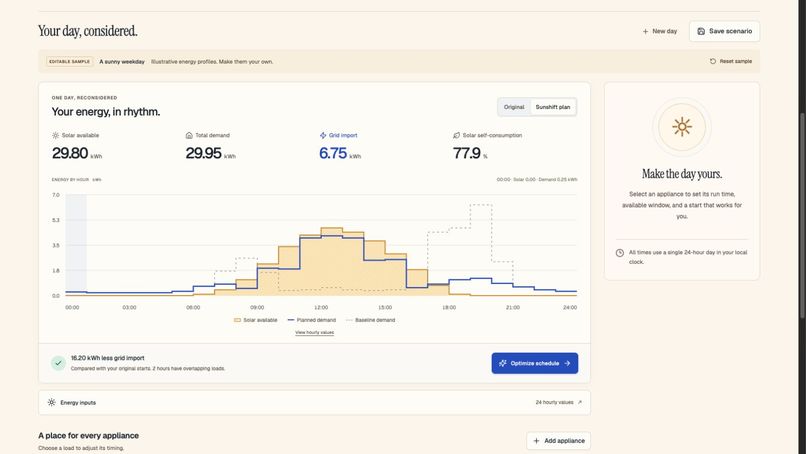
Editable 24-hour solar schedule and energy comparison using illustrative inputs.
-

Mobile appliance editing with power, duration, timing windows, and manual locks.


Watch the demo
Watch the 4 minutes 9 seconds narrated application walkthrough. The video page includes native playback controls and a full transcript, requires no login, and links back to the live app and public source.
Inspiration
Solar generation and daily routines do not always line up. A dishwasher or a charging session might be flexible, but deciding when to run several loads together is surprisingly difficult. Sunshift makes that timing problem visible and gives a household a transparent planning tool using energy assumptions they can inspect and change.
What it does
Sunshift builds a 24-hour schedule around editable solar-generation and baseline-household-consumption profiles. Users add appliances, set power and run duration, define allowed windows, and optionally lock a start. The app suggests a feasible schedule, compares grid import and solar self-consumption with the original starts, and explains the calculations.
The full workflow includes a responsive hourly chart, appliance editor and timeline, hourly data table, explicit invalid-input states, named scenarios saved locally, import/export JSON, CSV schedule export, a printable report, and undo after destructive local actions. The opening example is labeled as illustrative. No account or API key is required.
How we built it
This is a solo entrant project built with substantial OpenAI Codex assistance, beginning September 5, 2026. React and TypeScript provide the interface, Vite packages the static app, Lucide supplies icons, with locally bundled typography. The solar chart is original SVG, and the solar-neighborhood hero is original artwork generated with OpenAI's image-generation tool.
The scheduler is a pure TypeScript energy model, separate from the interface and persistence. It tries an original-start seed and an energy-first greedy seed, improves each using up to eight coordinate-descent passes, and returns the better feasible result. It is deterministic and bounded, not an exact global optimizer. There is no runtime AI API.
Challenges
The hardest design issue was keeping the calculations explainable while supporting edits and constraints. A previously computed plan must become stale as soon as its inputs change; otherwise the app could show convincing but incorrect results. Original starts must also stay distinct from manual planned locks, so the comparison remains honest. The implementation explicitly models these states and tests them.
The main visual challenge was showing all 24 hours on both a laptop and a phone. The chart adapts its actual coordinates to the available space, and the appliance inspector moves below the schedule on smaller screens.
Accomplishments
A complete local planning workflow with real validation and calculations, rather than simulated live integrations. The domain tests cover conservation of energy, locked starts, valid windows, deterministic schedules, import schemas, persistence failure, and malicious spreadsheet cell names. UI integration tests exercise editing, optimization, saving, reopening, renaming, deleting/undoing, and importing/exporting.
In the illustrative default sample, original import is 22.95 kWh and planned import is 6.75 kWh. That 16.20 kWh difference is a calculation from the included sample inputs, not measured real-world savings.
Engineering lessons
Good climate tools need more than a promising number. Units, constraints, original assumptions, data provenance, and algorithm limitations must be visible. A deterministic heuristic can be useful when it is testable and described honestly; a polished interface makes those details easier to understand.
What's next
Potential future work includes an exact solver for small scenarios, time-varying appliance profiles, sub-hour intervals, and an optional electrical-capacity constraint. These are future ideas, not current features. Live forecasts or device integrations would need explicit data-source and control safeguards.
AI and team disclosure
One human entrant, working solo. OpenAI Codex substantially assisted code, design, testing, documentation, and submission preparation. Created new beginning September 5, 2026. No human collaborators or pre-existing application are claimed; open-source dependencies are credited in the repository.
Demo format
The demo is a narrated walkthrough of actual application screenshots, clearly labelled with synthetic narration. Sample data is illustrative. It does not depict an uninterrupted live screen recording.
Built With
- geist
- lucide
- openai-codex
- openai-image-generation
- react
- typescript
- vite
- vitest


Log in or sign up for Devpost to join the conversation.