Read-only Syncthing health and file activity in the DankMaterialShell bar.
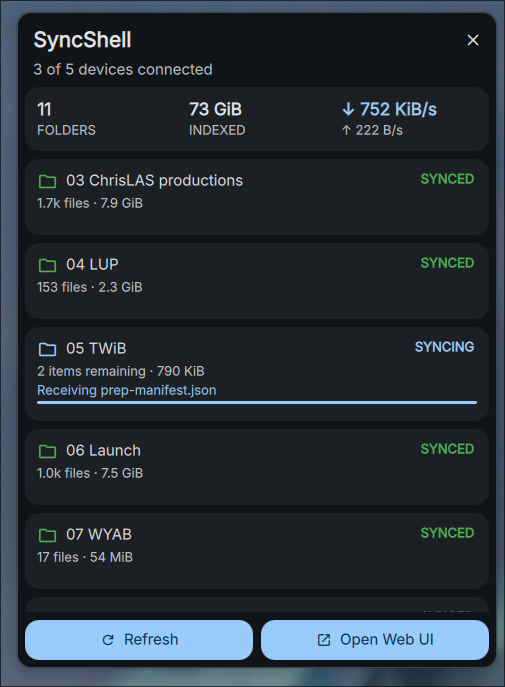
SyncShell shows local folder status, connected device counts, synchronization activity, and links to folders and the Syncthing Web UI. It does not install, start, stop, or reconfigure Syncthing.
This is a native DMS port derived from
ilyaZar/syncshell. It is not affiliated
with or endorsed by Syncthing, IlyaZar, DankMaterialShell, or Omarchy.
Add the flake input:
{
  inputs.syncshell-dms = {
    url = "github:ChrisLAS/syncshell-dms";
    inputs.nixpkgs.follows = "nixpkgs";
  };
}
Import and enable the module:
{
  imports = [ inputs.syncshell-dms.nixosModules.default ];

  programs.syncshell-dms.enable = true;
}
Then add "syncshell" to the desired DMS bar's widget list. Bar placement is
intentionally left to the host because DMS supports multiple independently
configured bars and displays.
The flake also exports the source package directly:
inputs.syncshell-dms.packages.${pkgs.system}.default- DankMaterialShell 1.5.0 or newer
- Quickshell 0.3.0 or newer
- Syncthing 1.21.0 or newer
xdg-open
Syncthing must already be configured and running for the desktop user. The
plugin discovers the local API key through syncthing cli config gui dump-json,
keeps it only in memory, and talks only to the loopback API.
Place this repository in DMS's plugin directory, rescan plugins, and enable
syncshell. Exact plugin paths vary by installation method; use the DMS plugin
manager for your installed release.
dms ipc call syncshell status
dms ipc call syncshell refresh- The API key is never persisted by SyncShell.
- The API key is never placed in process arguments or logs.
- SyncShell has no service or folder mutation endpoints.
- Shared DMS state excludes folder paths, folder IDs, and Syncthing device IDs.
- Folder paths remain private to the daemon and can be opened from the panel.
- Active transfers expose only the displayed filename, not its relative path.
- TLS settings are discovered from the local Syncthing configuration.
The plugin runs with the authority of the desktop user. Anyone able to modify the plugin can access the same local Syncthing API, as with other unsandboxed Quickshell plugins.
Nix is the canonical development environment:
nix develop
nix fmt flake.nix nix/module.nix
nix flake check
nix build
See AGENTS.md for source ownership, safety rules, and the complete agent
startup contract.
See CHANGELOG.md for release notes and tested versions.
Code is MIT licensed. Adapted Syncthing status icons remain MPL-2.0. See
THIRD_PARTY_NOTICES.md and UPSTREAM.md.
