Tariq Berrada Ifriqi, John Nguyen, Karteek Alahari, Jakob Verbeek, Ricky T. Q. Chen
Meta FAIR



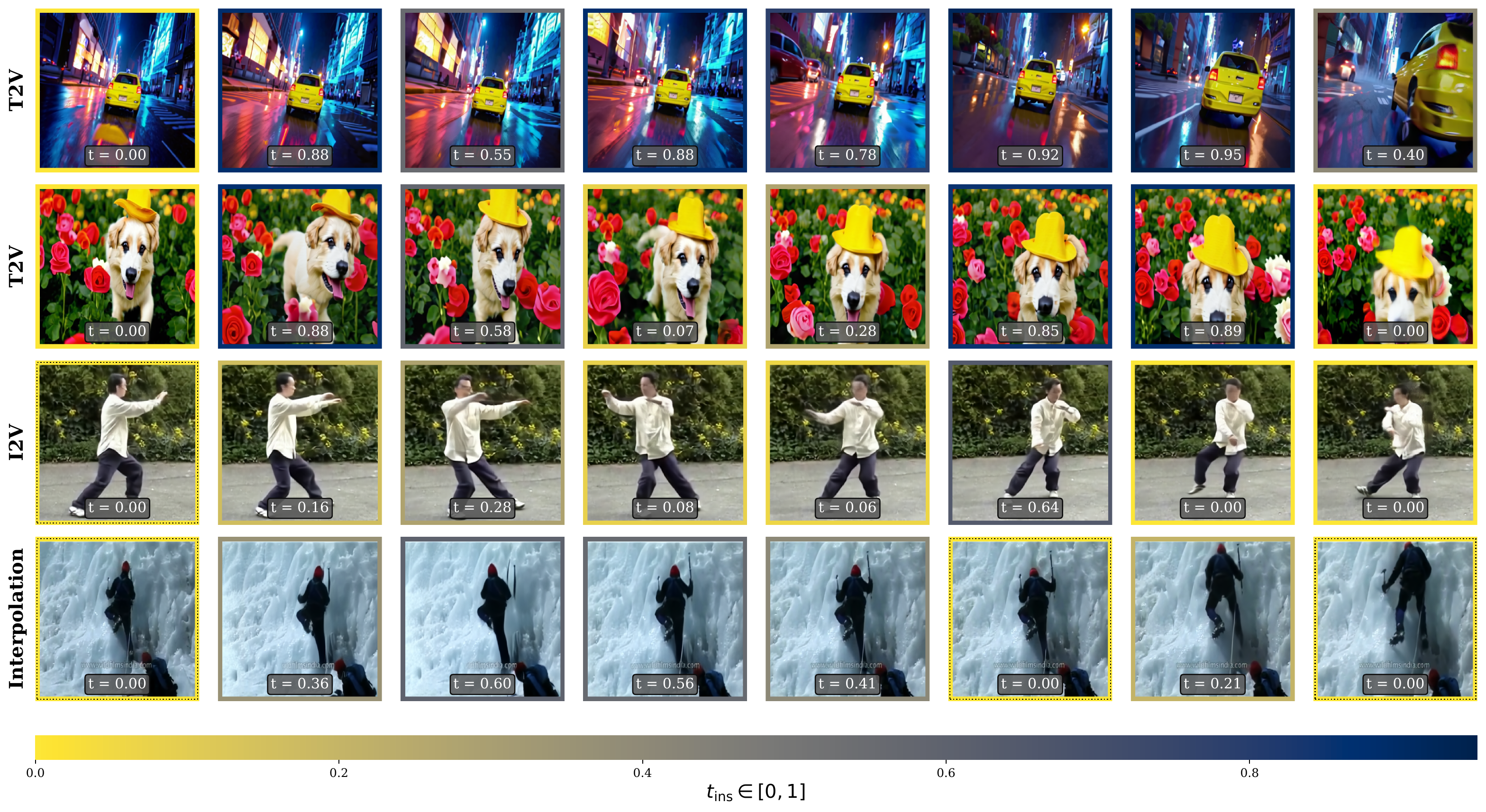
We present Flowception, a novel non-autoregressive and variable-length video generation framework. Flowception learns a probability path that interleaves discrete frame insertions with continuous frame denoising. Compared to autoregressive methods, Flowception alleviates error accumulation/drift as the frame insertion mechanism during sampling serves as an efficient compression mechanism to handle long-term context. Compared to full-sequence flows, our method reduces FLOPs for training three-fold, while also being more amenable to local attention variants, and allowing to learn the length of videos jointly with their content. Quantitative experimental results show improved FVD and VBench metrics over autoregressive and full-sequence baselines. Finally, by learning to insert and denoise frames in a sequence, Flowception seamlessly integrates different tasks such as image-to-video generation and video interpolation.
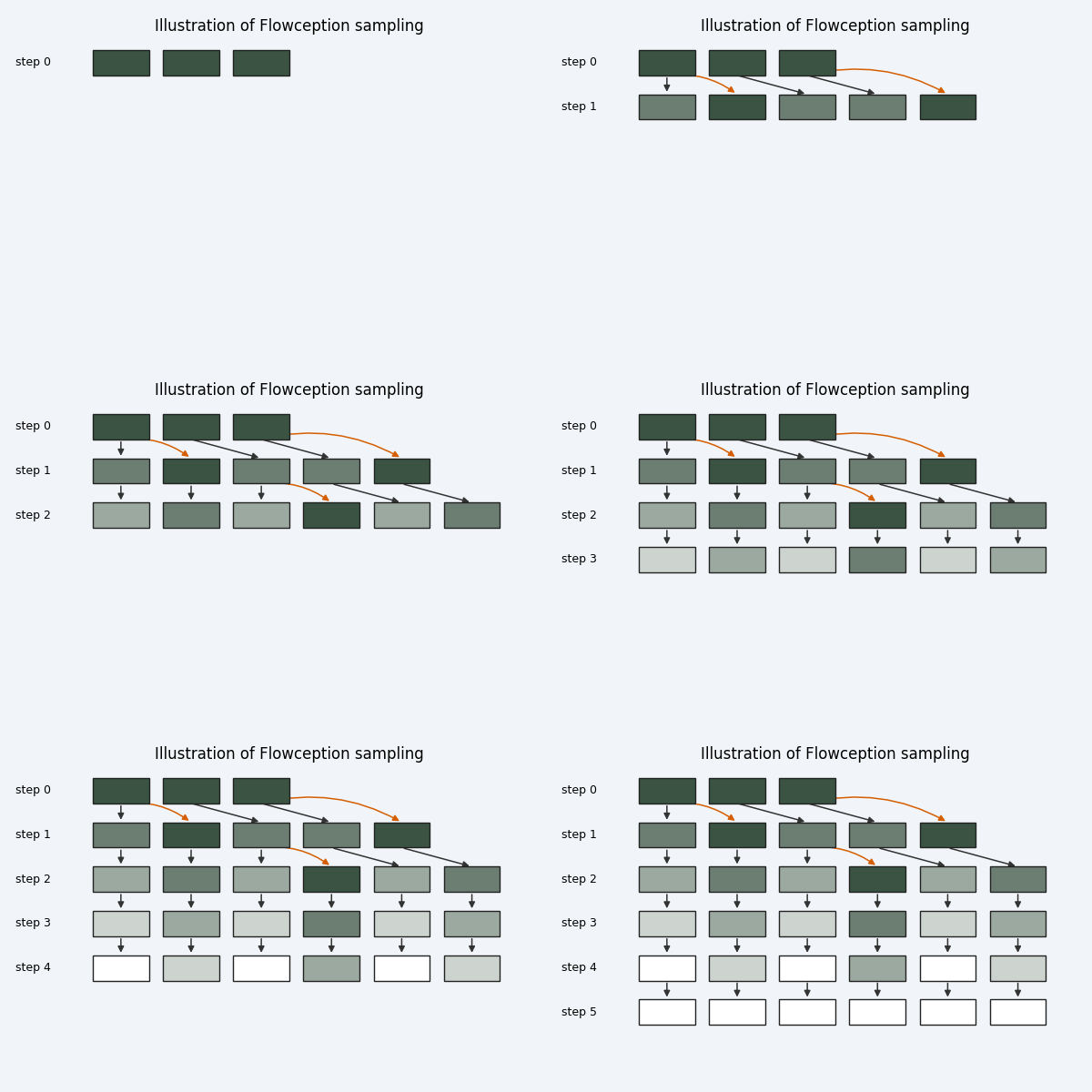
Flowception iteratively inserts and denoises frames, progressively increasing temporal resolution.
- Installation
- Project Structure
- Supported Features
- Configuration
- Required Paths
- Training
- Sampling / Inference
- Config Reference
- Citation
- Acknowledgements
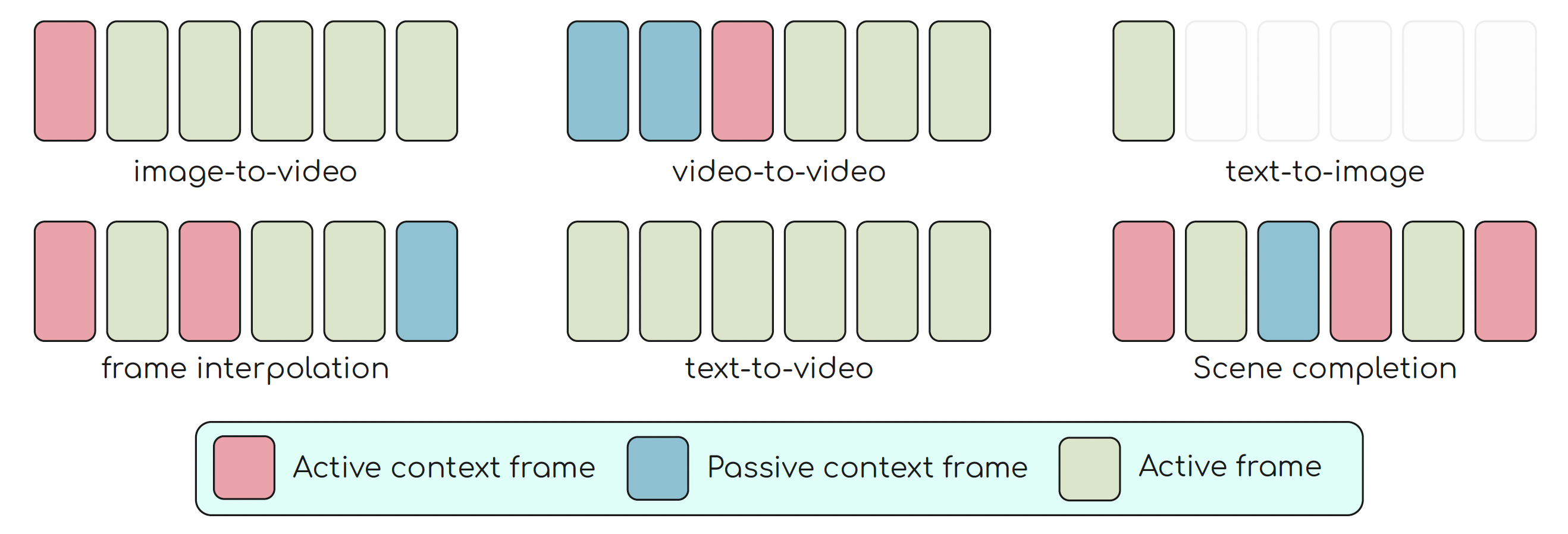
Flowception unifies multiple video generation tasks through its frame insertion mechanism. By varying the type and number of context (clean, visible) frames, the method currently supports:
| Task | Trainer | Description |
|---|---|---|
| Image-to-Video (I2V) | flowception |
Animate a single image into a video. The input image serves as the first context frame; the model inserts and denoises subsequent frames. |
| Text-to-Video (T2V) | flowception_t2v |
Generate a video from a text prompt. All frames start from noise; the model jointly inserts and denoises to produce a coherent video. |
| Video Interpolation | flowception_interpolate |
Given two or more keyframes, fill in intermediate frames. Anchor frames are provided as context; insertions happen between them. |
Set the trainer via SOLVER.TRAINER:
SOLVER:
  TRAINER: flowception              # for I2V
  # TRAINER: flowception_t2v        # for T2V
  # TRAINER: flowception_interpolate  # for interpolation
Video interpolation and image-to-video generation across different datasets.
| Method | Config | Description |
|---|---|---|
| Classifier-Free Guidance (CFG) | SAMPLER.CFG_SCALE |
Standard CFG — trained with SOLVER.USE_CFG=True and SOLVER.CFG_DROP_P conditioning dropout |
| Adaptive Projected Guidance (APG) | SAMPLER.APG.ENABLE=True |
Gradient-free guidance that projects the CFG update to reduce artifacts. Configure ETA, MOMENTUM, NORM_THRESHOLD. |
| Conditioner | MODEL.TEXT_ENCODER.VERSION |
Used for |
|---|---|---|
| LLaMA 3.2 + DINOv2 | llama3p2_and_dinov2 |
I2V and interpolation configs based on the Flowception DiT backbones |
| T5-XXL | t5_xxl |
LTX-based I2V, T2V, and interpolation configs |
| CLIP ViT-L/14 | clip-vit-large-p14 |
Default fallback in config/default.py and class/text-conditioned image generation |
The denoiser backbone is selected via MODEL.CONDITION. Supported families:
| Family | Examples | Description |
|---|---|---|
| LTX-Flowception | T2I-LTX-* |
LTX-Video transformer extended with Flowception temporal layers — recommended |
| Flowception DiT | T2I-FlowceptionV1-*/1, T2I-FlowceptionV1-H/1 |
DiT backbone with Flowception frame insertion heads |
conda env create -f environment.yaml
conda activate flowception
pip install -e .conda create -n flowception python=3.10 -y
conda activate flowception
pip install -e .The checked-in environment.yaml provides a minimal Python 3.10 environment and installs the project with pip install -e .. Adjust the PyTorch/CUDA packages for your machine if needed.
Key dependencies: PyTorch, HuggingFace diffusers, accelerate, transformers, submitit, optional wandb, and yacs.
flowception/
├── main.py                      # Training entry point
├── launcher_with_accelerate.py  # Multi-node SLURM launcher
├── launch_i2v.sh                # Example SLURM launcher for LTX I2V
├── launch_t2v.sh                # Example SLURM launcher for LTX T2V
├── launch_interp.sh             # Example SLURM launcher for LTX interpolation
├── test_run.sh                  # Sanity-check training script
├── config/
│   └── default.py               # All config defaults (YACS)
├── configs/
│   └── flowception/             # Toy, I2V, T2V, and interpolation configs
├── engine/
│   ├── trainer.py               # Base Trainer (training loop, checkpointing, EMA)
│   ├── flowception.py           # Flowception trainer (image-to-video)
│   ├── flowception_interpolate.py # Flowception trainer (interpolation)
│   ├── flowception_t2v.py       # Flowception trainer (text-to-video)
│   └── utils.py                 # Training utilities (augmentations, FSDP helpers)
├── modules/
│   ├── get_model.py             # Model registry — maps MODEL.CONDITION → architecture
│   ├── conditioning.py          # Text/image conditioners (CLIP, LLaMA, DINOv2)
│   ├── vae.py                   # VAE loader (LTX, Cosmos, and toy identity)
│   ├── ltx_flowception.py       # LTX-Video transformer with Flowception extensions
│   ├── metadit_flowception.py   # DiT-based Flowception backbone
│   ├── attention.py             # Attention layers (self, cross, memory-efficient)
│   ├── rope.py                  # Rotary position embeddings
│   ├── diffusion/               # Denoisers and sigma schedules
│   └── flowception/             # Flowception sampling, alignment, losses, and schedulers
├── data/
│   ├── datasets/
│   │   ├── dataset.py           # Dataset registry and loading
│   │   ├── dataloader.py        # Dataloader utilities
│   │   └── video/               # Video dataset implementations
│   └── loaders/
│       └── samplers.py          # Distributed samplers
└── helpers/
    ├── lr_schedulers.py         # Learning rate schedulers
    ├── checkpoint.py            # Checkpoint utilities
    ├── ema.py                   # EMA update
    └── modeling.py              # Gaussian log-likelihood utilities
Flowception uses YACS for configuration. All defaults are in config/default.py. Override via:
- YAML config file (recommended):
--config configs/flowception/i2v/openvid_128_ltx.yaml - CLI overrides:
--append KEY VALUE(e.g.,--append SOLVER.LR 0.0001 SOLVER.BATCH_SIZE 16)
Before training or inference, you should set the dataset and checkpoint paths your chosen config actually uses. Not every dataset backend consumes the same keys.
The checked-in data/datasets/paths.yaml is a public path template. It contains only LOCAL entries and placeholder paths; edit those values or add your own cluster key, then set DATA.CLUSTER to that key.
Flowception configs use the OpenVid-1M video dataset. Download and extract it:
# Download from HuggingFace
# https://huggingface.co/datasets/nkp37/OpenVid-1M

# Expected directory layout after extraction:
# /mnt/data/datasets/OpenVid-1M/
# ├── data/train/OpenVid-1M.csv   # annotations (video, caption, motion score, ...)
# └── video/                       # extracted .mp4 files
Update OPENVID1M.LOCAL.ROOT in data/datasets/paths.yaml to point to your download location. The checked-in OpenVid configs also set DATA.DATASET: openvid1m_flowception.
Supported datasets and path sections are:
| Path Section | Dataset Config Value | Expected Structure |
|---|---|---|
TOY_COLORING |
toy_coloring |
Synthetic toy dataset used by configs/flowception/toy/*; no external files required. |
OPENVID1M |
openvid1m, openvid1m_flowception |
Root directory containing data/train/OpenVid-1M.csv and video/. |
TAICHI |
taichi_flowception, taichi_cache_flowception |
.pt file or directory of .pt shards. Entries should include filepath and optionally description. |
RE10K |
re10k_flowception |
VIDEOS_DIR with videos plus optional VIDEO_PATHS joblib .pt index of filepath entries. |
VCHITECT2 |
vchitect2_flowception |
ANNOT_JSON plus INDEX_DB SQLite index used to locate video bytes in tar shards. |
YOUCOOK2 |
youcook2, youcook2_iter |
Video root plus .pt/.pkl/.joblib/.json annotations with filename and caption segments. |
KINETICS |
kinetics_flowception |
CSV annotations plus videos named <youtube_id>_<start:06d>_<end:06d>.mp4. |
CUSTOM_SUBJECTNESS |
custom_subjectness_flowception, custom_subjectness_flowception_aug |
Directory of .pt shards with video paths, captions, motion/entropy metadata, and subjectness fields. |
CUSTOM_WEBDATASET |
custom_webdataset, custom_webdataset_aes |
WebDataset tar shards with matching caption and entropy .pt metadata directories. |
CUSTOM_SUBJECTNESS and CUSTOM_WEBDATASET are public placeholders for custom dataset formats. Users must provide their own data in the documented structure before using those loaders.
Set CUSTOM_SUBJECTNESS.LOCAL.ROOT to a directory of joblib-readable .pt shards. Each shard should load to a list of dictionaries:
[
    {
        "filepath": "/absolute/path/to/video.mp4",  # or "path"
        "description": "caption or prompt text",
        "motion_score": 4.2,
        "subjectness": {
            "subjectness": 0.7,
            "size_ratio": 0.25,
        },
    },
]
The loader filters on motion_score, subjectness.subjectness, and subjectness.size_ratio, then reads the video from filepath or path.
Set CUSTOM_WEBDATASET.LOCAL.ORIGINAL.IMG_ROOT to a WebDataset root containing one or more .tar shards:
IMG_ROOT/
  shard-000000.tar
  shard-000001.tar
  nested/
    shard-000002.tar
Each tar sample should provide jpg, json, and txt fields. The json payload must include width, height, and AESTHETIC_SCORE; txt is the fallback caption.
CAPTIONS_0, CAPTIONS_1, and ENTROPY should mirror IMG_ROOT by relative path. For every image tar path, the loader replaces the caption/entropy root and swaps .tar for .pt. Each .pt sidecar should be a pickle/joblib-readable dictionary keyed by the WebDataset sample __key__:
# CAPTIONS_0 or CAPTIONS_1 sidecar
{"sample_key": "recaptioned text"}

# ENTROPY sidecar
{"sample_key": 5.8}| Config Key | Used by | Description |
|---|---|---|
DATA.DATA_ROOT |
most local datasets | Root directory of your training data |
DATA.VAL_DATA_ROOT |
optional validation override | Validation data root when different from DATA.DATA_ROOT |
DATA.ANNOT_TRAIN / DATA.ANNOT_VAL |
dataset-specific loaders | Alternate annotation paths used by some loaders |
data/datasets/paths.yaml |
OpenVid and other named datasets | Cluster-specific dataset roots resolved by dataset code |
| Config Key | Description | Example |
|---|---|---|
MODEL.WEIGHTS |
Pretrained denoiser checkpoint (.bin / .safetensors) |
/models/flowception_v1.bin |
MODEL.VAE.CHECKPOINT |
VAE weights — required for COSMOS_1_X8. LTX VAEs auto-download from HuggingFace. |
/models/cosmos-tokenizer |
Set MODEL.VAE.NAME to choose a VAE:
| VAE Name | Auto-download? | Notes |
|---|---|---|
IDENTITY |
n/a | Identity VAE for the synthetic toy-coloring configs only |
LTX_AE |
✅ | LTX-Video VAE — recommended for Flowception |
LTX_AE_0_9_5 |
✅ | LTX-Video v0.9.5 with timestep conditioning |
LTX_AE_0_9_8 |
✅ | LTX-Video v0.9.8 (13B distilled) |
COSMOS_1_X8 |
❌ | Cosmos tokenizer (8× spatial) |
Flowception supports three training frameworks. Set via SOLVER.TRAINER:
| Task | Trainer | Config Key | Description |
|---|---|---|---|
| Image-to-Video (I2V) | flowception |
NUM_CONTEXT_FRAMES: 1 |
First frame as context, model inserts+denoises the rest |
| Text-to-Video (T2V) | flowception_t2v |
NUM_CONTEXT_FRAMES: 1 |
All frames start noisy; text drives generation |
| Video Interpolation | flowception_interpolate |
NUM_CONTEXT_FRAMES: 2 |
First and last frames act as anchors; the model fills in between |
For a self-contained walkthrough of the Flowception method on a toy setting (no GPU or dataset required), see tutorial/tutorial.ipynb. It covers the core sampling algorithm, frame insertion mechanism, and training objective end-to-end.
# I2V
python main.py -c configs/flowception/toy/toy_coloring_i2v.yaml -t -n toy_i2v

# T2V
python main.py -c configs/flowception/toy/toy_coloring_t2v.yaml -t -n toy_t2v

# Interpolation
python main.py -c configs/flowception/toy/toy_coloring_interpolate.yaml -t -n toy_interp# I2V — LTX_AE, Flowception V1 backbone, 128px, OpenVid-1M
accelerate launch --num_processes 8 main.py \
-c configs/flowception/i2v/openvid_i2v.yaml -t -n i2v_run
# I2V — LTX-2B backbone, 256px, OpenVid-1M
accelerate launch --num_processes 8 main.py \
-c configs/flowception/i2v/openvid_ltx_i2v.yaml -t -n ltx_i2v
# T2V — LTX-2B backbone, 256px, OpenVid-1M
accelerate launch --num_processes 8 main.py \
-c configs/flowception/t2v/openvid_ltx_t2v.yaml -t -n ltx_t2v
# Interpolation — LTX-2B backbone, 256px, OpenVid-1M
accelerate launch --num_processes 8 main.py \
-c configs/flowception/interpolate/openvid_ltx_interpolate.yaml -t -n ltx_interp# T2V — 4 nodes × 8 GPUs = 32 GPUs
python launcher_with_accelerate.py \
--ngpus 8 --nodes 4 \
--partition your_partition \
--cluster your_cluster \
-c configs/flowception/t2v/openvid_ltx_t2v.yaml \
-t -n ltx_t2v_32gpu
# Interpolation — 4 nodes × 8 GPUs
python launcher_with_accelerate.py \
--ngpus 8 --nodes 4 \
--partition your_partition \
--cluster your_cluster \
-c configs/flowception/interpolate/openvid_ltx_interpolate.yaml \
-t -n ltx_interp_32gpu
# I2V — 2 nodes × 8 GPUs
python launcher_with_accelerate.py \
--ngpus 8 --nodes 2 \
--partition your_partition \
--cluster your_cluster \
-c configs/flowception/i2v/openvid_i2v.yaml \
-t -n i2v_16gpuLauncher options: --timeout (minutes, default 4320), --qos (job priority), --mem_gb (CPU RAM per GPU), --job_name (SLURM job name).
For single-node SLURM runs, the checked-in helper scripts mirror these commands:
launch_i2v.sh, launch_t2v.sh, launch_interp.sh, and test_run.sh.
configs/flowception/
├── toy/
│   ├── toy_coloring_i2v.yaml           # Toy 3×3, Flowception V1 Tiny, identity VAE
│   ├── toy_coloring_t2v.yaml           # Same, T2V trainer
│   ├── toy_coloring_interpolate.yaml   # Same, interpolation trainer
│   └── toy_coloring_tiny.yaml          # Minimal toy Flowception config
├── i2v/
│   ├── openvid_i2v.yaml                # Flowception V1, 128px, llama3p2+dino, OpenVid-1M
│   ├── openvid_128_ltx.yaml            # Alias-style 128px I2V config
│   └── openvid_ltx_i2v.yaml            # LTX-2B, 256px, t5_xxl, OpenVid-1M
├── t2v/
│   └── openvid_ltx_t2v.yaml           # LTX-2B, 256px, t5_xxl, SNR=3, OpenVid-1M
└── interpolate/
    ├── openvid_interpolate.yaml        # Flowception V1, 128px, OpenVid-1M
    └── openvid_ltx_interpolate.yaml    # LTX-2B, 256px, t5_xxl, SNR=3, OpenVid-1M
Training automatically resumes if a checkpoint exists at ./logs/<name>/checkpoint/. You can also resume from a specific directory:
accelerate launch --num_processes 8 main.py \
    --train --resume_from /path/to/checkpoint_dir \
    --config configs/flowception/i2v/openvid_128_ltx.yaml \
--name my_experiment| Config Key | Default | Description |
|---|---|---|
SOLVER.TRAINER |
"DDPM" |
Default in config/default.py; real training configs override this to flowception, flowception_t2v, or flowception_interpolate |
SOLVER.LR |
0.0001 |
Learning rate |
SOLVER.BATCH_SIZE |
64 |
Per-GPU batch size |
SOLVER.EPOCHS |
500 |
Number of training epochs |
SOLVER.AMP_TYPE |
"fp16" |
Mixed precision: "fp16" or "bf16" |
SOLVER.EMA_DECAY |
0.9999 |
EMA decay rate |
SOLVER.EMA_START |
500 |
Iteration to start EMA |
SOLVER.USE_CFG |
False |
Enable classifier-free guidance training |
SOLVER.CFG_DROP_P |
0.1 |
Conditioning dropout probability for CFG |
SOLVER.IMAGE_ONLY |
False |
Train on images only (no video) |
SOLVER.CKPT_EVERY |
2500 |
Checkpoint frequency (iterations) |
SOLVER.COMPILE_MODELS |
False |
Use torch.compile for speedup |
Generate samples from a trained checkpoint:
accelerate launch --num_processes 8 main.py \
    --sample_only \
    --config configs/flowception/i2v/openvid_128_ltx.yaml \
    --name my_samples \
    --logdir ./logs \
    --append \
        MODEL.WEIGHTS /path/to/trained_ckpt.bin \
EVAL.NUM_SAMPLES 256| Config Key | Default | Description |
|---|---|---|
SAMPLER.NUM_STEPS |
50 |
Denoising steps |
SAMPLER.CFG_SCALE |
4.0 |
Classifier-free guidance scale |
EVAL.NUM_SAMPLES |
256 |
Number of samples to generate |
| Section | Purpose |
|---|---|
MODEL |
Architecture: backbone selection, text encoder, VAE, video attention config |
SOLVER |
Training: LR, batch size, optimizer, EMA, checkpointing, parallelism |
FRAMEWORK |
Diffusion process: noise schedule, timesteps, denoiser/scaler configuration |
SAMPLER |
Inference: sampling algorithm, denoising steps, guidance settings |
EVAL |
Evaluation: FID settings, number of eval samples |
DATA |
Data loading: dataset paths, augmentation, video settings |
FLOWCEPTION |
Algorithm-specific: kappa scheduler, frame insertion, loss weights |
LOGGING |
Log level |
| Config Key | Default | Description |
|---|---|---|
FLOWCEPTION.KAPPA_SCHEDULER |
"linear" |
Kappa schedule (controls temporal interpolation strength) |
FLOWCEPTION.NUM_START_FRAMES |
2 |
Number of anchor frames |
FLOWCEPTION.ATTN_WINDOW |
1 |
Causal attention window size |
FLOWCEPTION.ARCHITECTURE.MERGE_MODE |
"deformable" |
Temporal feature merging: "deformable" or "gating" |
FLOWCEPTION.LOSS.IMG_WEIGHT |
1.0 |
Image reconstruction loss weight |
FLOWCEPTION.LOSS.POISSON_WEIGHT |
1.0 |
Poisson process (insertion timing) loss weight |
FLOWCEPTION.SAMPLING.INSERTION_RULE |
"learned" |
Frame insertion strategy during sampling |
FLOWCEPTION.SAMPLING.GUIDANCE_OFFSET |
0.1 |
Guidance offset for temporal sampling |
FLOWCEPTION.TAU_GLOBAL_DIST |
"uniform" |
Distribution for sampling the global tau boundary: "uniform", "lognorm", "beta" |
| Config Key | Default | Description |
|---|---|---|
FRAMEWORK.TIMESTEPS |
1000 |
Number of diffusion timesteps |
FRAMEWORK.DENOISER |
"DENOISER" |
Denoiser type |
FRAMEWORK.SIGMA_SCALE |
3.0 |
Sigma scale for CondOT discretization |
@misc{ifriqi2026flowceptiontemporallyexpansiveflow,
    title={Flowception: Temporally Expansive Flow Matching for Video Generation},
    author={Tariq Berrada Ifriqi and John Nguyen and Karteek Alahari and Jakob Verbeek and Ricky T. Q. Chen},
    year={2026},
    eprint={2512.11438},
    archivePrefix={arXiv},
    primaryClass={cs.CV},
    url={https://arxiv.org/abs/2512.11438},
}We thank the Lightricks team for open-sourcing LTX-Video. The LTX-Video transformer and VAE are the backbone of our strongest models, and their open release made this work possible. If you use the LTX-based Flowception configs, please also cite their work:
@article{HaCohen2024LTXVideo,
  title={LTX-Video: Realtime Video Latent Diffusion},
  author={HaCohen, Yoav and Chiprut, Nisan and Brazowski, Benny and Shalem, Daniel and Moshe, Dudu and Richardson, Eitan and Levin, Evgeny and Shiran, Guy and Zabari, Nir and Gordon, Ori and others},
  journal={arXiv preprint arXiv:2501.05219},
  year={2024}
}This repository is released under the Creative Commons Attribution-NonCommercial 4.0 International License (CC-BY-NC 4.0).
The code and materials are available for non-commercial research and educational use. Commercial use is not permitted under this license. See LICENSE for details.
