
Effortless data labeling with AI support from YOLO and Segment Anything!
AnyLabeling = LabelImg + Labelme + Improved UI + Auto-labeling








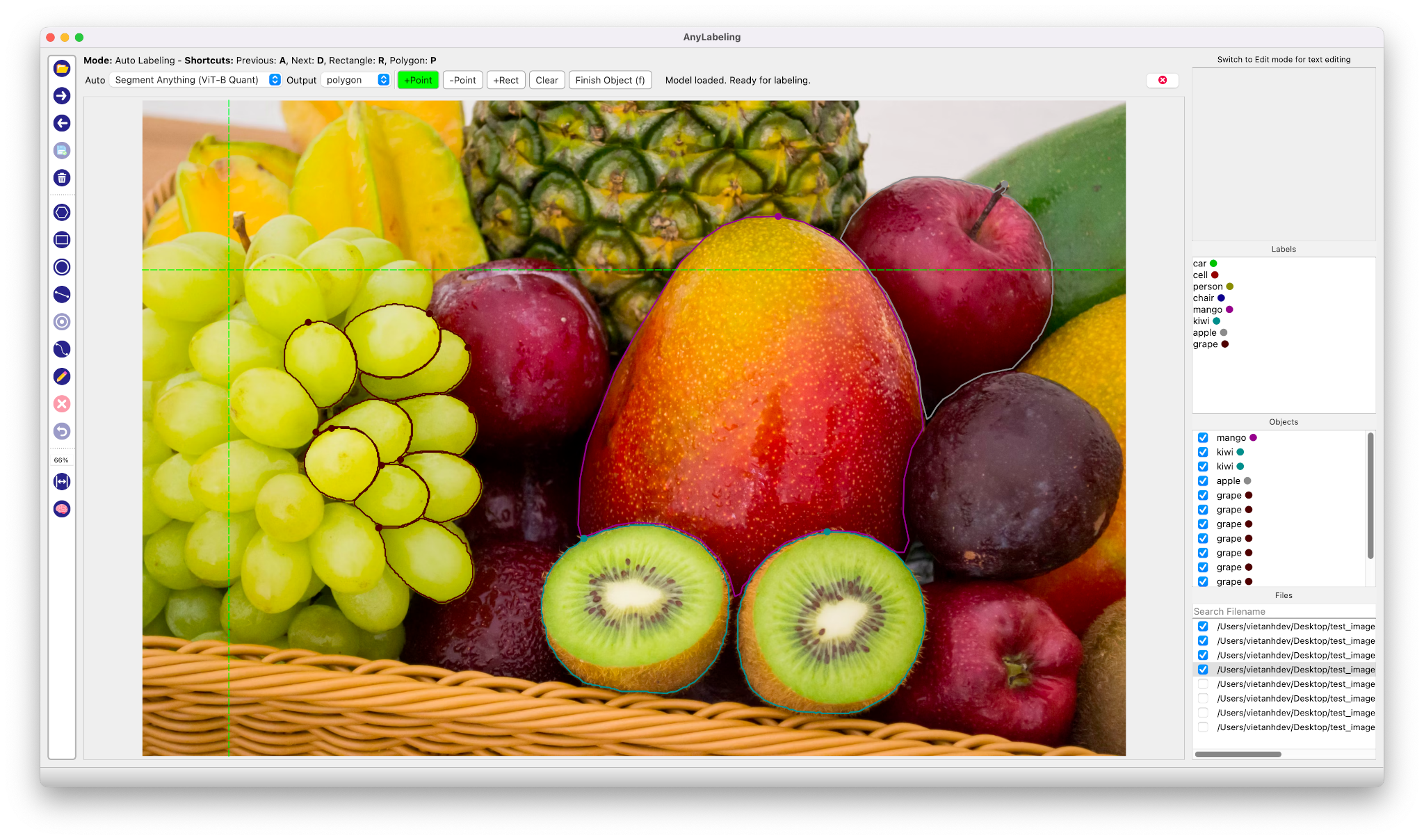
Auto Labeling with Segment Anything

- Youtube Demo: https://www.youtube.com/watch?v=5qVJiYNX5Kk
- Documentation: https://anylabeling.nrl.ai
Features:
- Image annotation for polygon, rectangle, circle, line and point.
- Auto-labeling with YOLOv8 (object detection).
- Auto-labeling with Segment Anything family:
- SAM (ViT-B / ViT-L / ViT-H) and MobileSAM
- SAM 2 and SAM 2.1 (Hiera-Tiny / Small / Base+ / Large)
- SAM 3 (ViT-H) — open-vocabulary segmentation with text prompts
- Text detection, recognition and KIE (Key Information Extraction) labeling.
- Multiple languages availables: English, Vietnamese, Chinese.
| Model | Prompt Types | Notes |
|---|---|---|
| SAM ViT-B / ViT-L / ViT-H | Point, Rectangle | Original Segment Anything |
| MobileSAM | Point, Rectangle | Lightweight SAM |
| SAM 2 Hiera-Tiny / Small / Base+ / Large | Point, Rectangle | Meta SAM 2 |
| SAM 2.1 Hiera-Tiny / Small / Base+ / Large | Point, Rectangle | Improved SAM 2 |
| SAM 3 ViT-H | Text, Point, Rectangle | Open-vocabulary; text drives detection |
| YOLOv8n / s / m / l / x | — | Object detection & auto-labeling |
All models are downloaded automatically on first use from Hugging Face.
- Download and run newest version from Releases.
- For MacOS:
- Download the folder mode build (
AnyLabeling-Folder.zip) from Releases - See macOS folder mode instructions for details
- Download the folder mode build (
-
Requirements: Python 3.11+. Recommended: Python 3.12.
-
Recommended: Miniconda/Anaconda.
-
Create environment:
conda create -n anylabeling python=3.12
conda activate anylabeling- (For macOS only) Install PyQt6 using Conda:
conda install -c conda-forge pyqt=6- Install anylabeling:
pip install anylabeling # or pip install anylabeling-gpu for GPU support- Start labeling:
anylabelingWebsite: https://anylabeling.nrl.ai/
| Object Detection | Recognition | Facial Landmark Detection | 2D Pose Estimation |
|---|---|---|---|
 |
 |
 |
 |
| 2D Lane Detection | OCR | Medical Imaging | Instance Segmentation |
 |
 |
 |
 |
| Image Tagging | Rotation | And more! | |
 |
 |
Your applications here! |
- Install packages:
pip install -r requirements-dev.txt
# or pip install -r requirements-macos-dev.txt for MacOS- Generate resources:
pyrcc5 -o anylabeling/resources/resources.py anylabeling/resources/resources.qrc- Run app:
python anylabeling/app.py- Install PyInstaller:
pip install -r requirements-dev.txt- Build:
bash build_executable.sh- Check the outputs in:
dist/.
If you want to contribute to AnyLabeling, please read Contribution Guidelines.
- Labeling UI built with ideas and components from LabelImg, LabelMe.
- Auto-labeling with Segment Anything (SAM, SAM 2, SAM 2.1, SAM 3), MobileSAM.
- Auto-labeling with YOLOv8.
- Icons from FlatIcon: DinosoftLabs, Freepik, Vectoricons, HideMaru.
