<?xml version="1.0" encoding="utf-8"?><feed xmlns="http://www.w3.org/2005/Atom" ><generator uri="https://jekyllrb.com/" version="3.10.0">Jekyll</generator><link href="https://metaredux.com/feed.xml" rel="self" type="application/atom+xml" /><link href="https://metaredux.com/" rel="alternate" type="text/html" /><updated>2026-07-18T08:59:06+00:00</updated><id>https://metaredux.com/feed.xml</id><title type="html">Meta Redux</title><subtitle>Writings on programming and open-source by Bozhidar Batsov, creator of RuboCop, CIDER, and Prelude.</subtitle><author><name>Bozhidar Batsov</name></author><entry><title type="html">Sayid 0.8</title><link href="https://metaredux.com/posts/2026/07/18/sayid-0-8.html" rel="alternate" type="text/html" title="Sayid 0.8" /><published>2026-07-18T07:00:00+00:00</published><updated>2026-07-18T07:00:00+00:00</updated><id>https://metaredux.com/posts/2026/07/18/sayid-0-8</id><content type="html" xml:base="https://metaredux.com/posts/2026/07/18/sayid-0-8.html"><![CDATA[<p><a href="https://github.com/clojure-emacs/sayid/blob/master/CHANGELOG.md">Sayid 0.8</a> is out! It’s the third release since I
<a href="/posts/2026/07/01/sayid-redux.html">brought Sayid back from the dead</a>
a couple of weeks ago, and it has a clear theme: making the tool easy to pick
up. The revival releases were mostly about the engine - bounding the recording,
consolidating the API, getting the data out. This one is about the experience.
If you’ve ever bounced off Sayid because you couldn’t figure out what to press,
or what it was trying to tell you, 0.8 is for you.</p>

<!--more-->

<h2 id="it-started-with-a-bug-report">It started with a bug report</h2>

<p>Shortly after the revival post, someone reported that pressing <code class="language-plaintext highlighter-rouge">c i</code> in the
workspace view - “inspect this captured value” - printed <code class="language-plaintext highlighter-rouge">Def'd as $s/*</code> and
then… nothing. The fix turned out to be a one-liner: Sayid was calling a
CIDER function whose signature changed years ago, and nobody had noticed since.
Which tells you everything about how many people were actually using that
command.<sup id="fnref:1" role="doc-noteref"><a href="#fn:1" class="footnote" rel="footnote">1</a></sup></p>

<p>The one-liner was easy, but the report got under my skin. If the inspector
integration could sit broken for years, what else about Sayid was quietly
hostile to anyone trying it for the first time? So I sat down and did a proper
UX audit of the Emacs client, wrote down everything that made me wince, and 0.8
is the result.</p>

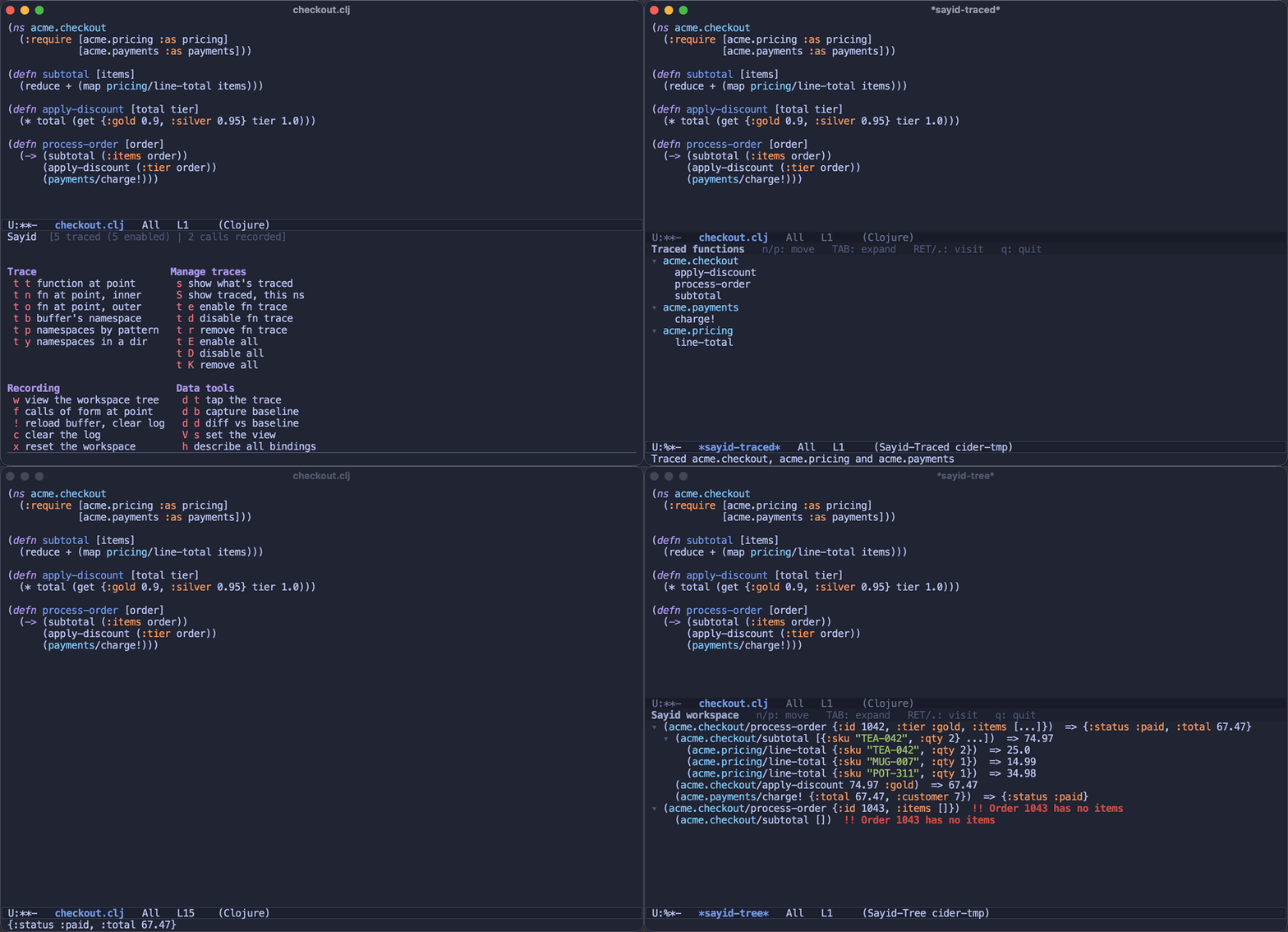
<p>Here’s the current state of affairs in one take - trace, run, explore:</p>

<p><img src="https://raw.githubusercontent.com/clojure-emacs/sayid/master/doc/images/sayid-workflow.gif" alt="The Sayid workflow - trace some namespaces, run your code, explore the recording" /></p>

<h2 id="catching-up-06-and-07">Catching up: 0.6 and 0.7</h2>

<p>Before we get to the UX work, a quick recap of the two releases I never got
around to announcing (the revival post covered things up to 0.5).</p>

<p><a href="https://github.com/clojure-emacs/sayid/blob/master/CHANGELOG.md">Sayid 0.6</a> rebuilt inner tracing - the mode that records every
intermediate expression <em>inside</em> a function - on top of <code class="language-plaintext highlighter-rouge">tools.analyzer.jvm</code>.
The old implementation re-read your source and rewrote raw forms, with special
cases for individual macros; the new one works off the analyzed AST. That
killed the long-standing bug where an inner-traced <code class="language-plaintext highlighter-rouge">try/catch</code> would swallow
exceptions, along with the per-macro special-casing that made the old
instrumenter so fragile.</p>

<p><a href="https://github.com/clojure-emacs/sayid/blob/master/CHANGELOG.md">Sayid 0.7</a> made the trace itself data. <code class="language-plaintext highlighter-rouge">sayid.data/trace-data</code>
returns the recorded call tree as plain Clojure data with the live captured
values, and <code class="language-plaintext highlighter-rouge">tap-trace!</code> sends it to <code class="language-plaintext highlighter-rouge">tap&gt;</code>, so you can explore a recording in
<a href="https://github.com/djblue/portal">Portal</a> or your data tool of choice. It also added <code class="language-plaintext highlighter-rouge">sayid.golden</code> - capture
a run’s call tree as a baseline, then assert future runs still match it, which
is a surprisingly pleasant way to pin down the behavior of gnarly legacy code
before refactoring it.</p>

<h2 id="the-highlights">The highlights</h2>

<p>Now, the 0.8 goodies. The full list is in the <a href="https://github.com/clojure-emacs/sayid/blob/master/CHANGELOG.md">changelog</a>, but here’s what I’m
most excited about:</p>

<ul>
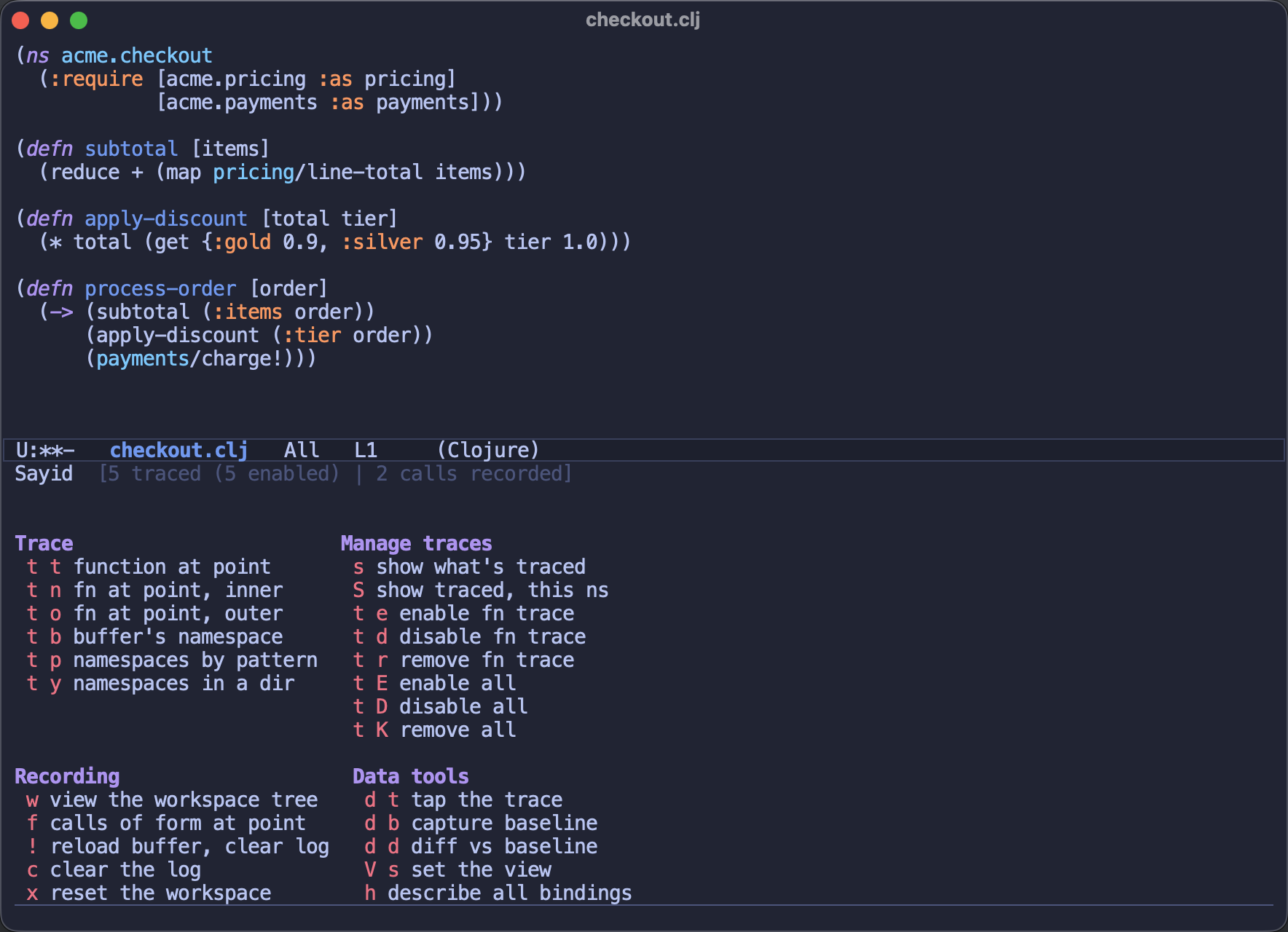
  <li>There’s a proper entry point now: <code class="language-plaintext highlighter-rouge">C-c s</code> pops up a <code class="language-plaintext highlighter-rouge">transient</code> menu
(<code class="language-plaintext highlighter-rouge">sayid-menu</code>) that groups the commands along Sayid’s core loop - trace
something, run your code, explore the recording - and shows you how much is
traced and recorded right now, or what’s missing (a REPL, the middleware) when
you’re not connected. The menu uses the same key sequences as the classic
prefix map, so your muscle memory keeps working, and <code class="language-plaintext highlighter-rouge">sayid-use-menu</code> brings
the plain keymap back if popups aren’t your thing.</li>
</ul>

<p><img src="https://raw.githubusercontent.com/clojure-emacs/sayid/master/doc/images/sayid-menu.png" alt="The Sayid menu" /></p>

<ul>
  <li><code class="language-plaintext highlighter-rouge">sayid-trace-fn</code> (<code class="language-plaintext highlighter-rouge">C-c s t t</code>) is the new “just trace this” command. You no
longer need to know what inner and outer traces are before you can trace your
first function - the default does the right thing, and you can graduate to
the fancier variants later.</li>
  <li>Empty views teach instead of scolding. Opening the workspace before anything
was recorded used to greet you with an error; now you get the buffer anyway,
with a short walkthrough of how to get data into it. The first five minutes
with Sayid should no longer require reading the manual.</li>
  <li>The commands talk back like a human. Tracing a function now tells you what
happened and what to do next (“Outer-traced acme.checkout/subtotal - run some
code, then <code class="language-plaintext highlighter-rouge">C-c s w</code> shows what was recorded”), and trying to enable a trace
that doesn’t exist tells you the actual problem instead of pretending
everything went fine.</li>
  <li>The workspace tree is now the one view to rule them all: on any call you can
inspect a captured value in CIDER’s inspector (<code class="language-plaintext highlighter-rouge">c i</code> - yes, it works now),
def it to a var for REPL poking (<code class="language-plaintext highlighter-rouge">c d</code>), pretty-print it (<code class="language-plaintext highlighter-rouge">c p</code>), or copy an
expression that reproduces the call (<code class="language-plaintext highlighter-rouge">c r</code>). <code class="language-plaintext highlighter-rouge">C-c s f</code> - show the recorded
calls of the form at point - renders there too.</li>
  <li>A pile of small courtesies that add up: tracing a function no longer steals
your window with a popup, <code class="language-plaintext highlighter-rouge">g</code> refreshes the Sayid buffers like every other
Emacs buffer, and resetting the workspace asks before irreversibly dropping
your traces and recording.</li>
  <li>The client and the middleware now tolerate version skew - if your <code class="language-plaintext highlighter-rouge">deps.edn</code>
pins an older Sayid jar than your Emacs package expects, things degrade
politely instead of erroring in strange ways.</li>
  <li>The Emacs client now requires CIDER 2.0, which let me drop a bunch of
compatibility shims and lean on the new <code class="language-plaintext highlighter-rouge">cider-tree-view</code> throughout.</li>
  <li>And the README finally <em>shows</em> the tool instead of just describing it -
screenshots and the GIF above included. A picture of a call tree is worth a
thousand words about one.</li>
</ul>

<h2 id="upgrading-notes">Upgrading notes</h2>

<p>Nothing here should break a working setup, but two things are worth knowing.
The Emacs package now requires CIDER 2.0 (released earlier this week), so
they’ll need to be upgraded together. And <code class="language-plaintext highlighter-rouge">C-c s</code> now opens the menu instead of
acting as a bare prefix - every old key sequence still works exactly as typed,
but if you prefer the old silent prefix, set <code class="language-plaintext highlighter-rouge">sayid-use-menu</code> to <code class="language-plaintext highlighter-rouge">nil</code>. A few
commands got more consistent names (<code class="language-plaintext highlighter-rouge">sayid-trace-fn-outer</code> and friends); the
old names live on as obsolete aliases.</p>

<h2 id="onward">Onward</h2>

<p>When I wrote the revival post I asked people to kick the tyres and tell me what
feels rough. This release is what acting on that feedback looks like, and it’s
exactly the kind of contribution I need more of - a two-line bug report turned
into the biggest usability overhaul in the project’s history. So thanks to
everyone who has been trying out the revived Sayid, and please keep the reports
coming on the <a href="https://github.com/clojure-emacs/sayid/issues">issue tracker</a>.</p>

<p><code class="language-plaintext highlighter-rouge">[mx.cider/sayid "0.8.0"]</code> is on Clojars, the Emacs package is on MELPA, and
tracing your first function is now a single <code class="language-plaintext highlighter-rouge">C-c s t t</code> away. Give it a spin!</p>

<p>Keep hacking!</p>

<div class="footnotes" role="doc-endnotes">
  <ol>
    <li id="fn:1" role="doc-endnote">
      <p>In fairness, it also tells you something about me - the bug shipped with
my own resurrection releases. Reviving a decade-old codebase means
inheriting a decade of API drift, and some of it only surfaces when a real
user presses a real key. <a href="#fnref:1" class="reversefootnote" role="doc-backlink">&#8617;</a></p>
    </li>
  </ol>
</div>]]></content><author><name>Bozhidar Batsov</name></author><category term="posts" /><category term="Clojure" /><category term="nREPL" /><category term="CIDER" /><category term="Emacs" /><category term="Debugging" /><summary type="html"><![CDATA[Sayid 0.8 is out! It’s the third release since I brought Sayid back from the dead a couple of weeks ago, and it has a clear theme: making the tool easy to pick up. The revival releases were mostly about the engine - bounding the recording, consolidating the API, getting the data out. This one is about the experience. If you’ve ever bounced off Sayid because you couldn’t figure out what to press, or what it was trying to tell you, 0.8 is for you.]]></summary><media:thumbnail xmlns:media="http://search.yahoo.com/mrss/" url="https://metaredux.com/assets/og-image.png" /><media:content medium="image" url="https://metaredux.com/assets/og-image.png" xmlns:media="http://search.yahoo.com/mrss/" /></entry><entry><title type="html">Projectile 3.2</title><link href="https://metaredux.com/posts/2026/07/18/projectile-3-2.html" rel="alternate" type="text/html" title="Projectile 3.2" /><published>2026-07-18T06:15:00+00:00</published><updated>2026-07-18T06:15:00+00:00</updated><id>https://metaredux.com/posts/2026/07/18/projectile-3-2</id><content type="html" xml:base="https://metaredux.com/posts/2026/07/18/projectile-3-2.html"><![CDATA[<p><a href="https://github.com/bbatsov/projectile/releases/tag/v3.2.0">Projectile 3.2</a> is out!<sup id="fnref:1" role="doc-noteref"><a href="#fn:1" class="footnote" rel="footnote">1</a></sup> That’s the third Projectile release this
month, and by now you probably see the pattern - a whole lot of nothing for a
couple of years, then everything at once. Where <a href="/posts/2026/07/01/projectile-3-0.html">3.0</a> was the big cleanup
and <a href="/posts/2026/07/04/projectile-3-1.html">3.1</a> the pile of long-standing feature requests, 3.2 is a focused
release with one clear theme: search and replace. Plus one bonus feature I’ve
wanted for ages, but more on that below.</p>

<!--more-->

<h2 id="replace-but-with-a-preview">Replace, but with a preview</h2>

<p><code class="language-plaintext highlighter-rouge">projectile-replace</code> has always been one of those commands that technically
worked, but that I never quite trusted. It walks the project file by file with
<code class="language-plaintext highlighter-rouge">query-replace</code>, asking you about every match with no way to see the big
picture, and once you start there’s no graceful way out. I’ve been promising
myself a better story there for years (that’s <a href="https://github.com/bbatsov/projectile/issues/1924">#1924</a>, if you’re keeping
score at home).</p>

<p>3.2 finally delivers it. <code class="language-plaintext highlighter-rouge">projectile-replace-review</code> (<code class="language-plaintext highlighter-rouge">s-p R</code>) prompts for a
search string and a replacement, gathers every match across the project into a
<code class="language-plaintext highlighter-rouge">*projectile-replace*</code> buffer, and shows you a per-match preview of exactly
what’s about to change. Every match can be toggled on or off, and <code class="language-plaintext highlighter-rouge">!</code> applies
just the enabled ones - in any order, whenever you’re ready. Here’s the whole
flow, start to finish:</p>

<p><img src="/assets/images/projectile-replace-review.gif" alt="projectile-replace-review in action" /></p>

<p>The matches are gathered in Emacs Lisp rather than by shelling out to grep, so
<code class="language-plaintext highlighter-rouge">projectile-replace-regexp-review</code> honours full Emacs regexp syntax (yes,
including <code class="language-plaintext highlighter-rouge">\_&lt;foo\_&gt;</code> and capture groups in the replacement), and the preview
reflects the exact text that will be edited - including unsaved changes in
buffers you already have open. The apply step is equally paranoid: files are
edited bottom-up so earlier edits can’t shift later matches, open buffers get a
single undo step, and buffers modified since the scan are skipped rather than
clobbered.</p>

<p>The results buffer is a little workbench of its own - you can toggle case
sensitivity (<code class="language-plaintext highlighter-rouge">c</code>), flip between literal and regexp matching (<code class="language-plaintext highlighter-rouge">x</code>), keep or
flush matches by line or by file (<code class="language-plaintext highlighter-rouge">k</code>/<code class="language-plaintext highlighter-rouge">d</code>/<code class="language-plaintext highlighter-rouge">K</code>/<code class="language-plaintext highlighter-rouge">D</code>), and export everything to a
<code class="language-plaintext highlighter-rouge">grep-mode</code> buffer (<code class="language-plaintext highlighter-rouge">e</code>) if you’d rather finish the job with <code class="language-plaintext highlighter-rouge">wgrep</code>. And both
reviewers scan the project asynchronously, so a big search no longer freezes
Emacs - matches stream in as they’re found and you can bail out at any point.</p>

<h2 id="search-gets-the-same-treatment">Search gets the same treatment</h2>

<p>Once the replace reviewer existed, the obvious next question was “can I have
this without the replacing part?”. You can. <code class="language-plaintext highlighter-rouge">projectile-search-review</code>
(<code class="language-plaintext highlighter-rouge">s-p s R</code>) collects every match for a term into a read-only
<code class="language-plaintext highlighter-rouge">*projectile-search*</code> buffer, grouped by file, with the matched spans
highlighted:</p>

<p><img src="/assets/images/projectile-search-review.png" alt="The projectile-search results buffer" /></p>

<p>It shares the replace reviewer’s navigation and filtering, and pressing <code class="language-plaintext highlighter-rouge">r</code>
hands the current search over to the replace reviewer, carrying along the term
and settings and prompting only for the replacement. So “look first, replace
later” is now a single keystroke, not a re-do.</p>

<p>My favourite touch: when <code class="language-plaintext highlighter-rouge">rg</code> is installed, a literal search rides ripgrep and
streams matches in near-instantly even on huge projects (customizable via
<code class="language-plaintext highlighter-rouge">projectile-search-use-ripgrep</code>). The regexp variant and the replace reviewer
always use the portable Emacs Lisp scan, so the preview you act on is always
the real thing.</p>

<h2 id="a-tab-per-project">A tab per project</h2>

<p>The bonus feature: <code class="language-plaintext highlighter-rouge">projectile-session-mode</code>, a global minor mode that gives
each project its own <code class="language-plaintext highlighter-rouge">tab-bar</code> tab. Switch to a project and Projectile either
selects its existing tab (with the window layout you left there) or opens a
fresh one named after the project. Sessions can also persist across restarts -
<code class="language-plaintext highlighter-rouge">s-p w s</code> saves a project’s layout and buffers, switching to the project can
restore it automatically, and <code class="language-plaintext highlighter-rouge">projectile-session-restore-all</code> brings your
whole working set back after a restart, each project in its own tab.</p>

<p>I’ve long envied the “workspace per project” workflows people build with
<code class="language-plaintext highlighter-rouge">tab-bar</code> and a handful of hooks, and now Projectile just does it out of the
box. It’s opt-in, so nothing changes unless you enable the mode.</p>

<h2 id="odds-and-ends">Odds and ends</h2>

<p>A few smaller things that shipped alongside the headliners:</p>

<ul>
  <li>The reviewable search/replace learned whole-word matching - toggle it with
<code class="language-plaintext highlighter-rouge">w</code> in the results buffer, or default it with <code class="language-plaintext highlighter-rouge">projectile-search-whole-word</code>.</li>
  <li><code class="language-plaintext highlighter-rouge">projectile-dispatch</code> picked up matching switches - <code class="language-plaintext highlighter-rouge">--word</code> and
<code class="language-plaintext highlighter-rouge">--case-sensitive</code> seed the reviewable search/replace, the same way
<code class="language-plaintext highlighter-rouge">--regexp</code> already did for the other search commands.</li>
  <li>All the search prompts now share one consistent format that shows the tool
that will actually run and the symbol-at-point default up front. No more
guessing whether you’re about to invoke grep or ripgrep.</li>
  <li>Projectile’s prompts now advertise the right completion metadata category per
command, so <code class="language-plaintext highlighter-rouge">marginalia</code> annotates candidates properly (buffers get buffer
annotations, projects get file ones) and <code class="language-plaintext highlighter-rouge">embark</code> can act on them. With
<code class="language-plaintext highlighter-rouge">vertico</code> and <code class="language-plaintext highlighter-rouge">marginalia</code> the built-in commands look downright fancy now:</li>
</ul>

<p><img src="/assets/images/projectile-find-file.gif" alt="projectile-find-file with vertico and marginalia" /></p>

<ul>
  <li>Function-valued lifecycle commands (say, a CMake preset picker) are
re-invoked on every run instead of having their first result frozen in the
command cache - an old gotcha that bit CMake users in particular.</li>
</ul>

<h2 id="wrapping-up">Wrapping up</h2>

<p>No breaking changes this time, and nothing to migrate - the full list of
changes is in the <a href="https://github.com/bbatsov/projectile/blob/master/CHANGELOG.md">changelog</a>, as always.</p>

<p>More importantly, 3.2 completes - for now - the arc I embarked on with 3.0.
Looking back at the whole 3.x series, the mission boils down to three things:</p>

<ul>
  <li>make Projectile’s internals faster, simpler and more robust</li>
  <li>modernize the UX (async everything, the dispatch menu, and now reviewable
search and replace) and give people more reasons to prefer Projectile</li>
  <li>replace hardcoded behavior with mechanisms - backend registries, file kinds,
named tasks, session serializers - that you can bend to your own workflow in
a few lines of config</li>
</ul>

<p>All three boxes feel properly ticked at this point, so the summer release burst
is probably winding down.<sup id="fnref:2" role="doc-noteref"><a href="#fn:2" class="footnote" rel="footnote">2</a></sup> Projectile is in the best shape it’s been in
years, and I’m having more fun working on it than I’ve had in a long time. Huge
thanks to everyone who reported issues and tested the new reviewers while they
were taking shape!</p>

<p>Keep hacking!</p>

<div class="footnotes" role="doc-endnotes">
  <ol>
    <li id="fn:1" role="doc-endnote">
      <p>Technically it’s been out since July 12th, and there’s already a 3.2.1
patch release, because 3.2.0 shipped with a crash in <code class="language-plaintext highlighter-rouge">projectile-search</code>.
You polish a release for a week and then break the one command everyone
uses. Classic. <a href="#fnref:1" class="reversefootnote" role="doc-backlink">&#8617;</a></p>
    </li>
    <li id="fn:2" role="doc-endnote">
      <p>Famous last words, again. I said something similar after 3.1. <a href="#fnref:2" class="reversefootnote" role="doc-backlink">&#8617;</a></p>
    </li>
  </ol>
</div>]]></content><author><name>Bozhidar Batsov</name></author><category term="posts" /><category term="Emacs" /><category term="Projectile" /><summary type="html"><![CDATA[Projectile 3.2 is out!1 That’s the third Projectile release this month, and by now you probably see the pattern - a whole lot of nothing for a couple of years, then everything at once. Where 3.0 was the big cleanup and 3.1 the pile of long-standing feature requests, 3.2 is a focused release with one clear theme: search and replace. Plus one bonus feature I’ve wanted for ages, but more on that below. Technically it’s been out since July 12th, and there’s already a 3.2.1 &#8617;]]></summary><media:thumbnail xmlns:media="http://search.yahoo.com/mrss/" url="https://metaredux.com/assets/og-image.png" /><media:content medium="image" url="https://metaredux.com/assets/og-image.png" xmlns:media="http://search.yahoo.com/mrss/" /></entry><entry><title type="html">Stepping Through Macros in CIDER</title><link href="https://metaredux.com/posts/2026/07/17/stepping-through-macros-in-cider.html" rel="alternate" type="text/html" title="Stepping Through Macros in CIDER" /><published>2026-07-17T05:15:00+00:00</published><updated>2026-07-17T05:15:00+00:00</updated><id>https://metaredux.com/posts/2026/07/17/stepping-through-macros-in-cider</id><content type="html" xml:base="https://metaredux.com/posts/2026/07/17/stepping-through-macros-in-cider.html"><![CDATA[<p>This is another installment in the series of articles about the notable changes
in <a href="/posts/2026/07/15/cider-2-0.html">CIDER 2.0</a>. Today’s topic is one of
those “ambitious ideas that lay dormant for ages” I keep mentioning: proper
interactive macro stepping.</p>

<h2 id="the-dream">The Dream</h2>

<p>CIDER has had macroexpansion support practically forever - <code class="language-plaintext highlighter-rouge">C-c C-m</code> expands
the form before point into a dedicated buffer, a feature we inherited
spiritually from SLIME. It works, but it has always felt a bit… detached. The
expansion lives in another buffer, divorced from the code you’re reading, and
for deeply nested macros you end up bouncing between buffers trying to keep
your bearings.</p>

<p>Emacs Lisp hackers have long had something nicer:
<a href="https://github.com/emacsorphanage/macrostep">macrostep</a>, a brilliant little
package that expands macros <em>in place</em> - right where they sit in your code - one
step at a time, and collapses them back when you’re done. I’ve wanted a Clojure
version of this for years. CIDER 2.0 finally ships one.</p>

<h2 id="standing-on-shoulders-not-on-top-of-them">Standing on shoulders, not on top of them</h2>

<p>I’m hardly the first person to want this. The idea of bridging CIDER and
macrostep goes back to at least
<a href="https://github.com/clojure-emacs/cider/issues/1850">2016</a>, where a proof of
concept wired up macrostep’s extension hooks to CIDER by injecting a couple of
helper functions into your REPL and shuttling forms back and forth as strings.
Later, <a href="https://github.com/nbfalcon/macrostep-geiser">macrostep-geiser</a> - a
Scheme-oriented macrostep backend - grew CIDER support as well, and SLIME
itself ships a <code class="language-plaintext highlighter-rouge">slime-macrostep</code> contrib built on the same extension API. So
the hooks were there, the hacks existed, and I could have blessed one of them
and called it a day.</p>

<p>I opted for a clean, from-scratch implementation in CIDER instead - mostly to
provide the best possible experience for Clojure programmers, without the
compromises the bridges had to make. macrostep’s extension API was designed
around Emacs Lisp’s happy circumstances, and Clojure violates most of them:</p>

<ul>
  <li><code class="language-plaintext highlighter-rouge">macrostep-expand-1-function</code> must be <em>synchronous</em>. That’s fine when
expansion is an elisp function call; it’s less fine when it’s a network
round-trip to an nREPL server. (CIDER has been busy removing exactly this
kind of blocking call lately - asynchronous eldoc being the poster child.)</li>
  <li>The API traffics in <em>forms</em> - elisp data structures. But Clojure code isn’t
elisp data: keywords, reader tags, <code class="language-plaintext highlighter-rouge">#()</code> lambdas and namespaced maps have no
faithful elisp representation, so every bridge ends up round-tripping code
through strings and hoping the quoting survives. The 2016 proof of concept
literally did <code class="language-plaintext highlighter-rouge">(format "(expand-once '%s)" form)</code>, which should make anyone
a little nervous.</li>
  <li><code class="language-plaintext highlighter-rouge">macrostep-print-function</code> expects the <em>client</em> to print and fontify the
expansion. In CIDER the <em>server</em> does the printing - that’s how we get
namespace tidying (<code class="language-plaintext highlighter-rouge">when</code> instead of <code class="language-plaintext highlighter-rouge">clojure.core/when</code>), print-option
handling and metadata display for free. A client-side printer would have to
reimplement all of that, badly.</li>
</ul>

<p>There’s also a less technical reason: lately I’ve grown rather averse to
adding third-party dependencies to CIDER. A dependency is a bet on someone
else’s continued enthusiasm, and such bets sometimes go bad - tellingly,
macrostep itself spent a stretch unmaintained and now lives in a GitHub org
literally named “emacsorphanage” (it has since found a new maintainer, but the
point stands). CIDER is 14 years old and intends to stick around; over that
kind of horizon, owning ~600 lines of overlay code is cheaper than adopting
someone else’s semi-abandoned package. So we kept
macrostep’s brilliant UX ideas and its familiar keybindings, and left the
coupling behind.</p>

<h2 id="cider-macrostep">cider-macrostep</h2>

<p>The entry point is <code class="language-plaintext highlighter-rouge">cider-macrostep-expand</code> (<code class="language-plaintext highlighter-rouge">C-c M-m e</code>). Put point after a
macro form, invoke it, and the form is replaced inline with its one-step
expansion, highlighted so you can tell what’s expansion and what’s your code:</p>

<div class="language-clojure highlighter-rouge"><div class="highlight"><pre class="highlight"><code><span class="p">(</span><span class="nb">when-let</span><span class="w"> </span><span class="p">[</span><span class="n">x</span><span class="w"> </span><span class="p">(</span><span class="nf">fetch-thing</span><span class="p">)]</span><span class="w">
  </span><span class="p">(</span><span class="nf">process</span><span class="w"> </span><span class="n">x</span><span class="p">))</span><span class="w">

</span><span class="c1">;; C-c M-m e =&gt;</span><span class="w">

</span><span class="p">(</span><span class="k">let</span><span class="w"> </span><span class="p">[</span><span class="n">temp__5825__auto__</span><span class="w"> </span><span class="p">(</span><span class="nf">fetch-thing</span><span class="p">)]</span><span class="w">
  </span><span class="p">(</span><span class="nb">when</span><span class="w"> </span><span class="n">temp__5825__auto__</span><span class="w">
    </span><span class="p">(</span><span class="k">let</span><span class="w"> </span><span class="p">[</span><span class="n">x</span><span class="w"> </span><span class="n">temp__5825__auto__</span><span class="p">]</span><span class="w">
      </span><span class="p">(</span><span class="nf">process</span><span class="w"> </span><span class="n">x</span><span class="p">))))</span><span class="w">
</span></code></pre></div></div>

<p>From there you’re in <code class="language-plaintext highlighter-rouge">cider-macrostep-mode</code>, where the further-expandable
sub-forms are underlined, <code class="language-plaintext highlighter-rouge">n</code>/<code class="language-plaintext highlighter-rouge">p</code> hop between them, <code class="language-plaintext highlighter-rouge">e</code> (or <code class="language-plaintext highlighter-rouge">RET</code>) steps into
one, and <code class="language-plaintext highlighter-rouge">c</code>/<code class="language-plaintext highlighter-rouge">q</code> collapse one level or everything back to the original code.
Your buffer is never
actually modified in a way that sticks - collapse everything and it’s exactly as
it was.</p>

<p>Here’s the whole flow in motion - expand, step into a nested macro, collapse
back to the original code:</p>

<p><img src="/assets/images/cider-macrostep.gif" alt="cider-macrostep stepping through when-let and collapsing back" /></p>

<p>A couple of touches I’m particularly fond of:</p>

<ul>
  <li>Every distinct gensym in the expansion gets its own color, so you can finally
track where that <code class="language-plaintext highlighter-rouge">temp__5825__auto__</code> flows through the expanded code. Once
you’ve seen a <code class="language-plaintext highlighter-rouge">for</code> expansion with colorized gensyms, you won’t want to go
back:</li>
</ul>

<p><img src="/assets/images/cider-macrostep-for-gensyms.png" alt="cider-macrostep expanding for, with colorized gensyms" /></p>

<ul>
  <li><code class="language-plaintext highlighter-rouge">E</code> (<code class="language-plaintext highlighter-rouge">cider-macrostep-expand-all</code>) fully expands the form in one step, for
when you don’t care about the journey.</li>
  <li><code class="language-plaintext highlighter-rouge">b</code> (<code class="language-plaintext highlighter-rouge">cider-macrostep-expand-in-buffer</code>) runs the same stepping session in a
dedicated popup, leaving the source buffer untouched - handy when you’re in
someone else’s code and feel uneasy about inline rewrites, however temporary.</li>
</ul>

<h2 id="the-classic-buffer-got-some-love-too">The classic buffer got some love too</h2>

<p>The traditional macroexpansion buffer wasn’t neglected either: it grew a header
line showing the active expander and display options, <code class="language-plaintext highlighter-rouge">n</code> and <code class="language-plaintext highlighter-rouge">t</code> cycle
namespace display and metadata in place, <code class="language-plaintext highlighter-rouge">g</code> re-expands with the latest macro
definition, and freshly expanded forms pulse briefly so your eye lands in the
right place.</p>

<p>The expansion commands also got more talkative: pointing them at an unresolved
symbol now tells you whether the namespace simply isn’t loaded yet (evaluate
the buffer!) or you’ve got a typo, instead of silently doing nothing.<sup id="fnref:1" role="doc-noteref"><a href="#fn:1" class="footnote" rel="footnote">1</a></sup></p>

<h2 id="why-bother">Why bother?</h2>

<p>Macros are the part of Clojure people are most likely to describe as “magic”,
and the standard advice - “just macroexpand it” - has always carried a hidden
tax: the expansion of any non-trivial macro is a wall of gensyms and nested
<code class="language-plaintext highlighter-rouge">let*</code>s that’s genuinely hard to read cold. Stepping through the expansion one
level at a time, in place, with the gensyms color-coded, turns that wall into
something you can actually follow. I did not expect macro debugging to become
<em>fun</em>, and yet here we are.</p>

<p>All the details are in the
<a href="https://docs.cider.mx/cider/debugging/macroexpansion.html">macroexpansion docs</a>.
Give it a try the next time a macro surprises you - and keep hacking!</p>

<div class="footnotes" role="doc-endnotes">
  <ol>
    <li id="fn:1" role="doc-endnote">
      <p>Amusingly, we initially overdid these diagnostics - the guard refused to
expand <code class="language-plaintext highlighter-rouge">let</code> and <code class="language-plaintext highlighter-rouge">fn</code> (which are macros wearing special-form badges) and
broke a beloved trick of using macroexpansion to normalize reader syntax
like <code class="language-plaintext highlighter-rouge">::auto/keywords</code>. See
<a href="https://github.com/clojure-emacs/cider/issues/4111">#4111</a> - fixed right
after 2.0. Even diagnostics need diagnostics. <a href="#fnref:1" class="reversefootnote" role="doc-backlink">&#8617;</a></p>
    </li>
  </ol>
</div>]]></content><author><name>Bozhidar Batsov</name></author><category term="posts" /><category term="Emacs" /><category term="Clojure" /><category term="CIDER" /><summary type="html"><![CDATA[This is another installment in the series of articles about the notable changes in CIDER 2.0. Today’s topic is one of those “ambitious ideas that lay dormant for ages” I keep mentioning: proper interactive macro stepping. The Dream CIDER has had macroexpansion support practically forever - C-c C-m expands the form before point into a dedicated buffer, a feature we inherited spiritually from SLIME. It works, but it has always felt a bit… detached. The expansion lives in another buffer, divorced from the code you’re reading, and for deeply nested macros you end up bouncing between buffers trying to keep your bearings. Emacs Lisp hackers have long had something nicer: macrostep, a brilliant little package that expands macros in place - right where they sit in your code - one step at a time, and collapses them back when you’re done. I’ve wanted a Clojure version of this for years. CIDER 2.0 finally ships one. Standing on shoulders, not on top of them I’m hardly the first person to want this. The idea of bridging CIDER and macrostep goes back to at least 2016, where a proof of concept wired up macrostep’s extension hooks to CIDER by injecting a couple of helper functions into your REPL and shuttling forms back and forth as strings. Later, macrostep-geiser - a Scheme-oriented macrostep backend - grew CIDER support as well, and SLIME itself ships a slime-macrostep contrib built on the same extension API. So the hooks were there, the hacks existed, and I could have blessed one of them and called it a day. I opted for a clean, from-scratch implementation in CIDER instead - mostly to provide the best possible experience for Clojure programmers, without the compromises the bridges had to make. macrostep’s extension API was designed around Emacs Lisp’s happy circumstances, and Clojure violates most of them: macrostep-expand-1-function must be synchronous. That’s fine when expansion is an elisp function call; it’s less fine when it’s a network round-trip to an nREPL server. (CIDER has been busy removing exactly this kind of blocking call lately - asynchronous eldoc being the poster child.) The API traffics in forms - elisp data structures. But Clojure code isn’t elisp data: keywords, reader tags, #() lambdas and namespaced maps have no faithful elisp representation, so every bridge ends up round-tripping code through strings and hoping the quoting survives. The 2016 proof of concept literally did (format "(expand-once '%s)" form), which should make anyone a little nervous. macrostep-print-function expects the client to print and fontify the expansion. In CIDER the server does the printing - that’s how we get namespace tidying (when instead of clojure.core/when), print-option handling and metadata display for free. A client-side printer would have to reimplement all of that, badly. There’s also a less technical reason: lately I’ve grown rather averse to adding third-party dependencies to CIDER. A dependency is a bet on someone else’s continued enthusiasm, and such bets sometimes go bad - tellingly, macrostep itself spent a stretch unmaintained and now lives in a GitHub org literally named “emacsorphanage” (it has since found a new maintainer, but the point stands). CIDER is 14 years old and intends to stick around; over that kind of horizon, owning ~600 lines of overlay code is cheaper than adopting someone else’s semi-abandoned package. So we kept macrostep’s brilliant UX ideas and its familiar keybindings, and left the coupling behind. cider-macrostep The entry point is cider-macrostep-expand (C-c M-m e). Put point after a macro form, invoke it, and the form is replaced inline with its one-step expansion, highlighted so you can tell what’s expansion and what’s your code: (when-let [x (fetch-thing)] (process x)) ;; C-c M-m e =&gt; (let [temp__5825__auto__ (fetch-thing)] (when temp__5825__auto__ (let [x temp__5825__auto__] (process x)))) From there you’re in cider-macrostep-mode, where the further-expandable sub-forms are underlined, n/p hop between them, e (or RET) steps into one, and c/q collapse one level or everything back to the original code. Your buffer is never actually modified in a way that sticks - collapse everything and it’s exactly as it was. Here’s the whole flow in motion - expand, step into a nested macro, collapse back to the original code: A couple of touches I’m particularly fond of: Every distinct gensym in the expansion gets its own color, so you can finally track where that temp__5825__auto__ flows through the expanded code. Once you’ve seen a for expansion with colorized gensyms, you won’t want to go back: E (cider-macrostep-expand-all) fully expands the form in one step, for when you don’t care about the journey. b (cider-macrostep-expand-in-buffer) runs the same stepping session in a dedicated popup, leaving the source buffer untouched - handy when you’re in someone else’s code and feel uneasy about inline rewrites, however temporary. The classic buffer got some love too The traditional macroexpansion buffer wasn’t neglected either: it grew a header line showing the active expander and display options, n and t cycle namespace display and metadata in place, g re-expands with the latest macro definition, and freshly expanded forms pulse briefly so your eye lands in the right place. The expansion commands also got more talkative: pointing them at an unresolved symbol now tells you whether the namespace simply isn’t loaded yet (evaluate the buffer!) or you’ve got a typo, instead of silently doing nothing.1 Why bother? Macros are the part of Clojure people are most likely to describe as “magic”, and the standard advice - “just macroexpand it” - has always carried a hidden tax: the expansion of any non-trivial macro is a wall of gensyms and nested let*s that’s genuinely hard to read cold. Stepping through the expansion one level at a time, in place, with the gensyms color-coded, turns that wall into something you can actually follow. I did not expect macro debugging to become fun, and yet here we are. All the details are in the macroexpansion docs. Give it a try the next time a macro surprises you - and keep hacking! Amusingly, we initially overdid these diagnostics - the guard refused to expand let and fn (which are macros wearing special-form badges) and broke a beloved trick of using macroexpansion to normalize reader syntax like ::auto/keywords. See #4111 - fixed right after 2.0. Even diagnostics need diagnostics. &#8617;]]></summary><media:thumbnail xmlns:media="http://search.yahoo.com/mrss/" url="https://metaredux.com/assets/og-image.png" /><media:content medium="image" url="https://metaredux.com/assets/og-image.png" xmlns:media="http://search.yahoo.com/mrss/" /></entry><entry><title type="html">clj-refactor.el 4.0</title><link href="https://metaredux.com/posts/2026/07/16/clj-refactor-4-0.html" rel="alternate" type="text/html" title="clj-refactor.el 4.0" /><published>2026-07-16T15:57:00+00:00</published><updated>2026-07-16T15:57:00+00:00</updated><id>https://metaredux.com/posts/2026/07/16/clj-refactor-4-0</id><content type="html" xml:base="https://metaredux.com/posts/2026/07/16/clj-refactor-4-0.html"><![CDATA[<p>Hot on the heels of <a href="/posts/2026/07/15/cider-2-0.html">CIDER 2.0</a>,
<a href="https://github.com/clojure-emacs/clj-refactor.el/releases/tag/v4.0.0">clj-refactor.el 4.0</a> is out! It’s the first major release of the
project in almost five years, and this time around the version bump is not
just ceremonial - 4.0 is the biggest batch of user-facing improvements
clj-refactor has seen in ages, plus a healthy dose of long-overdue spring
cleaning.</p>

<!--more-->

<h2 id="unfinished-business">Unfinished business</h2>

<p>When I announced <a href="/posts/2021/10/26/clj-refactor-3-0.html">clj-refactor.el 3.0</a>
back in 2021, I opened with a confession - we had failed to deliver the main
objective of that release, namely restoring the dependency hot-loading that
JDK 9’s module system broke. Well, better late than never:
<code class="language-plaintext highlighter-rouge">cljr-hotload-dependency</code> is back in 4.0, reimplemented on top of
<code class="language-plaintext highlighter-rouge">clojure.tools.deps</code>, and it even accepts <code class="language-plaintext highlighter-rouge">deps.edn</code>-style coordinate maps
alongside the classic Leiningen vectors.<sup id="fnref:1" role="doc-noteref"><a href="#fn:1" class="footnote" rel="footnote">1</a></sup></p>

<p>I’ll also be honest about the bigger picture, as I was back then:
clj-refactor spent most of the intervening years in maintenance mode, while
<code class="language-plaintext highlighter-rouge">clojure-lsp</code> became the default refactoring engine for much of the community.
That hasn’t discouraged me, though - it clarified what clj-refactor should
be. The project now has a proper <a href="https://github.com/clojure-emacs/clj-refactor.el/blob/master/ROADMAP.md">roadmap</a> that spells out where
things are headed (spoiler: a static analysis index and closer ties with
CIDER), and 4.0 is the first big step in that direction.</p>

<h2 id="the-highlights">The highlights</h2>

<p>The <a href="https://github.com/clojure-emacs/clj-refactor.el/blob/master/CHANGELOG.md">changelog</a> for 4.0 has over 40 entries, but here’s what I’m
most excited about:</p>

<ul>
  <li>There’s a new <code class="language-plaintext highlighter-rouge">clj-refactor-menu</code> - a <code class="language-plaintext highlighter-rouge">transient</code> menu of every command,
grouped by category (bound to <code class="language-plaintext highlighter-rouge">hh</code> under your prefix, e.g. <code class="language-plaintext highlighter-rouge">C-c C-m hh</code>).
It mirrors the classic two-letter mnemonics, so it doubles as a way to
finally learn them. It replaces the old hydra-powered menus, which allowed
us to drop the <code class="language-plaintext highlighter-rouge">hydra</code> dependency.</li>
  <li>Project-wide refactorings are no longer a leap of faith. <code class="language-plaintext highlighter-rouge">cljr-rename-symbol</code>,
<code class="language-plaintext highlighter-rouge">cljr-change-function-signature</code> and <code class="language-plaintext highlighter-rouge">cljr-inline-symbol</code> now show you their
edits as a diff and touch nothing until you confirm, and the new
<code class="language-plaintext highlighter-rouge">cljr-undo-last-refactoring</code> (<code class="language-plaintext highlighter-rouge">ur</code>) reverts the last applied refactoring
across every affected file in one step.</li>
  <li>The heavyweight commands went asynchronous. Renames, signature changes and
file renames used to freeze Emacs while refactor-nrepl analyzed the project -
now they return immediately, show a spinner in the mode-line, and finish when
the analysis does. Cold-cache runs on big projects are dramatically more
pleasant.</li>
  <li><code class="language-plaintext highlighter-rouge">cljr-change-function-signature</code> grew up: it can add and remove parameters
now (not just reorder and rename them), it understands multi-arity
functions, and a long-standing parsing bug that broke it against recent
CIDER releases is fixed.</li>
  <li><code class="language-plaintext highlighter-rouge">cljr-slash</code> (the magic requires feature) learned a neat trick: entries in
<code class="language-plaintext highlighter-rouge">cljr-magic-require-namespaces</code> can carry an <code class="language-plaintext highlighter-rouge">:artifact</code> coordinate, and
when the namespace isn’t on your classpath, typing <code class="language-plaintext highlighter-rouge">json/</code> will offer to add
the library to your project and hotload it on the spot.</li>
  <li>A bunch of commands now work without a running REPL. <code class="language-plaintext highlighter-rouge">cljr-slash</code> and
<code class="language-plaintext highlighter-rouge">cljr-add-missing-libspec</code> fall back to the static alias table,
<code class="language-plaintext highlighter-rouge">cljr-clean-ns</code> falls back to sorting the ns form, and <code class="language-plaintext highlighter-rouge">cljr-remove-let</code> and
the <code class="language-plaintext highlighter-rouge">#(...)</code> -&gt; <code class="language-plaintext highlighter-rouge">(fn ...)</code> promotion are handled purely on the Emacs side.
Refactoring your requires before the REPL is up is no longer a paper cut.</li>
  <li>Everything got snappier. Artifact lists and libspec suggestions are cached
client-side (the latter matters because <code class="language-plaintext highlighter-rouge">cljr-slash</code> fires on every <code class="language-plaintext highlighter-rouge">/</code>
keystroke), and the startup cache warming now actually populates the cache
the interactive commands read from.</li>
  <li>clj-refactor now talks to refactor-nrepl using namespaced op names
(<code class="language-plaintext highlighter-rouge">refactor/clean-ns</code> and friends), with a graceful fallback for older
middleware versions. The companion <a href="https://github.com/clojure-emacs/refactor-nrepl/releases/tag/v3.14.0">refactor-nrepl</a> 3.14.0
release also hardened the AST analysis and made find-usages noticeably
faster on projects with many macros.</li>
  <li>The dependency diet continued: <code class="language-plaintext highlighter-rouge">multiple-cursors</code>, <code class="language-plaintext highlighter-rouge">hydra</code> and <code class="language-plaintext highlighter-rouge">inflections</code>
are gone, along with a pile of aliases that had been deprecated since 2.3.0.
clj-refactor is a much leaner package than it used to be.</li>
  <li>And a long tail of quality-of-life fixes - <code class="language-plaintext highlighter-rouge">cljr-describe-refactoring</code> now
opens the wiki page in your browser instead of scraping HTML,
the dependency commands give clear errors instead of raw search failures,
and <code class="language-plaintext highlighter-rouge">clojure-ts-mode</code> users get a working offline ns sort and proper setup
docs.</li>
</ul>

<h2 id="upgrading">Upgrading</h2>

<p>4.0 is a major release and it does come with breaking changes: the minimum
requirements are now Emacs 28.1 and CIDER 2.0, the long-deprecated 2.3.0-era
command aliases are gone (use the <code class="language-plaintext highlighter-rouge">clojure-*</code> equivalents that live in
<code class="language-plaintext highlighter-rouge">clojure-mode</code> these days), and the legacy <code class="language-plaintext highlighter-rouge">namespace-aliases</code> code path in
<code class="language-plaintext highlighter-rouge">cljr-slash</code> was removed along with its three configuration options. On the
middleware side you don’t need to do anything if you use <code class="language-plaintext highlighter-rouge">cider-jack-in</code> -
refactor-nrepl 3.14.0 gets injected automatically, and older versions keep
working thanks to the op-name fallback. Most setups should upgrade without
touching a thing, but do skim the <a href="https://github.com/clojure-emacs/clj-refactor.el/blob/master/CHANGELOG.md">changelog</a> if you have a
heavily customized configuration.</p>

<h2 id="five-years-later">Five years later</h2>

<p>Reading the 3.0 announcement again, I wrote back then that we wanted to show
“we haven’t reached the limit of what one can do with a purely (mostly?)
REPL-powered approach to refactoring”. I still believe that, and 4.0 is
hopefully some evidence. The <a href="https://github.com/clojure-emacs/clj-refactor.el/blob/master/ROADMAP.md">roadmap</a> has the rest of the plan -
including making the analysis fast and robust enough to erase the reasons
people reach for other tools - and with CIDER 2.0 out the door I finally have
some cycles to spend here.</p>

<p>Huge thanks to everyone who contributed to clj-refactor and refactor-nrepl
over the years, to <a href="https://www.clojuriststogether.org/">Clojurists Together</a>
for supporting the broader CIDER ecosystem, and to everyone who kept filing
issues during the quiet years - they shaped most of what shipped in this
release.</p>

<p>In the REPL we trust!</p>

<div class="footnotes" role="doc-endnotes">
  <ol>
    <li id="fn:1" role="doc-endnote">
      <p>Only five years late. In my defense, nobody said <em>when</em> it would be
restored. <a href="#fnref:1" class="reversefootnote" role="doc-backlink">&#8617;</a></p>
    </li>
  </ol>
</div>]]></content><author><name>Bozhidar Batsov</name></author><category term="posts" /><category term="Clojure" /><category term="Emacs" /><category term="nREPL" /><summary type="html"><![CDATA[Hot on the heels of CIDER 2.0, clj-refactor.el 4.0 is out! It’s the first major release of the project in almost five years, and this time around the version bump is not just ceremonial - 4.0 is the biggest batch of user-facing improvements clj-refactor has seen in ages, plus a healthy dose of long-overdue spring cleaning.]]></summary><media:thumbnail xmlns:media="http://search.yahoo.com/mrss/" url="https://metaredux.com/assets/og-image.png" /><media:content medium="image" url="https://metaredux.com/assets/og-image.png" xmlns:media="http://search.yahoo.com/mrss/" /></entry><entry><title type="html">Simplifying Session Management in CIDER</title><link href="https://metaredux.com/posts/2026/07/16/simplifying-session-management-in-cider.html" rel="alternate" type="text/html" title="Simplifying Session Management in CIDER" /><published>2026-07-16T06:10:00+00:00</published><updated>2026-07-16T06:10:00+00:00</updated><id>https://metaredux.com/posts/2026/07/16/simplifying-session-management-in-cider</id><content type="html" xml:base="https://metaredux.com/posts/2026/07/16/simplifying-session-management-in-cider.html"><![CDATA[<p>The <a href="/posts/2026/07/15/cider-2-0.html">CIDER 2.0 announcement</a> was, by
necessity, a mile wide and an inch deep - there was simply too much to cover.
So I’m planning to make up for that with a small series of articles, each
shedding a bit more light on one notable change and the reasoning behind it.
This is the first one, and it tackles the area that has probably generated more
confusion (and bug reports) than any other over the years: session management.</p>

<p>Truth be told, I meant to write this article back when the work landed in
<a href="https://github.com/clojure-emacs/cider/releases/tag/v1.22.0">CIDER 1.22</a>,<sup id="fnref:1" role="doc-noteref"><a href="#fn:1" class="footnote" rel="footnote">1</a></sup>
but I was so busy wrapping up CIDER 2.0 that I’m only getting to it now, as
part of this series. Better late than never, right?</p>

<h2 id="a-bit-of-history">A bit of history</h2>

<p>Back in the pre-history of CIDER (before 0.18), there were no sessions at all -
just <em>connections</em>, and a very simple rule: commands went to the most recently
used connection that made sense for your buffer. Crude? Sure. But it mostly
worked OK, and - crucially - everyone understood it.</p>

<p>CIDER 0.18 replaced this with <a href="https://github.com/vspinu/sesman">Sesman</a>-based
session management. Sessions grouped related REPLs together and could be
<em>linked</em> to projects, directories and buffers, which made multi-project
workflows a lot more robust. Shortly afterwards, in 0.19, we introduced the
concept of <em>friendly sessions</em> (I wrote about it back in
<a href="/posts/2019/01/01/happy-new-cider.html">Happy New CIDER!</a>) - sessions that
CIDER would infer for buffers that had no explicit links, so that things Just
Worked without any setup.</p>

<p>I’ll be honest: I was never a big fan of the friendly-session concept. It was
one more piece of terminology for users to learn (“linked? friendly? current?”),
and its behavior felt a bit like magic in some cases - your buffer would get
associated with <em>some</em> REPL, and it wasn’t always obvious why that one. Magic is
great when it works and infuriating when it doesn’t, and session inference
worked… most of the time.</p>

<h2 id="the-breaking-point">The breaking point</h2>

<p>Over the years the friendly-session matching logic quietly accumulated
complexity. To decide whether a session was friendly to your buffer, CIDER
would check whether the file was on the session’s <em>classpath</em> (fetched over
nREPL and rescanned regularly), and, failing that, try to match the buffer’s
<em>namespace</em> against the namespaces loaded in the REPL. Clever! Also: slow,
hard to predict, and hard to debug.</p>

<p>Then it got worse. The matcher runs on a very hot path - the mode-line needs to
know the current REPL, so it effectively ran on <strong>every redisplay</strong>. At some
point a change made it call <code class="language-plaintext highlighter-rouge">file-truename</code> over every classpath root on each
of those runs, and Clojure buffers without a connected REPL became visibly
laggy (<a href="https://github.com/clojure-emacs/cider/issues/3933">#3933</a> - if you’ve
ever felt CIDER make plain <em>editing</em> sluggish, that was probably it).</p>

<p>The performance bug was fixable in place. But while staring at the code I
realized the classpath scan never needed to be there at all. Friendly sessions
were <a href="https://github.com/clojure-emacs/cider/issues/2446">originally introduced</a>
for essentially one use case: making <code class="language-plaintext highlighter-rouge">cider-find-var</code> (<code class="language-plaintext highlighter-rouge">M-.</code>) into a
dependency’s source land in a buffer that still talks to your project’s REPL.
That’s a navigation problem, not an inference problem.</p>

<h2 id="the-fix-less-magic-more-predictability">The fix: less magic, more predictability</h2>

<p>So <a href="https://github.com/clojure-emacs/cider/pull/3935">#3935</a> restructured the
whole thing around two simple rules:</p>

<ul>
  <li>When you jump to a dependency’s source via a CIDER navigation command, the
buffer gets <em>pinned</em> to the session you came from. Evaluation, completion and
friends keep targeting that REPL, no inference required.</li>
  <li>For everything else, a session is friendly to a buffer simply when the
buffer’s file lives under the session’s project directory. That’s one cheap
string comparison instead of a classpath scan.</li>
</ul>

<p>That’s the entire model now. It killed the redisplay lag, dropped a couple of
nREPL round-trips we used to make on every connection, and - more importantly
to me - you can now predict what CIDER will do without consulting the source
code.</p>

<p>Is the new behavior dumber than the old one? Slightly, and deliberately so.
It’s still smarter than the pre-0.18 “last used connection” rule - project
boundaries are respected, and dependency buffers follow the session you were
working in. The one thing you lose is auto-association for files <em>outside</em> the
project that you open by non-CIDER means (say, a plain <code class="language-plaintext highlighter-rouge">find-file</code> into a jar).
For those you can link a session explicitly (<code class="language-plaintext highlighter-rouge">C-c C-s p</code> and friends) - or use
the next thing.</p>

<h2 id="default-sessions-opting-out-of-inference-entirely">Default sessions: opting out of inference entirely</h2>

<p>While I was in the area, I also added (back) a <em>default session</em> facility -
old-timers may remember that the pre-sesman connection era had a similar
notion. If you’d rather have absolute predictability than any cleverness:</p>

<div class="language-plaintext highlighter-rouge"><div class="highlight"><pre class="highlight"><code>M-x cider-set-default-session
</code></pre></div></div>

<p>Pick a session, and from that point on <em>every</em> REPL lookup - evaluation,
completion, documentation, the lot - goes to it, regardless of which buffer
you’re in. <code class="language-plaintext highlighter-rouge">M-x cider-clear-default-session</code> reverts to the normal
project-based association. No linking, no friendliness, no inference - just
“always use this one, until I say otherwise”.</p>

<h2 id="the-two-styles-side-by-side">The two styles, side by side</h2>

<p>Say you’re working on two projects at once - a backend and a frontend:</p>

<ul>
  <li><code class="language-plaintext highlighter-rouge">~/code/backend</code> with a Clojure REPL</li>
  <li><code class="language-plaintext highlighter-rouge">~/code/frontend</code> with a shadow-cljs (ClojureScript) REPL</li>
</ul>

<p>With the default (inference-based) behavior, things flow like you’d hope:</p>

<ul>
  <li>You open <code class="language-plaintext highlighter-rouge">~/code/backend/src/api/handler.clj</code> and evaluate a form - it goes
to the backend REPL, because the file lives under that session’s project
directory.</li>
  <li>You press <code class="language-plaintext highlighter-rouge">M-.</code> on a <code class="language-plaintext highlighter-rouge">ring</code> var and land in a jar - the dependency buffer is
pinned to the backend session, so completion and evaluation keep working
against the backend REPL.</li>
  <li>You switch to <code class="language-plaintext highlighter-rouge">~/code/frontend/src/ui/views.cljs</code> - commands now target the
frontend REPL. No links, no configuration, no surprises.</li>
</ul>

<p>Now the contrasting style. Suppose you’re spending the afternoon debugging the
backend, but you keep bouncing between projects, scratch buffers, and random
files scattered around your disk, and you want <em>all</em> of it to hit the backend
REPL:</p>

<ul>
  <li><code class="language-plaintext highlighter-rouge">M-x cider-set-default-session RET backend</code></li>
  <li>Every buffer - the frontend sources included - now talks to the backend REPL.
What you evaluate is what you get, everywhere.</li>
  <li>When you’re done: <code class="language-plaintext highlighter-rouge">M-x cider-clear-default-session</code>, and the project-based
behavior above kicks back in.</li>
</ul>

<p>The full dispatch pipeline (pinned buffer → default session → linked/friendly
session → REPL type filter → recency) is documented in detail in the
<a href="https://docs.cider.mx/cider/usage/managing_connections.html">session management docs</a>,
including an ASCII flowchart I’m unreasonably proud of. See in particular the
sections on <a href="https://docs.cider.mx/cider/usage/managing_connections.html#friendly-sessions">friendly sessions</a>
and the <a href="https://docs.cider.mx/cider/usage/managing_connections.html#default-session">default session</a>.</p>

<h2 id="closing-thoughts">Closing thoughts</h2>

<p>Session management is one of those areas where the “smart” solution and the
<em>good</em> solution turned out to be different things. Seven years of friendly
sessions taught me that users don’t actually want their tools to be clever -
they want them to be predictable, and fast, and clever only when the cleverness
is cheap and explainable in one sentence. “Your project’s files use your
project’s REPL” passes that bar; “your buffer matches some session’s classpath”
never did.</p>

<p>More posts about the notable changes in CIDER 2.0 are coming soon. Until then -
keep hacking!</p>

<div class="footnotes" role="doc-endnotes">
  <ol>
    <li id="fn:1" role="doc-endnote">
      <p>In retrospect these changes should have probably happened in 2.0, given
that they altered some long-standing behavior. In my defense, when I was
working on them I still hadn’t decided whether 2.0 would be the next
release or something in the more distant future. <a href="#fnref:1" class="reversefootnote" role="doc-backlink">&#8617;</a></p>
    </li>
  </ol>
</div>]]></content><author><name>Bozhidar Batsov</name></author><category term="posts" /><category term="Emacs" /><category term="Clojure" /><category term="CIDER" /><summary type="html"><![CDATA[The CIDER 2.0 announcement was, by necessity, a mile wide and an inch deep - there was simply too much to cover. So I’m planning to make up for that with a small series of articles, each shedding a bit more light on one notable change and the reasoning behind it. This is the first one, and it tackles the area that has probably generated more confusion (and bug reports) than any other over the years: session management. Truth be told, I meant to write this article back when the work landed in CIDER 1.22,1 but I was so busy wrapping up CIDER 2.0 that I’m only getting to it now, as part of this series. Better late than never, right? A bit of history Back in the pre-history of CIDER (before 0.18), there were no sessions at all - just connections, and a very simple rule: commands went to the most recently used connection that made sense for your buffer. Crude? Sure. But it mostly worked OK, and - crucially - everyone understood it. CIDER 0.18 replaced this with Sesman-based session management. Sessions grouped related REPLs together and could be linked to projects, directories and buffers, which made multi-project workflows a lot more robust. Shortly afterwards, in 0.19, we introduced the concept of friendly sessions (I wrote about it back in Happy New CIDER!) - sessions that CIDER would infer for buffers that had no explicit links, so that things Just Worked without any setup. I’ll be honest: I was never a big fan of the friendly-session concept. It was one more piece of terminology for users to learn (“linked? friendly? current?”), and its behavior felt a bit like magic in some cases - your buffer would get associated with some REPL, and it wasn’t always obvious why that one. Magic is great when it works and infuriating when it doesn’t, and session inference worked… most of the time. The breaking point Over the years the friendly-session matching logic quietly accumulated complexity. To decide whether a session was friendly to your buffer, CIDER would check whether the file was on the session’s classpath (fetched over nREPL and rescanned regularly), and, failing that, try to match the buffer’s namespace against the namespaces loaded in the REPL. Clever! Also: slow, hard to predict, and hard to debug. Then it got worse. The matcher runs on a very hot path - the mode-line needs to know the current REPL, so it effectively ran on every redisplay. At some point a change made it call file-truename over every classpath root on each of those runs, and Clojure buffers without a connected REPL became visibly laggy (#3933 - if you’ve ever felt CIDER make plain editing sluggish, that was probably it). The performance bug was fixable in place. But while staring at the code I realized the classpath scan never needed to be there at all. Friendly sessions were originally introduced for essentially one use case: making cider-find-var (M-.) into a dependency’s source land in a buffer that still talks to your project’s REPL. That’s a navigation problem, not an inference problem. The fix: less magic, more predictability So #3935 restructured the whole thing around two simple rules: When you jump to a dependency’s source via a CIDER navigation command, the buffer gets pinned to the session you came from. Evaluation, completion and friends keep targeting that REPL, no inference required. For everything else, a session is friendly to a buffer simply when the buffer’s file lives under the session’s project directory. That’s one cheap string comparison instead of a classpath scan. That’s the entire model now. It killed the redisplay lag, dropped a couple of nREPL round-trips we used to make on every connection, and - more importantly to me - you can now predict what CIDER will do without consulting the source code. Is the new behavior dumber than the old one? Slightly, and deliberately so. It’s still smarter than the pre-0.18 “last used connection” rule - project boundaries are respected, and dependency buffers follow the session you were working in. The one thing you lose is auto-association for files outside the project that you open by non-CIDER means (say, a plain find-file into a jar). For those you can link a session explicitly (C-c C-s p and friends) - or use the next thing. Default sessions: opting out of inference entirely While I was in the area, I also added (back) a default session facility - old-timers may remember that the pre-sesman connection era had a similar notion. If you’d rather have absolute predictability than any cleverness: M-x cider-set-default-session Pick a session, and from that point on every REPL lookup - evaluation, completion, documentation, the lot - goes to it, regardless of which buffer you’re in. M-x cider-clear-default-session reverts to the normal project-based association. No linking, no friendliness, no inference - just “always use this one, until I say otherwise”. The two styles, side by side Say you’re working on two projects at once - a backend and a frontend: ~/code/backend with a Clojure REPL ~/code/frontend with a shadow-cljs (ClojureScript) REPL With the default (inference-based) behavior, things flow like you’d hope: You open ~/code/backend/src/api/handler.clj and evaluate a form - it goes to the backend REPL, because the file lives under that session’s project directory. You press M-. on a ring var and land in a jar - the dependency buffer is pinned to the backend session, so completion and evaluation keep working against the backend REPL. You switch to ~/code/frontend/src/ui/views.cljs - commands now target the frontend REPL. No links, no configuration, no surprises. Now the contrasting style. Suppose you’re spending the afternoon debugging the backend, but you keep bouncing between projects, scratch buffers, and random files scattered around your disk, and you want all of it to hit the backend REPL: M-x cider-set-default-session RET backend Every buffer - the frontend sources included - now talks to the backend REPL. What you evaluate is what you get, everywhere. When you’re done: M-x cider-clear-default-session, and the project-based behavior above kicks back in. The full dispatch pipeline (pinned buffer → default session → linked/friendly session → REPL type filter → recency) is documented in detail in the session management docs, including an ASCII flowchart I’m unreasonably proud of. See in particular the sections on friendly sessions and the default session. Closing thoughts Session management is one of those areas where the “smart” solution and the good solution turned out to be different things. Seven years of friendly sessions taught me that users don’t actually want their tools to be clever - they want them to be predictable, and fast, and clever only when the cleverness is cheap and explainable in one sentence. “Your project’s files use your project’s REPL” passes that bar; “your buffer matches some session’s classpath” never did. More posts about the notable changes in CIDER 2.0 are coming soon. Until then - keep hacking! In retrospect these changes should have probably happened in 2.0, given that they altered some long-standing behavior. In my defense, when I was working on them I still hadn’t decided whether 2.0 would be the next release or something in the more distant future. &#8617;]]></summary><media:thumbnail xmlns:media="http://search.yahoo.com/mrss/" url="https://metaredux.com/assets/og-image.png" /><media:content medium="image" url="https://metaredux.com/assets/og-image.png" xmlns:media="http://search.yahoo.com/mrss/" /></entry><entry><title type="html">CIDER 2.0: Sky is the Limit</title><link href="https://metaredux.com/posts/2026/07/15/cider-2-0.html" rel="alternate" type="text/html" title="CIDER 2.0: Sky is the Limit" /><published>2026-07-15T13:40:00+00:00</published><updated>2026-07-15T13:40:00+00:00</updated><id>https://metaredux.com/posts/2026/07/15/cider-2-0</id><content type="html" xml:base="https://metaredux.com/posts/2026/07/15/cider-2-0.html"><![CDATA[<p>Two weeks ago I wrote that <a href="/posts/2026/06/30/cider-2-0-is-brewing.html">CIDER 2.0 was brewing</a>. Today the brew is ready -
<a href="https://github.com/clojure-emacs/cider/releases/tag/v2.0.0">CIDER 2.0</a>
(“Terceira”)<sup id="fnref:1" role="doc-noteref"><a href="#fn:1" class="footnote" rel="footnote">1</a></sup> is officially out! I promised the release would follow the
preview within a week or two if nothing serious surfaced, and for once in my
life I’m actually on schedule.</p>

<p>The preview post covered the big themes in detail - the
<a href="https://docs.cider.mx/cider/keybindings.html">transient menus</a>, the
<a href="https://docs.cider.mx/cider/usage/navigation.html">call-graph browsers</a>,
<a href="https://docs.cider.mx/cider/debugging/macroexpansion.html"><code class="language-plaintext highlighter-rouge">cider-macrostep</code></a>,
the revamped <a href="https://docs.cider.mx/cider/debugging/tracing.html">tracing</a> and
<a href="https://docs.cider.mx/cider/debugging/enlighten.html">enlighten</a>, the
ClojureScript improvements - so I won’t rehash all of that here. Instead I’ll
focus on what changed between the preview and the release, and on the bigger
picture of what CIDER 2.0 is actually about.</p>

<h2 id="what-cider-20-is-about">What CIDER 2.0 is about</h2>

<p>Looking back at the (enormous) changelog, the release boils down to four themes:</p>

<ul>
  <li>Tackle some ambitious ideas that had been lying dormant for ages - inline
macro stepping, rich (content-type) results, source-aware cross-referencing.
Some of the issues closed by this release were filed the better part of a
decade ago.</li>
  <li>Polish the “understand your code” toolbox - the debugger, the macroexpansion
facilities, tracing, enlighten, the stacktraces and the cross-references all
got a serious amount of love.</li>
  <li>Make the whole CIDER experience more consistent and discoverable - transient
menus everywhere, one tree-view widget shared by all the browsers, and a
naming cleanup that brought a bunch of stragglers in line.</li>
  <li>Fix old annoyances - the friendly-session complexity that 1.22 started taming
(remember the <a href="https://github.com/clojure-emacs/cider/issues/3933">redisplay lag fix</a>
and default sessions?), the find-references gaps, the flaky SSH tunnels, the
confused stdin handling.</li>
</ul>

<p>Notice what’s <em>not</em> on that list - a pile of shiny new features. There are a few
genuinely new things in 2.0, of course, but the heart of this release is that
most of CIDER’s important features got overhauled (tastefully, I hope) or made
more robust and faster. After 14 years you accumulate a lot of good ideas with
rough edges; 2.0 is me going over them with fine-grit sandpaper.</p>

<h2 id="what-landed-after-the-preview">What landed after the preview</h2>

<p>Quite a lot, as it turns out - the last two weeks were busy. The headliners:</p>

<ul>
  <li><a href="https://docs.cider.mx/cider/usage/code_evaluation.html#rich-results">Rich results</a>
are now on by default. Evaluate something that returns an image
and it renders inline; a result that points to external content (a file, a
URL) gets a <code class="language-plaintext highlighter-rouge">[show content]</code> button that fetches it <em>only when you press it</em>.
HTML renders as formatted text, URLs are clickable. This works for regular
<code class="language-plaintext highlighter-rouge">C-x C-e</code>-style evaluations too, not just in the REPL (configurable via
<code class="language-plaintext highlighter-rouge">cider-eval-rich-content-destination</code>). Fun fact: content-type support was
added way back in 0.17, <a href="https://github.com/clojure-emacs/cider/issues/2825">disabled in 0.25</a>
after it got a bit overzealous with the fetching, and the interactive-eval
part was <a href="https://github.com/clojure-emacs/cider/issues/2476">requested in 2018</a>.
Better late than never, right?</li>
  <li>The transient story got finished. The debugger and the inspector now have
menus of their own (<code class="language-plaintext highlighter-rouge">?</code> and <code class="language-plaintext highlighter-rouge">m</code> respectively), and many menus grew argument
flags - pick a pretty-printer per invocation, set test selectors once and
reuse them across runs, toggle the refresh modes, pass aliases at jack-in.
As before, your muscle memory is safe - the menus only help when you pause.</li>
  <li>There’s a new <a href="https://docs.cider.mx/cider/troubleshooting.html"><code class="language-plaintext highlighter-rouge">cider-doctor</code></a>
command that checks your Emacs setup and your
active session for common problems (version mismatches, stale byte-code,
leftover obsolete config) and produces a copy-pasteable report. My hope is
that it will make “CIDER doesn’t work” bug reports a thing of the past - or
at least give us something to look at when they arrive.</li>
  <li>Pending evaluations now show an animated spinner overlay right at the form
you’re evaluating, instead of a spinner in the mode-line of a REPL buffer you
probably can’t even see.</li>
  <li>The <a href="https://docs.cider.mx/cider/debugging/debugger.html">debugger</a> got
dusted off properly: quitting a debug session finally
restores point to where you started - an issue
<a href="https://github.com/clojure-emacs/cider/issues/1595">filed in 2016</a> - the
force-step-out key works again, and <code class="language-plaintext highlighter-rouge">cider-nrepl</code> 0.62 fixed a batch of
instrumentation bugs (records surviving instrumentation, clear errors for
forms too big to instrument, and a few crashes).</li>
  <li><a href="https://docs.cider.mx/cider/usage/code_evaluation.html#reading-input-from-running-code">Stdin handling</a>
got a long overdue overhaul - input prompts are routed to the
session that actually asked for input, cancelling a prompt now interrupts the
evaluation (instead of quietly letting it continue), and <code class="language-plaintext highlighter-rouge">C-c C-d</code> sends EOF
for code that reads until end of input.</li>
  <li>Clicking a stack frame for a top-level anonymous function now jumps to the
actual source instead of <code class="language-plaintext highlighter-rouge">clojure.core/fn</code> - a bug
<a href="https://github.com/clojure-emacs/cider/issues/3157">from 2020</a> - and
ClojureScript frames render their <code class="language-plaintext highlighter-rouge">ns/fn</code> properly.</li>
  <li>A big consistency pass over the options: the REPL history browser is now
<code class="language-plaintext highlighter-rouge">cider-history</code>, the inline-result options became a coherent
<code class="language-plaintext highlighter-rouge">cider-eval-result-*</code> family, and the six per-buffer auto-select options
collapsed into a single <code class="language-plaintext highlighter-rouge">cider-auto-select-buffer</code>. Every old name keeps
working as an obsolete alias, so nothing breaks.</li>
  <li>And a long tail of robustness work - a slow memory leak on the
eldoc/completion path, <code class="language-plaintext highlighter-rouge">cider-classpath</code> on Windows, formatting no longer
corrupting multi-line strings, theme-aware colors for the nREPL message log,
and plenty more of the same ilk.</li>
</ul>

<p>The documentation also got restructured to be more approachable - there’s a
proper <a href="https://docs.cider.mx/cider/basics/quickstart.html">quickstart</a> now, a
<a href="https://docs.cider.mx/cider/keybindings.html">keybindings reference page</a>,
dedicated pages on using CIDER alongside
<a href="https://docs.cider.mx/cider/config/lsp.html"><code class="language-plaintext highlighter-rouge">clojure-lsp</code></a> and
<a href="https://docs.cider.mx/cider/config/clojure_ts_mode.html"><code class="language-plaintext highlighter-rouge">clojure-ts-mode</code></a>,
and a guide for
<a href="https://docs.cider.mx/cider/cljs/up_and_running.html#full-stack-clojure-clojurescript-projects">full-stack Clojure + ClojureScript projects</a>.
The manual has grown organically for over a decade, and it showed; hopefully
finding things is much easier now.</p>

<h2 id="upgrading">Upgrading</h2>

<p>Despite the big scary version number, upgrading should be uneventful. All the
renames ship with obsolete aliases, the transient menus preserve the classic
keybindings, and the only removals are commands that had been no-ops for years.
The one bit of muscle memory you may need to adjust: <code class="language-plaintext highlighter-rouge">cider-macroexpand-all</code>
moved from <code class="language-plaintext highlighter-rouge">C-c M-m</code> to <code class="language-plaintext highlighter-rouge">C-c M-m a</code>, as <code class="language-plaintext highlighter-rouge">C-c M-m</code> is now a prefix for all the
macroexpansion commands. If anything feels off after the upgrade, <code class="language-plaintext highlighter-rouge">M-x
cider-doctor</code> is your friend.</p>

<h2 id="fourteen-years-later">Fourteen years later</h2>

<p>CIDER 0.1 (well, <code class="language-plaintext highlighter-rouge">nrepl.el</code> 0.1) was released on July 10th, 2012 - fourteen
years (and five days) ago.<sup id="fnref:2" role="doc-noteref"><a href="#fn:2" class="footnote" rel="footnote">2</a></sup> I’ve been reflecting on this a lot lately.
Fourteen years is an eternity in our line of work - entire ecosystems have come
and gone in that time - and yet here we are, still innovating, still improving,
still moving forward. I dare say CIDER 2.0 is the strongest release in the
project’s history, and it’s certainly the one I’ve enjoyed working on the most.<sup id="fnref:3" role="doc-noteref"><a href="#fn:3" class="footnote" rel="footnote">3</a></sup></p>

<p>None of this would have been possible without the people and organizations who
have supported the project over the years - everyone who contributed code,
reported issues, wrote about CIDER, answered questions, or backed the project
financially. A special thanks to <a href="https://www.clojuriststogether.org/">Clojurists Together</a>
for their long-standing support, and to everyone who took the snapshot for a
spin after the preview post and shared feedback - several rough edges got filed
down because of you.</p>

<p>So, go play with CIDER 2.0! Kick the tires, explore the menus, crack open some
values in the <a href="https://docs.cider.mx/cider/debugging/inspector.html">inspector</a>,
step through a macro or two. And if CIDER makes your
work a little nicer every day, consider <a href="https://opencollective.com/cider">supporting its future development</a></p>
<ul>
  <li>that’s what keeps CIDER and friends going.</li>
</ul>

<p>Where to from here? The sky is the limit. The REPL is the inspiration. The best is always yet to come…</p>

<p>Keep hacking!</p>

<div class="footnotes" role="doc-endnotes">
  <ol>
    <li id="fn:1" role="doc-endnote">
      <p>Continuing the Azores naming streak started by 1.22 (“São Miguel”).
“Terceira” literally means “the third” in Portuguese, which is a slightly
confusing name for a 2.0 release, but naming things has never been my
strong suit. <a href="#fnref:1" class="reversefootnote" role="doc-backlink">&#8617;</a></p>
    </li>
    <li id="fn:2" role="doc-endnote">
      <p>The full origin story is in <a href="/posts/2022/07/10/cider-turns-10.html">CIDER Turns 10</a>, if you’re curious how a prototype hacked on
a flight to San Francisco ended up here. <a href="#fnref:2" class="reversefootnote" role="doc-backlink">&#8617;</a></p>
    </li>
    <li id="fn:3" role="doc-endnote">
      <p>That I can remember. My memory is not what it used to be. <a href="#fnref:3" class="reversefootnote" role="doc-backlink">&#8617;</a></p>
    </li>
  </ol>
</div>]]></content><author><name>Bozhidar Batsov</name></author><category term="posts" /><category term="Emacs" /><category term="Clojure" /><category term="CIDER" /><summary type="html"><![CDATA[Two weeks ago I wrote that CIDER 2.0 was brewing. Today the brew is ready - CIDER 2.0 (“Terceira”)1 is officially out! I promised the release would follow the preview within a week or two if nothing serious surfaced, and for once in my life I’m actually on schedule. The preview post covered the big themes in detail - the transient menus, the call-graph browsers, cider-macrostep, the revamped tracing and enlighten, the ClojureScript improvements - so I won’t rehash all of that here. Instead I’ll focus on what changed between the preview and the release, and on the bigger picture of what CIDER 2.0 is actually about. What CIDER 2.0 is about Looking back at the (enormous) changelog, the release boils down to four themes: Tackle some ambitious ideas that had been lying dormant for ages - inline macro stepping, rich (content-type) results, source-aware cross-referencing. Some of the issues closed by this release were filed the better part of a decade ago. Polish the “understand your code” toolbox - the debugger, the macroexpansion facilities, tracing, enlighten, the stacktraces and the cross-references all got a serious amount of love. Make the whole CIDER experience more consistent and discoverable - transient menus everywhere, one tree-view widget shared by all the browsers, and a naming cleanup that brought a bunch of stragglers in line. Fix old annoyances - the friendly-session complexity that 1.22 started taming (remember the redisplay lag fix and default sessions?), the find-references gaps, the flaky SSH tunnels, the confused stdin handling. Notice what’s not on that list - a pile of shiny new features. There are a few genuinely new things in 2.0, of course, but the heart of this release is that most of CIDER’s important features got overhauled (tastefully, I hope) or made more robust and faster. After 14 years you accumulate a lot of good ideas with rough edges; 2.0 is me going over them with fine-grit sandpaper. What landed after the preview Quite a lot, as it turns out - the last two weeks were busy. The headliners: Rich results are now on by default. Evaluate something that returns an image and it renders inline; a result that points to external content (a file, a URL) gets a [show content] button that fetches it only when you press it. HTML renders as formatted text, URLs are clickable. This works for regular C-x C-e-style evaluations too, not just in the REPL (configurable via cider-eval-rich-content-destination). Fun fact: content-type support was added way back in 0.17, disabled in 0.25 after it got a bit overzealous with the fetching, and the interactive-eval part was requested in 2018. Better late than never, right? The transient story got finished. The debugger and the inspector now have menus of their own (? and m respectively), and many menus grew argument flags - pick a pretty-printer per invocation, set test selectors once and reuse them across runs, toggle the refresh modes, pass aliases at jack-in. As before, your muscle memory is safe - the menus only help when you pause. There’s a new cider-doctor command that checks your Emacs setup and your active session for common problems (version mismatches, stale byte-code, leftover obsolete config) and produces a copy-pasteable report. My hope is that it will make “CIDER doesn’t work” bug reports a thing of the past - or at least give us something to look at when they arrive. Pending evaluations now show an animated spinner overlay right at the form you’re evaluating, instead of a spinner in the mode-line of a REPL buffer you probably can’t even see. The debugger got dusted off properly: quitting a debug session finally restores point to where you started - an issue filed in 2016 - the force-step-out key works again, and cider-nrepl 0.62 fixed a batch of instrumentation bugs (records surviving instrumentation, clear errors for forms too big to instrument, and a few crashes). Stdin handling got a long overdue overhaul - input prompts are routed to the session that actually asked for input, cancelling a prompt now interrupts the evaluation (instead of quietly letting it continue), and C-c C-d sends EOF for code that reads until end of input. Clicking a stack frame for a top-level anonymous function now jumps to the actual source instead of clojure.core/fn - a bug from 2020 - and ClojureScript frames render their ns/fn properly. A big consistency pass over the options: the REPL history browser is now cider-history, the inline-result options became a coherent cider-eval-result-* family, and the six per-buffer auto-select options collapsed into a single cider-auto-select-buffer. Every old name keeps working as an obsolete alias, so nothing breaks. And a long tail of robustness work - a slow memory leak on the eldoc/completion path, cider-classpath on Windows, formatting no longer corrupting multi-line strings, theme-aware colors for the nREPL message log, and plenty more of the same ilk. The documentation also got restructured to be more approachable - there’s a proper quickstart now, a keybindings reference page, dedicated pages on using CIDER alongside clojure-lsp and clojure-ts-mode, and a guide for full-stack Clojure + ClojureScript projects. The manual has grown organically for over a decade, and it showed; hopefully finding things is much easier now. Upgrading Despite the big scary version number, upgrading should be uneventful. All the renames ship with obsolete aliases, the transient menus preserve the classic keybindings, and the only removals are commands that had been no-ops for years. The one bit of muscle memory you may need to adjust: cider-macroexpand-all moved from C-c M-m to C-c M-m a, as C-c M-m is now a prefix for all the macroexpansion commands. If anything feels off after the upgrade, M-x cider-doctor is your friend. Fourteen years later CIDER 0.1 (well, nrepl.el 0.1) was released on July 10th, 2012 - fourteen years (and five days) ago.2 I’ve been reflecting on this a lot lately. Fourteen years is an eternity in our line of work - entire ecosystems have come and gone in that time - and yet here we are, still innovating, still improving, still moving forward. I dare say CIDER 2.0 is the strongest release in the project’s history, and it’s certainly the one I’ve enjoyed working on the most.3 None of this would have been possible without the people and organizations who have supported the project over the years - everyone who contributed code, reported issues, wrote about CIDER, answered questions, or backed the project financially. A special thanks to Clojurists Together for their long-standing support, and to everyone who took the snapshot for a spin after the preview post and shared feedback - several rough edges got filed down because of you. So, go play with CIDER 2.0! Kick the tires, explore the menus, crack open some values in the inspector, step through a macro or two. And if CIDER makes your work a little nicer every day, consider supporting its future development that’s what keeps CIDER and friends going. Where to from here? The sky is the limit. The REPL is the inspiration. The best is always yet to come… Keep hacking! Continuing the Azores naming streak started by 1.22 (“São Miguel”). “Terceira” literally means “the third” in Portuguese, which is a slightly confusing name for a 2.0 release, but naming things has never been my strong suit. &#8617; The full origin story is in CIDER Turns 10, if you’re curious how a prototype hacked on a flight to San Francisco ended up here. &#8617; That I can remember. My memory is not what it used to be. &#8617;]]></summary><media:thumbnail xmlns:media="http://search.yahoo.com/mrss/" url="https://metaredux.com/assets/og-image.png" /><media:content medium="image" url="https://metaredux.com/assets/og-image.png" xmlns:media="http://search.yahoo.com/mrss/" /></entry><entry><title type="html">Lowering the Drawbridge</title><link href="https://metaredux.com/posts/2026/07/14/lowering-the-drawbridge.html" rel="alternate" type="text/html" title="Lowering the Drawbridge" /><published>2026-07-14T07:30:00+00:00</published><updated>2026-07-14T07:30:00+00:00</updated><id>https://metaredux.com/posts/2026/07/14/lowering-the-drawbridge</id><content type="html" xml:base="https://metaredux.com/posts/2026/07/14/lowering-the-drawbridge.html"><![CDATA[<p><a href="https://github.com/nrepl/drawbridge/releases/tag/v0.4.0">Drawbridge 0.4</a> is out! If your reaction is “Draw-what now?”, I can’t
really blame you - Drawbridge is easily the most obscure project in the nREPL
stable, and it has spent most of its life in a state best described as
“technically maintained”. I’ve set out to change that recently, and this post
is both a release announcement and the story of a 14-year-old project that
never quite lived up to its potential. Hopefully, until now.</p>

<!--more-->

<h2 id="whats-drawbridge-anyway">What’s Drawbridge, anyway?</h2>

<p>In case you’ve never come across it: <a href="https://github.com/nrepl/drawbridge">Drawbridge</a> is an HTTP transport for
nREPL, packaged as a humble Ring handler. You mount it in your web application, and suddenly you
can REPL into that application over plain HTTP(S) - no open socket, no special
network setup, just another route in your app:</p>

<div class="language-clojure highlighter-rouge"><div class="highlight"><pre class="highlight"><code><span class="p">(</span><span class="nf">ns</span><span class="w"> </span><span class="n">my-app.repl</span><span class="w">
  </span><span class="p">(</span><span class="no">:require</span><span class="w"> </span><span class="p">[</span><span class="n">drawbridge.core</span><span class="w"> </span><span class="no">:refer</span><span class="w"> </span><span class="p">[</span><span class="n">secure-ring-handler</span><span class="p">]]</span><span class="w">
            </span><span class="p">[</span><span class="n">ring.adapter.jetty</span><span class="w"> </span><span class="no">:refer</span><span class="w"> </span><span class="p">[</span><span class="n">run-jetty</span><span class="p">]]))</span><span class="w">

</span><span class="p">(</span><span class="k">defn</span><span class="w"> </span><span class="n">-main</span><span class="w"> </span><span class="p">[</span><span class="o">&amp;</span><span class="w"> </span><span class="n">_</span><span class="p">]</span><span class="w">
  </span><span class="p">(</span><span class="nf">run-jetty</span><span class="w"> </span><span class="p">(</span><span class="nf">secure-ring-handler</span><span class="w"> </span><span class="no">:token</span><span class="w"> </span><span class="p">(</span><span class="nf">System/getenv</span><span class="w"> </span><span class="s">"DRAWBRIDGE_TOKEN"</span><span class="p">))</span><span class="w">
             </span><span class="p">{</span><span class="no">:port</span><span class="w"> </span><span class="mi">8080</span><span class="w"> </span><span class="no">:join?</span><span class="w"> </span><span class="n">false</span><span class="p">}))</span><span class="w">
</span></code></pre></div></div>

<p><a href="https://github.com/cemerick">Chas Emerick</a> created it way back in 2012, in the golden era of
Heroku-style PaaS platforms.<sup id="fnref:1" role="doc-noteref"><a href="#fn:1" class="footnote" rel="footnote">1</a></sup> The problem it solved was very real: those
platforms gave your application exactly one way in - HTTP on port 80/443 - and
nREPL speaks bencode over a raw socket. If you wanted a REPL into your
production app (and of course you did, this is Clojure), you needed the REPL to
ride on HTTP. Drawbridge was that ride. The name suddenly makes a lot of sense,
doesn’t it? It’s the thing you lower to let people into the castle.</p>

<p>When I took over nREPL’s maintenance in 2018, Drawbridge came along as part of
the <a href="/posts/2018/10/29/nrepl-redux.html">broader ecosystem cleanup</a> and moved to the <code class="language-plaintext highlighter-rouge">nrepl</code> GitHub
org. It got a couple of releases back then (0.2.0 and 0.2.1), and after that…
silence. Seven years of it.</p>

<h2 id="the-bridge-that-never-got-you-across">The bridge that never got you across</h2>

<p>Truth be told, Drawbridge never really delivered on its promise. Let me try to
explain why.</p>

<p>First, security. A Drawbridge endpoint is remote code execution as a service -
that’s the whole point - but the project shipped with no authentication story
at all. “Bring your own middleware” was the official answer, and the number of
people who got that right on the first try was, I suspect, not large. Exposing
your production REPL on the public internet with hand-rolled auth is the kind
of thing that keeps security teams up at night, and rightfully so.</p>

<p>Second, the tooling never came. CIDER, Calva, and practically every other
nREPL client connect over a plain socket with a host and a port. Drawbridge
connections only worked through <code class="language-plaintext highlighter-rouge">lein repl :connect</code> and hand-written clients -
so the audience was limited to people willing to REPL without their editor.
That’s a tough sell.</p>

<p>Third, the transport itself was long-polling: the client keeps asking the
server “anything for me yet?” over and over. It worked, but it always felt a
bit sluggish, and it could flood your server with polling requests in the
process.</p>

<p>Given all that, the community sensibly routed around the problem. If you had
SSH access to the box, tunneling the nREPL port (<code class="language-plaintext highlighter-rouge">ssh -L</code>) was simpler and
more secure than anything Drawbridge offered. And nREPL itself eventually grew
native TLS support, which covered another chunk of the use cases. Between those
two, “secure remote nREPL” mostly stopped meaning “HTTP”.<sup id="fnref:2" role="doc-noteref"><a href="#fn:2" class="footnote" rel="footnote">2</a></sup></p>

<p>But the original niche never went away. Plenty of environments still give you
HTTP ingress and nothing else - PaaS platforms, container services, corporate
networks where the only thing allowed through the firewall is 443. In those
places SSH tunnels and TLS sockets aren’t options, and Drawbridge remains the
only game in town. It just needed to stop being a liability there.</p>

<h2 id="dusting-it-off">Dusting it off</h2>

<p>The modernization happened in two waves. A quiet 0.3.0 earlier this year
dragged the foundations into the present - current nREPL, Ring and friends,
Clojure 1.10+, Java 17+, a real test suite and CI. The fun stuff landed now, in
0.4, and it goes straight after the three problems above - reach, trust and
speed.</p>

<ul>
  <li>The headline feature is the <em>bridge</em> (<code class="language-plaintext highlighter-rouge">drawbridge.bridge</code>) - a small local
process that presents a plain nREPL socket on <code class="language-plaintext highlighter-rouge">localhost</code> and relays
everything to a remote Drawbridge endpoint. This single thing unlocks the
entire nREPL ecosystem: CIDER, Calva, rebel-readline, anything that speaks
bencode can now reach a Drawbridge endpoint. It even writes a <code class="language-plaintext highlighter-rouge">.nrepl-port</code>
file, so <code class="language-plaintext highlighter-rouge">cider-connect</code> picks it up automatically.</li>
  <li>Security is finally built in, and it’s opt-out rather than opt-in.
<code class="language-plaintext highlighter-rouge">secure-ring-handler</code> gives you a complete endpoint with bearer-token
authentication (constant-time comparison, naturally) in one form, and it
flat-out refuses to create an unauthenticated endpoint unless you explicitly
pass <code class="language-plaintext highlighter-rouge">:insecure true</code>. Exposing an open REPL should be a deliberate act, not
an oversight.</li>
  <li>There’s a brand-new WebSocket transport that replaces long-polling with real
server push - output streams to your REPL the moment it’s produced. The
bridge picks it automatically for <code class="language-plaintext highlighter-rouge">ws(s)://</code> URLs, and the server pings idle
connections so aggressive proxies (looking at you, 55-second router
timeouts) don’t sever your session mid-thought.</li>
  <li>The old HTTP transport is still there as the lowest-common-denominator
fallback, and it got some love too - including a fix for a subtle
session-affinity race that had been quietly lurking in the client since the
beginning.</li>
  <li>The bridge CLI tries to be a good citizen: it reads the token from
<code class="language-plaintext highlighter-rouge">DRAWBRIDGE_TOKEN</code> (command-line arguments leak via <code class="language-plaintext highlighter-rouge">ps</code>), validates its
arguments, has a <code class="language-plaintext highlighter-rouge">--help</code>, and when it can’t reach the remote endpoint it
tells you <em>why</em> right in your REPL instead of silently dropping the
connection.</li>
  <li>There’s a <code class="language-plaintext highlighter-rouge">deps.edn</code> now, so you can run the bridge straight from a git
coordinate without installing anything.</li>
  <li>A couple of ancient issues got closed along the way, including the
“Drawbridge clobbers my Ring session” bug that had been open since 2018.
(It had actually been fixed for a while - now there’s a regression test
proving it.)</li>
</ul>

<p>The end-to-end experience today looks like this. On the server - the
<code class="language-plaintext highlighter-rouge">secure-ring-handler</code> example above. On your machine:</p>

<div class="language-plaintext highlighter-rouge"><div class="highlight"><pre class="highlight"><code>$ export DRAWBRIDGE_TOKEN=&lt;token&gt;
$ clojure -Sdeps '{:deps {nrepl/drawbridge {:mvn/version "0.4.0"}}}' \
    -M -m drawbridge.bridge --url https://my-app.example.com/repl
</code></pre></div></div>

<p>…and then <code class="language-plaintext highlighter-rouge">cider-connect</code> (or <code class="language-plaintext highlighter-rouge">lein repl :connect http://localhost:7888</code>, or
whatever you fancy). Your editor neither knows nor cares that there’s HTTP in
the middle.</p>

<h2 id="where-you-might-actually-use-it">Where you might actually use it</h2>

<p>A few scenarios worth trying:</p>

<ul>
  <li>REPL into an app on a PaaS or container platform that only exposes HTTP(S) -
the original 2012 use case, finally with your editor along for the ride.</li>
  <li>Debugging a staging environment from behind a corporate firewall that only
lets 443 through.</li>
  <li>Ops-style poking at a running service where provisioning SSH access would be
a bureaucratic adventure, but adding one authenticated route is a code
review away.</li>
  <li>The WebSocket transport within your own infrastructure, simply because
server push makes for a much nicer remote REPL than polling ever did.</li>
</ul>

<p>To be clear - if you <em>do</em> have SSH access or can expose a TLS socket, those
remain excellent options, and I’m not here to talk you out of them. Drawbridge
is for everywhere they don’t reach.</p>

<h2 id="feedback-please">Feedback, please!</h2>

<p>Drawbridge spent so long in hibernation that I’ve genuinely lost track of who
still uses it and for what. If you take 0.4 for a spin - or if you looked at it
years ago and bounced off - I’d love to hear about it on the
<a href="https://github.com/nrepl/drawbridge/issues">issue tracker</a>: what works, what doesn’t, what’s missing. I have some
ideas of my own for where to take it next (smarter session handling is high on
the list), but I’d much rather steer by real use cases than by my own guesses.</p>

<p>Big thanks to Chas Emerick for building Drawbridge (and nREPL!) in the first
place - reviving a well-designed project is a pleasure, even 14 years later.
And big thanks to <a href="https://www.clojuriststogether.org/">Clojurists Together</a>, Nubank, and all the other
organizations and people supporting my Clojure OSS work - none of this would be
happening without you.</p>

<p>In the REPL we trust! Keep hacking!</p>

<div class="footnotes" role="doc-endnotes">
  <ol>
    <li id="fn:1" role="doc-endnote">
      <p>The docstring of nREPL’s <code class="language-plaintext highlighter-rouge">url-connect</code> still lists
<code class="language-plaintext highlighter-rouge">http://your-app-name.heroku.com/repl</code> among its examples, to this very
day. 2012 was a different time - deploying to Heroku was the height of
fashion and we all thought dynos were the future. <a href="#fnref:1" class="reversefootnote" role="doc-backlink">&#8617;</a></p>
    </li>
    <li id="fn:2" role="doc-endnote">
      <p>Fun trivia: Leiningen’s REPL client (REPL-y) has been quietly bundling
Drawbridge all these years to make <code class="language-plaintext highlighter-rouge">lein repl :connect http://...</code> work.
Every Leiningen user has been carrying a copy of Drawbridge 0.2.1 around
without knowing it. <a href="#fnref:2" class="reversefootnote" role="doc-backlink">&#8617;</a></p>
    </li>
  </ol>
</div>]]></content><author><name>Bozhidar Batsov</name></author><category term="posts" /><category term="Clojure" /><category term="nREPL" /><summary type="html"><![CDATA[Drawbridge 0.4 is out! If your reaction is “Draw-what now?”, I can’t really blame you - Drawbridge is easily the most obscure project in the nREPL stable, and it has spent most of its life in a state best described as “technically maintained”. I’ve set out to change that recently, and this post is both a release announcement and the story of a 14-year-old project that never quite lived up to its potential. Hopefully, until now.]]></summary><media:thumbnail xmlns:media="http://search.yahoo.com/mrss/" url="https://metaredux.com/assets/og-image.png" /><media:content medium="image" url="https://metaredux.com/assets/og-image.png" xmlns:media="http://search.yahoo.com/mrss/" /></entry><entry><title type="html">Clojurists Together Update: May and June 2026</title><link href="https://metaredux.com/posts/2026/07/05/clojurists-together-update-may-june-2026.html" rel="alternate" type="text/html" title="Clojurists Together Update: May and June 2026" /><published>2026-07-05T08:57:30+00:00</published><updated>2026-07-05T08:57:30+00:00</updated><id>https://metaredux.com/posts/2026/07/05/clojurists-together-update-may-june-2026</id><content type="html" xml:base="https://metaredux.com/posts/2026/07/05/clojurists-together-update-may-june-2026.html"><![CDATA[<p>Some of you might know that <a href="https://www.clojuriststogether.org/">Clojurists Together</a> are supporting my work on <a href="https://nrepl.org">nREPL</a>, <a href="https://cider.mx">CIDER</a> and friends
this year. Normally I send them a bi-monthly progress report, but I saw some other people who got
funding for their OSS work publish those reports as blog posts for the broader public and I thought
to try this for a change.</p>

<p>The past two months were super productive. I had a lot of inspiration during this period and I managed
to tackle a lot of long-standing ideas and issues across the entire nREPL/CIDER ecosystem. Funnily enough,
I also managed to grow the ecosystem with a couple of brand new projects, but more about those later.</p>

<p>The big highlights from my perspective:</p>

<ul>
  <li>CIDER 1.22 is out</li>
  <li>CIDER 2.0 is essentially ready and needs more user testing</li>
  <li><a href="https://github.com/clojure-emacs/sayid">Sayid</a> is reborn</li>
  <li>Two brand new projects saw the light of day: <a href="https://github.com/clojure-emacs/port">port</a> and <a href="https://github.com/nrepl/neat">neat</a></li>
  <li><a href="https://github.com/nrepl/piggieback">Piggieback</a> 0.7.0 is out (and <a href="https://github.com/nrepl/weasel">Weasel</a> got modernized while I was in the area)</li>
  <li><a href="https://github.com/clojure-emacs/clj-refactor.el">clj-refactor</a> and <a href="https://github.com/clojure-emacs/refactor-nrepl">refactor-nrepl</a> got some love as well</li>
</ul>

<p>Below you’ll find more details about the work I did, project by project.</p>

<h2 id="cider">CIDER</h2>

<p>CIDER 1.22 (“São Miguel”) landed in mid-June, wrapping up the 1.x series. Its
main features:</p>

<ul>
  <li>a registry for jack-in tools, so third parties can plug new build tools and
Clojure dialects into <code class="language-plaintext highlighter-rouge">cider-jack-in</code></li>
  <li>a “default session” escape hatch from sesman’s project-based dispatch</li>
  <li>keyword-argument versions of the low-level request APIs, alongside a proper
decoupling of the nREPL client layer from CIDER’s UI</li>
</ul>

<p>It also fixed a long list of small annoyances: severe editor lag in unlinked
buffers, several TRAMP and SSH tunnel problems, request id leaks, and a bunch
of broken menu entries.</p>

<ul>
  <li><a href="https://github.com/clojure-emacs/cider/releases/tag/v1.22.0">CIDER 1.22.0</a></li>
  <li><a href="https://github.com/clojure-emacs/cider/releases/tag/v1.22.2">CIDER 1.22.2</a> (plus a quick 1.22.1 fixing a docs site problem)</li>
</ul>

<p>Right after that I switched the development version to 2.0 and most of the
planned work is already done. The headline items so far:</p>

<ul>
  <li><a href="https://docs.cider.mx/cider/usage/cider_mode.html#command-menus">transient menus</a> for all the command groups (plus new menus for the debugger
and the inspector)</li>
  <li><a href="https://docs.cider.mx/cider/debugging/macroexpansion.html#inline">inline stepwise macroexpansion</a></li>
  <li>SLIME-style <a href="https://docs.cider.mx/cider/usage/misc_features.html#browsing-the-call-graph">call graph browsers</a> (who-calls, who-implements and friends)</li>
  <li>source-based <a href="https://docs.cider.mx/cider/usage/misc_features.html#find-references">find-references</a></li>
  <li>a <code class="language-plaintext highlighter-rouge">tap&gt;</code> buffer and a dedicated <a href="https://docs.cider.mx/cider/debugging/tracing.html">trace buffer</a></li>
  <li>namespace <a href="https://docs.cider.mx/cider/usage/code_evaluation.html#load-state-indicators">load-state indicators</a></li>
  <li>the revival of <a href="https://docs.cider.mx/cider/repl/configuration.html#displaying-rich-content-in-the-repl">rich content in the REPL</a></li>
</ul>

<p>That last one deserves a special mention: evaluation
results that are images now <a href="https://docs.cider.mx/cider/usage/code_evaluation.html#rich-results">render inline out of the box</a>, and file/URL results
offer their content on demand, six years after the feature had to be disabled
over its safety problems. There was also a big cleanup pass: consolidated
configuration options, the REPL history browser renamed to <code class="language-plaintext highlighter-rouge">cider-history</code> to
end a long-standing naming clash, theme-aware faces instead of hardcoded colors,
refreshed docs and a regenerated refcard. CIDER 2.0 is available from MELPA
snapshots and I’d love for more people to take it for a spin before the final
release.</p>

<h2 id="cider-nrepl">cider-nrepl</h2>

<p>Lots of <a href="https://github.com/clojure-emacs/cider-nrepl">cider-nrepl</a> releases, driving the CIDER work above:</p>

<ul>
  <li><a href="https://github.com/clojure-emacs/cider-nrepl/releases/tag/v0.60.0">cider-nrepl 0.60.0</a> added the ops backing the new protocol exploration commands (<code class="language-plaintext highlighter-rouge">cider/who-implements</code>, <code class="language-plaintext highlighter-rouge">cider/type-protocols</code>, <code class="language-plaintext highlighter-rouge">cider/protocols-with-method</code>).</li>
  <li><a href="https://github.com/clojure-emacs/cider-nrepl/releases/tag/v0.61.0">cider-nrepl 0.61.0</a> brought ClojureScript test support, a ClojureScript macroexpansion fix, formatting that honors the project’s cljfmt configuration, and a <code class="language-plaintext highlighter-rouge">pprint</code> backed by <code class="language-plaintext highlighter-rouge">orchard.pp</code>.</li>
  <li><a href="https://github.com/clojure-emacs/cider-nrepl/releases/tag/v0.62.0-alpha1">cider-nrepl 0.62.0-alpha1</a> and <a href="https://github.com/clojure-emacs/cider-nrepl/releases/tag/v0.62.0-alpha2">0.62.0-alpha2</a> hardened the content-type and slurp middleware (URL scheme allowlist, size caps, graceful fetch errors) and cleaned up the response protocol, which is what made it safe to turn rich content on by default in CIDER 2.0.</li>
</ul>

<p>Along the way the project’s build was migrated from Leiningen to tools.deps, which required a new <a href="https://github.com/benedekfazekas/mranderson">MrAnderson</a> release (see the blog posts below).</p>

<h2 id="orchard">Orchard</h2>

<p><a href="https://github.com/clojure-emacs/orchard">Orchard</a>, the library that powers much of cider-nrepl’s functionality, kept pace:</p>

<ul>
  <li><a href="https://github.com/clojure-emacs/orchard/releases/tag/v0.42.0">Orchard 0.42.0</a> and <a href="https://github.com/clojure-emacs/orchard/releases/tag/v0.43.0">Orchard 0.43.0</a> continued the inspector polish, added symbol classification to <code class="language-plaintext highlighter-rouge">orchard.meta</code>, a programmatic listener API for the tracer, and protocol/multimethod introspection in <code class="language-plaintext highlighter-rouge">orchard.xref</code>. The project also moved to tools.deps and its CI now covers JDK 26.</li>
</ul>

<h2 id="sayid">Sayid</h2>

<p>Sayid, the omniscient Clojure debugger, had been dormant for years and I finally gave it the revival it deserved:</p>

<ul>
  <li><a href="https://github.com/clojure-emacs/sayid/releases/tag/v0.2.0">Sayid 0.2.0</a> was the big modernization pass: new <code class="language-plaintext highlighter-rouge">mx.cider/sayid</code> coordinates, a documented nREPL middleware API, a consolidated op surface (37 ops down to 26) and fixes for the most annoying Emacs client breakages.</li>
  <li><a href="https://github.com/clojure-emacs/sayid/releases/tag/v0.3.0">Sayid 0.3.0</a> followed with usability work: no more frozen Emacs during the reload workflow, simpler query commands and help buffers generated from the keymaps.</li>
</ul>

<h2 id="port">port</h2>

<p><a href="https://github.com/clojure-emacs/port">port</a> is a brand new project I started in May: a minimalist Clojure interactive programming environment for Emacs, built on prepl instead of nREPL. It went from nothing to three releases in the course of the month:</p>

<ul>
  <li><a href="https://github.com/clojure-emacs/port/releases/tag/v0.1.0">port 0.1.0</a></li>
  <li><a href="https://github.com/clojure-emacs/port/releases/tag/v0.2.0">port 0.2.0</a></li>
  <li><a href="https://github.com/clojure-emacs/port/releases/tag/v0.3.0">port 0.3.0</a>, which added eldoc with active argument highlighting, a wire-level message log for debugging and a roughly 10x speedup in handling large prepl responses.</li>
</ul>

<p>I don’t have any particular plans for the future of this project - it was just something that I wanted to experiment with for a while.
I see it as an interesting option for people looking for some middle ground between <code class="language-plaintext highlighter-rouge">inf-clojure</code> and CIDER.</p>

<h2 id="neat">neat</h2>

<p><a href="https://github.com/nrepl/neat">neat</a> is the other new arrival: a small, language-agnostic nREPL client for Emacs. <a href="https://github.com/nrepl/neat/releases/tag/v0.1.0">neat 0.1.0</a> has the essentials in place: a pure-elisp bencode codec, a comint-based REPL, and a source-buffer minor mode with eval, completion, eldoc, xref and doc lookup, tested against Clojure, Babashka and Basilisp. It’s early days, but it’s a nice testbed for exercising the nREPL protocol outside CIDER.</p>

<p>This project also means I’ve dropped any plans to try to make CIDER a language-agnostic development environment. Going forward CIDER will focus only on
Clojure-like languages, and everything else will be covered by <code class="language-plaintext highlighter-rouge">neat</code>.</p>

<h2 id="piggieback-and-weasel">Piggieback and Weasel</h2>

<p>The nREPL org saw some ClojureScript-flavored action:</p>

<ul>
  <li><a href="https://github.com/nrepl/piggieback/releases/tag/0.6.2">Piggieback 0.6.2</a> and <a href="https://github.com/nrepl/piggieback/releases/tag/0.7.0">Piggieback 0.7.0</a>. The 0.7.0 release makes <code class="language-plaintext highlighter-rouge">load-file</code> evaluate the editor’s buffer contents instead of re-reading from disk, tears down ClojureScript REPLs when their sessions close (no more leaked Node processes) and surfaces ClojureScript status in the <code class="language-plaintext highlighter-rouge">describe</code> response.</li>
  <li><a href="https://github.com/nrepl/weasel/releases/tag/0.8.0">Weasel 0.8.0</a> modernized the WebSocket REPL: the client now uses the platform’s native <code class="language-plaintext highlighter-rouge">WebSocket</code>, so it runs in any modern JavaScript runtime (browsers, Node 22+, Deno, Bun, workers), and the minimum requirements moved to Clojure/ClojureScript 1.12.</li>
</ul>

<p>I also backfilled proper GitHub releases for the historic tags of both projects, so their release history is finally browsable.</p>

<p>Improving the ClojureScript support in CIDER has long been a major objective for me, and these small changes were some initial steps in that direction.</p>

<h2 id="refactor-nrepl-and-clj-refactor">refactor-nrepl and clj-refactor</h2>

<p>refactor-nrepl got three releases: <a href="https://github.com/clojure-emacs/refactor-nrepl/releases/tag/v3.12.0">3.12.0</a>, <a href="https://github.com/clojure-emacs/refactor-nrepl/releases/tag/v3.13.0">3.13.0</a> and <a href="https://github.com/clojure-emacs/refactor-nrepl/releases/tag/v3.14.0">3.14.0</a>, the last one making the AST-based indexing much faster and more reliable. clj-refactor.el received a round of maintenance on master as well, and will get a new release after I wrap up the work on CIDER 2.0.</p>

<p>I’m still pondering the future of both projects, as I plan to move the most useful refactor-nrepl features (those that don’t carry a lot of complexity) to CIDER
and cider-nrepl eventually, and I’m not sure that the flagship AST-powered refactorings are very competitive these days (compared to <code class="language-plaintext highlighter-rouge">clojure-lsp</code> and static project-wide analysis a la <code class="language-plaintext highlighter-rouge">clj-kondo</code> in general).</p>

<p>I’ll write a bit more about this and I’d certainly appreciate more feedback from the users of clj-refactor on the subject. It’s funny that
I’ve been maintaining the project for ages, but I’ve never really used it (mostly due to its brittleness in the past). I think I managed to address
some of the biggest problems recently, but perhaps this happened too late and the project has lost its relevance by now.</p>

<h2 id="blog-posts">Blog posts</h2>

<p>I wrote a few articles related to the work above:</p>

<ul>
  <li><a href="https://batsov.com/articles/2026/05/12/port-a-minimalist-prepl-client-for-emacs/">Port: a minimalist prepl client for Emacs</a></li>
  <li><a href="https://batsov.com/articles/2026/05/20/neat-a-language-agnostic-nrepl-client-for-emacs/">neat: a language-agnostic nREPL client for Emacs</a></li>
  <li><a href="https://batsov.com/articles/2026/05/20/nrepl-forever/">nREPL Forever</a></li>
  <li><a href="https://metaredux.com/posts/2026/06/16/cider-1-22.html">CIDER 1.22 (“São Miguel”)</a></li>
  <li><a href="https://metaredux.com/posts/2026/06/22/mranderson-0-6.html">MrAnderson 0.6</a></li>
  <li><a href="https://metaredux.com/posts/2026/06/30/cider-2-0-is-brewing.html">CIDER 2.0 is Brewing…</a></li>
  <li><a href="https://metaredux.com/posts/2026/07/01/demystifying-piggieback.html">nREPL and ClojureScript: Demystifying Piggieback</a></li>
  <li><a href="https://metaredux.com/posts/2026/07/01/sayid-redux.html">Sayid Redux</a></li>
</ul>

<h2 id="wrapping-up">Wrapping up</h2>

<p>Big thanks to Clojurists Together, Nubank and the other organizations and people supporting my Clojure OSS work! I love you and none of this would have happened without you.
Sadly, the amount of financial support my projects receive has eroded massively over the past 4 years and I’ve kind of lost hope that this negative trend will eventually be reversed. It was never easy to maintain many popular OSS projects, but the job certainly hasn’t got any easier or more rewarding in recent years…</p>

<p>Overall, a super productive two months. Hopefully the next two are going to be just as productive, although I have to admit I’ve plucked most of the low-hanging fruit already. Then again, I’ve said this many times in the past, so one never knows…</p>]]></content><author><name>Bozhidar Batsov</name></author><category term="posts" /><category term="Clojure" /><category term="nREPL" /><category term="CIDER" /><category term="OSS" /><summary type="html"><![CDATA[Some of you might know that Clojurists Together are supporting my work on nREPL, CIDER and friends this year. Normally I send them a bi-monthly progress report, but I saw some other people who got funding for their OSS work publish those reports as blog posts for the broader public and I thought to try this for a change. The past two months were super productive. I had a lot of inspiration during this period and I managed to tackle a lot of long-standing ideas and issues across the entire nREPL/CIDER ecosystem. Funnily enough, I also managed to grow the ecosystem with a couple of brand new projects, but more about those later. The big highlights from my perspective: CIDER 1.22 is out CIDER 2.0 is essentially ready and needs more user testing Sayid is reborn Two brand new projects saw the light of day: port and neat Piggieback 0.7.0 is out (and Weasel got modernized while I was in the area) clj-refactor and refactor-nrepl got some love as well Below you’ll find more details about the work I did, project by project. CIDER CIDER 1.22 (“São Miguel”) landed in mid-June, wrapping up the 1.x series. Its main features: a registry for jack-in tools, so third parties can plug new build tools and Clojure dialects into cider-jack-in a “default session” escape hatch from sesman’s project-based dispatch keyword-argument versions of the low-level request APIs, alongside a proper decoupling of the nREPL client layer from CIDER’s UI It also fixed a long list of small annoyances: severe editor lag in unlinked buffers, several TRAMP and SSH tunnel problems, request id leaks, and a bunch of broken menu entries. CIDER 1.22.0 CIDER 1.22.2 (plus a quick 1.22.1 fixing a docs site problem) Right after that I switched the development version to 2.0 and most of the planned work is already done. The headline items so far: transient menus for all the command groups (plus new menus for the debugger and the inspector) inline stepwise macroexpansion SLIME-style call graph browsers (who-calls, who-implements and friends) source-based find-references a tap&gt; buffer and a dedicated trace buffer namespace load-state indicators the revival of rich content in the REPL That last one deserves a special mention: evaluation results that are images now render inline out of the box, and file/URL results offer their content on demand, six years after the feature had to be disabled over its safety problems. There was also a big cleanup pass: consolidated configuration options, the REPL history browser renamed to cider-history to end a long-standing naming clash, theme-aware faces instead of hardcoded colors, refreshed docs and a regenerated refcard. CIDER 2.0 is available from MELPA snapshots and I’d love for more people to take it for a spin before the final release. cider-nrepl Lots of cider-nrepl releases, driving the CIDER work above: cider-nrepl 0.60.0 added the ops backing the new protocol exploration commands (cider/who-implements, cider/type-protocols, cider/protocols-with-method). cider-nrepl 0.61.0 brought ClojureScript test support, a ClojureScript macroexpansion fix, formatting that honors the project’s cljfmt configuration, and a pprint backed by orchard.pp. cider-nrepl 0.62.0-alpha1 and 0.62.0-alpha2 hardened the content-type and slurp middleware (URL scheme allowlist, size caps, graceful fetch errors) and cleaned up the response protocol, which is what made it safe to turn rich content on by default in CIDER 2.0. Along the way the project’s build was migrated from Leiningen to tools.deps, which required a new MrAnderson release (see the blog posts below). Orchard Orchard, the library that powers much of cider-nrepl’s functionality, kept pace: Orchard 0.42.0 and Orchard 0.43.0 continued the inspector polish, added symbol classification to orchard.meta, a programmatic listener API for the tracer, and protocol/multimethod introspection in orchard.xref. The project also moved to tools.deps and its CI now covers JDK 26. Sayid Sayid, the omniscient Clojure debugger, had been dormant for years and I finally gave it the revival it deserved: Sayid 0.2.0 was the big modernization pass: new mx.cider/sayid coordinates, a documented nREPL middleware API, a consolidated op surface (37 ops down to 26) and fixes for the most annoying Emacs client breakages. Sayid 0.3.0 followed with usability work: no more frozen Emacs during the reload workflow, simpler query commands and help buffers generated from the keymaps. port port is a brand new project I started in May: a minimalist Clojure interactive programming environment for Emacs, built on prepl instead of nREPL. It went from nothing to three releases in the course of the month: port 0.1.0 port 0.2.0 port 0.3.0, which added eldoc with active argument highlighting, a wire-level message log for debugging and a roughly 10x speedup in handling large prepl responses. I don’t have any particular plans for the future of this project - it was just something that I wanted to experiment with for a while. I see it as an interesting option for people looking for some middle ground between inf-clojure and CIDER. neat neat is the other new arrival: a small, language-agnostic nREPL client for Emacs. neat 0.1.0 has the essentials in place: a pure-elisp bencode codec, a comint-based REPL, and a source-buffer minor mode with eval, completion, eldoc, xref and doc lookup, tested against Clojure, Babashka and Basilisp. It’s early days, but it’s a nice testbed for exercising the nREPL protocol outside CIDER. This project also means I’ve dropped any plans to try to make CIDER a language-agnostic development environment. Going forward CIDER will focus only on Clojure-like languages, and everything else will be covered by neat. Piggieback and Weasel The nREPL org saw some ClojureScript-flavored action: Piggieback 0.6.2 and Piggieback 0.7.0. The 0.7.0 release makes load-file evaluate the editor’s buffer contents instead of re-reading from disk, tears down ClojureScript REPLs when their sessions close (no more leaked Node processes) and surfaces ClojureScript status in the describe response. Weasel 0.8.0 modernized the WebSocket REPL: the client now uses the platform’s native WebSocket, so it runs in any modern JavaScript runtime (browsers, Node 22+, Deno, Bun, workers), and the minimum requirements moved to Clojure/ClojureScript 1.12. I also backfilled proper GitHub releases for the historic tags of both projects, so their release history is finally browsable. Improving the ClojureScript support in CIDER has long been a major objective for me, and these small changes were some initial steps in that direction. refactor-nrepl and clj-refactor refactor-nrepl got three releases: 3.12.0, 3.13.0 and 3.14.0, the last one making the AST-based indexing much faster and more reliable. clj-refactor.el received a round of maintenance on master as well, and will get a new release after I wrap up the work on CIDER 2.0. I’m still pondering the future of both projects, as I plan to move the most useful refactor-nrepl features (those that don’t carry a lot of complexity) to CIDER and cider-nrepl eventually, and I’m not sure that the flagship AST-powered refactorings are very competitive these days (compared to clojure-lsp and static project-wide analysis a la clj-kondo in general). I’ll write a bit more about this and I’d certainly appreciate more feedback from the users of clj-refactor on the subject. It’s funny that I’ve been maintaining the project for ages, but I’ve never really used it (mostly due to its brittleness in the past). I think I managed to address some of the biggest problems recently, but perhaps this happened too late and the project has lost its relevance by now. Blog posts I wrote a few articles related to the work above: Port: a minimalist prepl client for Emacs neat: a language-agnostic nREPL client for Emacs nREPL Forever CIDER 1.22 (“São Miguel”) MrAnderson 0.6 CIDER 2.0 is Brewing… nREPL and ClojureScript: Demystifying Piggieback Sayid Redux Wrapping up Big thanks to Clojurists Together, Nubank and the other organizations and people supporting my Clojure OSS work! I love you and none of this would have happened without you. Sadly, the amount of financial support my projects receive has eroded massively over the past 4 years and I’ve kind of lost hope that this negative trend will eventually be reversed. It was never easy to maintain many popular OSS projects, but the job certainly hasn’t got any easier or more rewarding in recent years… Overall, a super productive two months. Hopefully the next two are going to be just as productive, although I have to admit I’ve plucked most of the low-hanging fruit already. Then again, I’ve said this many times in the past, so one never knows…]]></summary><media:thumbnail xmlns:media="http://search.yahoo.com/mrss/" url="https://metaredux.com/assets/og-image.png" /><media:content medium="image" url="https://metaredux.com/assets/og-image.png" xmlns:media="http://search.yahoo.com/mrss/" /></entry><entry><title type="html">Projectile 3.1</title><link href="https://metaredux.com/posts/2026/07/04/projectile-3-1.html" rel="alternate" type="text/html" title="Projectile 3.1" /><published>2026-07-04T05:30:00+00:00</published><updated>2026-07-04T05:30:00+00:00</updated><id>https://metaredux.com/posts/2026/07/04/projectile-3-1</id><content type="html" xml:base="https://metaredux.com/posts/2026/07/04/projectile-3-1.html"><![CDATA[<p>Hot on the heels of <a href="/posts/2026/07/01/projectile-3-0.html">Projectile 3.0</a>
comes <a href="https://github.com/bbatsov/projectile/releases/tag/v3.1.0">Projectile 3.1</a>!</p>

<p>Three days apart, yes. There’s a story there. A big chunk of what’s in 3.1 was
originally meant for 3.0, but 3.0 was already turning into a monster of a release
and I decided to cut it into two, so I’d actually be able to reason about each of
them. So think of 3.1 less as “the next release” and more as “the second half of
3.0 that I was too scared to ship all at once”.</p>

<!--more-->

<p>There was also a bit of calendar mischief involved. I really wanted a release on
the 1st of July - that’s July Morning, which is a bit of a thing here in
Bulgaria<sup id="fnref:1" role="doc-noteref"><a href="#fn:1" class="footnote" rel="footnote">1</a></sup> - and then another one on the 4th of July. Partly because it’s the
250th US Independence Day, and partly because it happens to be my wedding
anniversary. When else am I going to get a round number like that to line up? So
here we are.</p>

<p>Unlike 3.0, <strong>3.1 has no breaking changes</strong>. Nothing was removed, no command or
option changed its name. What it does instead is knock out a pile of
long-standing ideas and feature requests, most of which pull in the same
direction: making Projectile leaner under the hood and a lot more extensible from
your own config.</p>

<h2 id="projectile-learns-what-you-actually-work-on">Projectile learns what you actually work on</h2>

<p><code class="language-plaintext highlighter-rouge">projectile-find-file</code> now ranks the files you visit most often and most recently
at the top of the completion list. It’s the kind of thing you don’t notice until
you go back to a Projectile without it and suddenly your muscle memory is off.
It works with any completion UI (Vertico, the default one, whatever) and under
every indexing method, and it’s on by default. If it’s not your thing, set
<code class="language-plaintext highlighter-rouge">projectile-enable-frecency</code> to <code class="language-plaintext highlighter-rouge">nil</code>.</p>

<h2 id="named-project-tasks">Named project tasks</h2>

<p>The six lifecycle commands (compile, test, run, …) were never enough for real
projects, which tend to accumulate a dozen little “run this incantation”
commands. So there’s <code class="language-plaintext highlighter-rouge">projectile-tasks</code> now - an arbitrary set of named commands
you can attach to a project. The nice part is you can put them in
<code class="language-plaintext highlighter-rouge">.dir-locals.el</code> and share them with your team through the repo:</p>

<div class="language-elisp highlighter-rouge"><div class="highlight"><pre class="highlight"><code><span class="p">((</span><span class="no">nil</span> <span class="o">.</span> <span class="p">((</span><span class="nv">projectile-tasks</span> <span class="o">.</span> <span class="p">((</span><span class="s">"lint"</span>   <span class="o">.</span> <span class="s">"make lint"</span><span class="p">)</span>
                              <span class="p">(</span><span class="s">"deploy"</span> <span class="o">.</span> <span class="s">"make deploy STAGE=prod"</span><span class="p">))))))</span>
</code></pre></div></div>

<p>Then <code class="language-plaintext highlighter-rouge">s-p c x</code> (<code class="language-plaintext highlighter-rouge">projectile-run-task</code>) prompts you for a task and runs it, with a
prefix argument if you want to tweak the command first. This one subsumes about
four separate feature requests I’d been staring at for years.</p>

<h2 id="finding-files-by-kind">Finding files by kind</h2>

<p>This is my favourite one. Lots of frameworks organize files into well-known
kinds - Rails has models, controllers, views and helpers; Django has models,
views and urls; and so on. Projectile can now describe those kinds
declaratively, and it gives you two commands for free: <code class="language-plaintext highlighter-rouge">s-p j</code> to jump to a file
of a particular kind, and <code class="language-plaintext highlighter-rouge">s-p J</code> to hop between related files (from a model to
its controller to its views and back).</p>

<p>The best part is that it’s not hardcoded. Rails and Django ship out of the box,
but the whole thing is driven by a <code class="language-plaintext highlighter-rouge">:file-kinds</code> entry on the project type, so
you can teach Projectile about your own framework’s layout in a few lines. This
is the “more extensible” theme in a nutshell - I’d much rather ship a mechanism
than a hardcoded list.</p>

<h2 id="running-the-test-at-point">Running the test at point</h2>

<p>If you’re on Emacs 29+ with tree-sitter, <code class="language-plaintext highlighter-rouge">s-p c .</code> runs just the test your cursor
is in, rather than the whole suite. It figures out the enclosing test from the
parse tree and builds the right command. pytest, <code class="language-plaintext highlighter-rouge">go test</code> and jest are supported
out of the box, and - you guessed it - you can register rules for other test
runners yourself.</p>

<h2 id="other-window-and-other-frame-the-emacs-way">Other-window and other-frame, the Emacs way</h2>

<p>Instead of a small army of <code class="language-plaintext highlighter-rouge">-other-window</code>/<code class="language-plaintext highlighter-rouge">-other-frame</code> command variants, there
are now <code class="language-plaintext highlighter-rouge">s-p 4 4</code> and <code class="language-plaintext highlighter-rouge">s-p 5 5</code> prefixes, modeled exactly on Emacs’s own
<code class="language-plaintext highlighter-rouge">C-x 4 4</code> / <code class="language-plaintext highlighter-rouge">C-x 5 5</code>. Press <code class="language-plaintext highlighter-rouge">s-p 4 4</code> and the next Projectile command opens its
buffer in another window - even commands that never had a dedicated variant. The
old commands still work, of course.</p>

<h2 id="more-solid-under-the-hood">More solid under the hood</h2>

<p>A few things got quietly sturdier:</p>

<ul>
  <li><code class="language-plaintext highlighter-rouge">projectile-invalidate-cache</code> has always been
Projectile’s most notorious footgun. If you opt into
<code class="language-plaintext highlighter-rouge">projectile-auto-update-cache-with-watches</code>, Projectile watches your project
and keeps its file cache in sync as files come and go, so you rarely have to
think about invalidation at all. It’s off by default and deliberately
conservative - when in doubt it just rebuilds.</li>
  <li>The glob patterns in your dirconfig now
follow <code class="language-plaintext highlighter-rouge">.gitignore</code>-style rules, and they behave identically under <code class="language-plaintext highlighter-rouge">native</code> and
<code class="language-plaintext highlighter-rouge">hybrid</code> indexing. This kills a whole family of “why is this file showing up”
bug reports that go back the better part of a decade.</li>
  <li>Project and project-type detection now probe marker
files with a single directory listing instead of a stat per marker, which turns
dozens of sequential round-trips into one over TRAMP.</li>
</ul>

<p>I should have done all of those a long time ago, but better late then never, right?</p>

<h2 id="wrapping-up">Wrapping up</h2>

<p>There are no breaking changes, but a handful of defaults and behaviors did shift
(auto-discovery is on by default now, for one), so give the
<a href="https://docs.projectile.mx/projectile/upgrading_to_projectile_3_1.html">Upgrading to Projectile 3.1</a>
guide a quick read before you upgrade. The full list of changes lives in the
<a href="https://github.com/bbatsov/projectile/blob/master/CHANGELOG.md">changelog</a>, as always.</p>

<p>With 3.1 out the door, Projectile is basically where I always wanted it to be.
I’ve got a few ideas for follow-up releases, but the pressure is off - this is
the release where the big items I’d been carrying around for years finally got
done. Another win for my
<a href="https://batsov.com/articles/2025/11/16/burst-driven-development-my-approach-to-oss-projects-maintenance/">burst-driven approach</a>
to maintaining my projects: nothing happens for a while, and then a whole lot
happens at once.</p>

<p>Keep hacking!</p>

<div class="footnotes" role="doc-endnotes">
  <ol>
    <li id="fn:1" role="doc-endnote">
      <p>July Morning is a Bulgarian tradition where people head to the Black Sea
coast to greet the sunrise on the 1st of July. It started as a hippie /
rock-and-roll thing in the 80s and stuck around. Highly recommended, if you
ever get the chance. <a href="#fnref:1" class="reversefootnote" role="doc-backlink">&#8617;</a></p>
    </li>
  </ol>
</div>]]></content><author><name>Bozhidar Batsov</name></author><category term="posts" /><category term="Emacs" /><category term="Projectile" /><summary type="html"><![CDATA[Hot on the heels of Projectile 3.0 comes Projectile 3.1! Three days apart, yes. There’s a story there. A big chunk of what’s in 3.1 was originally meant for 3.0, but 3.0 was already turning into a monster of a release and I decided to cut it into two, so I’d actually be able to reason about each of them. So think of 3.1 less as “the next release” and more as “the second half of 3.0 that I was too scared to ship all at once”.]]></summary><media:thumbnail xmlns:media="http://search.yahoo.com/mrss/" url="https://metaredux.com/assets/og-image.png" /><media:content medium="image" url="https://metaredux.com/assets/og-image.png" xmlns:media="http://search.yahoo.com/mrss/" /></entry><entry><title type="html">Projectile 3.0</title><link href="https://metaredux.com/posts/2026/07/01/projectile-3-0.html" rel="alternate" type="text/html" title="Projectile 3.0" /><published>2026-07-01T17:21:00+00:00</published><updated>2026-07-01T17:21:00+00:00</updated><id>https://metaredux.com/posts/2026/07/01/projectile-3-0</id><content type="html" xml:base="https://metaredux.com/posts/2026/07/01/projectile-3-0.html"><![CDATA[<p><a href="https://github.com/bbatsov/projectile/releases/tag/v3.0.0">Projectile 3.0</a> is finally out, and it’s a big one - easily the biggest
release in years. There’s a nice reason for that: this year Projectile turns 15.<sup id="fnref:1" role="doc-noteref"><a href="#fn:1" class="footnote" rel="footnote">1</a></sup> It
all started back in the summer of 2011, simply because I was frustrated that
<code class="language-plaintext highlighter-rouge">find-file-in-project</code> didn’t work on Windows, and somehow that little
anniversary made me want to shake things up and finally tackle a whole pile of
changes I’d been putting off for ages. Some new features, some long-overdue
spring cleaning, and a few things I’d wanted to remove for the better part of a
decade.</p>

<!--more-->

<h2 id="whats-dead-cant-die">What’s dead can’t die</h2>

<p>There’s a running joke that Projectile is obsolete now that Emacs ships
<code class="language-plaintext highlighter-rouge">project.el</code> out of the box. I’ve heard it many times, and I even wrote about it
when <a href="/posts/2021/10/28/projectile-turns-10.html">Projectile turned 10</a> - it’s
obviously hard to compete with a built-in package, as it has a home-field
advantage you can never match.</p>

<p>But here’s the thing. If it’s really true that Projectile is dead and everyone
has moved on to <code class="language-plaintext highlighter-rouge">project.el</code>, then that’s oddly liberating. What’s dead can’t
die, right? If there are no users left to upset, I can finally go wild with my
wildest ideas and stop worrying about breaking the workflows of Projectile’s
(non-existent) users. And that’s more or less the spirit in which I approached
3.0 - I stopped being quite so precious about backwards compatibility and just
did what I felt was right for the project.</p>

<p>(Turns out there might still be a user or two out there after all, so do skim the
upgrade notes below. Sorry in advance!)</p>

<h2 id="the-highlights">The highlights</h2>

<p>There’s a lot in this release - well over a hundred entries in the changelog -
but here are the highlights I’m most excited about:</p>

<ul>
  <li><code class="language-plaintext highlighter-rouge">projectile-dispatch</code> (bound to <code class="language-plaintext highlighter-rouge">s-p m</code>) is a new <code class="language-plaintext highlighter-rouge">transient</code> menu that mirrors
the command map, so you no longer have to remember every keybinding. It also
exposes command modifiers as switches, so you can toggle a regexp search, start
a fresh shell, invalidate the cache, or open a result in another window/frame
right from the menu.</li>
  <li>Projectile can now index a project asynchronously, in a background process, so
a cold <code class="language-plaintext highlighter-rouge">projectile-find-file</code> no longer freezes Emacs while it walks a huge
tree. The building blocks are public, so external tools can drive Projectile’s
indexing asynchronously as well.</li>
  <li>There’s a new (optional) <code class="language-plaintext highlighter-rouge">projectile-consult</code> integration built on those async
data sources. Its finder streams candidates into the minibuffer as the project
gets indexed, instead of blocking until indexing is done, while still honouring
your VCS and indexing configuration.</li>
  <li>The various search commands got folded into a single <code class="language-plaintext highlighter-rouge">projectile-search</code>,
backed by a small, extensible backend registry. It ships grep, ripgrep and ag
backends out of the box, and you can register your own (deadgrep,
consult-ripgrep, whatever you fancy) in a few lines.</li>
  <li>The shell, REPL and terminal commands got the same treatment - one
<code class="language-plaintext highlighter-rouge">projectile-run</code> with shell, eshell, ielm, term, vterm, eat and ghostel
backends, plus a seam to plug in your own.</li>
  <li>The indexers got a thorough going-over - batched <code class="language-plaintext highlighter-rouge">stat</code> calls, single
directory listings instead of dozens of <code class="language-plaintext highlighter-rouge">file-exists-p</code> probes, smarter
caching. It all adds up, and it really shows over TRAMP, where every needless
round-trip used to hurt. I think that 15 years later I’ve finally solved
Projectile’s infamous performance issues over TRAMP!<sup id="fnref:2" role="doc-noteref"><a href="#fn:2" class="footnote" rel="footnote">2</a></sup></li>
  <li>I finally removed a pile of features that had outlived their usefulness - the
single-key Commander (superseded by the dispatch menu), the idle timer,
<code class="language-plaintext highlighter-rouge">projectile-browse-dirty-projects</code>, and all of the built-in tags support
(<code class="language-plaintext highlighter-rouge">xref</code> and LSP do this far better nowadays).</li>
  <li>The minimum supported Emacs is now 28.1. That let me drop a heap of
compatibility shims and finally make <code class="language-plaintext highlighter-rouge">transient</code> a proper dependency instead of
an optional extra.</li>
  <li>Projectile is a better <code class="language-plaintext highlighter-rouge">project.el</code> citizen now - it implements more of the
protocol (project name, buffers, ignores), so tools built on top of
<code class="language-plaintext highlighter-rouge">project.el</code> behave correctly in Projectile-managed projects.</li>
  <li>I also dropped the legacy <code class="language-plaintext highlighter-rouge">ido</code>/<code class="language-plaintext highlighter-rouge">ivy</code>/<code class="language-plaintext highlighter-rouge">helm</code> completion systems - these days
everything rides on the standard <code class="language-plaintext highlighter-rouge">completing-read</code>, so Vertico, Consult and
friends just work. <code class="language-plaintext highlighter-rouge">ido</code> fans are the one group that has to lift a finger:
install <a href="https://github.com/DarwinAwardWinner/ido-completing-read-plus"><code class="language-plaintext highlighter-rouge">ido-completing-read+</code></a> (the package formerly known as
<code class="language-plaintext highlighter-rouge">ido-ubiquitous</code>) and turn on <code class="language-plaintext highlighter-rouge">ido-ubiquitous-mode</code>, and <code class="language-plaintext highlighter-rouge">ido</code> will drive
Projectile’s prompts just like before.</li>
  <li>And there’s a pile of smaller quality-of-life additions - subproject
compile/test for multi-module projects (<code class="language-plaintext highlighter-rouge">c m c</code> / <code class="language-plaintext highlighter-rouge">c m t</code>), a <code class="language-plaintext highlighter-rouge">%p</code> placeholder
for the project name in command strings, <code class="language-plaintext highlighter-rouge">projectile-add-and-switch-project</code>,
jumping back to the most recent project, and more.</li>
</ul>

<h2 id="upgrading">Upgrading</h2>

<p>3.0 is a major release for a reason - there are breaking changes. The minimum
Emacs version is now 28.1, several long-deprecated commands and options are gone,
and a couple of keybindings moved around. I’ve written a dedicated
<a href="https://docs.projectile.mx/projectile/upgrading_to_projectile_3.html">Upgrading to Projectile 3.0</a> guide that walks through everything and
how to adapt your config. Most setups will keep working untouched, but please
give it a read before you upgrade.</p>

<h2 id="fifteen-years-later">Fifteen years later</h2>

<p>As I said back when Projectile turned 10 - it’s always hard to compete with
built-in packages. Still, I’m genuinely proud that 15 years in, Projectile is
still here and, hopefully, still relevant to at least some of you. It remains one
of my favourite projects and the one I reach for every single day.</p>

<p>Huge thanks to everyone who has contributed code, reported bugs, written
extensions, or simply used Projectile over the years - none of this would exist
without you. I really hope 3.0 isn’t the end of the innovation for Projectile,
and that it’ll keep surprising and delighting its users for years to come.</p>

<p>Keep hacking!</p>

<div class="footnotes" role="doc-endnotes">
  <ol>
    <li id="fn:1" role="doc-endnote">
      <p>Give or take - I started Emacs Prelude the same year, so it’s always been a
little hard to say which of my open-source projects was truly first. In my
mind it’s always been Projectile. <a href="#fnref:1" class="reversefootnote" role="doc-backlink">&#8617;</a></p>
    </li>
    <li id="fn:2" role="doc-endnote">
      <p>Famous last words… I know… <a href="#fnref:2" class="reversefootnote" role="doc-backlink">&#8617;</a></p>
    </li>
  </ol>
</div>]]></content><author><name>Bozhidar Batsov</name></author><category term="posts" /><category term="Emacs" /><category term="Projectile" /><summary type="html"><![CDATA[Projectile 3.0 is finally out, and it’s a big one - easily the biggest release in years. There’s a nice reason for that: this year Projectile turns 15.1 It all started back in the summer of 2011, simply because I was frustrated that find-file-in-project didn’t work on Windows, and somehow that little anniversary made me want to shake things up and finally tackle a whole pile of changes I’d been putting off for ages. Some new features, some long-overdue spring cleaning, and a few things I’d wanted to remove for the better part of a decade. Give or take - I started Emacs Prelude the same year, so it’s always been a &#8617;]]></summary><media:thumbnail xmlns:media="http://search.yahoo.com/mrss/" url="https://metaredux.com/assets/og-image.png" /><media:content medium="image" url="https://metaredux.com/assets/og-image.png" xmlns:media="http://search.yahoo.com/mrss/" /></entry></feed>