

idempotencyKey twice, the second request will not create a new task run. Instead, the original run’s handle is returned, allowing you to track the existing run’s progress.
Why use idempotency keys?
The most common use case is preventing duplicate child tasks when a parent task retries. Without idempotency keys, each retry of the parent would trigger a new child task run: Other common use cases include:- Preventing duplicate emails - Ensure a confirmation email is only sent once, even if the parent task retries
- Avoiding double-charging customers - Prevent duplicate payment processing during retries
- One-time setup tasks - Ensure initialization or migration tasks only run once
- Deduplicating webhook processing - Handle the same webhook event only once, even if it’s delivered multiple times
idempotencyKey option
You can provide an idempotencyKey when triggering a task:
idempotencyKeys.create SDK function to create an idempotency key before passing it to the options object.
We automatically inject the run ID when generating the idempotency key when running inside a task by default. You can turn it off by passing the scope option to idempotencyKeys.create:
idempotencyKeys.create SDK function to create an idempotency key.
idempotencyKey option, without first creating it with idempotencyKeys.create.
When you pass a raw string, it defaults to
"run" scope (scoped to the parent run). See Default behavior for details on how scopes work and how to use global scope instead.Make sure you provide sufficiently unique keys to avoid collisions.
Idempotency keys are limited to 2048 characters. Keys produced by
idempotencyKeys.create() are 64-character hashes and always fit; this limit only matters if you pass a long raw string. Requests above the limit return 400.idempotencyKey when calling batchTrigger as well:
Understanding scopes
Thescope option determines how your idempotency key is processed. When you provide a key, it gets hashed together with additional context based on the scope. This means the same key string can produce different idempotency behaviors depending on the scope you choose.
Available scopes
run scope (default)
The run scope makes the idempotency key unique to the current parent task run. This is the default behavior for both raw strings and idempotencyKeys.create().
run scope, if you trigger processOrder twice with different run IDs, both will send emails because the idempotency keys are different (they include different parent run IDs).
attempt scope
The attempt scope makes the idempotency key unique to each attempt of the parent task. Use this when you want child tasks to re-execute on each retry.
global scope
The global scope makes the idempotency key truly global across all runs. Use this when you want to ensure a task only runs once ever (until the TTL expires), regardless of which parent task triggered it.
Even with
global scope, idempotency keys are still isolated to the specific task and environment. Using the same key to trigger different tasks will not deduplicate - both tasks will run. See Environment and task scoping for more details.Default behavior
Understanding the default behavior is important to avoid unexpected results:Passing a raw string
When you pass a raw string directly to theidempotencyKey option, it is automatically processed with run scope:
scope: "global":
Triggering from backend code
When triggering tasks from your backend code (outside of a task), there is no parent run context. In this case,run and attempt scopes behave the same as global since there’s no run ID or attempt number to inject:
When triggering from backend code, the scope doesn’t matter since there’s no task context. All scopes effectively behave as global.
idempotencyKeyTTL option
The idempotencyKeyTTL option defines a time window during which a task with the same idempotency key will only run once. Here’s how it works:
- When you trigger a task with an idempotency key and set
idempotencyKeyTTL: "5m", it creates a 5-minute window. - During this window, any subsequent triggers with the same idempotency key will return the original task run instead of creating a new one.
- Once the TTL window expires, the next trigger with that idempotency key will create a new task run and start a new time window.
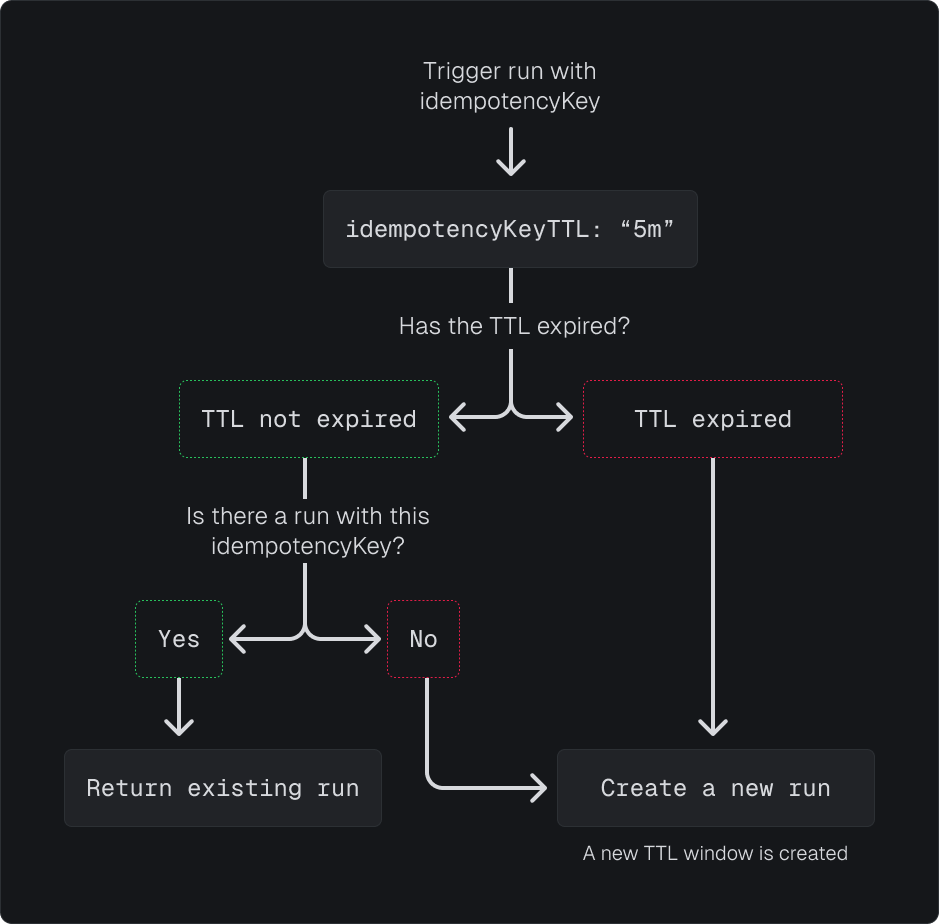
idempotencyKeyTTL option when triggering a task:
idempotencyKeyTTL option:
sfor seconds (e.g.60s)mfor minutes (e.g.5m)hfor hours (e.g.2h)dfor days (e.g.3d)
Failed runs and idempotency
When a run with an idempotency key fails, the key is automatically cleared. This means triggering the same task with the same idempotency key will create a new run. However, successful and canceled runs keep their idempotency key. If you need to re-trigger after a successful or canceled run, you can:- Reset the idempotency key using
idempotencyKeys.reset():
- Use a shorter TTL so the key expires automatically:
Payload-based idempotency
We don’t currently support payload-based idempotency, but you can implement it yourself by hashing the payload and using the hash as the idempotency key.Resetting idempotency keys
You can reset an idempotency key to clear it from all associated runs. This is useful if you need to allow a task to be triggered again with the same idempotency key. When you reset an idempotency key, it will be cleared for all runs that match both the task identifier and the idempotency key in the current environment. This allows you to trigger the task again with the same key.API signature
Resetting keys created with idempotencyKeys.create()
When you pass an IdempotencyKey created with idempotencyKeys.create(), the scope and original key are automatically extracted, making it easy to reset:
Resetting global keys
Global keys are the simplest to reset since they don’t require any run context:Resetting run-scoped keys
Keys created with"run" scope (the default) include the parent run ID in the hash. When resetting from inside the same task, the run ID is automatically available:
parentRunId if the key was created within a task context:
If you triggered the task from backend code, all scopes behave as global (see Triggering from backend code). Use
scope: "global" when resetting.Resetting attempt-scoped keys
Keys created with"attempt" scope include both the parent run ID and attempt number. When resetting from outside a task, you must provide both:
Resetting from the dashboard
You can also reset idempotency keys directly from the Trigger.dev dashboard:- Navigate to the run that has the idempotency key you want to reset
- In the run details panel, find the “Idempotency key” section
- Click the “Reset” button
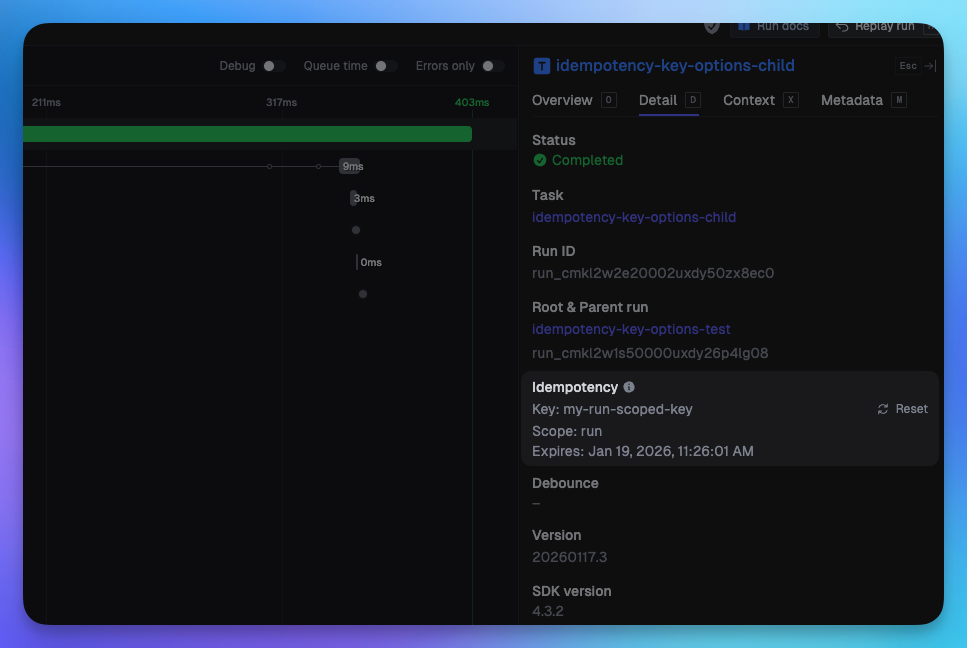
Resetting an idempotency key only affects runs in the current environment. The reset is scoped to the specific task identifier and idempotency key combination.
Important notes
Environment and task scoping
Idempotency keys, even the ones scoped globally, are actually scoped to the task and the environment. This means that you cannot collide with keys from other environments (e.g. dev will never collide with prod), or to other projects and orgs. If you use the same idempotency key for triggering different tasks, the tasks will not be idempotent, and both tasks will be triggered. There’s currently no way to make multiple tasks idempotent with the same key.How scopes affect the key
The scope determines what gets hashed alongside your key:- Same key +
"run"scope in different parent runs = different hashes = both tasks run - Same key +
"global"scope in different parent runs = same hash = only first task runs - Same key + different scopes = different hashes = both tasks run
