

Usage
Add metadata to a run when triggering by passing it as an object to thetrigger function:
metadata.get() or metadata.current() (only inside a run):
Calling
metadata.current() or metadata.get() outside of the run function will always return
undefined.trigger.config.ts file.
Updates API
One of the more powerful features of metadata is the ability to update it as the run progresses. This is useful for tracking the progress of a run, storing intermediate results, or storing any other information that changes over time. (Combining metadata with Realtime can give you a live view of the progress of your runs.) All metadata update methods (accept forflush and stream) are synchronous and will not block the run function. We periodically flush metadata to the database in the background, so you can safely update the metadata inside a run as often as you need to, without worrying about impacting the run’s performance.
set
Set the value of a key in the metadata object:del
Delete a key from the metadata object:replace
Replace the entire metadata object with a new object:append
Append a value to an array in the metadata object:remove
Remove a value from an array in the metadata object:increment
Increment a numeric value in the metadata object:decrement
Decrement a numeric value in the metadata object:stream
As of SDK version 4.1.0,
metadata.stream() has been replaced by Realtime Streams
v2. We recommend using the new streams.pipe() API for better reliability,
unlimited stream length, and improved developer experience. The examples below are provided for
backward compatibility.metadata.stream accepts any AsyncIterable or ReadableStream object. The stream will be captured and made available in the Realtime API. So for example, you could pass the body of a fetch response to metadata.stream to capture the response body and make it available in Realtime:
flush
Flush the metadata to the database. The SDK will automatically flush the metadata periodically, so you don’t need to call this method unless you need to ensure that the metadata is persisted immediately.Fluent API
All of the update methods can be chained together in a fluent API:Parent & root updates
Tasks that have been triggered by a parent task (a.k.a. a “child task”) can update the metadata of the parent task. This is useful for propagating progress information up the task hierarchy. You can also update the metadata of the root task (root = the initial task that was triggered externally, like from your backend). To update the parent task’s metadata, use themetadata.parent accessor:
metadata.parent and metadata.root:
Example
An example of where you might use parent and root updates is in a task that triggers multiple child tasks in parallel. You could use the parent metadata to track the progress of the child tasks and update the parent task’s progress as each child task completes:More metadata task examples
Using metadata updates in conjunction with our Realtime React hooks can be a powerful way to build real-time UIs. Here are some example tasks demonstrating how to use metadata in your tasks to track progress, status, and more:Progress tracking
Track progress with percentage and current step:Status updates with logs
Append log entries while maintaining status:User context and notifications
Store user information and notification preferences:Metadata propagation
Metadata is NOT propagated to child tasks. If you want to pass metadata to a child task, you must do so explicitly:Type-safe metadata
The metadata APIs are currently loosely typed, accepting any object that is JSON-serializable:If you pass in an object like a Date, it will be serialized to a string when stored in the
metadata. That also means that when you retrieve it using
metadata.get() or
metadata.current(), you will get a string back. You will need to deserialize it back to a Date
object if you need to use it as a Date.Inspecting metadata
Dashboard
You can view the metadata for a run in the Trigger.dev dashboard. The metadata will be displayed in the run details view: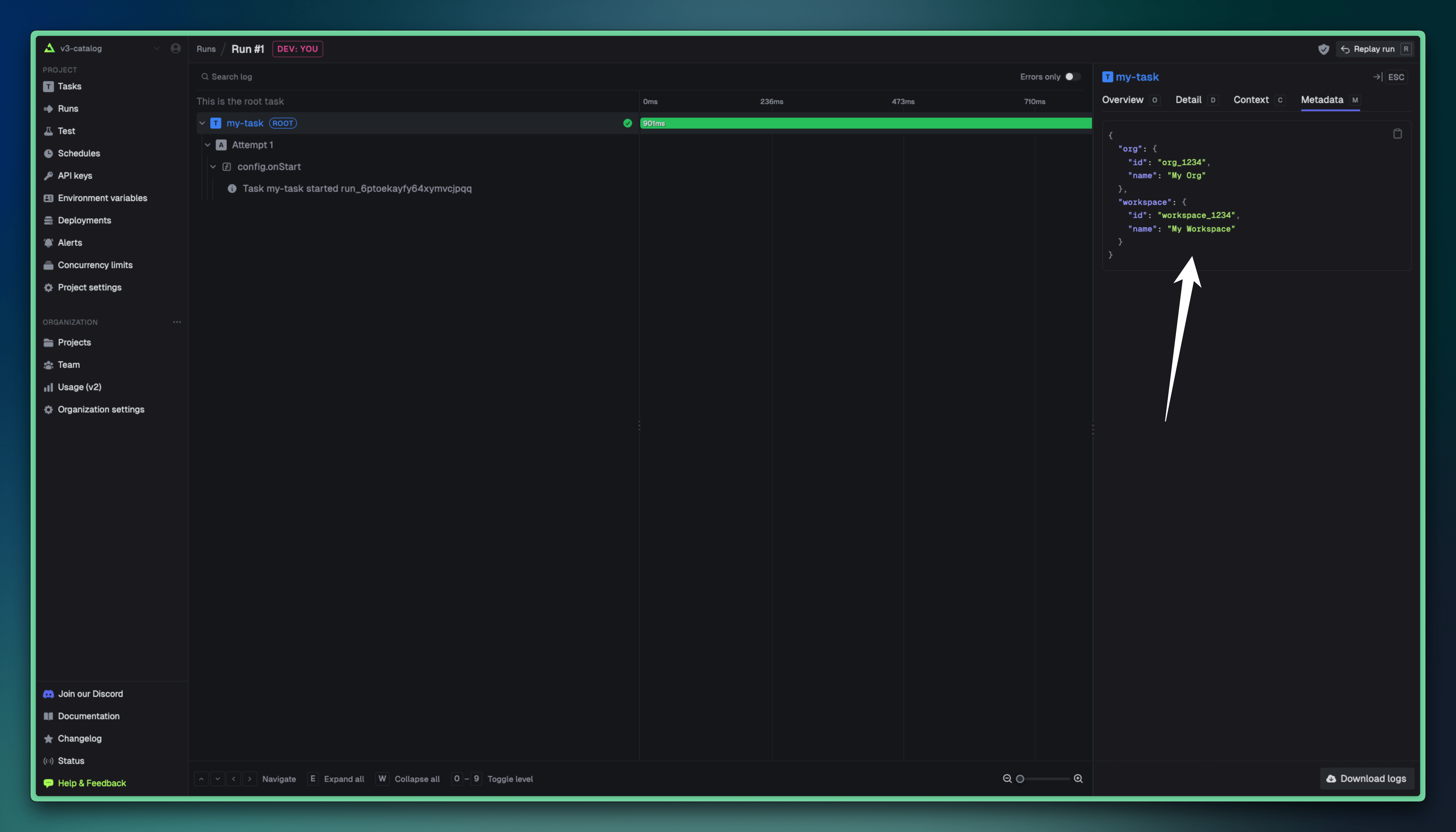
API
You can use theruns.retrieve() SDK function to get the metadata for a run:
Size limit
The maximum size of the metadata object is 256KB. If you exceed this limit, the SDK will throw an error. If you are self-hosting Trigger.dev, you can increase this limit by setting theTASK_RUN_METADATA_MAXIMUM_SIZE environment variable. For example, to increase the limit to 16KB, you would set TASK_RUN_METADATA_MAXIMUM_SIZE=16384.