Audit your subscriptions this April Fool's and stop wasting money

It's April Fool's Day, so it's a great time to make sure you're not getting tricked out of your hard-earned cash and cancel those subscriptions you've forgotten about. Here's how to do it.
Why and how you should audit your subscriptions
Digital hygiene, the practice of keeping a clean, safe digital footprint, is critical for anyone who uses the internet -- which is pretty much everyone. Many things fall under the digital hygiene umbrella, from responsible email management to removing your data from data brokerage companies' websites.
There are many digital hygiene tasks you should do at least twice a year. For instance, you're probably going to want to check to make sure none of your passwords have wound up in a data breach.
But that sort of thing is for another day. Today, we're going to save you money by killing zombies.
Zombie subscriptions
Zombie subscriptions are subscriptions that you're being charged for without really using them.
Some businesses, like low-cost, high-value gyms, make a significant portion of their income from zombie subscriptions. Not only are their costs low enough that some people may not notice them being syphoned from their bank accounts, but some of them are notoriously difficult to cancel.
Doing a self-audit of your subscriptions could save you hundreds of dollars a year. In some cases, it could save you hundreds of dollars a month.
That's why we here at AppleInsider are going to suggest that you prune those subscriptions at least twice a year. Our suggestion is to do it on April 1 and October 31.
Not only are they relatively low-stress holidays, but they also have some thematic linking. After all, you don't want to get fooled by zombie subscriptions, right?
A word about third-party services
Now, if you watch YouTube, odds are, you've seen advertisements for a certain money-management app. That same app promises it can save you hundreds of dollars in subscription fees.
It even promises to cancel or negotiate your subscriptions for you. Which is great -- in theory.
I'm not going to name names, but the app in question is pretty useful for identifying your subscriptions. I'd even argue that it's a pretty good way to see the impact of said subscriptions on your actual budget.
It's significantly less useful for canceling them, and completely useless for "negotiating" them.
Companies typically will not negotiate with third-party persons. Sometimes, the company will go as far as marking it on your profile that you let a third-party have access to your information to do so -- a demerit of sorts.
So, unfortunately, you're on your own in that regard. But if you do this once or twice a year, it really doesn't take any time at all.
If you haven't done it in a while... Well, at least you'll get it done now and not need to worry about it.
Starting at the top
Everything has a subscription these days, it seems. Which, truthfully, can make this a daunting task if you haven't done it in a while.
But if you break it down into more manageable chunks, it's suddenly not that big of a deal. So, here's how you should go about it.
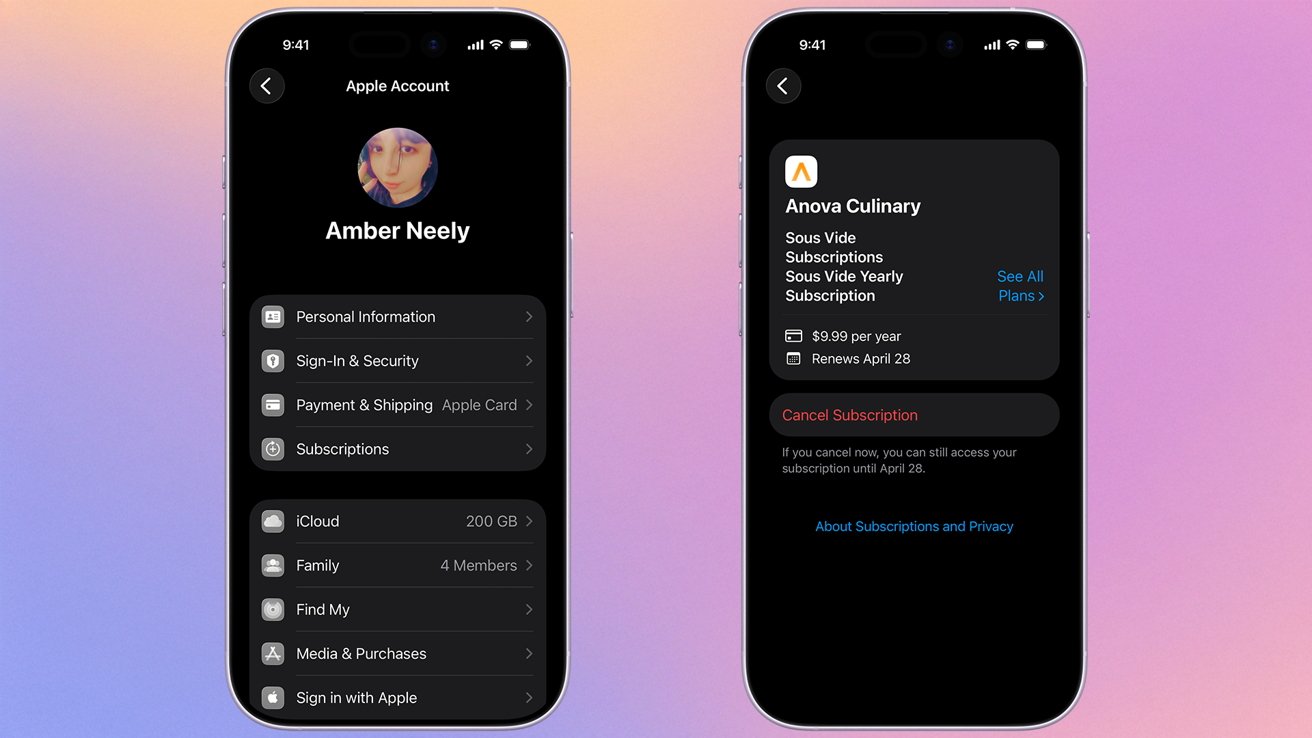
Cancelling your Apple-managed subscriptions is, fortunately, very easy.
My favorite place to start is in the subscription settings of your iPhone. A lot of apps have a subscription model, and many of them have 7, 14, or 30-day trials you may have forgotten about.
So, we'll begin here because it's one of the easiest to manage.
- Open the Settings app on your iPhone or iPad
- Tap your name at the top of the page
- Tap the Subscriptions button
- Tap any subscription you would like to cancel
- Tap cancel subscription
- Confirm you'd like to cancel
This is great, because it only takes a few minutes to do, and has the potential to save you hundreds of dollars a year. We want to earn those wins early because things are about to get a lot more annoying a lot quicker.
Important: You'll need to cancel your Apple-managed subscription more than 24 hours before it renews to ensure you won't be charged again.
Break them down by category
Going through your bank statements is a great idea, but if you don't know what you're looking for -- or if you are running multiple credit cards -- it might be a real hassle to do so.
That's why it makes sense to sit down and think about what subscriptions you might have by category. That way, when you start looking through your bank statements, you know what you should be on the lookout for.
I personally suggest making an analog list and crossing them off as you work through them.
That's right, kids, I'm suggesting you get out an actual pen and paper for this next part.
I find that the good old pen and paper tag team duo is better for a number of reasons. The first is that my brain isn't meant to juggle six or seven concurrent tasks at any given point -- writing them down is an excellent safety net.
The second, and perhaps the most important, is that you're not going to lose a sheet of paper the same way you'll conveniently lose your notes app or a text file on your computer. You're going to be shuffling through a lot of apps and browser tabs -- don't make it harder than it needs to be.
Food delivery, shoppers clubs, and online warehouses
Many of these are your "big boy" subscription fees, often being charged annually in one fell swoop. Even without it, there's still a good chance that you might be paying for a subscription that you haven't used in a while.
If you can, now's a great time to see what doesn't get used -- or maybe what shouldn't get used. It's also a good chance to see where things can be consolidated.

For example, you likely don't need multiple food delivery apps. Instead of paying for DoorDash, Uber Eats, Seamless, and Grubhub, see which one has restaurants you eat from the most and prioritize that.
Here are some of the notable subscriptions in this category it's worth checking on:
- Amazon Prime
- Walmart+
- Costco
- Sam's Club
- Instacart
- Uber Eats
- Seamless
- Grubhub
- Misfit Produce
- Thrive Market
Meal kits
This is worth a small mention. While you'd likely know if you have an active subscription to a meal delivery kit, there's always a chance that you paused a subscription for an extended period, only for it to be nearing the time when it springs back to life.
And, if you're not paying attention, you might come home to a box of food you weren't expecting, and $100+ missing from your bank account. Here's an example of meal kits you'll probably want to cancel, rather than pause, if you don't intend on using them anytime soon.
- Hello Fresh
- EveryPlate
- Blue Apron
- Home Chef
- Sunbasket
- Hungryroot
- Factor
Streaming services
Fifteen years ago, there were a handful of streaming services that were pretty easy to keep tabs on. Now, it seems like every single media company has at least one service you can subscribe to, if not three or four.
With the weather warming up for much of the U.S., now's the perfect time to cancel any streaming services you won't get much use out of. Plus, there's an excellent chance you may have a few hanging around that you forgot about.
Credit: David Balev/Unsplash
And don't forget about music streaming services, either. You'd be surprised how many people pay for both Apple Music and Spotify, just because they forgot they were subscribed to both.
- Netflix
- Hulu
- Amazon Prime Video
- Disney+
- ESPN+
- Max (Formerly HBO Max)
- YouTube TV
- Apple TV
- YouTube Prime
- Peacock
- Paramount+
- Spotify
- Pandora
- Apple Music
Gym memberships & Fitness Apps
If you're like a lot of people, your primary time to hit the gym is during the winter, when the weather prevents you from getting outside. Now's a perfect time to pause or cancel gym memberships.
It's also plausible that you may have subscriptions to fitness equipment or workout apps that you're no longer using. Instead of shoveling the money straight into the company's pockets, take some time to cancel anything you're not using.
- Planet Fitness
- Crunch Fitness
- Anytime Fitness
- 24 Hour Fitness
- Gold's Gym
- Apple Fitness+
- Peloton
- iFIT
- Strava
- FitBit Premium
- MyFitness Pal
Gym memberships are notoriously difficult to cancel. Some places will tell you that you need to cancel in person, though many hide options on your user profile that allow you to cancel right from their websites.
Expect this to be the most difficult category, so getting it out of the way early may be worth it.
Rideshare
While many people choose to use rideshare subscription-free, there are times when Uber and Lyft will entice you with hard-to-beat free trials of their premium services. Now's as good a time as any to give them the boot.
- Uber
- Lyft
- Waymo
- Curb
- Via
Gaming subscriptions
This is the one that gets me the most frequently. I'm prone to subscribing to World of Warcraft, playing for six months, and then not playing it at all for another four months while I continue to fork over $15.99 a month to Blizzard.

Image credit: Blizzard
So, learn from my mistakes and cancel your unused gaming subscriptions. Here are some of the major players to look out for.
- Xbox Game Pass
- PlayStation Plus
- Nintendo Switch Online
- Ubisoft+
- EA Play
- Humble Choice
- World of Warcraft
- Final Fantasy XIV
- GTA+
Software as a Service
It's not just apps and streaming services that have monetized their products; it's also major software companies. It's easy to sign up for a free trial of a service you used to use, or to rationalize keeping a subscription around "just in case."
Do yourself a favor and cancel any of the following if you haven't used them regularly in the last few months. Just be aware of Adobe's highly predatory cancellation terms and conditions.
- Adobe Creative Cloud
- Capcut
- Microsoft Office 360
- Canva
- Apple Creator Studio
- Grammarly Premium
- Dropbox
- Google One
- Evernote
- Linkedin Premium
Comb your bank and credit card statements
There's not much I can give in advice for making this less annoying. Unfortunately, it's just going to be what it's going to be.
If your bank has an app or a website that lets you search transactions by keyword, this might be a good place to start. However, some subscriptions truncate their names or use the name of a parent company, so it might not be so useful.
Again, this is another place where printing out your bank statement could be useful. At least then, you can highlight anything that looks fishy.
The problem, however, is when you have subscriptions that don't renew monthly, but quarterly or annually. Again, I didn't say this would be a particularly pleasant process, but ideally you'll only have to do one big decluttering, and then smaller ones every six months or so.
Comb your emails and use keywords to your advantage
Fortunately, one of the easier ways to check for subscriptions is via email. It's super easy to do -- you'll just need to use the search bar.
I personally suggest doing this in-browser if possible. Using an email client can make searching a little annoying, especially if you're doing it on a device like an iPhone.
Gmail
In your browser of choice, head to your email provider's website. For example. If you use Gmail, head to mail.google.com.
Then, in the search bar for your email inbox, search the following terms:
- renew
- renews
- renewal
- subscription
- charged
- membership
- payment
If you're being regularly alerted to recurring payment plans, odds are that searching these words will help you find them. If English isn't your native language, you'll probably want to swap it for the terms that are routinely used -- for example, if you speak Spanish, you'll want to use suscripcion instead of subscription.
Twice a year, every year
As stated at the beginning of this helpful little PSA, you're going to want to do this at least twice a year every year. We recommend April Fool's Day and Halloween.
Not only is it going to save you money, which is always a bonus, but it can also alert you to new, fraudulent charges being added in.
Read on AppleInsider

Comments