Internal Releases
Internal Release Policy
Internal releases adhere to the same policy requirements as patch releases: they are limited to critical bug fixes and security patches only. Internal releases do not contain new features, feature flag changes, or incomplete work, nor may be used for testing purposes.
For the general release policy framework including ownership, exception process, and escalation paths, see the Release Policy section.
If the internal release is not the result of a security incident, an incident must be declared. The incident should be marked “Planned Activity” and be S1 or S2 given the need for an out-of-band patch. To uphold the reliability and availability of the GitLab platform, completing an incident review and an [FCL] is mandatory.
Internal release overview
Internal Releases are private releases of GitLab for our single-tenant SaaS instances. They allow us to remediate high-severity issues on Dedicated instances:
- As quickly and efficiently as on GitLab.com (SLA driven)
- Without version skips in the public packages
- Without disclosing vulnerabilities before a public patch release
Internal releases are performed according to a specific criteria:
- Addressed critical (S1)
fixes (bug or security vulnerability) that impact GitLab Dedicated availability:
- Security vulnerability: The SIRT team investigates a vulnerability and deems the issue to be of high severity.
- Critical bug: The Dedicated team reports a high-severity issue causing a performance degradation.
- Target the current minus one (N-1) and current minus two (N-2) GitLab versions
- Deliver fixes through a private channel before public disclosure
If you’re a GitLab engineer looking to fix a high-severity issue and create an internal release, please follow the steps on the internal release runbook for GitLab engineers.
Relationship to Other Release Types
Internal releases follow the same process as patch releases but serve a different purpose:
- Both use stable branches created during monthly releases
- Internal releases deliver fixes to GitLab Dedicated before public patch releases
- After an internal release, the same fixes are included in the next scheduled patch release for all self-managed customers
Timeline
Internal releases have two phases with different time characteristics:
| Phase | Duration | Notes |
|---|---|---|
| Request and approval | Variable | Depends on issue severity validation, stakeholder availability, and fix readiness |
| Execution | ~8 hours | Once approved and fix is ready, Release Managers can complete the release process |
The request phase includes:
- Issue detection and Dedicated severity assessment
- Stakeholder notification and alignment
- Fix development and validation on GitLab.com
- Backport preparation with passing pipelines
Only after these prerequisites are met can Release Managers begin the ~8 hour execution phase.
Internal release process
The end-to-end internal release process consists of the following stages:
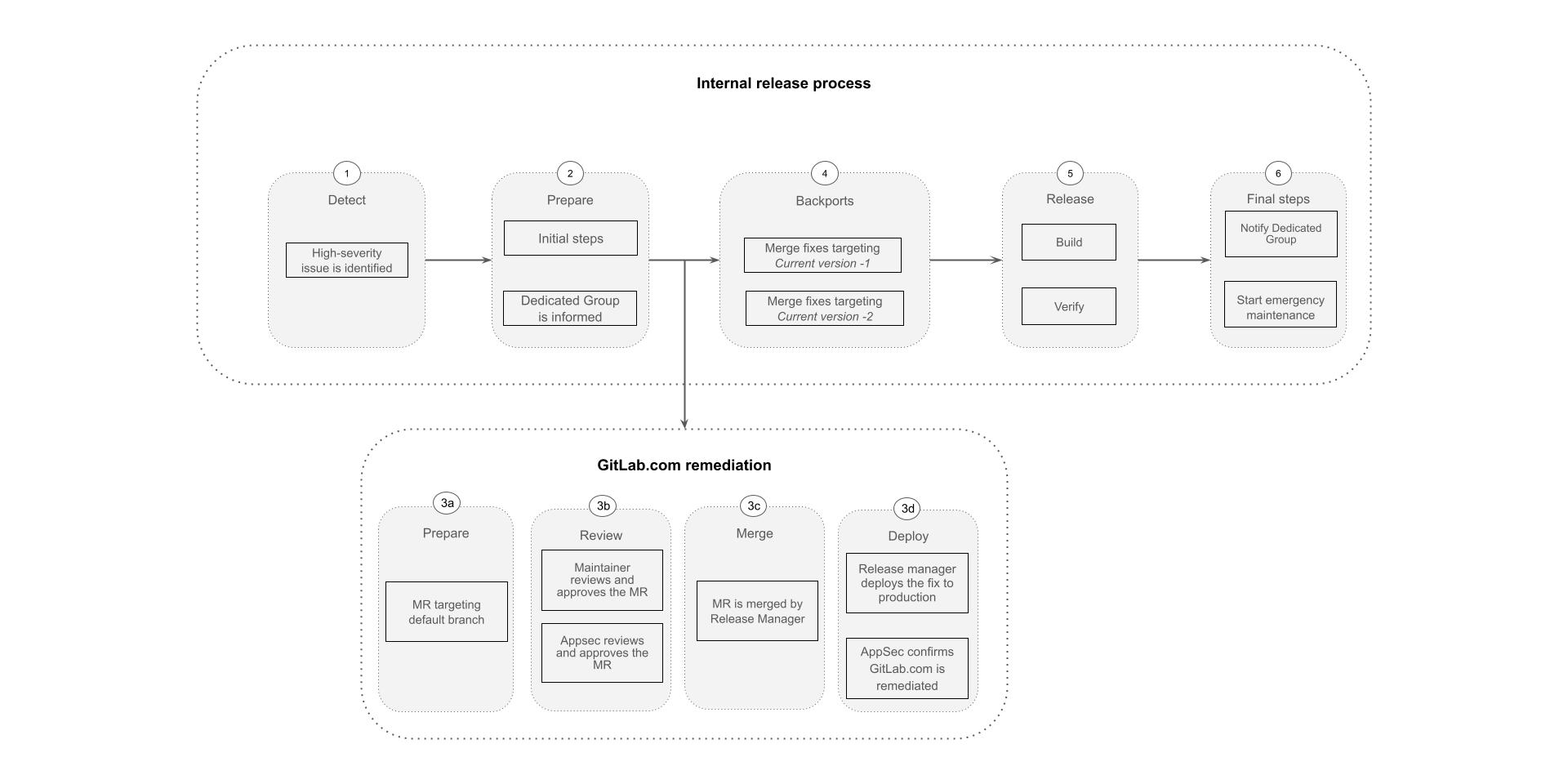
An internal release has the following phases:
-
Detect: A high-severity issue (S1) impacting GitLab Dedicated availability is identified.
- Security vulnerability: The SIRT team investigates the vulnerability and deems the issue to be of a high severity.
- Critical bug: The Dedicated team reports a high-severity issue causing a usability degradation.
-
Prepare: The first step in the internal release process when a release task issue is created and stakeholders, including the GitLab Dedicated Group are notified.
-
GitLab.com remediation:
- The group relevant to the vulnerability/bug prepares the fix on the appropriate GitLab repositories.
- Release Managers merge the fix to the GitLab default branch.
- The high-severity fix is deployed to GitLab multi-tenant production environment (GitLab.com).
- In case of a vulnerability, the PSIRT team verifies that the vulnerability/bug has been remediated on GitLab.com.
-
Backports: Security merge requests targeting N-1 and N-2 stable branches are prepared by the relevant group associated with the vulnerability/bug.
- Engineers ensure the backports are ready to be merged (approvals, green pipelines, etc).
- Once the backports are ready to be merged, Release Managers merge them into the stable branches.
-
Release: The internal CNG images and Omnibus packages are built and uploaded to the pre-release channel.
-
Final Steps: Roll out the internal release packages to GitLab single-tenant SaaS instances.
- The GitLab Dedicated Group is notified.
- A Dedicated emergency maintenance process starts.
20b49812)

