

A new malicious kit called EvilTokens integrates device code phishing capabilities, allowing attackers to hijack Microsoft accounts and provide advanced features for business email compromise attacks.
The kit is sold to cybercriminals over Telegram and is under continuous development, its author stating that they plan to extend support for Gmail and Okta phishing pages.
Device code phishing attacks abuse the OAuth 2.0 device authorization flow, in which attackers gain access to a victim account by tricking the owner into authorizing a malicious device.
The technique is well-documented and has been used by various threat actors, including Russian groups tracked as Storm-237, UTA032, UTA0355, UNK_AcademicFlare, and TA2723 [1, 2, 3], and the ShinyHunters data extortion group.
EvilTokens attacks
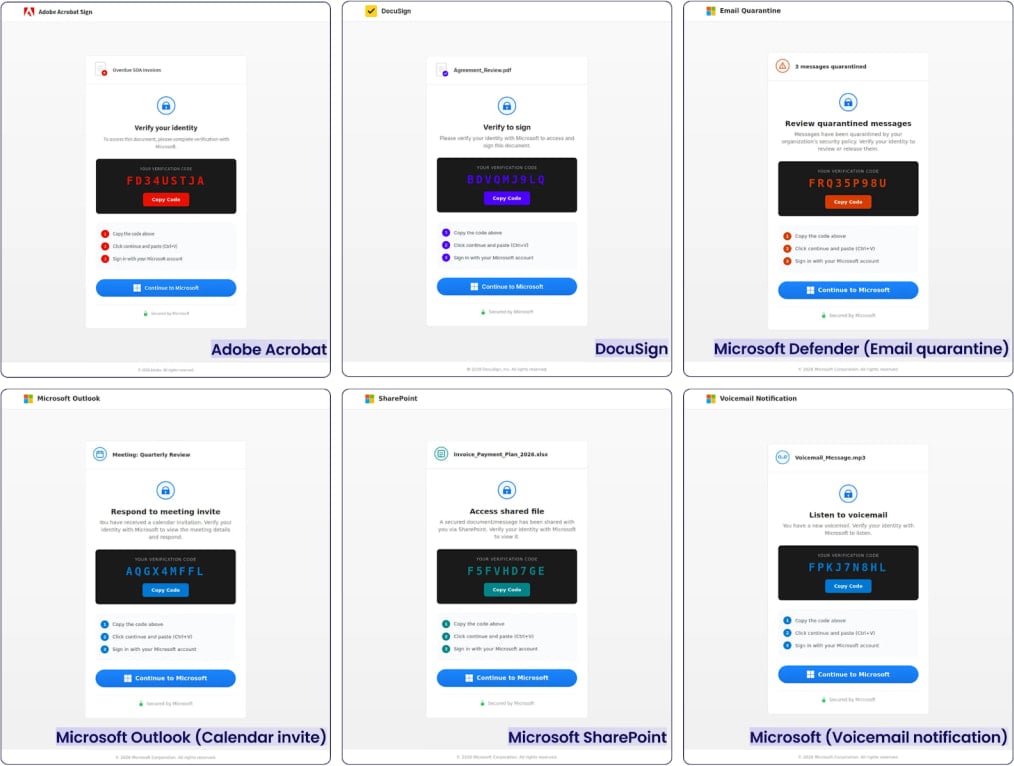
Researchers at threat detection and response company Sekoia observed EvilTokens attacks where the victims received emails with documents (PDF, HTML, DOCX, XLSX, or SVG) that contained either a QR code or a hyperlink to an EvilTokens phishing template.
These lures impersonate legitimate business content such as financial documents, meeting invitations, logistics or purchase orders, payroll notices, or shared documents via services like DocuSign or SharePoint, and are often tailored to employees in finance, HR, logistics, or sales roles.
Source: Sekoia
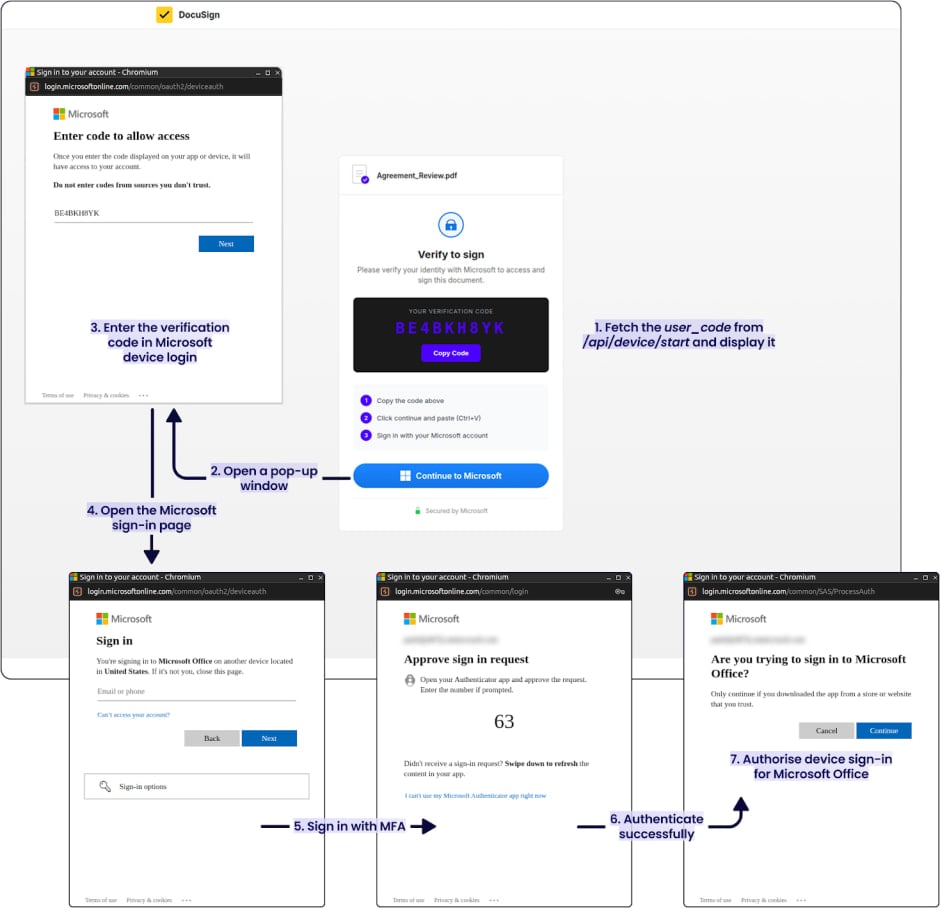
When the victim opens the link, they are presented with a phishing page that impersonates a trusted service (e.g., Adobe Acrobat or DocuSign), which displays a verification code and instructions to complete identity verification.
The page prompts the user to click a “Continue to Microsoft” button, redirecting them to the legitimate Microsoft device login page.
At this step, the attacker uses a legitimate client (any Microsoft application) to request a device code. Then, they trick the victim into authenticating to the legitimate Microsoft URL from the threat actor.
Source: Sekoia
This way, the attacker receives both a short-lived access token and a refresh token for persistent access.
These tokens give the attacker immediate access to the services associated with the victim account, including email, files, Teams data, and the capability to perform SSO impersonation across Microsoft services.
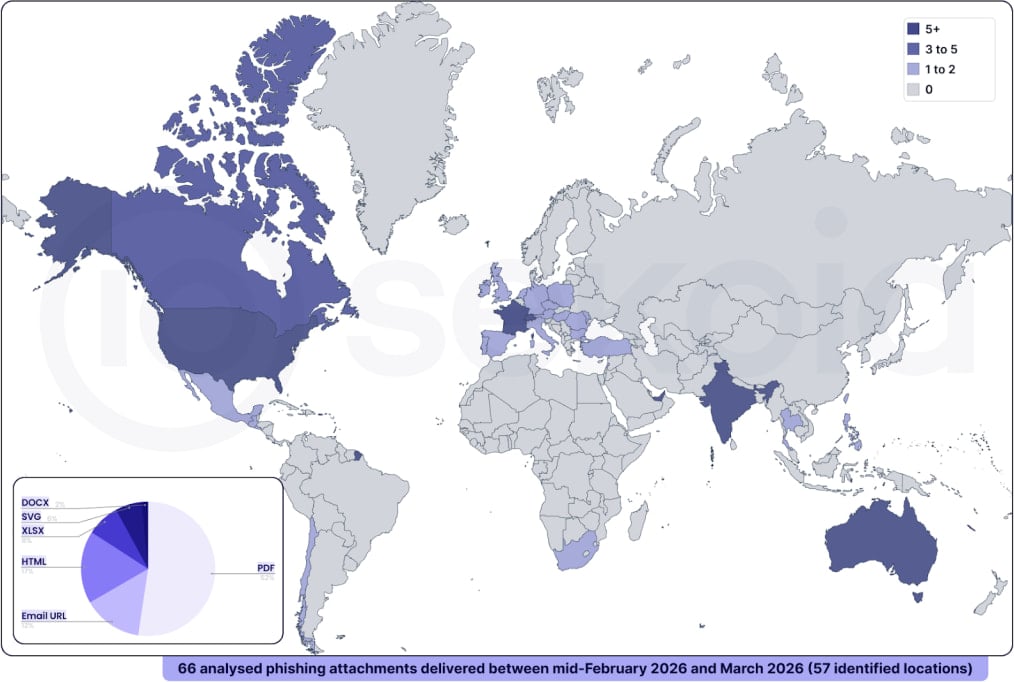
Sekoia researchers examined EvilTokens' infrastructure and uncovered campaigns with a global reach, the most affected countries being the United States, Canada, France, Australia, India, Switzerland, and the UAE.
Source: Sekoia
Apart from advanced phishing, Sekoia researchers say that the EvilTokens phishing-as-a-service (PhaaS) operation also provides "advanced features to conduct BEC [business email compromise] attacks" through automation.
The variety of the campaigns suggests that EvilTokens is already being used at scale by threat actors involved in phishing and business email compromise (BEC) activities.
Sekoia provides indicators of compromise (IoC), technical details, and YARA rules to help defenders block attacks leveraging the EvilTokens PhaaS kit.

99% of What Mythos Found Is Still Unpatched.
AI chained four zero-days into one exploit that bypassed both renderer and OS sandboxes. A wave of new exploits is coming.
At the Autonomous Validation Summit (May 12 & 14), see how autonomous, context-rich validation finds what's exploitable, proves controls hold, and closes the remediation loop.
Claim Your Spot







Comments
2022computerissues - 4 weeks ago
This is a risk you take when you use a Microsoft account. Think about it - you sync all your data to your Microsoft account - now someone hacks your MS account. They use your compromised account to reset passwords, access your email, find sensitive information, or establish persistence on devices signed in on that MS account. From there, the sky is the limit. If you've enabled Remote Desktop or Quick Assist on your device, they could potentially use those features to access your computer remotely - the Windows Hello/PIN on the login screen doesn't block these remote access methods. They might be able to reset your Windows password through your MS account settings, which could allow them to create a new account or change authentication methods—potentially bypassing other Hello/PIN protections.
horsedoggs - 4 weeks ago
"This is a risk you take when you use a Microsoft account. Think about it - you sync all your data to your Microsoft account - now someone hacks your MS account. They use your compromised account to reset passwords, access your email, find sensitive information, or establish persistence on devices signed in on that MS account. From there, the sky is the limit. If you've enabled Remote Desktop or Quick Assist on your device, they could potentially use those features to access your computer remotely - the Windows Hello/PIN on the login screen doesn't block these remote access methods. They might be able to reset your Windows password through your MS account settings, which could allow them to create a new account or change authentication methods—potentially bypassing other Hello/PIN protections."
Look up Microsoft intune device compliance, if this is used properly these types of attacks are useless, any good IT firm will have this in place, With out the company device attacker sign in will be rejected. Identify and device layering is key here.
2022computerissues - 4 weeks ago
You are making assumptions - "any good IT firm will have this in place" and "these types of attacks are useless." In the real world this is far from the truth. Its the kind of thinking that leads to security gaps - "We have Intune, so we're fine"—when actually, you need Intune plus token monitoring, user training, email filtering, incident response, and so on. Many organizations big and small continue to fail to implement defenses properly, and are subject to human error/social engineering. If the attacker tricks an actual employee into authorizing the device (which is what this attack does) Or the attackers can and do often use an employees compromised device that is already trusted.