[Video] Office Hours in the Vegas Home Office

Videos
0

When you’ve got questions about architecture, development, or best practices, post ’em at https://pollgab.com/room/brento, and upvote the ones you’d like to see me cover. It’s like free bite-sized consulting.

Here’s what we covered this week:

  • 00:00 Start
  • 01:37 DBAInAction: Hi Brent, could you please suggest an archival/purging strategy for multi-TB tables to free up disk space? Also, is there a recommended method for designing archiving/purging process for new databases before they become too large? Thank you!
  • 03:47 MyTeaGotCold: I was surprised that Mastering Server Tuning never mentioned what you can do with files and filegroups in user databases. Do you find that they solve problems for you?
  • 06:52 Forgetful: Do you ever recommend putting the tempdb log file on a different drive to the tempdb data files?
  • 07:42 Adrian: Hi, would you enable tempdb ADR by default for new SQL 2025 servers? Any risks or negatives to consider, especially in combination with Availability Groups?
  • 11:12 Dopinder: For SQL Server multi tenancy, one database per account seems optimal in limiting potential future corruption. However, doesn’t SQL AG tip over in the one database per account model due to AG database count limits?
  • 13:40 FrugalShaun: What’s your go-to stat for measuring SQL Server throughput? When I want a quick comparison with past performance I check Batch Requests/sec, but that shows requests received, not necessarily work actually completed. What do you rely on instead?
  • 15:02 Micen1: I have a customer running MDS on SQL 2019, they are looking to be able to run it on Azure SQL db but it seems that the MDS app still needs IIS on a vm? Do you the future of MDS or could you give your thoughts abouts its future and what to expect?

Updated First Responder Kit and Consultant Toolkit for April 2026

If there was ever a release you should skip for reliability reasons, it’s this one. There’s a lot of AI-edited code in here. I’m really only putting it out there because I want to let early adopters start playing around with a few new things:

  • sp_BlitzIndex adds an @AI parameter to get index consolidation advice for a single table.
  • A breaking change in the AI config tables for sp_BlitzCache (and now, sp_BlitzIndex as well.) We used to have both the AI providers and prompts in the same table, but I needed to normalize that out into two tables now that we’re adding AI capabilities to more procs. If you’ve started playing around with sp_BlitzCache’s AI config table, run this script to migrate your configs to the new table structure before running the new version of sp_BlitzCache.
  • Added a new SQL Server Setup Checklist markdown file in the Documentation folder. This replaces the old PDF doc that we used to distribute, but it hadn’t been updated in years. I did a quick pass with some basic updates, and folks are welcome to add their own guidance. Just create a Github issue first describing the kinds of changes you’d like to make so that you can have a community discussion about the guidance – I wanna make sure the right stuff ends up in there.
  • There’s a new sp_kill stored procedure, driven by your design ideas. I’ll be blogging more about this in the coming weeks, but wanted to get the first draft out there for a client who needed it ASAP. You’re welcome to use it now, and log any issues you find with it.
  • Starting with this release, we only support SQL Server 2016 SP2 & newer. Remember, even SQL Server 2016 drops out of support in 3 months, and 2014’s been out of support for 2 years. If you need to tune your Antiques Roadshow servers, use the scripts in the Deprecated folder. Why SP2 and not RTM or SP1? Because SP2 added a ton of DMVs and columns in existing DMVs.

To see how these work, read the documentation. In the coming weeks, I’ll be updating my (still free!) class, How I Use the First Responder Kit, with details on the AI calls and sp_kill.

To get the new version:

sp_Blitz Changes

  • Fix: wrap sp_Blitz, sp_BlitzIndex, sp_BlitzAnalysis, and sp_DatabaseRestore stored proc contents in a BEGIN and END to make it easier to automate updates to the Consultant Toolkit. (#3851)
  • Fix: code modernization for SQL Server 2016 & newer. (#3872)

sp_BlitzCache Changes

  • Enhancement: return oversized >128 node plans inline instead of asking the user to run a separate query. (#3868, thanks Erik Darling.)
  • Enhancement: add per-database warnings for duplicate and single-use plans to help narrow down which apps are causing the problems. (#3878, thanks Erik Darling.)
  • Fix: wrong parameter name in readme.md fixed. (#3861, thanks Ioan Podaru.)
  • Fix: skip @AI = 1 calls when query plan is null, and allow @AI = 2 to build a prompt even when there’s no query plan, just a query text. (#3855 and #3854)
  • Fix: invalid column reference in AI-generated code. (#3880, thanks shekarkola.)
  • Fix: code modernization for SQL Server 2016 & newer. (#3870)

sp_BlitzIndex Changes

  • Enhancement: AI advice available at the table detail level. When calling sp_BlitzIndex @TableName = ‘mytable’, you can use the @AI = 2 parameter to get an AI prompt for your favorite LLM, or @AI = 1 to call the LLM directly as we do with sp_BlitzCache. (#3827)
  • Fix: code modernization for SQL Server 2016 & newer. (#3876)

sp_BlitzLock Changes

  • Fix: corrected deadlock numbering errors. (#3859, thanks Vlad Drumea.)
  • Fix: avoid duplicate rows in result sets. (#3765, thanks Tisit.)
  • Fix: nicer error messages in Azure SQL DB that include instructions on creating an event session. (#3892)

sp_BlitzWho Changes

  • Fix: code modernization for SQL Server 2016 & newer. (#3874)

sp_kill Changes

  • First version! See the documentation for more details. (#3864)

Consultant Toolkit Changes

Brent Ozar's Consultant ToolkitIf you’re a consultant that does long term work, maintaining a client’s SQL Servers, then you probably want to track the health and performance of those servers over time. You want data – in a database.

We’ve got a new Loader app that watches a folder for incoming zip files, and when one shows up, it processes the data to load it into a SQL Server (or Azure SQL DB) repository for you.

This means you can set up the Consultant Toolkit at your clients on a scheduled daily task, upload the data to S3 (built in) or use your own file sync methods to get it to the location of your choosing, and then have the data automatically loaded into your database server for you.

To learn more about that, read the PDF documentation included with the Consultant Toolkit.

We’ve also added a new separate Consultant Toolkit download for SQL Server 2012-2014. Microsoft no longer supports those versions, so we’re not making changes to it anymore. It still works just the same as it always did – it just doesn’t have the cleaner code and additional diagnostics that we’re adding to the newer versions, starting this month.

For Support

When you have questions about how the tools work, talk with the community in the #FirstResponderKit Slack channel. Be patient: it’s staffed by volunteers with day jobs. If it’s your first time in the community Slack, get started here.

When you find a bug or want something changed, read the contributing.md file.

When you have a question about what the scripts found, first make sure you read the “More Details” URL for any warning you find. We put a lot of work into documentation, and we wouldn’t want someone to yell at you to go read the fine manual. After that, when you’ve still got questions about how something works in SQL Server, post a question at DBA.StackExchange.com and the community (that includes me!) will help. Include exact errors and any applicable screenshots, your SQL Server version number (including the build #), and the version of the tool you’re working with.


Announcing the Panel Lineup for My SQLBits Cloud Discussion

Cloud Computing, SQLBits
0

At SQLBits, I’m hosting a panel discussion called 20 Years of the Cloud: What Changed, What Didn’t, and What’s Next. I’m excited to share the panel lineup – all of the links go to their LinkedIn profiles:

I’m excited because the panelists have a diverse set of experiences. Across the group, they’ve seen the cloud from its infancy 20 years ago, to its current state, and their visibility across a lot of companies and industries means they’re better equipped to see what’s coming next.

I’ll be asking them questions like:

  • What misunderstandings do executives or application teams still have about what cloud means for database performance and operations?
  • Has cloud improved collaboration between dev, ops, and data teams, or just created new boundaries and blame patterns?
  • What’s something that younger data professionals take for granted today that used to be a slow, painful process?
  • If you had to point to one area where cloud delivered beyond expectations, what would it be? What about under-delivered?
  • Looking ahead, which current cloud trends feel foundational, and which are just fashionable?
  • What’s a belief about cloud that you held 10 years ago, and no longer believe?
  • What should attendees be more skeptical about, and what should they be more optimistic about?
  • What skill or mindset should a data professional build now if they still want to be effective 10 years from today?
  • If you had to live with a system for 10 years, what choices would you make differently than if you were just trying to get it live in 3 months?

Wanna watch it unfold? Join us Thursday 10:00-10:50 in the Living Lounge. Here are calendar invite files for all of my sessions to make it easier:

See you in Newport!


SQL Server 2016 Support Ends in 90 Days.

SQL Server 2016
14 Comments

On July 14, 2026, Microsoft’s extended support ends for SQL Server 2016.

We aged like fine wine, not like SQL Server 2016
Brent Ozar Unlimited circa 2016

They will offer Extended Security Updates that you can buy for 3 more years, either through Azure or your licensing partner. The price is stunning:

  • Year 1, July 2026-2027: 75% of the original license price
  • Year 2, July 2027-2028: 150% of the original license price
  • Year 3, July 2028-2029: 300% of the original license price
  • Total for 3 years of security updates: 525% of your original license price

I didn’t know numbers went that high.

This must be that “big data” I keep hearing about. In Microsoft’s credit, I understand they’re working on an ad campaign to raise awareness, and it’ll feature Roger Allen Wade’s classic song. I’m looking forward to those commercials.

If you’re SQL Server 2016 or prior, and you’re having difficulty getting management buy-in for version upgrades, and you’re at a large enough company where you have a security team, send this in an email to your security team:

Does our tech insurance, HIPAA/PCI/SOX compliance needs, or corporate policies require us to be on currently supported software, or is it okay if we’re relying on out-of-support software that no longer gets security updates?

This lets somebody else be the bad cop, and you can connect the security team with your managers & accountants to let them duke it out. If your company doesn’t have a dedicated security team, you can send that same question to your manager, but then you’re the bad cop. That’s not nearly as much fun, but you should still probably send the email just to have something in writing to cover your rear.

Ideally, the security team and/or managers recognize the risk involved in running your shop on Antiques Roadshow software, and you start picking out which version of SQL Server you should replace it with.

If your company’s security team and/or your manager reply in writing saying no, no problems, then you’ve at least done your duty. I will say, though, that if your company is willing to be on unsupported software, they’re probably doing it to save money – and that means they’re probably also cheap on stuff like salary, employee benefits, and training. Long term, you probably wanna start passively looking for work elsewhere before your skills get as out of date as your database server. (What a dark way to end a post, eh?)


Announcing More Improvements to PasteThePlan.com

AI, PasteThePlan.com
4 Comments

Need to share an execution plan, like on forums or on Stack Overflow, and you wanna get their advice as quickly as possible? Paste the XML into PasteThePlan.com and you get a link that you can share to anyone with your plan’s details.

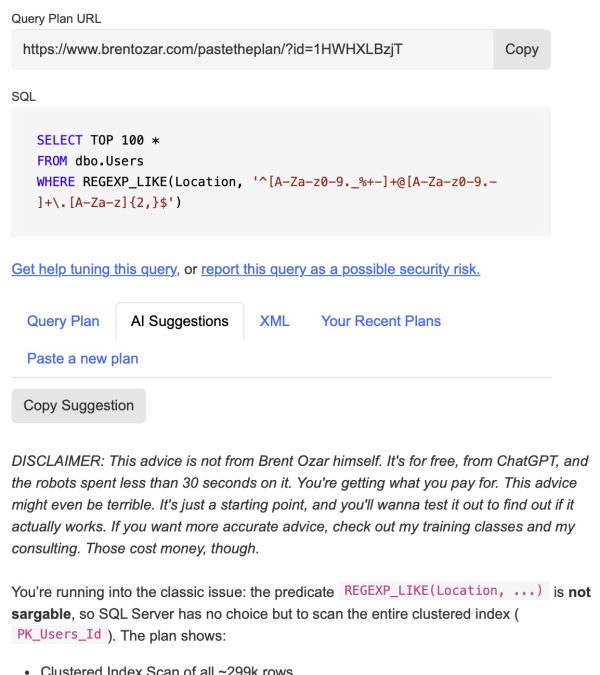
The user interface is now cleaner, with separate tabs for query plan, query text, AI suggestions, raw XML, and your recent plans:

Paste the Plan

We noticed that a lot of people were pasting in estimated execution plans, which frankly doesn’t get you very good advice from either humans or AI. We added a warning suggesting that you paste the actual plan instead.

Note the “Delete Plan” button at the top right – that’s new too. I’d been getting more and more emails from people who realized that pasting their query plans into a web site meant that their query plans were, uh, on a web site, and I got tired of manually deleting those behind the scenes.

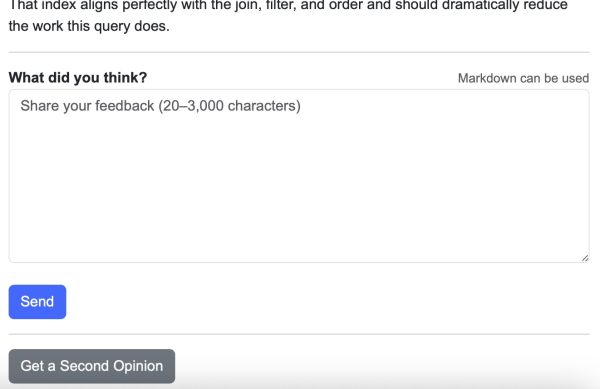
On the AI Suggestions tab, there’s a new feedback form so that after you try the AI’s advice, you can tell me how it did. I get notifications about the feedback, and I review it on a regular basis to help tune the prompt I send to the AI.

Feedback and second opinion

Finally, there’s a new “Get a Second Opinion” button at the bottom. The default first opinion is a fast, cheap call to gpt-5.4-nano that should return within 30 seconds. The second opinion calls gpt-5.4, a slower model that produces more in-depth results, but takes longer to do it (up to 3 minutes.)

I hope this helps you get more help, faster, whether that help is from your fellow humans by sharing your query plan’s link to forums and friends, or whether it’s instant free AI advice.


SQLBits Bonus: Free Fundamentals + Mastering Bundle for My Training Day Attendees

SQLBits
1 Comment

Good news! My training day workshop, Dev/Prod Demon Hunters, was sold out, but Bits just moved me into the auditorium with way more capacity and space for you to stretch out.

Plus, there’s power and tables at each seat. Feel free to bring your charger, gadget, and laptop. You don’t have to follow along, but it’ll be nice for note-taking and for asking questions online, since I’ll have Pollgab up for questions so you don’t have to raise your hand and yell.

ImageSo to celebrate, I’m giving the attendees my Fundamentals & Mastering Bundle free for a year! Here’s everything you wanna know to attend.

The conference is at the International Convention Center in Newport, Wales.

SQLBits also has ticket + hotel packages for a handful of nearby hotels – expand the “Accommodation” section on that page to see the prices and hotels.

Book now here. I’ll see you in a few days! Hit reply if you’ve got any questions about how the conference works or what to expect. I’ve been there many times, and I love it.


[Video] Office Hours: Microsoft Database Q&A

Videos
6 Comments

Let’s go through a LOT of your top-voted questions from https://pollgab.com/room/brento on a VERY early Saturday morning.

  • 00:00 Start
  • 01:52 DBAInAction: Hi Brent Microsoft just announced Automatic Index Compaction for Azure SQL and Fabric. do you see this finally killing off the traditional ‘index maintenance’ debate? Also, any gut feeling on whether this will eventually be backported to box versions of SQL Server? Thank you!
  • 04:19 VladDBA: Hey Brent, meant to DM you but figured this fits office hours: I’m on 2-month garden leave and weighing whether to hunt for another job or launch my own consulting business. If you were in my shoes, what would you do?
  • 06:28 Jacob H: What is everyone using for stress testing SQL Server in 2025? Looks like Microsoft has deprecated all it’s tools. (Distributed Replay and it’s replacement Replay Markup Language Utility)
  • 09:01 EagerBeaver: hi Brent, when populating table from data from another table via INSERT INTO SELECT is there a way to OUTPUT columns that are not being inserted? I need to store mapping between old and new PK and the only way I found was to use MERGE which you don’t recommend. Thanks
  • 10:30 Thomas Franz: Auto Create statistics is enabled on my DWH (billions of rows in partitioned Columnstore tables). When someone executes a query that uses on uncommon column first time in WHERE / JOIN it takes forever to create an execution plan. Is there a way to autocreate the stats async too?
  • 11:56 Zale: Ola Brent, have you encountered any significant performance issues in SQL Server caused by the use of cursors?
  • 12:37 SteveE: Hi Brent, Do you know of any resources for creating good AI prompts for query tuning? The people who appear to get the most out of AI appear to be good at writing prompts
  • 14:57 MyTeaGotCold: Has SAN multipathing improved over the last decade? I remember when we had to be very careful with vendors not having true multipathing.
  • 18:43 Jason Not JSON: Should we start designing schemas differently now that AI tools prefer semi-structured data like JSON?
  • 21:11 Felipe: Hi Brent, Nowadays, do you think it’s still worth becoming or remaining a DBA specialist? Maybe this is just my impression, but I’ve been working as a DBA for over a decade (mostly with Oracle) and I’m starting to think about changing my career to another role.
  • 23:48 .Net Dev: I’m on Azure SQL DB at compat level 140. I’ve heard you say that being “out of support” is a valid reason to upgrade. Since SQL 2017 is hitting EOL, does that logic apply to compat levels in Azure? Or is it fine to stay on 140 indefinitely if I have no performance issues?
  • 24:36 Andrew G: I am SaaS support. I work with VMs and SQL server. Why do t-logs, if not properly maintained, affect memory / cause timeouts? Is this something to do with TempDB? If you could let me know if you have a course that covers, this currently working through fundamentals! TY !
  • 27:59 Dopinder: We have many old sp’s that reference no longer existent columns but fortunately these sp’s are no longer used. Is there a good way to force a recompile for all sp’s so that we can identify these crusty / old sp’s that error on recompile so we can delete? SQL 2019
  • 29:16 Matteo: Hi Brent, I just finished the ‘Faster, cheaper, cloud databases’ module. How much do you think the recent price increases for physical RAM and SSDs will impact the way we evaluate the cost-effectiveness of cloud VMs?
  • 32:21 YouTubeFreeLoader: As a query tuner, how do you address or identify performance issues that might be a data issue in a system you aren’t familiar with. For example, a query suddenly performing worse but the root cause is a data issue like a job isn’t running that should be but you don’t know it.
  • 34:50 How Did I Even Get Here: Just an update. I recently asked for ideas on choosing a pet project (don’t worry, during work hours). I set up a CMS to deploy/run sp_Blitz and its friends across 12 servers from my CMS and collect data in a table on the CMS. It’s AMAZING! Is this still rare, and if so, why?
  • 38:19 Josef: How do you index for a WHERE condition with LIKE ‘%’ + @SearchText + ‘%’?
  • 40:06 chris: Howdy, Brent! When working with a client to resolve a problem they’ve brought to you, how much time would you say you spend on documentation after you’ve landed on a solution?
  • 43:35 DickBowen: Is using DBCC SHOW_STATISTICS to extract the histogram information into a temporary table for a lookup of RANGE_HI_KEY values a good idea?

Contest: Make the Comments Look Like My ChatGPT History.

AI, Humor
75 Comments

Image

Let’s have some fun.

Put yourself in the frame of mind of the fella who writes this blog.

What do you think I send to ChatGPT?

In the comments, write prompts that you think I’m sending to the giant robots. In one week (on April 15), I’ll go through ’em and pick my favorites. My top 3 favorites will get a Fundamentals & Mastering Bundle, and 5 honorable mentions will get the Fundamentals.

Update: the contest is over.


How Multi-Column Statistics Work

Statistics
4 Comments

The short answer: in the real world, only the first column works. When SQL Server needs data about the second column, it builds its own stats on that column instead (assuming they don’t already exist), and uses those two statistics together – but they’re not really correlated.

For the longer answer, let’s take a large version of the Stack Overflow database, create a two-column index on the Users table, and then view the resulting statistics:

The output of DBCC SHOW_STATISTICS shows that we’ve got about 22 million rows in this table. So, what does the statistics histogram say about the relationships between locations and reputations?

DBCC SHOW_STATISTICS output

In the first result set, you can see that Rows = 22,484,235, and Rows Sampled = 22,484,235 – the same number. That means our statistics had a full scan, which is as good as they can possibly get.

The density vectors aren’t very useful.

The second result set are the density vectors – aka, the averages – and it has 3 rows. The first one says Location: all density = 3.282714E-06. If you take that number, times 22,484,235, you get 73.8093. That’s the density vector: if SQL Server needs to estimate how many rows are going to match for a given location, and it doesn’t know what the location is, it’ll estimate 73.8093.

Here’s an example query to prove that. I’m using a local variable to prevent SQL Server from sniffing the value, so it’ll have no idea what the @LocationUnknown value will be at compilation time:

In the resulting query plan:

Query plan

When you hover your mouse over the index seek and look at “Estimated Number of Rows Per Execution”, you get 73.8093:

ENHANCE

Back to our DBCC SHOW_STATISTICS output. We explained that the first row was the density vector for Location alone – so what’s the second row, which says Location, Reputation?

Density vectors

What’s that “1.058257E-06” number mean in the Location, Reputation column? Multiply that by the number of rows in the table (22,484,235) and you get 23.794. I bet you can see where I’m going with this:

Here’s our query plan, and bingo, 23.794 estimated rows:

Unknown location and reputation

If you’re searching for an unknown (or unpredictable before runtime) location and reputation combo, SQL Server uses the density vector in the histogram to calculate how many rows are going to match. SQL Server thinks that for any given location and reputation, no matter what values you pass in, they’re going to produce 23.7941.

At first, that sounds ridiculous: Reputation is an integer number. If you’re asking for equality searches on that number, and you’re passing in random numbers, there’s practically no way that estimate could be right. On “average”, maybe across thousands or millions of searches, this could be vaguely the average number – but it’s never going to be correct. It’s going to be wildly overestimated some times, and wildly underestimated at other times.

But what about the histogram?

The next result set in DBCC SHOW_STATISTICS is the histogram, which contains the detailed list of up to 201 location values – because Location is the first column in our statistic:

Locations histogram

Let’s scroll down to the Vegas area:

Las Vegas area

Las Vegas isn’t big enough of an outlier to get its own bucket, so if we query for the people who live in Las Vegas:

Note that I’m using 1 = (SELECT 1) in order to prevent autoparameterization, which is a totally different subject for another day. Hover our mouse over the execution plan to see the estimated number of rows:

Estimated number of rows

The 7.04485 estimate comes from our statistics. Scroll back up a couple of images, and note that in our statistics, I highlighted the row for Lebanon. “Las Vegas, NV” is somewhere between “Lahore, Pakistan” and “Lebanon” (it certainly feels that way on the highway sometimes), so SQL Server uses the AVG_RANGE_ROWS number of 7.044848.

When SQL Server is searching for an unknown Location, it uses the density vector. When it’s searching for a known location in between two range high keys, it uses the AVG_RANGE_ROWS number. So far, so good.

But what happens if we pass in a search for a known location AND a known reputation?

Before we look at the execution plan of that query, take a moment to review the statistics at play here. Which column is SQL Server going to use for its estimate?

Las Vegas area

Which column in the above screenshot tells SQL Server that any particular location has a higher or lower average reputation score, or how distributed the values are?

That’s right: there isn’t one!

This statistics histogram isn’t really about the second column of the object at all. It’s about the first column! Multi-column stats aren’t, really: they’re really just single-column stats!

Here’s the part that’s kinda mind-blowing. Here’s the query plan for Las Vegas and 1234:

Query plan of disappointment

Look familiar? That’s a 7.04485 estimate. Exactly the same as if we weren’t filtering on reputation at all. It’s using the avg_range_rows from our statistics, giving us the exact same estimate that we got from just filtering on Location = Las Vegas.

The histogram values for the first column in our object is really useful. Subsequent columns, not so much.

The Reputation value I’m searching for doesn’t really matter here either. Let’s try one of the biggest values, Reputation = 1. You’ll see why this is important later:

Estimated number of rows = static here

The estimate is still 7.04485: exactly the same as not filtering by reputation at all. That’s… not great.

Things change a little for really big outliers.

Let’s try searching for the very biggest location value: India. If we search for just the location value (not a reputation yet), the histogram is useful because India’s one of our outliers:

The resulting execution plan estimates are absolutely bang on:

Estimated number of rows for India

Then add in a filter for a given reputation number, and here I’m going to do both 1234 and 1 back to back:

And whaddya know: now our estimates are not 7.04485, unlike Las Vegas:

Estimated number of rows for India

SQL Server manages to figure out that India is not only huge, but also that Reputation = 1 is huge. So, how’d it do that? Right-click on the SELECT operator of the second query, go into Properties, and then OptimizerStatsUsage:

Optimizer Stats Usage

SQL Server didn’t just use the stat on Location_Reputation. In order to understand that Reputation = 1 is an outlier, it also automatically created a statistic on the Reputation column separately because the Reputation data in the Location_Reputation statistic just wasn’t useful enough.

Multi-column stats just don’t help much by themselves.

To really prove it, let’s set up an artificial scenario. Let’s say that everyone in China has really high reputation. And, just to give SQL Server the best defenses possible, let’s create a multi-column index (and therefore stat) on Reputation, Location. Hell, let’s even update statistics on Users so that our existing Location, Reputation stat completely understands that China’s where the smart people are at:

If that was a Venn diagram, we would now have a perfect circle: all of the people in China have exactly 1,000,000 reputation points, and the only people with exactly 1,000,000 reputation points are in China:

The results:

Venn diagram results

So now, let’s ask SQL Server:

  • How many people do you THINK live in China?
  • How many people do you THINK have 1,000,000 reputation points?
  • How many people do you THINK live in China, AND have 1,000,000 points?

Check out the estimated number of rows on the query plans:

Oopsie daisie

Or for those of you who prefer memes:

How you doin

If SQL Server had anything even remotely resembling true multi-column stats, the estimate would be closer than this. We don’t, so it’s not.

The documentation suggests that you should create these statistics manually when you know there’s correlation:

But yeah no, that still doesn’t work, and still produces the same 89-row estimate.

To learn how to solve these kinds of problems, check out my Mastering Query Tuning class.


Who’s Hiring Database People? April 2026 Edition

Who’s Hiring
7 Comments

Is your company hiring for a database position as of April 2026? Do you wanna work with the kinds of people who read this blog? Let’s make a love connection.

You probably don't wanna hire these two.If your company is hiring, leave a comment. The rules:
  • Your comment must include the job title, and either a link to the full job description, or the text of it.
  • An email address to send resumes, or a link to the application process – if I were you, I’d put an email address because you may want to know that applicants are readers here, because they might be more qualified than the applicants you regularly get.
  • Please state the location and include REMOTE and/or VISA when that sort of candidate is welcome. When remote work is not an option, include ONSITE.
  • Please only post if you personally are part of the hiring company—no recruiting firms or job boards. Only one post per company. If it isn’t a household name, please explain what your company does.
  • It has to be a data-related job.

If your comment isn’t relevant or smells fishy, I’ll delete it. If you have questions about why your comment got deleted, or how to maximize the effectiveness of your comment, contact me.

Each month, I publish a new post in the Who’s Hiring category here so y’all can get the latest opportunities.


SQL Server 2025 CU4 Adds Automatic Updates

Humor
34 Comments

April 1, 2026: Big news for everyone who has to manage Microsoft SQL Server, whether they’re DBAs, sysadmins, or developers.

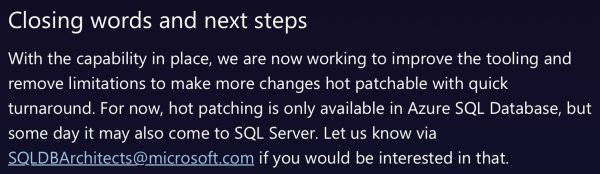
Seven years ago, Microsoft announced automatic, downtime-free hot patching of the SQL Server engine in Azure SQL DB. The tail end of that post had a teaser in it:

Hot patching announcement

Well, I guess enough of you emailed in, because 7 years later, starting with Cumulative Update 4, SQL Server finally has that capability! The original technical post covers the internals of how it works, but there are a few changes for the on-premises boxed-product version of SQL Server:

  • SQL Server’s CEIP service (the Customer Experience Improvement Program telemetry service that constantly connects back to Microsoft’s servers) gets the list of available updates for your build. It was already sending your build number to Microsoft anyway,
  • SQL Server downloads the most recent available update, staging it in the binaries directory
  • The updates are applied based on the new sp_configure setting for ‘automatic updates’

Obviously, for safety reasons, you’re not opted into automatic updates. You have to choose when you want the binaries to be applied with that new sp_configure setting:

There are more options, similar to SQL Server 2014’s options for online index rebuilds, and I love that they used the exact same syntax to keep things simple:

Some of you out there are going to raise your wrinkled old hands to the sky and shake your fist angrily, cursing modern Microsoft. First, they came for your job with automatic index tuning in Azure in 2018, then brought that to the SQL Server boxed product, then automated patching in Azure SQL DB, and now they’re coming for your maintenance jobs on-premises too. That’s scary, I know, because it can feel like there’s less and less left for database administrators to do.

All we’ve got left to do with SQL Server is the initial installation, engine configuration, backups, high availability, disaster recovery, corruption checking, permissions setup, performance monitoring, query tuning, and outage troubleshooting. I don’t know how future DBAs will be able to stay busy, and they should definitely start thinking about better long term career options now that the database is self-managing and self-patching.

Note: this post was published on April 1, 2026. That date probably means something significant, given that I’ve shown it a few times on the page.


How to Draw Line Graphs in SSMS

Ever just need a quick visualization of some numbers to get a rough idea of the trend, like this:

SSMS spatial results graph

Option 1: ask Copilot to write the query for you.

In SSMS v22.3 and newer, with the results query on your screen, open up SSMS Copilot and copy/paste this into the prompt:

Given the query in this window, graph the results as a line chart in the SSMS Spatial Results tab using these rules:
1. Wrap the original query in a CTE called SourceData
2. Create a ScaledData CTE that scales X values to 0–300 and Y values to 0–100 using window functions MIN/MAX OVER()
3. Build a LINESTRING geometry from the scaled points
4. Use STDifference to cut holes in the line where data points are, so tooltips don’t conflict
5. Use STBuffer(3) to make each data point a large circle
6. UNION ALL the line (with holes) and the circles, with the line row having NULL for all non-geometry columns
7. The first column in the SELECT should be the X-axis label, the second column should be the Y-axis measure, and the third column should be the geometry — so tooltips show meaningful data when hovering over circles

Use a large model (like Claude Opus 4.6 or newer) for the best results. It’ll write the query for you, and if you’ve been living your life right, you’ll get something like this:

Voila! Graph. Un-check the “Show grid lines” box on the SSMS results tab because the X/Y axis won’t make sense.

Option 2: use this user-defined function.

I asked Copilot to bundle this into a reusable piece of code so that I could use it for any query. It sets up a user-defined table type, then a function that accepts that user-defined table type as an input parameter:

To use it, insert your data into the user-defined table type. In this example below, I’m loading in the top 10 biggest locations in the Stack Overflow Users table:

And voila:

Spatial graph in SSMS

Line charts don’t make as much sense for that particular set of data – you’d probably want bar charts or column charts instead. I’ll leave that to you and your robot friend to work on.

If you wanna watch me work through this with Copilot to come up with the queries, here’s a video of me working on it. Enjoy!

And no, this isn’t my April Fool’s post, hahaha. This does actually work – although I obviously wouldn’t recommend it for any end-user-facing stuff. It’s just fun to have a nice, quick, easy visualization that you can copy/paste into emails or presentations.


I’m Coming to the PASS Summit in Frankfurt!

#SQLPass
0

PASS Data Community Summit Frankfurt

The pre-conference lineup for the PASS Data Community Summit Frankfurt event was just released, and I’m proud to share that I’ll be teaching my new all-day pre-conference workshop.

Dev-Prod Demon Hunters:
Finding the Real Cause of Production Slowness

Production is slow. Development is fast. The same query runs in both. Somewhere between the two, a performance demon is hiding—and this session is about hunting it down.

Your queries drive me to drink.
My own demons

Inspired by Brent Ozar’s love of the K-Pop Demon Hunters theme song, this class is delivered almost entirely as live demos, not slides. Brent Ozar will run real queries against two environments labeled “dev” and “prod,” then work through them exactly the way an experienced DBA would in the real world: comparing server settings, analyzing execution plans, and uncovering the subtle differences that led SQL Server to make different decisions. Each “hunt” reveals another demon—statistics, configuration, data distribution, or plan choice—and shows how easily a test environment can lie.

Along the way, Brent will demonstrate practical techniques you can use immediately: running sp_Blitz to surface meaningful environment differences, comparing execution plans to understand why SQL Server behaved differently, and making targeted changes to development so it better reflects production reality. By the end, you’ll understand how to stop guessing, stop blaming the engine, and follow the clues that lead to the truth—because when dev and prod finally move in sync, that’s when performance goes golden.

3 things you’ll get out of this session

  • Discover what caused query plans to vary from production
  • Learn how to quickly assess environment differences that would cause query plan changes
  • Understand how to change dev to more closely match prod

Pre-requisites: You should already be comfortable writing queries, reading execution plans, and using the First Responder Kit to gather data about your server’s wait stats and health.

Registration is open now with early bird pricing expiring March 31 (quickly!), and attendees will get a free year of my Recorded Class Season Pass: Fundamentals. See you in Frankfurt!


[Video] Office Hours: Q&A on the Mountaintop

Videos
4 Comments

Well, maybe mountain is a bit of a strong word, but it’s one of the highest elevation home sites in Las Vegas, with beautiful views over the valley, the Strip, the airport, and the surrounding mountains. Let’s go through your top-voted questions from https://pollgab.com/room/brento while taking in the view – and you can move the camera around, since this is an Insta360 video.

I had to cut the first ~60 seconds of the intro, so it seems to start in an odd place:

Here’s what we covered:

  • 00:00 Start
  • 00:33 Sun Ra: Who is your favorite musician?
  • 01:27 Dopinder: What is your opinion of the query hint tool in SSMS22? Who is the target audience? Will end users misuse it?
  • 02:30 Trushit: I need medallion architecture for BI initiative. What would be your thought process? Largest table today is about 3M rows.
  • 03:42 I Graduated MIT: In the MIT class, you say developers just need clustered indexes on each table (and FK) as a starting point, and DBAs take over later once it’s in production. Does AI change that? Should devs use AI to predict indexes earlier?
  • 05:15 Bandhu: SQL log shipping performance can be bad over cloud provider SMB storage options. What’s your opinion of swapping out the default log shipping transport (SMB file copy) to using something more network efficient (Blob storage for Azure or S3 for Amazon)?
  • 06:54 racheld933: Do you have a specific industry/sector of clients that you prefer over others? Like healthcare, finance, education, etc. Are there any specific challenges or trends that show up within each group?
  • 08:21 RoJo: Can you comment on the use of BitLocker on a SQL server host? I’m concerned on speed, and another layer to add when patching or updating. Is it really needed if the Host is physically locked in a rack and room.
  • 10:09 Alice: AI sent me down a powershell rabbit hole of try this, oh wait, sorry try that only to tell me many attempts later that what I was asking for is no longer supported. What is the worst AI rabbit hole you’ve experienced?
  • 11:30 Mister Robot: At what point does “AI-assisted DBA” turn into “why do we still have DBAs?”
  • 12:58 NicTheDataGuy: Hi Brent, you made a comment in a previous post that ” I actually put serious thought into deciding which tool I was going to learn next because I’d have so much free time”, curious what you would have done and why? is there a tool/language you think is going to be in demand?

Y’all Are Getting Good Free AI Advice from PasteThePlan.

AI, PasteThePlan.com
9 Comments

PasteThePlan has a new AI Suggestions tab, and it’s been really fun to watch the query plans come in and the advice go out. Here are some examples:

  • Date “tables” – when I looked at the query, I glossed over the real problem. I thought arc_Calendar was a real date table, but AI figured out that it’s actually generated on the fly with spt_values, something that blows my mind at what an incredibly bad idea that is. It never crossed my mind that someone would even consider doing this in production, and AI tells them what to do instead.
  • This is fine – someone asked for advice on a select from a 1-row temp table. AI said get outta here with that nonsense.
  • One-table delete – but due to foreign keys, it’s actually touching multiple tables. The AI advice explains what’s going on and how to make it go faster, plus boils it down to “if you only do one thing” – I love that! I love prioritized advice.
  • Reporting process – a kitchen-sink style query that at first glance should probably be rewritten to dynamic SQL, but they’ve already solved that to some extent by slapping an option recompile hint on it. The AI advice catches a scalar UDF causing problems, suggests a rewrite using a technique the company’s already using on another column, and suggests a slight rewrite to push filtering earlier. Again, I love its recap here, all for free, in less than 30 seconds.
  • Lengthy paged dynamic SQL – ugh, even just glancing at this makes me look at the clock to think about how long it would take me to analyze. In seconds, AI reasoned over this monster to suggest indexes that would help the paging, plus raises some eyebrows at a weird not-exists-not-exists design.
  • Meaningful function rewrites – advice to quickly and easily change non-sargable functions into index seeks, and remove a correlated subquery.

Advice I’m not as wild about, and I’m thinking about how to tune the AI prompt in order to improve it:

  • 16,000 row export with no WHERE clause – my first reaction here is to say, “Whoa now, we don’t tune for 16,000-row XML export queries.” However, when it comes to tuning the prompt to deliver better advice, I think we need to push the user harder to copy/paste in actual execution plans that include timing information, and then evaluate whether we should bother making changes, or whether the query’s performing good enough based on the wild output we’re asking for. This Power BI query is a similar example – whenever I see scientific notation for the estimated number of rows, I wanna stop tuning there and go get the actual plan.
  • Covering indexes galore – this is just one example, but my first iteration on my AI prompt didn’t discourage covering indexes, and AI seems to really wanna suggest ’em. I need to refine the prompt to suggest starting indexes with just the keys, and then only add includes for covering if the query’s still not fast enough after the initial indexes. There also seems to be a hesitance to recommend clustered indexes on heaps, even reporting heaps that were just created for the purpose of the query we’re looking at.
  • Lose the cursor – I’m surprised at how often I’ve seen folks paste cursor plans in. I do love the advice – it’s always “hey lose the cursor” – but I think we could do better. I’d like to be able to proactively rewrite stuff for folks, but realistically, a web page isn’t the best UI for that, and it will probably need a better, slower model with a >30 second timeout. We need to tell people, “Here’s a link to a set of commands that will rewrite the query for you” – whether that’s Claude Code, ChatGPT Codex, the plain chat interface for those tools, or something else.

And some queries & advice are just making me think. For example, in this multi-step reporting query, the AI seemed to find a lot of advice, but to understand if the advice is any good, I kinda want a followup status report from the user. Did they implement any of these fixes? Which ones? What kinds of differences did they see? We probably need a feedback loop of some kind to help iterate over the AI prompt.

I’m not delusional enough to think PasteThePlan.com is the right long-term solution for getting plan advice! We only have about 50 people using it each weekday. However, if that helps 50 people per day avoid posting questions to forums, and get instant answers that solve their problems for free and make users happier, then I’m very happy with that result. I couldn’t possibly answer 50 peoples’ query questions per day for free in my spare time!


My Wish List for SQL Server Performance Features

SQL Server vNext
25 Comments

There are a lot of shopping days left before Christmas, and even more before the next version of SQL Server ships, so might as well get my wish list over to Santa now so the elves can start working on ignoring them.

My work focuses on performance tuning, so that’s what my wish list focuses on, too. They really are wishes, like I-want-a-pony, because I know I’m discussing some stuff that’s easy to describe, but really challenging to implement.

Forced Parameterization v2: The original implementation of this feature helped mitigate the multiple-plans-for-one-query issue, but it has a ton of gotchas, like not fully parameterizing any partially parameterized queries, or the select list of select statements. I still hit a lot of clients with those problems in their queries, making monitoring tools, Query Store, and the plan cache way less useful, and I’d love to see forced parameterization updated to fix these additional issues. If you search the the SQL feedback site for forced parameterization, there are a few dozen issues that reference it in various ways, including plan guide challenges.

Forced Parameterization v3, Handling IN Lists: When you use Contains() in a LINQ query, it gets translated into a T-SQL IN clause. This list can have different numbers of values depending on how many things you’re looking for – maybe you’re looking for just 1 value, or 10, or 100. Unfortunately, even when forced parameterization catches these, it still builds different plans for different quantities of values – like 1 value, 10 values, and 100 values all produce different plans in the cache – again, making monitoring tools, Query Store, and the plan cache way less useful. I would love the ability to just build one plan for an IN list, regardless of the number of values.

Better Approach to Query Hash: The whole reason I’m focusing on Forced Parameterization here is that SQL Server compiles different execution plans for each submitted query string. Even differences in spacing and casing cause different plans to be cached in memory – again, as discussed in this multiple-plans-one-query post. What if the optimizer was just smarter about recognizing that these two queries are really the same thing, and only caching one plan instead of building two separate plans?

Cost Threshold for Recompile: If a query plan’s cost is higher than X, recompile it every time rather than caching the plan. If the query cost is 5000 Query Bucks, it’s worth the extra 1-10 seconds to compile the dang thing again before we run a giant data warehouse report with the wrong parameter plan. It’s basically like adding a Query Store hint for OPTION (RECOMPILE), but doing it automatically on expensive queries rather than trying to play whack-a-mole. Here’s my feedback request for it.

We do Christmas decorations a little differently around here

Execution Threshold for Recompile: If a query has run 100 times, asynchronously compile a new plan for it, but this time around, take a lot more time to build the plan. Don’t do an early termination of statement optimization to save a few milliseconds – we’re serious about running this query. Use the execution metrics that have piled up over those 100 executions to think about whether this is really small data or big data. This is challenging to do, I know, because it means SQL Server would need a task list (like plans to be recompiled), plus an asynchronous way of processing those tasks, plus a way to know when it’s safe to run those tasks without impacting end user activity. It would also require a lot of new monitoring to know if we’re falling behind on that task list, and ways to identify which plans were re-thought, and persistence of those “better” plans in places like Query Store. Here’s my feedback request for it.

Configurable Statistics Size: SQL Server’s stats histogram size has been frozen at a max of 201 buckets since the dawn of time. In the age of big data, that’s nowhere near enough for accurate estimates, as explained in this Query Exercise challenge post and the subsequent answer and discussion posts. I wish SQL Server would switch to a larger statistics object by default, perhaps jumping to an extent per stat for large objects rather than a single page, or a configurable stats object size. This would be painful to develop, for sure – not only would it affect building the stats, but it would also impact everything that reads those stats, like PSPO which needs to detect stats outliers. Here’s the feedback request for it.

Update Statistics Faster: In SQL Server 2016, Microsoft added parallelism during stats updates, and then promptly ripped it back out in 2017, as the documentation explains in a note in the sampling section. Forget parallelism on a single stat: I want SQL Server to do a single parallel pass on a table, updating all of the statistics on that table at the same time, instead of doing separate passes of the table for each and every statistic on it. Think merry-go-round scans meets stats updates. Here’s the feedback request for it.

DDL Change Logging: When any object is modified – table, index, stored proc, database setting, server-level setting, login – have an API hook or call of some kind. Send notifications to an API to log that action: who did it, what object was changed, and what the change was. This would make true source control integration and alerting easier, not just for the database, but for the server itself, getting us closer to the point of being able to rebuild existing servers from some kind of source of truth. Yes, I know the “right” thing to do is make people check their own changes into some kind of source control system first, and then use that source control to build the server and the database, but in reality, that poses both organizational AND technical problems that most organizations can’t fix. We need a change logging system so we can at least be reactive. There have been multiple feedback requests for this over time and they’ve all gotten archived, but ever the optimist, here’s my new feedback request for it.

That last one isn’t technically a performance feature, but… if people can make changes in a production system without easy alerting, logging, and source control, then it’s a performance issue in one way or another, because people gonna break stuff. Users gonna use.


SSMS v22.4.1: Copilot is GA. So What’s It Do Right Now?

Copilot in SSMS has two parts. Usually people focus on the pop-out Copilot chat window, and that’s useful for sure, but honestly I think you’re going to get way more mileage out of the code completions feature, right away, because it blends in with your existing workflows.

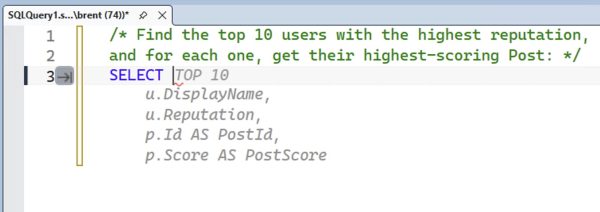
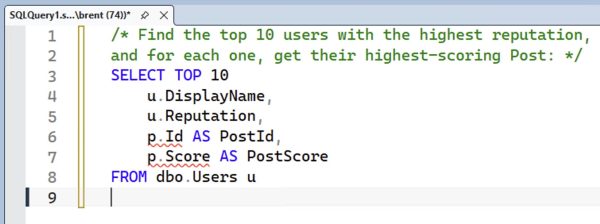
Let’s say that I’m working with the Stack Overflow database and I wanna find the top 10 users with the highest reputations, and for each one, find their top-scoring Post. I would start by typing a comment describing what I’m doing, then type SELECT, and the magic happens:

Code completions in progress

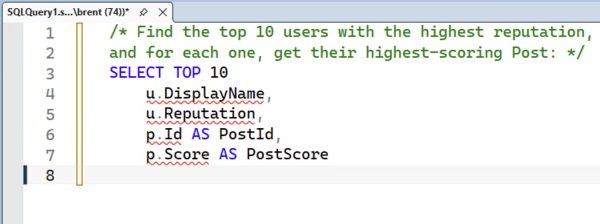
Copilot’s code completions automatically fill out pretty much what I’m looking for! That’s awesome. Note that I did have to type the word SELECT, but, uh, I’m okay with that. Copilot code completions don’t kick in until you at least give it a character. Hey, I’ve got plenty of characters around here. Let’s hit Tab to accept its work, and then hit enter:

Code completions in progress

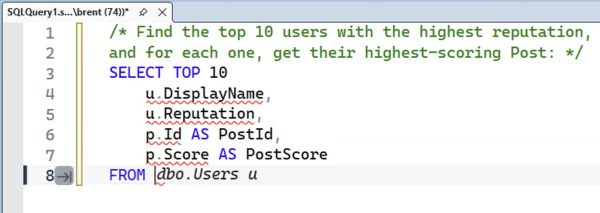
We’re at an impasse until I type the word FROM, which is fine, let’s do that:

Code completions in progress

And it figures out that I want the Users table first. It even suggests aliasing the table correctly so that it matches up with what it’s already got in the SELECT! Lovely. Note that it only wrote one line – just the Users table – and not the subsequent join. Hit Tab to accept it, then enter:

Code completions in progress

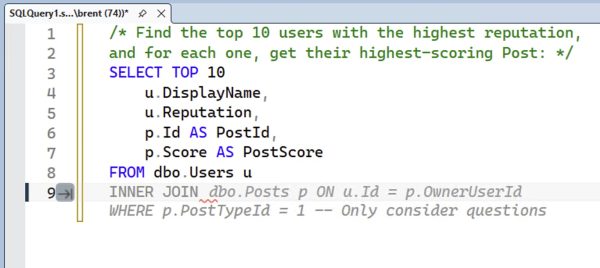
Again, nothing happens until I type something else in, so we’ll prompt it with an inner join:

Code completions in progress

It adds the bang-on correct join to the Posts table, even though there’s no foreign key to explain the join, AND it lays out the WHERE clause. Note that earlier it only added one line for the From – just the Users table – but here it adds both the Posts table, and suggests no more joins are necessary, and it’s time for the WHERE clause, and adds it.

It does filter for only questions, which is something I didn’t ask for. Hmm. I would imagine that this filter and the joins are influenced by the fact that the Stack Overflow database is open source, and there’s a lot of copyrighted blog posts AI training material out there that Copilot learned from, so it’s automatically adding that. Your own surely private database might not get that quality of recommendations (although here of course the quality is what we call “bad”, since I didn’t ask for that filter, but “bad” is still a quality.)

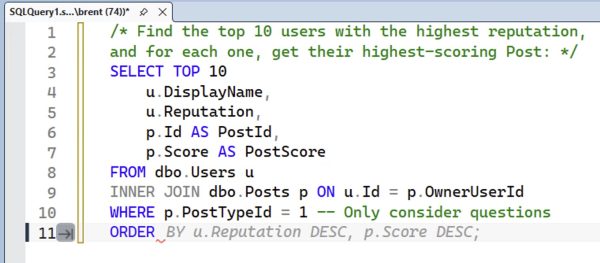
Hit tab to accept, and it just sits there until we start the ORDER, at which point it fires back up with more advice:

Code completions in progress

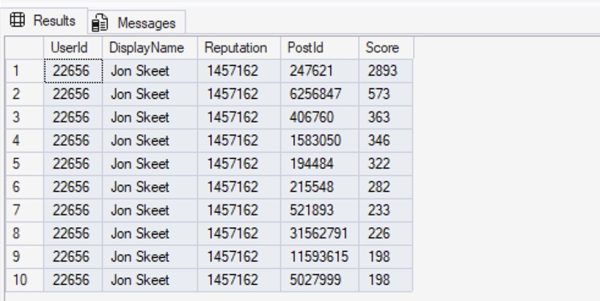
The order is pretty good, but overall the query doesn’t produce the results we’re actually looking for, as we’ll see when we hit F5:

Code completions in progress

That’s … not what we wanted. We specifically asked for the top 10 users, and for each one, get their highest-scoring post. That’s not what we’re seeing here.

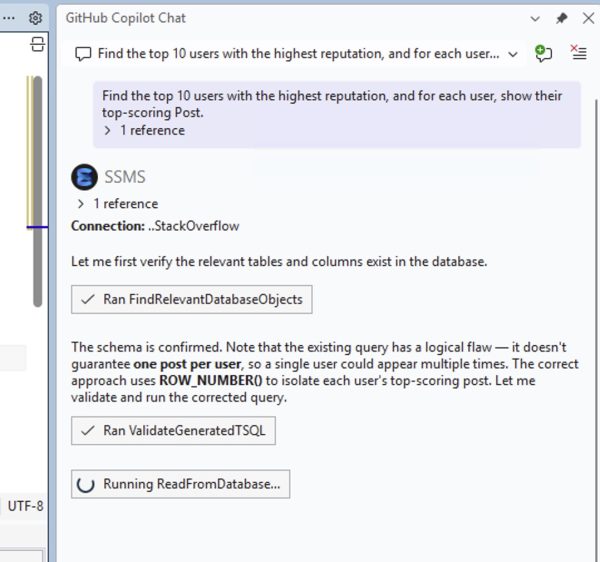
Let’s switch over to the Copilot Chat window and ask the same question:

Copilot Chat in progress

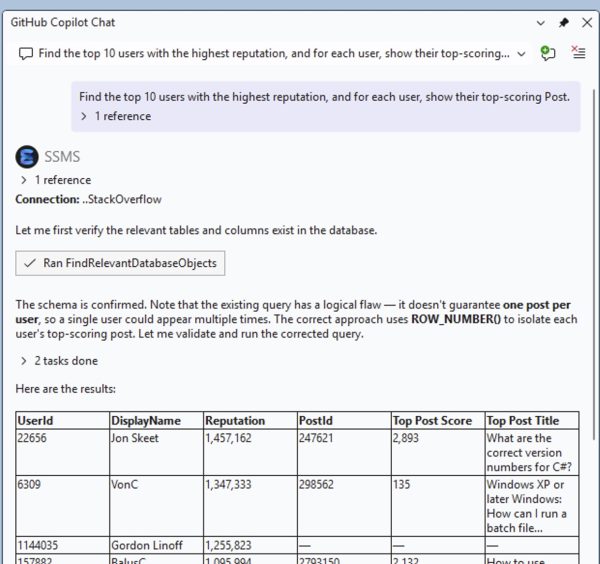
Note that I didn’t even ask Copilot Chat to evaluate the query in the SSMS window! It just decided to do that, and gauged the code completion chat as lacking in brains. That’s fantastic! In fairness, Copilot Chat takes a hell of a lot more time to figure that out, and as its analysis continues…

Copilot Chat in progress

It shows the results, and those results are bang on. I love how it adds the top post title, too, which our code completions query didn’t. Continue scrolling down and after the results:

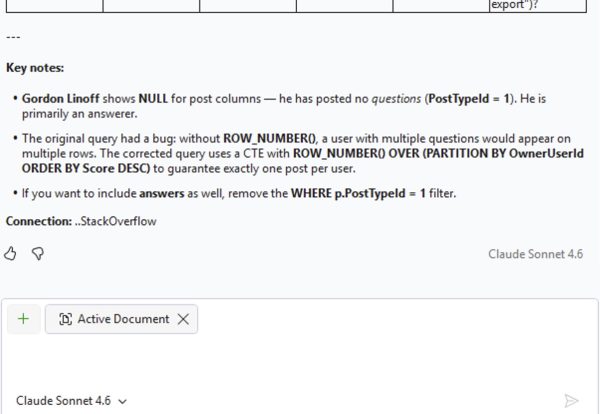
Copilot Chat in progress

Brilliant! It … well, it doesn’t show me the actual query it wrote, but it does follow exactly what I asked for. I technically didn’t ask it to write the query – I just asked it for the results, so I’m left with copy/pasting the results out of the text, or asking it to show me its query.

If you want to get a feel for the real time response speed, you can watch this going down in the silent video below:

(No audio narration from me on that one because I was jamming out to the John Summit set in Vail as I wrote this post, getting psyched up for Experts Only Vail this weekend. Any EDM fans in the house?)

My verdict: enable code completions, NOW.

adore Copilot’s code completions because they show up where you are. You have to enable them by going into Tools, Options, Text Editor, Inline Suggestions, and Copilot completions, then go into Inline Suggestions, Preferences, and check Show suggestions only after a pause in typing. (Otherwise they’re obnoxiously fast and when you hit tab, you’ll get the wrong stuff constantly, and you’ll be constantly forced to go back.)

Are they as good as a human can do? Not even close, as this quick & dirty demo showed. Code completions just makes your life easier, silently, as you’re working, without interrupting the tools and workflow you’re already used to using. I feel like it’s about 70% accurate, 30% inaccurate, which sounds terrible, but that 70% is massively helpful.

The Copilot Chat window is much more accurate, but it’s slow as hell in comparison, and it requires you to change your workflow. Nothing against that – it does good work – but I know you, dear reader, and you’re lazy. You’re not gonna switch over to the chat window. You’re gonna just keep typing in SSMS, and for that, Copilot code completions is the bomb.

Now if you’ll forgive me, I wanna go throw a sweater in the car for the road trip lest I shiver.


[Video] Office Hours in North Bay, Ontario

Videos
7 Comments

I’m up in North Bay, Ontario, Canada for the 2026 Can-Am Curling Cup run by Aaron Bertrand – and my team actually won!

Image
Hanging out with Andy Mallon, Aaron Bertrand, Leanne Swart, Michael J Swart, and Ken Mallon before the tournament
Image
The winning team, woohoo!

Let’s bask in the warmth (cough) of our glory as we go through your top-voted questions from https://pollgab.com/room/brento.

Here’s what we covered:

  • 00:00 Start
  • 02:07 Adrian: With all the storage on the same SAN with nVME, having separate virtual disks for data, log, temp data and temp log still makes sense? Our SQL servers have 7-8 drives each and managing free space is boring.
  • 03:44 Newish Jr DBA: I’m a 7 month old SQL/DBA baby, but I just heard about policy management (PBM). After searching your blogs I did not find much. Do most shops not use it? Could you please elaborate on the pros and cons and primary use case for this tool?
  • 05:05 Silent but Threadly: If a DBA never speaks at conferences or blogs, does that limit their career growth?
  • 06:07 A Rose: Is “Database Engineer” just a rebranded DBA, or is it actually a different skill set?
  • 07:02 MyTeaGotCold: Got much left to do for updating your mastering classes for SQL Server 2025?
  • 08:49 Not Brent O: At what size or number of servers do you recommend clients use Central Management Servers (CMS), and any other advice regarding CMS?
  • 09:20 Meatbag: How is AI changing your training classes and conference sessions?
  • 11:35 For a Friend: How many years of experience does someone really need before they can call themselves a “Senior DBA”?
  • 13:11 MidwestDataPerson: I use SP_Rename to switch tables. Any gotchas about this approach? What about indexes and statistics? e.g. ‘Table1’ becomes ‘Table1_old’ and ‘Table1_new’ becomes ‘Table1’. Indexes are built on ‘Table1_new’ prior to rename.

Updated First Responder Kit and Consultant Toolkit for March 2026

For the last few years, I’ve slowed the First Responder Kit release down to once per quarter. It felt pretty feature-complete, and I didn’t want to make y’all upgrade any more than you have to. You’re busy, and I don’t want to take up your time unless there’s something really big to gain from doing an upgrade.

However, things are changing fast – in a good way – and you can blame AI.

Thanks to AI, we’re able to iterate faster, and bring in more improvements in less time than I ever would have thought possible. I know a lot of folks out there hate AI, but this release is a good example of how it can make your job better.

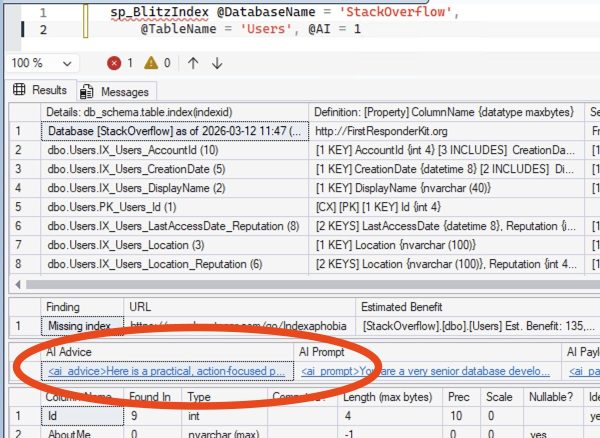
sp_BlitzIndex now offers AI advice for a table’s indexes. It’s as easy as:

And you get a new result set with advice from ChatGPT or Gemini:

sp_BlitzIndex AI Advice

Click on it to see the advice in more detail, in Markdown for easy copy/pasting into client-friendly recommendations:

sp_BlitzIndex AI Advice

Including the exact index creation & undo scripts:

sp_BlitzIndex AI Advice

For more details on that, check out the new documentation on Using AI with the First Responder Kit, this free video on using @AI = 2, and this video on using @AI = 1.

Another big set of commits this month: Erik Darling had the brilliant idea to run the FRK scripts through Claude Code for an automated code review. I’m kicking myself for not doing it sooner. It found a bunch of real bugs across the scripts, stuff that slipped past everybody for years, plus a lot of code quality things. You can click on each issue in the below list to see the specific fixes for each proc. Make no mistake, most of these weren’t fluffy “your syntax should be better” bugs – these were real bugs, like sp_BlitzLock was over-reporting memory grant values by 8x because a DMV’s contents was already in KB as opposed to data pages. That’s the kind of bug that humans are rarely going to catch because we rarely do things like compare a query’s memory grants between diagnostic tools and their plans.

This release has a breaking change in the AI config tables for sp_BlitzCache (and now, sp_BlitzIndex as well.) We used to have both the AI providers and prompts in the same table, but I needed to normalize that out into two tables now that we’re adding AI capabilities to more procs. If you’ve started playing around with sp_BlitzCache’s AI config table, run this script to migrate your configs to the new table structure before running the new version of sp_BlitzCache.

To get the new version:

sp_Blitz Changes

  • Enhancement: add warning about AI-influencing Agents.md and Consitution.md extended properties being present in user databases. (#3798)
  • Enhancement: warn if Automatic Tuning is in a non-default state. (#3800, thanks Reece Goding.)
  • Enhancement: skip Google Cloud SQL admin database gcloud_cloudsqladmin. (#3818, thanks Vlad Drumea.)
  • Fix: typo in Acclerated Database Recovery Enabled. (#3796, thanks Christophe Platteeuw.)
  • Fix: typo in “individial”. (#3835, thanks CuriousGeoSq and GitHub Copilot – this was our first completely robot-performed bug fix done inside of Github.com. I was delighted by how easy the process was.)
  • Fix: code review by Claude Code found 14 assorted bugs. (#3807 and #3808, thanks Erik Darling.)

sp_BlitzCache Changes

  • Breaking change: the last release used a single Blitz_AI table to hold both AI provider configurations and AI prompts. In this release, to support sp_BlitzIndex having its own set of prompts, we split that Blitz_AI table into two tables. This script will migrate the data from old to new tables. (#3823)
  • Enhancement: include the CONSTITUTION.md extended database property when building an AI prompt so that your company’s code and database standards will (hopefully) be honored. (#3809)
  • Fix: performance tuning by removing a duplicate join. (#3791, thanks Connor Moolman.)
  • Fix: code review by Claude Code found 16 assorted bugs. (#3806, thanks Erik Darling.)

sp_BlitzIndex Changes

  • Enhancement: skip Google Cloud SQL admin database gcloud_cloudsqladmin. (#3818, thanks Vlad Drumea.)
  • Enhancement: add AI advice for table-level index review. (#3670, #3827, #3837)
  • Enhancement: add more support for JSON indexes. Note that SQL Server itself doesn’t appear to track index usage statistics on these indexes, at least not yet as of 2025 CU3. (#3736)
  • Fix: in table level detail mode, show details for resumable index builds that are still building for the first time. (#3812, thanks Reece Goding.)
  • Fix: don’t error out when @GetAllDatabases = 1 is used with restricted permissions. (#3820, thanks Vlad Drumea.)

sp_BlitzLock Changes

sp_BlitzWho Changes

Wanna watch me work on some of these pull requests? Here was a live stream with me plugging along:

Consultant Toolkit Changes

We didn’t release a Consultant Toolkit in conjunction with this month’s FRK release. We’re having some problems with our automated build system, and I didn’t want to hold back the FRK release. Once we get that fixed, I’ll actually do another quiet FRK release (because we’ve already got a couple of things in the works for it), and email the Consultant Toolkit owners about that new release.

For Support

When you have questions about how the tools work, talk with the community in the #FirstResponderKit Slack channel. Be patient: it’s staffed by volunteers with day jobs. If it’s your first time in the community Slack, get started here.

When you find a bug or want something changed, read the contributing.md file.

When you have a question about what the scripts found, first make sure you read the “More Details” URL for any warning you find. We put a lot of work into documentation, and we wouldn’t want someone to yell at you to go read the fine manual. After that, when you’ve still got questions about how something works in SQL Server, post a question at DBA.StackExchange.com and the community (that includes me!) will help. Include exact errors and any applicable screenshots, your SQL Server version number (including the build #), and the version of the tool you’re working with.


Get Free AI Query Advice in PasteThePlan.

PasteThePlan.com
7 Comments

At PasteThePlan.com, you can paste execution plans into your browser, then send a link to someone else to get query advice. It’s useful for online forums, Stack Exchange, and the like.

After you paste the plan, you’ve got a new AI Suggestions tab. It sends your query plan (and my custom prompt) up to ChatGPT 5.3, and in 30 seconds or less, you get a second opinion on ways to make it go faster:

Paste-the-Plan AI suggestions

Here’s the prompt we’re using for now, in case you’d rather do this kind of thing yourself:

Please give specific, actionable advice for the attached Microsoft SQL Server query plan. You can give recommendations to tune the query or the indexes on the underlying tables. Do not give server-level or database-level advice: stay focused on this specific query, these specific tables. Your one-time advice will be handed to the developer responsible for the database. They will not be able to change server-level or database-level settings, and they will not be able to correspond with you again. Distill your advice down to the most important things that are likely to make a difference in performance. Deliver your advice in a friendly, upbeat way because you are on the same team, rooting for their success, and having a good time.

Right now, we’re using OpenAI’s ChatGPT 5.3 with a 25-second timeout. If it times out, we advise you to get out your own wallet and use your own AI tool, since we have to pay for these API calls. I like you, though. I think you’re worth it.