If you’ve ever wandered through your Jira instance wondering why half your apps are dusty museum pieces no one touches anymore, or why you’re paying for tools that only a few team members actually use—trust me, you’re not alone.
But something’s changing—something good.
App sprawl, unclear value, and outdated pricing models have long been part of the Jira ecosystem. But that’s changing—quickly and for the better.
Therefore, Atlassian is ushering in a smarter, more sustainable era with Forge, its next-generation cloud app platform, and user-based billing, a new pricing model that finally aligns cost with actual usage.
In this article, we’ll explore what Atlassian Forge and user-based billing are, and especially GanttTable, a planning and scheduling tool for Jira that is already ahead of the curve.
What is the Forge platform?
Forge is Atlassian’s fancy name for their cloud-native app development platform. But don’t let the term “cloud-native” scare you. It basically means: apps built on Forge run within Atlassian’s own infrastructure.
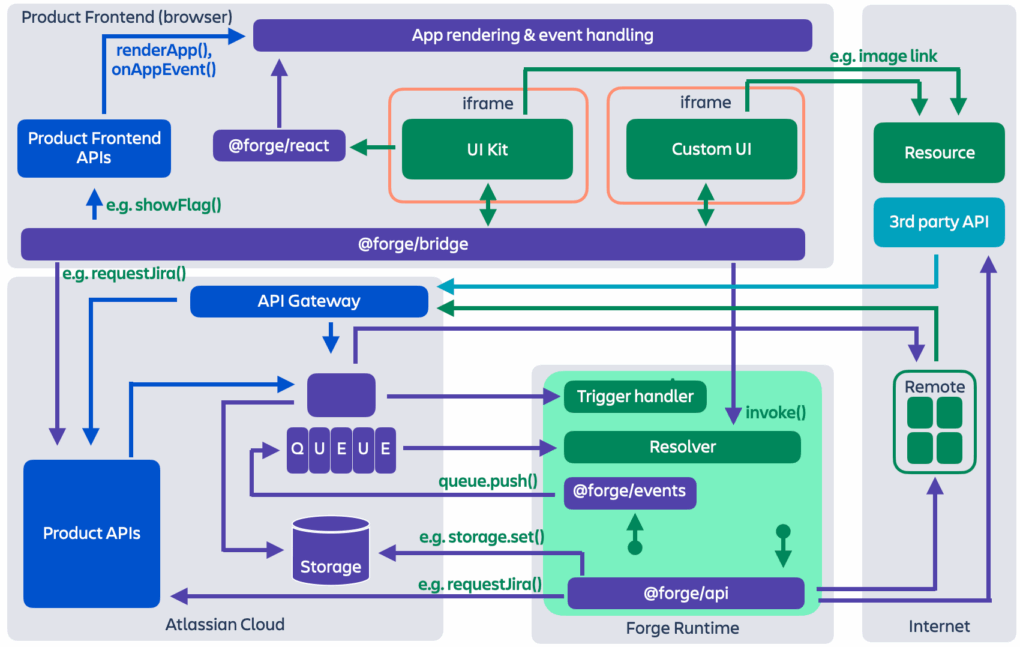
So, you don’t have to worry about external servers, maintenance, or waking up at 3 a.m. because someone forgot to renew an SSL certificate.
Besides, the Forge platform is also great for developers, but let’s leave them to their magic spells and deployment pipelines. Here is what you should care about as a Jira user: apps are getting faster, safer, and more consistent—because that’s what Forge makes possible.
Why shifting to Forge can be the best bet you can get?
So now that you know what Forge is, you might be wondering—why should anyone actually care?
If you’re someone who’s been around the Jira block more than a few times, let me tell you: Forge is more than just a buzzword. It’s a game-changer in the Atlassian world.
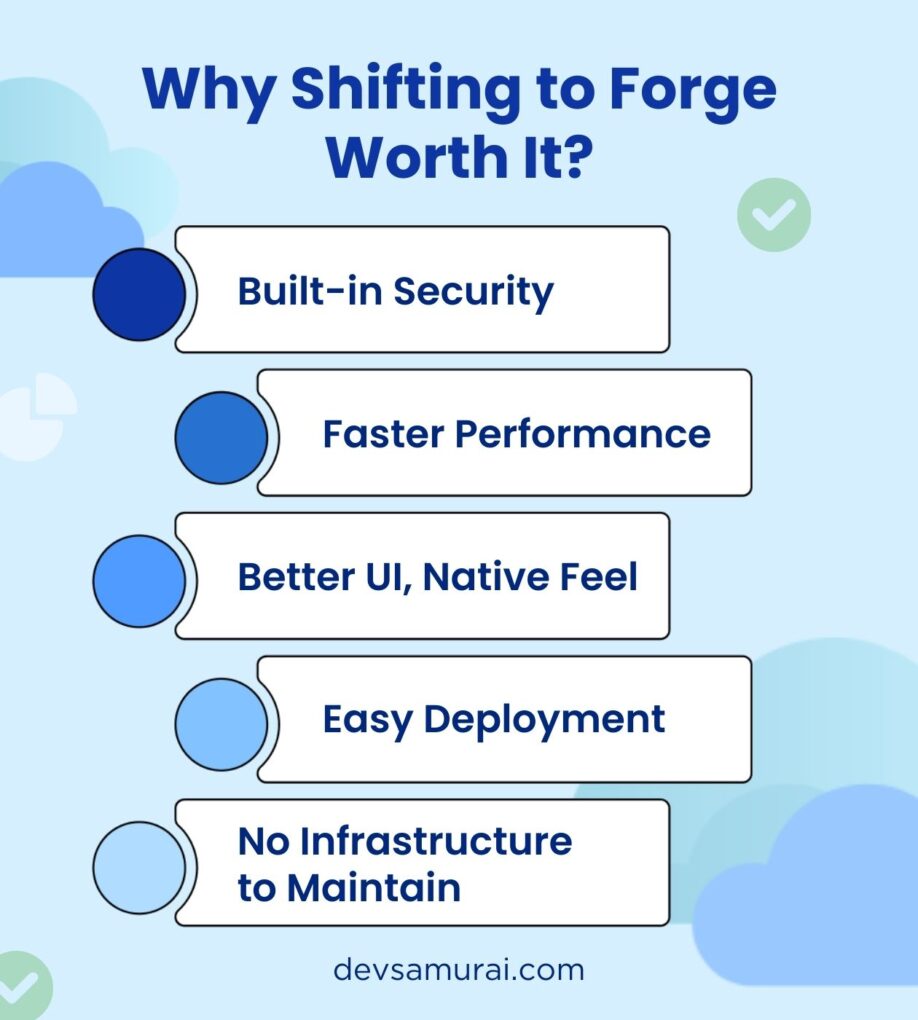
1. Built-in security equals fewer nightmares
Forge apps run within Atlassian’s infrastructure, not on someone’s sketchy third-party server from 2012.
That means:
- No more worrying about security breaches or compliance audits.
- No more late-night “urgent patches” because of a vulnerability on an external service.
You can sleep soundly. Your CISO will love that.
2. Faster performance, right where you need it
Because Forge apps run close to Jira and Confluence, they feel faster.
UI components render smoothly. Data shows up without delays. As a result, you spend less time refreshing the page and more time actually doing stuff.
In other words: fewer spinners, more winners.
3. Better UI, native feel
Forge gives developers two main ways to build UI:
- UI Kit: Simple and native-feeling, using Atlassian’s design system.
- Custom UI: Full frontend freedom (for the creative types who love React).
The result? Apps don’t look “glued on.” They look and behave like they belong inside Jira and Confluence—which means less confusion and a smoother experience for your team.
4. Easy deployment means frequent improvements
Forge apps can be deployed and updated super fast. That means developers can:
- Roll out new features more often
- Fix bugs without waiting for approvals or manual server updates
- Iterate based on your feedback (yep, your feedback)
We all win.
5. No infrastructure to maintain
This one’s huge. Developers don’t have to manage servers, storage, or uptime—Atlassian handles all of that. Therefore, it’s like going from owning a car (with all the oil changes and flat tires) to calling a rideshare when you need it.
Convenient, clean, and someone else deals with the mess. And remember: all of these benefits trickle down to us, the users.
- More stable apps
- Faster updates
- Interfaces that make sense
- And integrations that actually work the way they should
Forge is making Jira apps great again (I said it).
For example, a Jira checklist built on Forge can provide lightweight, secure functionality without any external infrastructure or maintenance, making it ideal for everyday use cases such as QA steps or Definition of Done checklists.
Forge and User-based billing: The new pricing model for all
Let’s talk about pricing. That’s because while Jira might be free for small teams, many of the tools we use to extend it are not.
And here’s the kicker: with the old model, you had to pay for every user in your Jira instance, whether they used the app or not.
That’s like buying coffee for the entire office when only two people drink it.
- Generous? Sure.
- Efficient? Hmm, not so much.
But worry not, here comes one of the greatest changes ever: User-Based Billing. This Atlassian’s new pricing model is built on a very simple principle: Pay for the users who ACTUALLY use the app. That’s it!
Here’s how it works:
- Let’s say your company has 500 Jira users, but only 50 use a project planning app. With user-based billing, you only pay for those 50 users.
As more users start using the app, billing scales accordingly. No need to manually adjust or request additional approval.
For managers and budget owners, it’s a win. Meanwhile, for users, it’s transparent. For app makers, it encourages better engagement.
And for everyone? It’s fair.
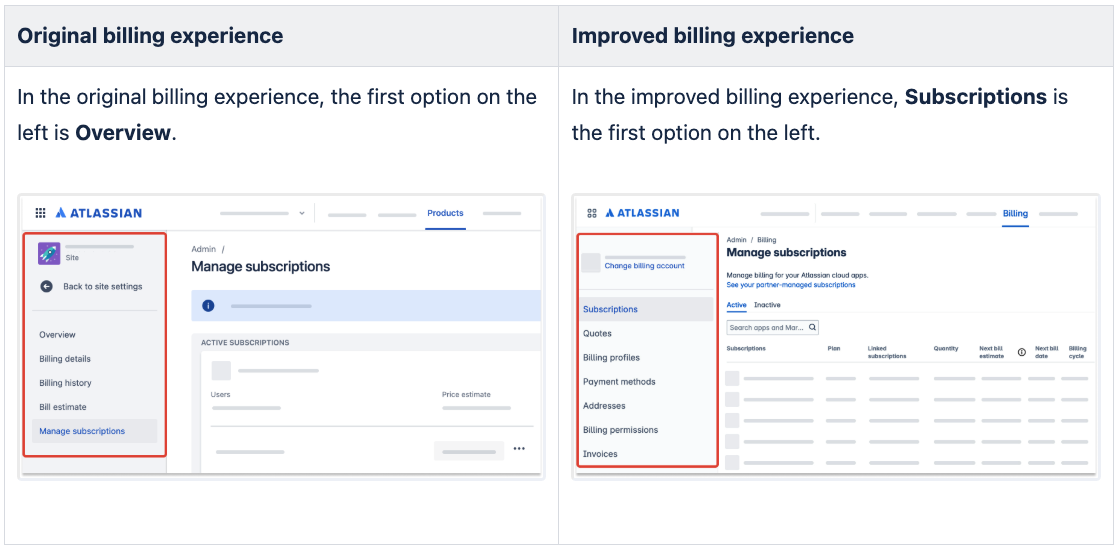
If you want to know more about how Atlassian manages the new pricing model, please visit their documentation on improving billing experience.
GanttTable – Ready for the new chapter
Now let’s talk about an app that embodies the new Forge direction: GanttTable for Jira.
Designed for teams who need more than static roadmaps or cluttered backlogs, GanttTable brings structure, clarity, and control to Jira project planning. Whether you’re managing sprints, large-scale timelines, or complex dependencies, it transforms scattered issue data into an interactive, visual workspace.
So, what is GanttTable?
Imagine a Gantt chart, but built natively inside Jira. It lets you:
- Visualize tasks, timelines, and dependencies clearly
- Drag and drop issues to reschedule
- See who’s doing what (and maybe who’s doing nothing)
- Filter by epics, assignees, or sprint—whatever makes sense for your team
And best of all? It’s built entirely on Forge.
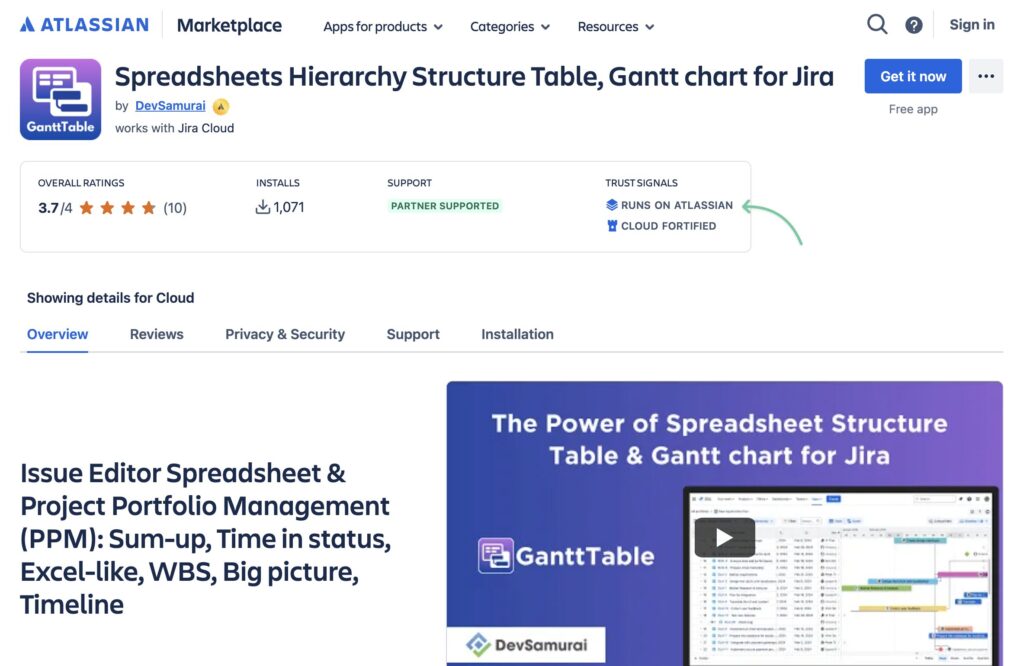
Additionally, GanttTable is also one of the first apps to receive Atlassian’s new “Runs on Atlassian” badge. It meets the highest standards of trust, security, and performance in the Atlassian Marketplace.
What’s the deal with this badge?
Introduced in May 2025, the Runs on Atlassian badge signals that an app is hosted entirely on Atlassian’s cloud infrastructure. That means:
- Zero third-party servers.
- Built-in support for data residency that matches Atlassian’s own services.
And strict control over data egress, giving customers the power to manage and restrict where their data goes—anytime.
And yes, GanttTable will fully support the user-based billing model. Therefore, your organization pays only for those who use the planning features.
An issue spreadsheet powerhouse for Jira
GanttTable is much more than a project timeline tool. At its core, it’s one of the most advanced issue spreadsheets you can get for Jira today.
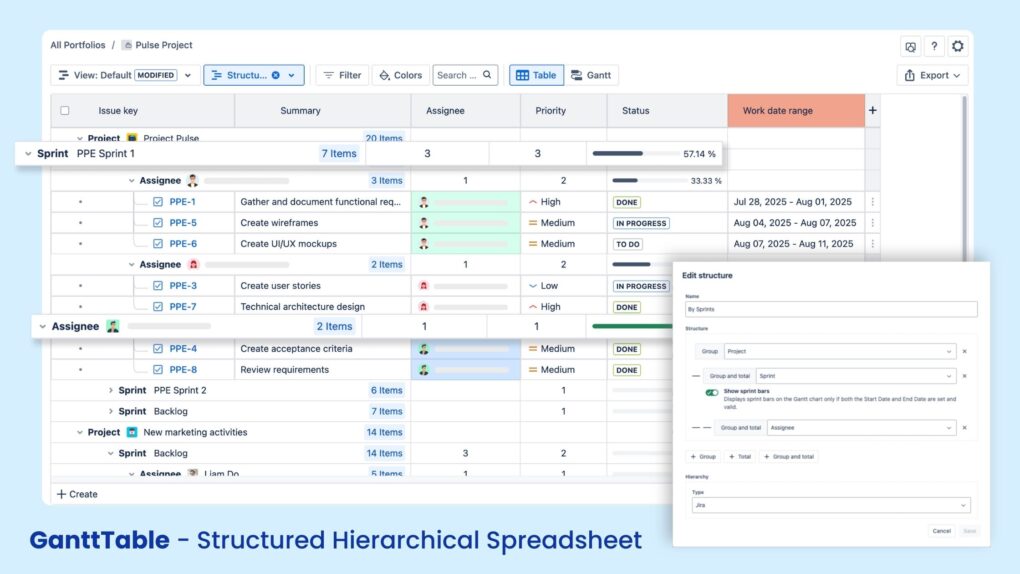
Think Excel-style tables—but fully connected to your Jira issues. You can browse, edit, and track tasks across multiple projects in a single view. Besides, filtering, grouping, and calculating are all built in.
Some of its key features:
- Smart Columns that go beyond Jira defaults, showing calculated or derived data (like time deltas, progress percentages, or custom formulas).
- Structure Views to group and total issues by sprint, epic, assignee, or any field you choose—then save and reuse those views.
- Multiple cell selection, Copy & Paste, and even Color Marking to make managing dozens (or hundreds) of issues fast and intuitive.
And if your team’s workflow is just a little “non-standard”, GanttTable’s custom formula fields let you tailor the table exactly how you need it.
And a fully capable Gantt chart, too
Of course, GanttTable wouldn’t be GanttTable without its namesake view: a robust, drag-and-drop Gantt chart that brings your project timelines to life.
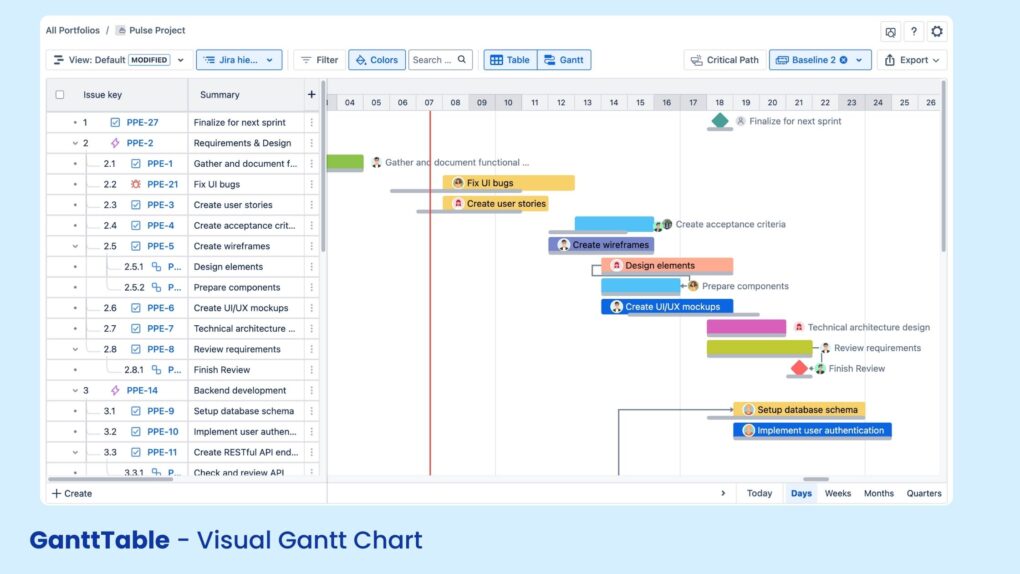
GanttTable’s Gantt chart supports:
- Critical Path highlighting to focus on what’s truly delaying your project.
- Dependencies help visualize the relationship between one task and another.
- Baselines to track how far your current plan has drifted from the original.
- Milestones, because not every task is created equal.
- Auto-Scheduling, which auto-adjusts dates and dependencies like a helpful project assistant that doesn’t complain.
Combine that with Work Breakdown Structure (WBS) support, and you’ve got a powerful tool that blends visual clarity with tactical control.
Conclusion
Atlassian’s Forge and user-based billing model mark a turning point in how we build, use, and pay for apps in the Jira ecosystem. It’s a shift away from clunky add-ons and one-size-fits-all pricing—toward smarter, cloud-native apps that scale with real team needs.
With Forge, teams get better performance, stronger security, and apps that feel like a natural extension of Jira—not an afterthought. And with user-based billing, companies finally get what they’ve been asking for all along: pricing that reflects actual usage, not headcount.
Besides, GanttTable stands as a perfect example of this evolution—bringing intuitive Gantt chart planning to Jira, backed by the power of Forge and the fairness of user-based billing. It’s built for teams that want visibility without complexity, and flexibility without surprise costs.
So whether you’re planning your next product launch, mapping dependencies across projects, or just looking to streamline your Jira experience, GanttTable is ready—and now, it makes more sense than ever to give it a try.