
The TCP/IP model is a layered networking framework that explains how data is communicated between devices over a network using standardized protocols to ensure reliable and efficient transmission.
- Defined as a four-layer architecture consisting of Application, Transport, Internet, and Network Access layers.
- Standardized by RFC 1122, which specifies its structure and behavior.
- Simpler and more practical than the seven-layer OSI model.
- Serves as the core framework of the modern Internet and networking systems.
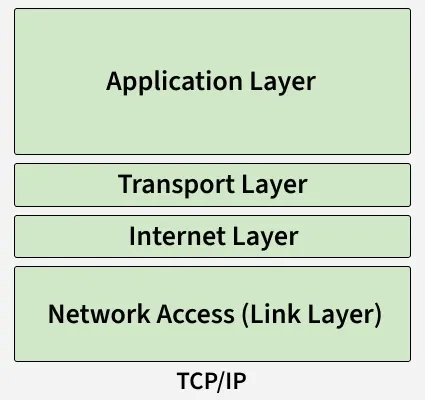
Layers of TCP/IP Model
1. Application Layer
The top layer of the TCP/IP model, closest to the user, where applications like web browsers, email clients, and file-sharing tools interact with the network. It provides an interface between user software and the lower layers that handle data transmission, enabling seamless communication over the network.
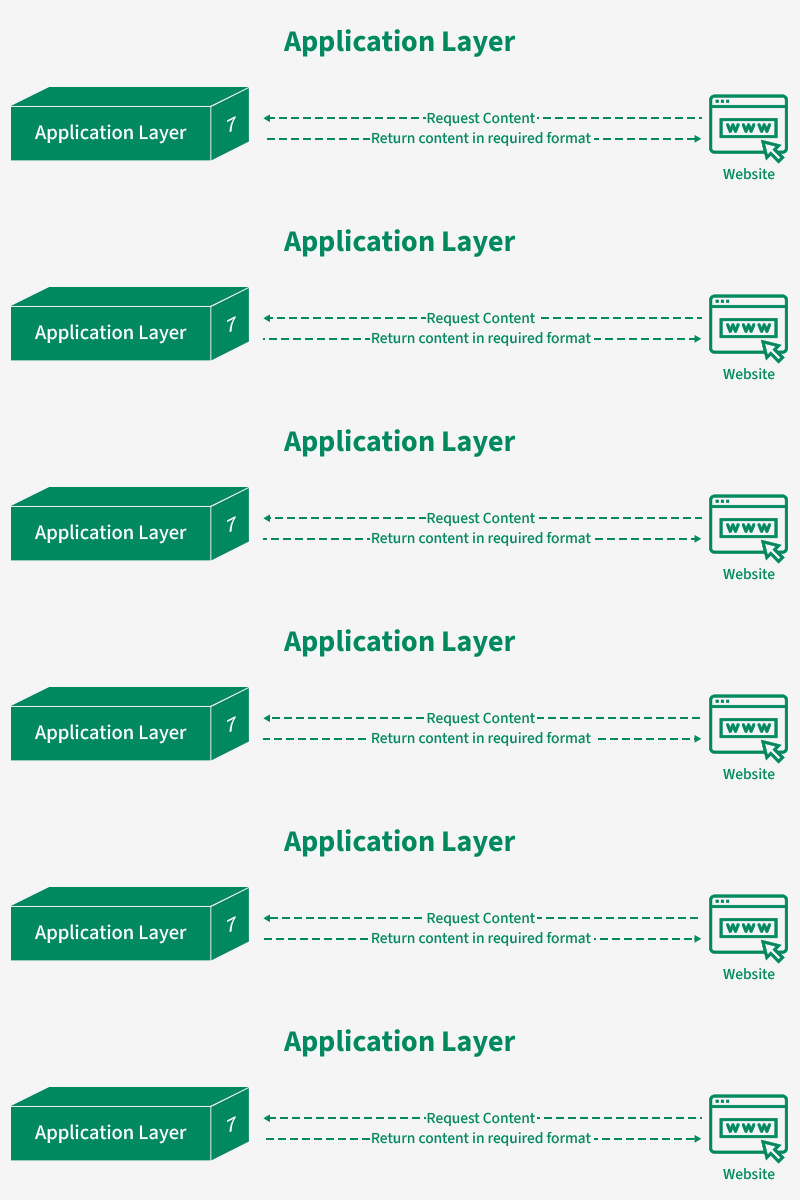
- Acts as a bridge between user applications and lower network layers
- Supports protocols such as HTTP, FTP, SMTP, and DNS
- Handles data formatting so information is correctly understood by both sender and receiver
- Provides encryption for secure communication
- Manages sessions to track ongoing connections
2. Transport Layer
Ensures reliable and efficient delivery of data between devices, managing segmentation, ordering, and retransmission as needed.
- Segmentation and Reassembly: Breaks large messages into packets and reassembles them at the destination.
- Reliable Delivery & Error Handling: TCP checks for errors, resends lost data, and ensures correct order.
- Fast Communication: UDP provides low-latency, connectionless delivery without error checking.
- Flow Control: Prevents the receiver from being overwhelmed by regulating data flow.
- Multiplexing: Uses port numbers to allow multiple applications to share the network simultaneously.
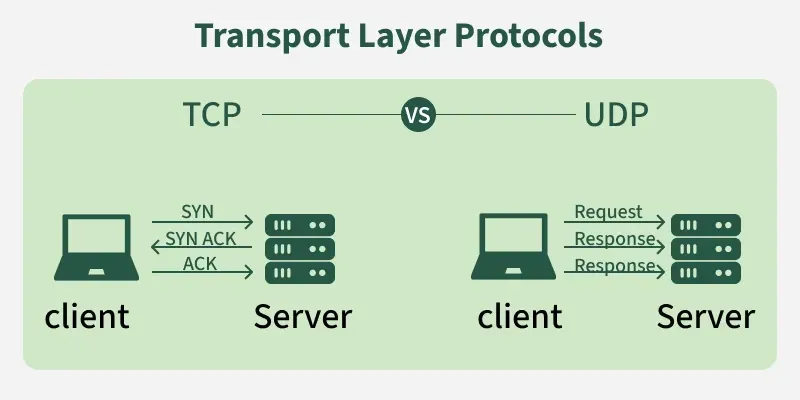
TCP (Transmission Control Protocol): TCP is used when reliability and accuracy are important. It ensures that data is delivered exactly as sent.
- Error Checking: TCP detects errors in the data using checksums to ensure integrity.
- Retransmission: If any data is lost or corrupted during transmission, TCP automatically resends it.
- Ordered Delivery: Data is broken into packets, and TCP ensures these packets arrive in the correct sequence.
- Connection-Oriented: TCP establishes a connection between sender and receiver before sending data, maintaining a stable session throughout the communication.
- Use Cases: Loading web pages, downloading files, sending emails, or any application where data must be complete and accurate.
UDP (User Datagram Protocol): UDP is used when speed is more important than perfect accuracy. It is faster but does not guarantee reliable delivery.
- No Error Checking: UDP does not verify whether the data has errors.
- No Retransmission: Lost or damaged data is not resent.
- No Ordered Delivery: Packets may arrive out of order, and the protocol does not fix it.
- Lightweight: Because it avoids extra checks and connections, UDP is faster and uses fewer resources.
- Use Cases: Live video streaming, online gaming, VoIP calls, or real-time applications where speed matters more than reliability.
3. Internet Layer
Responsible for addressing, packaging, and routing data packets so they can travel across networks and reach the correct destination device. It ensures that data can move between different networks efficiently.
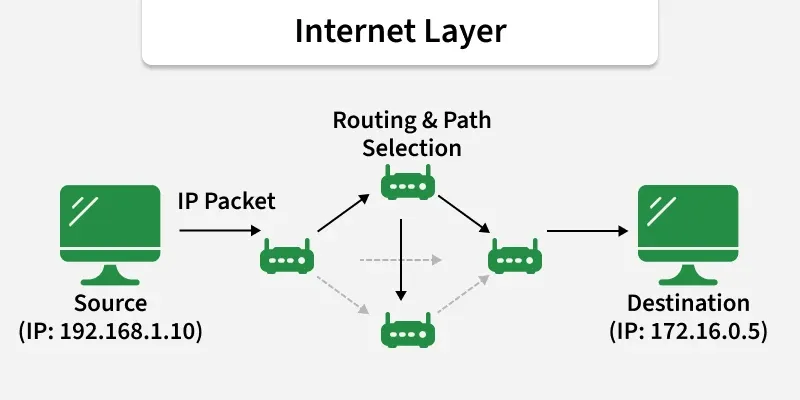
- Logical Addressing: Assigns IP addresses to identify source and destination devices.
- Packet Routing: Determines the best path for data to travel across networks.
- Fragmentation and Reassembly: Breaks large packets into smaller ones for transmission and reassembles them at the destination.
- Protocol Support: Primarily uses IP (Internet Protocol), along with supporting protocols like ICMP for error reporting and ARP for address resolution.
4. Network Access (Link Layer)
Responsible for physically transmitting data over network hardware, including cables, switches, and wireless connections. It handles how data is formatted for the network medium and ensures it reaches the next device on the path.
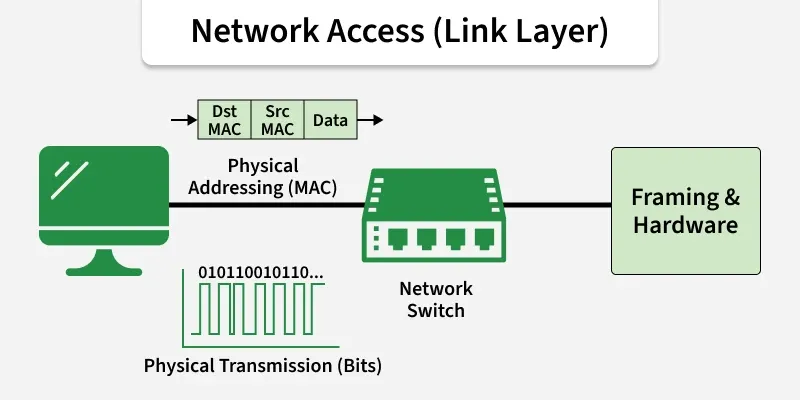
- Physical Transmission: Sends and receives raw bits over physical media like Ethernet cables, fiber optics, or Wi-Fi.
- Framing: Organizes data into frames for proper transmission and recognition by devices.
- Error Detection: Detects transmission errors using checksums or CRC.
- MAC Addressing: Uses hardware addresses to identify devices within the same network segment.
- Access Control: Determines how multiple devices share the same physical medium, avoiding collisions.
Working of TCP/IP Model
The working of TCP/IP can be explained with the help of the diagram given below and explained:
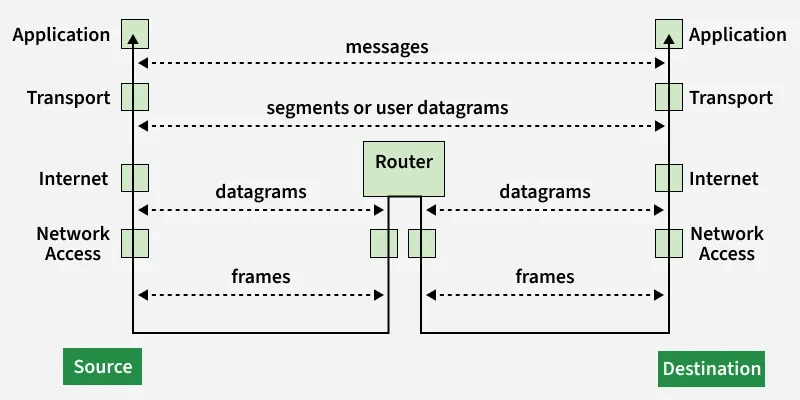
When Sending Data (From Sender to Receiver)
- Application Layer: The user’s software (like a web browser or email client) creates the data and passes it to the next layer.
- Transport Layer: The data is broken into segments, and TCP or UDP adds control information to ensure reliable delivery or fast transmission.
- Internet Layer: Each segment is encapsulated into packets with IP addresses so it can be routed across networks to the destination device.
- Network Access (Link) Layer: The packets are converted into frames suitable for the physical network (Ethernet, Wi-Fi) and transmitted over cables or wireless signals.
When Receiving Data (At the Destination)
- Network Access Layer: The frames are received from the physical medium and checked for errors.
- Internet Layer: Frames are unpacked to extract packets and use the IP address to ensure it reaches the correct device.
- Transport Layer: Segments are reassembled into the original message, and any missing or corrupted data is corrected (if TCP is used).
- Application Layer: The complete data is delivered to the user application (like the browser displaying a webpage or the email client showing a message).
Advantages
- Widely Used: Forms the foundation of the Internet and most modern networks.
- Platform Independent: Works on different hardware and operating systems.
- Reliable Communication: TCP ensures error checking, delivery confirmation, and data integrity.
- Scalable: Can support small networks to global Internet-scale networks.
- Open Standard: Free to use and not controlled by a single organization.
Limitations
- Complexity for Beginners: Can be difficult to fully understand all protocols.
- No Strict Layer Enforcement: Unlike OSI, layer boundaries are not rigid, which may cause implementation variations.
- Overhead: TCP’s error checking and reliability features can add extra data overhead.
- Security Limitations: Basic TCP/IP was not designed with strong built-in security; additional protocols like TLS/SSL are needed.
- Limited Multimedia Support: Original design focused on data, not optimized for real-time audio/video (needs extra protocols).
Why TCP/IP is Used Over the OSI Model
TCP/IP is preferred over the OSI model because it is simpler, practical, and widely implemented in real-world networks and the Internet. Unlike OSI, which is mostly theoretical, TCP/IP is protocol-driven and focuses on actual communication needs.
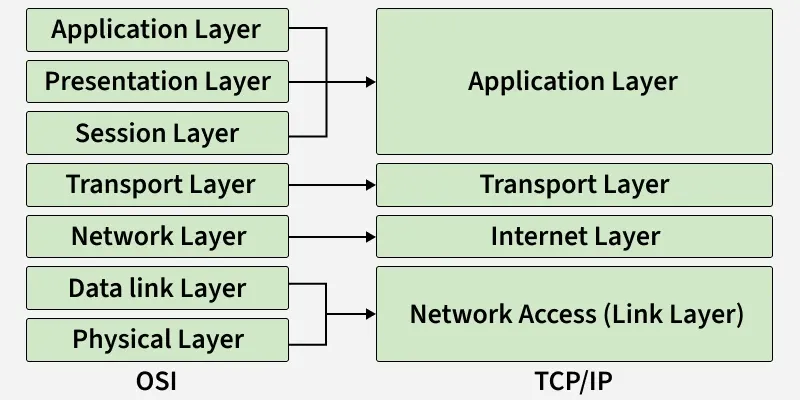
- Simpler Structure: TCP/IP has only 4 layers, compared to 7 in OSI, making it easier to implement and understand in real systems.
- Protocol-Driven Design: TCP/IP was designed based on working protocols, while OSI is mostly a theoretical framework.
- Flexibility and Robustness: TCP/IP adapts well to different hardware and networks and includes error handling, routing, and congestion control.
- Open Standard: TCP/IP is open, free to use, and not controlled by any single organization, which helped it gain universal acceptance.
- Actual Use vs Conceptual Model: OSI is great for learning and design principles, but TCP/IP is the model actually used in real-world networking.
