
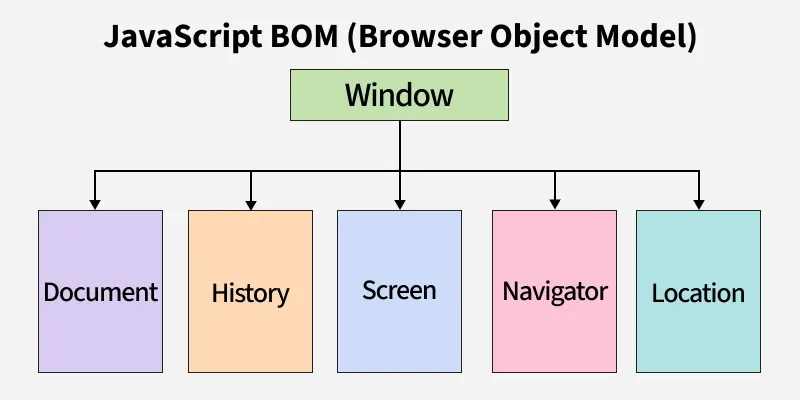
The Browser Object Model (BOM) allows JavaScript to interact with the browser itself, beyond just the webpage content. It provides control over browser features like windows, navigation, and history.
- Helps manage browser window properties (resize, open, close).
- Allows navigation control using location and history objects.
- Provides information about the browser via the navigator object.
Browser Object Model Types
Here are the main parts of the Browser Object Model (BOM)
| Object | Description |
|---|---|
window | Represents the browser window, controlling aspects like size and location, and serves as the global object. |
navigator | Provides details about the user's browser and operating system. |
location | Manages the current URL, allowing for retrieval and modification of the web address. |
screen | Offers information about the user's screen, such as its width and height. |
history | Provides access to the browser's session history, enabling navigation through the user's browsing history. |
Let's see each part of the Browser Object Model in more detail.
1. Window Object
window is the global object in browsers, but not everything (like developer tools or browser UI) is part of it
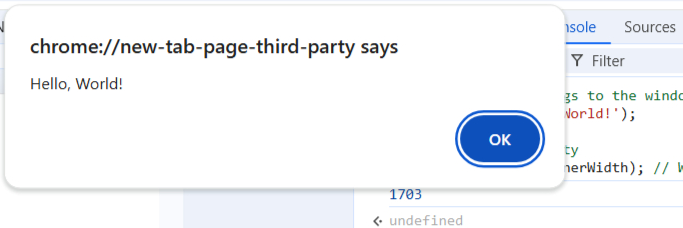
window.alert('Hello, World!');
console.log(window.innerWidth);
- The window object provides methods like alert(), confirm(), and prompt().
- It also gives you access to other important objects, such as document, navigator, screen, location, and history.
2. Navigator Object
The navigator object provides information about the browser and the user's environment. It is often used to detect the browser type or features.
console.log(navigator.userAgent);
console.log(navigator.language);
- navigator.userAgent can be used to identify the browser and its version, but it's not always reliable.
- navigator.language tells you the user's preferred language.
3. Location Object
The location object allows you to interact with the URL of the current document. It can be used to retrieve or manipulate parts of the URL and navigate to different pages.
console.log(location.href);
location.href = 'https://www.google.com/'
- location.href gives you the full URL.
- You can change location.href to load a different page.

location object Properties
- location.href: Returns the full URL of the current page, including the protocol, domain, path, and query string.
- location.protocol: Returns the protocol part of the URL (e.g., https: or http:).
- location.hostname: Returns the domain name or IP address of the URL (e.g., www.example.com).
- location.pathname: Returns the path part of the URL after the domain (e.g., /path/to/page).
4. Screen Object
The screen object provides information about the user’s screen, such as its resolution.
console.log(screen.width);
console.log(screen.height);
- screen.width and screen.height give you the screen's dimensions.
- This can be useful for adapting your website's layout to different screen sizes.

5. History Object
The history object allows you to navigate through the browser's session history. It provides methods to move forward, backward, or to specific pages in the history stack.To see the working of history object you can run this code on the browser.
history.back();
history.forward();
- history.back() goes back one page.
- history.forward() goes forward one page.
6. Using window.resizeTo
The window.resizeTo() method is used to resize the browser window to a specific width and height. This can be useful for controlling window dimensions in a web application.
let newWindow = window.open("https://www.example.com/", "NewWindow", "width=500,height=500");
newWindow.resizeTo(300, 300);

- window.open("https://www.example.com/", "NewWindow", "width=500,height=500") opens a new browser window with the URL https://www.example.com/ The window is named "NewWindow", and its size is set to 500px by 500px.
- newWindow.resizeTo(300, 300) resizes the newly opened window to 300px by 300px. This resizing happens after the window is opened.
Key Features of the BOM
- Dynamic Browser Control: The BOM allows developers to control browser windows and perform operations like resizing, opening, and closing windows.
- URL Manipulation: Through the location object, developers can retrieve, modify, and navigate URLs dynamically.
- Browser and Device Information: The navigator object provides details about the user's browser, operating system, and hardware capabilities.
- Screen and Resolution Access: Developers can access screen properties like width, height, and pixel depth for responsive design.
- Session History Navigation: The history object enables smooth navigation through the user's browsing history.
- Cookie Management: Using the document.cookie property, developers can set, retrieve, and delete cookies for session management.
- Event Handling and Timers: Functions like setTimeout and setInterval allow scheduling and periodic execution of tasks.s the current web address (URL) and allows changes within the Browser Object Model (BOM).
