
MongoDB Aggregation processes documents through a pipeline of stages to transform, analyze, and compute results directly in the database.
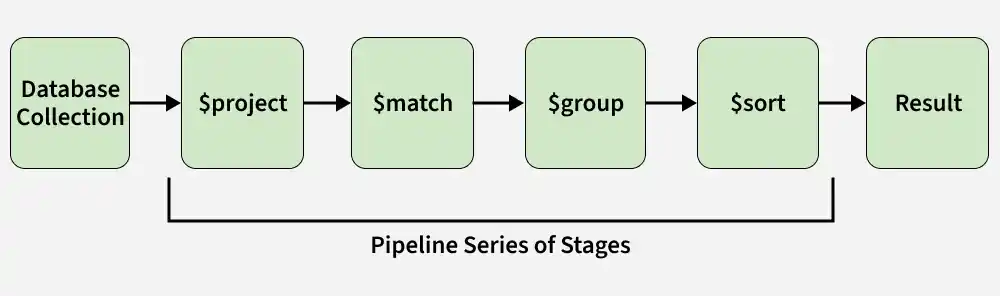
- Processes data step by step through pipeline stages.
- Performs computations on the server to reduce client load.
- Transforms and reshapes documents for analytics.
Aggregation Approaches
MongoDB provides multiple approaches for performing aggregation -depending on the complexity and type of data analysis you need to perform.
1. Single Purpose Aggregation
Single-purpose aggregation methods are used for quick, simple analytics like counting documents or fetching distinct field values, without using the aggregation pipeline.
- count(): Returns the number of documents in a collection.
- distinct(): Retrieves unique values for a specified field.
- estimatedDocumentCount(): Provides an estimated count of documents.
Example: Counting Users in Each City
Consider a single-purpose aggregation example where we find the total number of users in each city from the users collection.
db.users.aggregate([
  { $group: { _id: "$city", totalUsers: { $sum: 1 } } }
])
Output:
[
  { _id: 'Los Angeles', totalUsers: 1 },
  { _id: 'New York', totalUsers: 1 },
  { _id: 'Chicago', totalUsers: 1 }
]
- This example uses the aggregation pipeline (not single-purpose aggregation) because it involves the $group stage.
Note: countDocuments() is the recommended method for accurate document counts, supports query filters, and replaces the deprecated count() method for reliable results.
2. MongoDB Aggregation Pipeline
The MongoDB aggregation pipeline is a multi-stage process where each stage transforms documents. The output of one stage becomes the input for the next, with each stage filtering, modifying, or computing on documents until the final result is produced.
- Filters that will operate like queries.
- The document transformation that modifies the resultant document.
- Provide pipeline tools for grouping and sorting documents.
- Aggregation pipelines can run on sharded collections, where processing is distributed across shards and results are merged efficiently.
The aggregation pipeline consists of stages, which can use expressions and accumulators to process and transform data.
db.collection.aggregate([
  {
    $group: {
      _id: "$groupField",
      totalCount: { $sum: 1 }
    }
  }
])
- Stages: Define each step in the aggregation pipeline to filter, group, sort, or reshape documents.
- Expressions: Compute values and transform fields within pipeline stages.
- Accumulators: Perform calculations (sum, average, count) while grouping documents.
Aggregation Pipeline Method
To understand Aggregation Pipeline Method let's imagine a collection named users with some documents for our examples.
{
  "_id": ObjectId("60a3c7e96e06f64fb5ac0700"),
  "name": "Alex",
  "age": 30,
  "email": "alex@example.com",
  "city": "New York"
}
{
  "_id": ObjectId("60a3c7e96e06f64fb5ac0701"),
  "name": "Ben",
  "age": 35,
  "email": "ben@example.com",
  "city": "Los Angeles"
}
{
  "_id": ObjectId("60a3c7e96e06f64fb5ac0702"),
  "name": "Clevin",
  "age": 25,
  "email": "clevin@example.com",
  "city": "Chicago"
}
1. $group: It Groups documents by the city field and calculates the average age using the $avg accumulator.
db.users.aggregate([
  { $group: { _id: "$city", averageAge: { $avg: "$age" } } }
])
Output:
[
  { _id: 'New York', averageAge: 30 },
  { _id: 'Chicago', averageAge: 25 },
  { _id: 'Los Angeles', averageAge: 35 }
]
2. $project: Include or exclude fields from the output documents.
db.users.aggregate([
  { $project: { name: 1, city: 1, _id: 0 } }
])
Output:
[
  { name: 'Alex', city: 'New York' },
  { name: 'Ben', city: 'Los Angeles' },
  { name: 'Clevin', city: 'Chicago' }
]
3. $match: Filter documents to pass only those that match the specified condition(s).
db.users.aggregate([
  { $match: { age: { $gt: 30 } } }
])
Output:
[
  {
    _id: ObjectId('60a3c7e96e06f64fb5ac0701'),
    name: 'Ben',
    age: 35,
    email: 'ben@example.com',
    city: 'Los Angeles'
  }
]
4. $sort: It Sorts documents based on field values.
db.users.aggregate([
  { $sort: { age: 1 } }
])
Output:
[
  {
    _id: ObjectId('60a3c7e96e06f64fb5ac0702'),
    name: 'Clevin',
    age: 25,
    email: 'clevin@example.com',
    city: 'Chicago'
  },
  {
    _id: ObjectId('60a3c7e96e06f64fb5ac0700'),
    name: 'Alex',
    age: 30,
    email: 'alex@example.com',
    city: 'New York'
  },
  {
    _id: ObjectId('60a3c7e96e06f64fb5ac0701'),
    name: 'Ben',
    age: 35,
    email: 'ben@example.com',
    city: 'Los Angeles'
  }
]
5. $limit: Limit the number of documents passed to the next stage.
db.users.aggregate([
  { $limit: 2 }
])
Output:
[
  {
    _id: ObjectId('60a3c7e96e06f64fb5ac0700'),
    name: 'Alex',
    age: 30,
    email: 'alex@example.com',
    city: 'New York'
  },
  {
    _id: ObjectId('60a3c7e96e06f64fb5ac0701'),
    name: 'Ben',
    age: 35,
    email: 'ben@example.com',
    city: 'Los Angeles'
  }
]
Using MongoDB Aggregation
To use MongoDB for aggregating data, follow below steps:
1. Connect to MongoDB: Ensure you are connected to your MongoDB instance.
2. Choose the Collection: Select the collection you want to perform aggregation on, such as students.
3. Define the Aggregation Pipeline: Create an array of stages, like $group to group documents and perform operations (e.g., calculate the average grade).
4. Run the Aggregation Query: Use the aggregate method on the collection with your defined pipeline.
Example: Calculates the average grade of all students in the students collection.
db.students.aggregate([
  {
    $group: {
      _id: null,
      averageGrade: { $avg: "$grade" }
    }
  }
])
Output:
[
  { "_id": null, "averageGrade": 85 }
]
Factors affecting Aggregation performance in MongoDB
Aggregation speed depends on pipeline complexity, data size, server hardware, and index efficiency.
- MongoDB’s aggregation framework is designed to handle large data sets and complex operations efficiently.
- Proper query optimization and use of indexes improve performance.
- Server configuration plays a key role in ensuring fast and scalable aggregation.
- Performance can vary by use case and setup, so monitoring and tuning are important.
